Hadoop Eco adds features for operational efficiency in data lake architecture

· 5 min read
Evan (진은용)
Service Manager
HDE update

When enterprises design cloud-based large-scale data lake architectures, we have reached a point where we must go beyond simply accumulating data and maximize operational efficiency. To secure efficiency, it is necessary to build a balanced set of core elements such as high-performance processing, flexible separation of compute resources, and robust data governance.

If this balance breaks down, complex problems can occur, such as real-time analytics queries being delayed by batch jobs or difficulty understanding the location and reliability of the data needed.

KakaoCloud Hadoop Eco (HDE) recently carried out a large-scale update to solve these problems and improve the processing power and operational management capabilities of analytics environments. Based on the release of the new HDE-2.3.0 version, this update includes major changes such as improved integration with Iceberg catalogs, a next-generation metastore, and the introduction of task nodes optimized for workloads.

In this post, we briefly introduce how these improvements can be used within HDE to improve analytics workflows.

🚀 New HDE-2.3.0 version and powerful components added

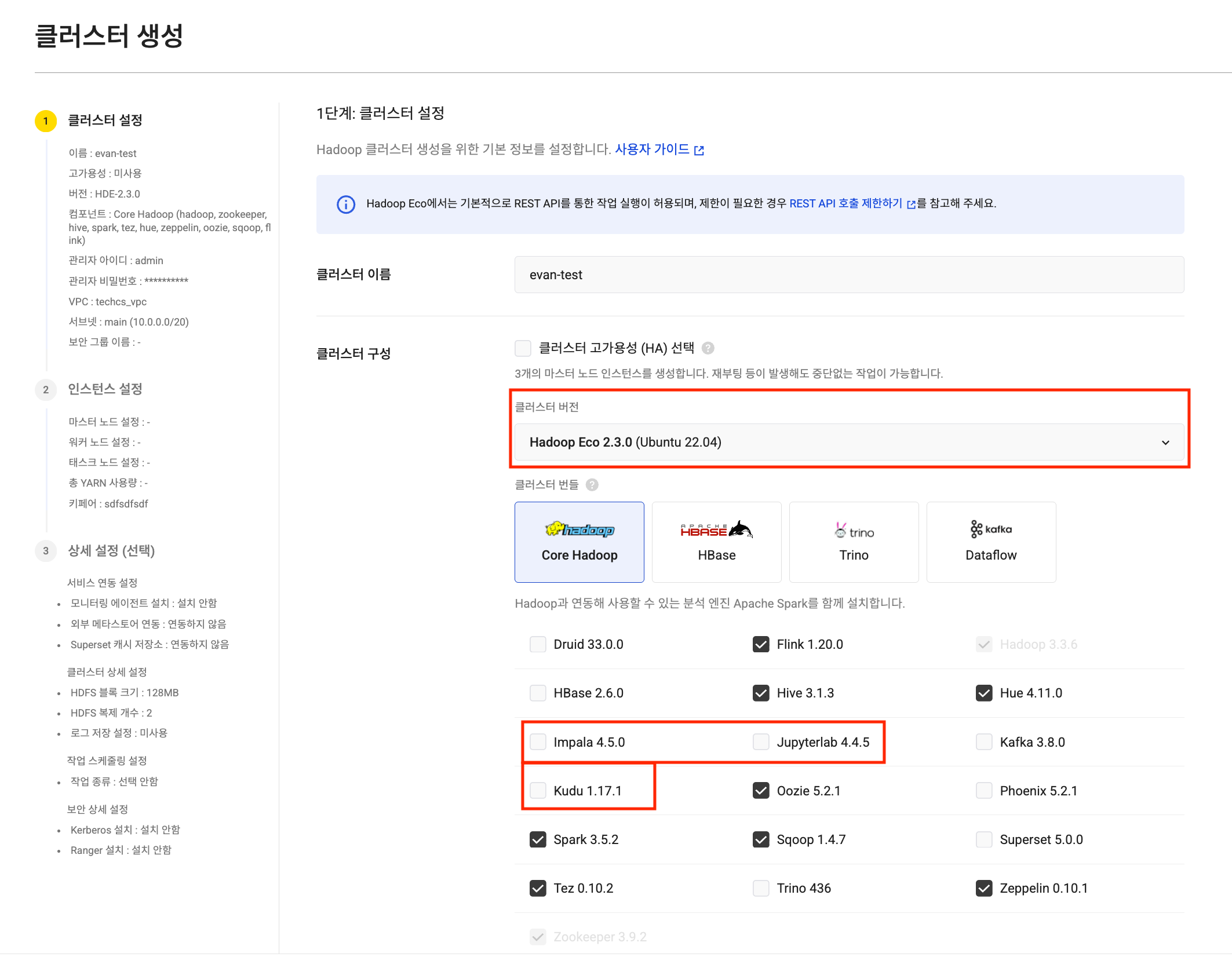
With this update, HDE-2.3.0 is newly provided, and JupyterLab, Impala, and Kudu components have been added to effectively support data analytics and processing workflows.

Create HDE cluster Create HDE cluster
  • JupyterLab: Provides a web-based programming and shell environment, offering a development environment where data exploration and analysis code can be executed immediately within cluster nodes.
  • Impala: A powerful query engine that supports fast interactive queries against data stores such as Kudu based on Hive Metastore.
  • Kudu: Serves as a columnar data store that supports low-latency reads and writes.

In addition, Druid, a core component of Dataflow-type clusters, has been upgraded to v33.0.0, and Superset has been upgraded to v5.0.0, further improving performance and stability.

💡 View the Hadoop Eco component list

⚙️ Securing cluster structure flexibility: introducing task nodes

One of the tricky parts of cluster operations is separating batch processing and interactive processing resources to minimize mutual interference. In this update, the newly introduced task node effectively reduces operational burden.

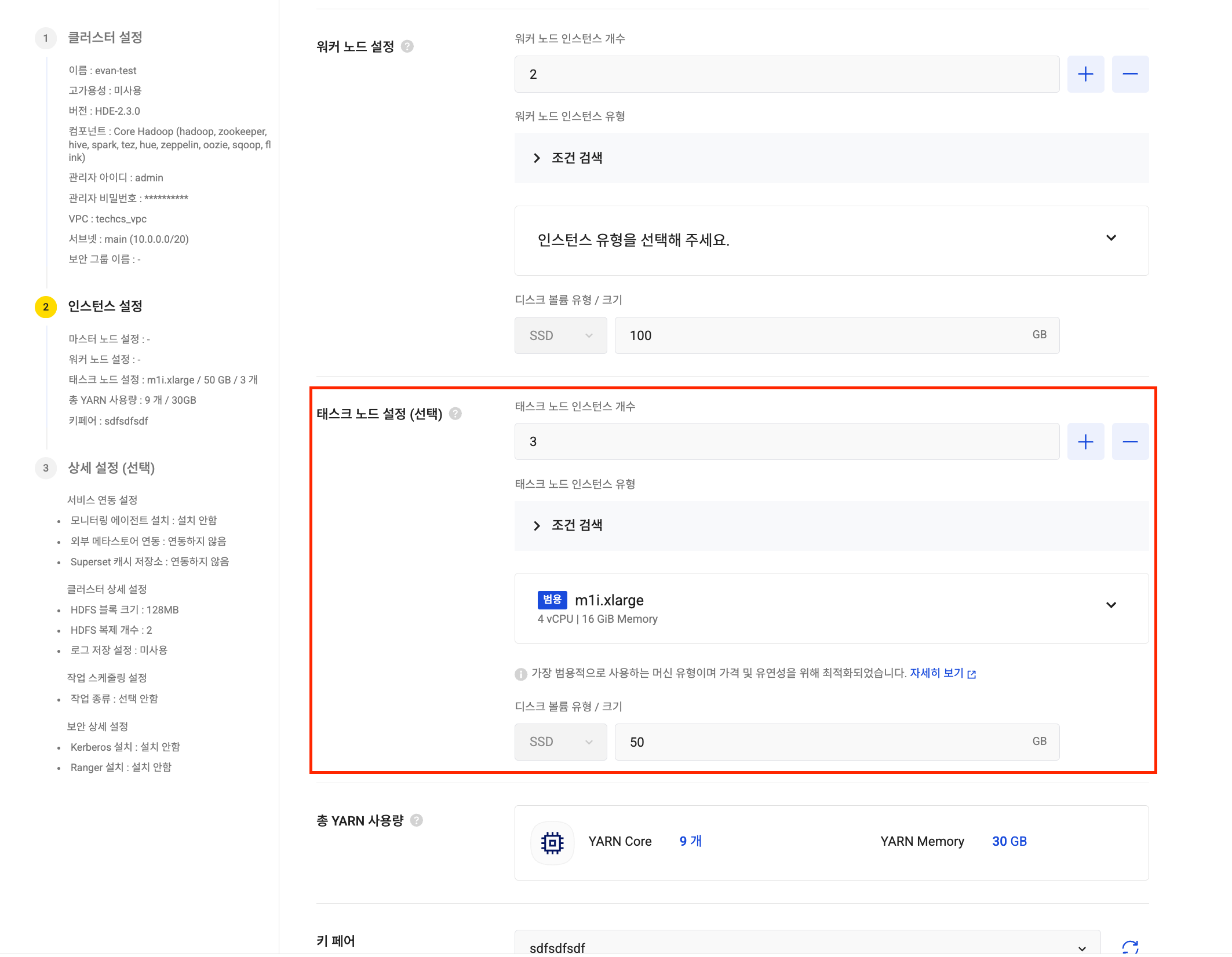
Task node settings Task node settings

  • Role separation: Task nodes are mainly used as dedicated compute resources for executing large-scale batch computation jobs (YARN Jobs). By separating their role from worker nodes, they ensure the stability of core data processing resources and effectively prevent performance degradation caused by resource contention.
  • More accurate capacity planning: With the introduction of task nodes, the method for calculating YARN available resources has been changed to include the number and flavor of task nodes. This makes cluster capacity planning more accurate and predictable.

⚠️ Note when using task nodes: Task nodes can only be added when creating a cluster. Please carefully decide whether to add task nodes during the initial design stage, because they cannot be added after creation. However, reducing the number of nodes to 0 and increasing it again is possible.

🧊 Iceberg catalog integration, now with one click

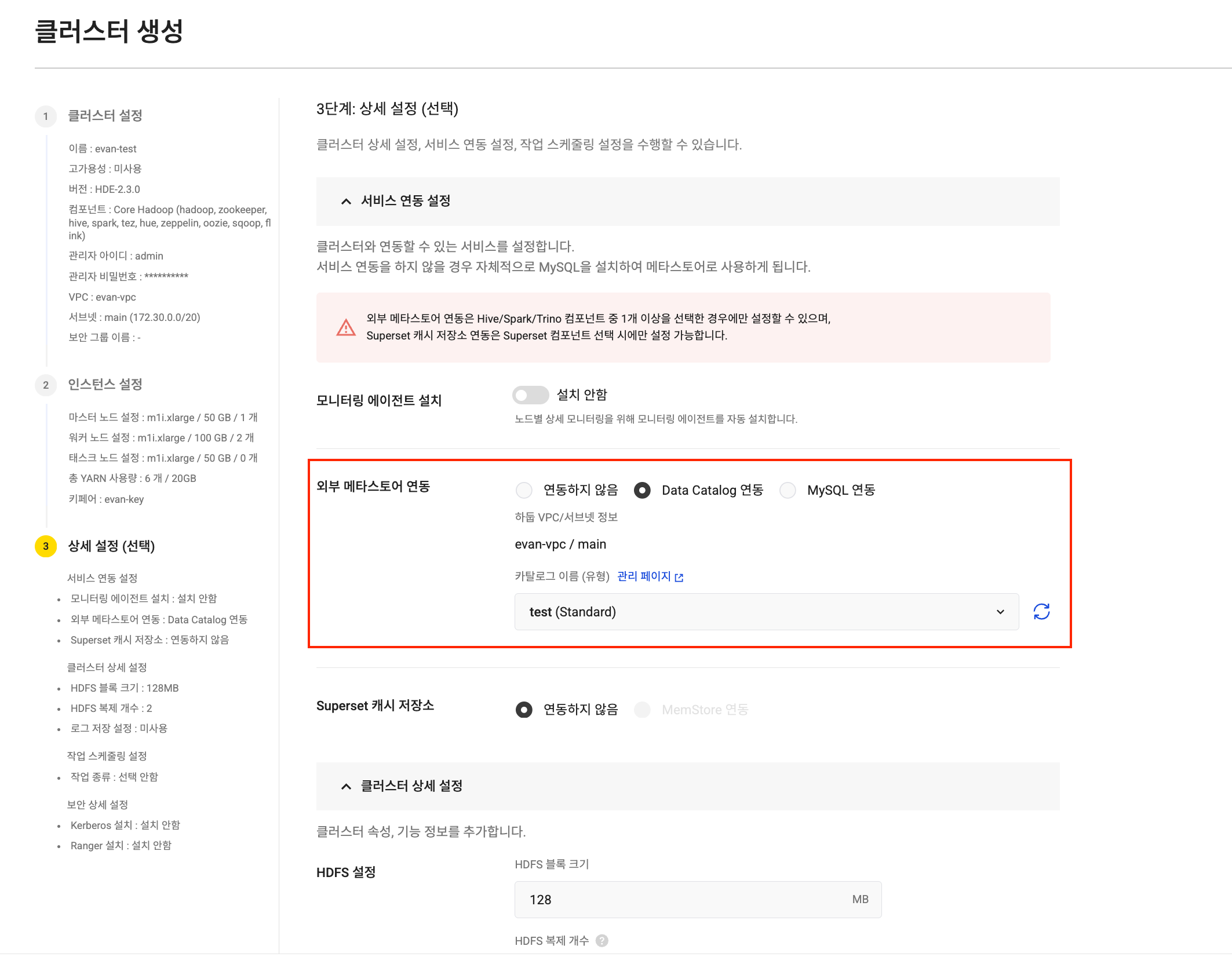
As KakaoCloud Data Catalog officially supports the Apache Iceberg format, Iceberg catalog integration when creating a Hadoop Eco cluster has been dramatically simplified.

Iceberg catalog integration Iceberg catalog integration


In the Hadoop Eco service with this improvement, the console now lets you directly select and connect a Data Catalog Iceberg catalog in the external metastore integration setting during cluster creation. This minimizes human error, shortens integration time, and lets you start analytics work immediately.

In addition, an option has been added so that users can choose whether to automatically retain data during the data retention period (90 days) after cluster deletion. This feature can be used to prevent unnecessary metadata retention costs and clarify governance.

This Hadoop Eco update is not just a feature expansion. It further strengthens the operational efficiency of data lake architecture around three axes: stable metadata governance, high-performance interactive analytics environments, and flexible compute resource management.

Operate analytics workflows more efficiently and systematically with KakaoCloud's new Hadoop Eco.

Thank you.

👉 Start KakaoCloud now

Latest service updates for stronger operational reliability - Iceberg, PITR, SMS

· 4 min read
Mia (정혜원)
Technical Contents Manager
update

One of the most important values in cloud operations is stability. System stability is not only about preventing problems. Its reliability is determined by how quickly and flexibly problems can be recovered and resolved when they occur, and how well they can be prevented and prepared for in advance.

Through recent updates across several services, KakaoCloud has further strengthened this important value of Operational Reliability. We focused on improving users' operating experience around safe data recovery, efficient system maintenance, and fast failure notification systems.

In this post, we take a closer look at three notable improvements that can substantially improve operational reliability.


🧊 1. Iceberg format support for data integrity

One notable change in the recent update is that Data Catalog has officially started supporting the Apache Iceberg format. Apache Iceberg, developed by Netflix, is a powerful open-source table format designed for tracking change history in large-scale data (Time Travel) and restoring to specific points in time.

You can now select the Iceberg catalog type in KakaoCloud Data Catalog. With Iceberg added alongside the existing Hive Metastore-based Standard type, version management and point-in-time recovery have become much simpler even in large-scale data environments. Even if data loss or errors occur, you can easily restore to a previous state, and integration with major analytics engines such as Spark and Trino can be used immediately.

Through this update, KakaoCloud Data Catalog fully supports the integrity and resilience of large-scale data at a practical operational level, and is expected to further improve data reliability across analytics environments.

📝 Learn more about Apache Iceberg catalogs

⏪ 2. Stronger recovery reliability with point-in-time recovery (PITR)

Databases are one of the most important elements of cloud operational stability. Improving the reliability of recovery features in these database systems is truly important. In this MySQL update, the long-awaited Point-in-Time Recovery (PITR) feature has been added.

Based on automatic backups and Binary Logs, you can specify a desired point in time and restore a new instance group to the state at that time. Because you can now specify the recovery point down to the second, you can respond very flexibly to data loss caused by mistakes or errors.

💡 Please note! For service stability, point-in-time recovery currently supports a single availability configuration. If high availability (HA) configuration is required, we recommend adding instances after recovery is complete.

In addition, security groups can now be modified while instances are running, improving flexibility in network control. Account management procedures have also been improved so that password policies are applied in the same way when procedures are used. These detailed improvements to security and recovery features are important changes that substantially increase stability in real operating environments.

📝 Learn more about MySQL point-in-time recovery

📩 3. Notification speed is response speed

The outcome of responding to issues depends on how quickly operators recognize the system status. In this update, Maintenance introduced a new SMS notification feature in addition to existing email. When a maintenance task fails or an important event occurs, a notification is immediately sent to the registered mobile phone number. Now, even if you do not check email, you can recognize and respond to problem situations in real time.

💡 Please note! SMS notifications are sent only for events that require quick action, and project administrators must register valid contact information in advance.

📝 Learn more about Maintenance


These three updates were made in different services, but they all point in the same direction. Data can be restored safely without loss, security settings have become more flexible, and failures can be detected faster. This is the operational resilience KakaoCloud aims for. Stability improvements covering the entire operational process, from data to notifications, will continue.

KakaoCloud will continue improving technical completeness so that customers' operating environments become more stable and predictable. We appreciate your continued interest and support.

👉 Start KakaoCloud now

Building a Kafka-based real-time data pipeline

· 3 min read
Erin (오예진)
Cloud Engineer
Tutorial new release

Logs, user events, and transaction information generated by services. Storing this data is important, but it becomes a truly "meaningful flow" only when it can be analyzed quickly.

The Kafka-based real-time data pipeline tutorial series introduced here is a hands-on tutorial that lets you directly follow how to implement this "flow of data" on KakaoCloud.

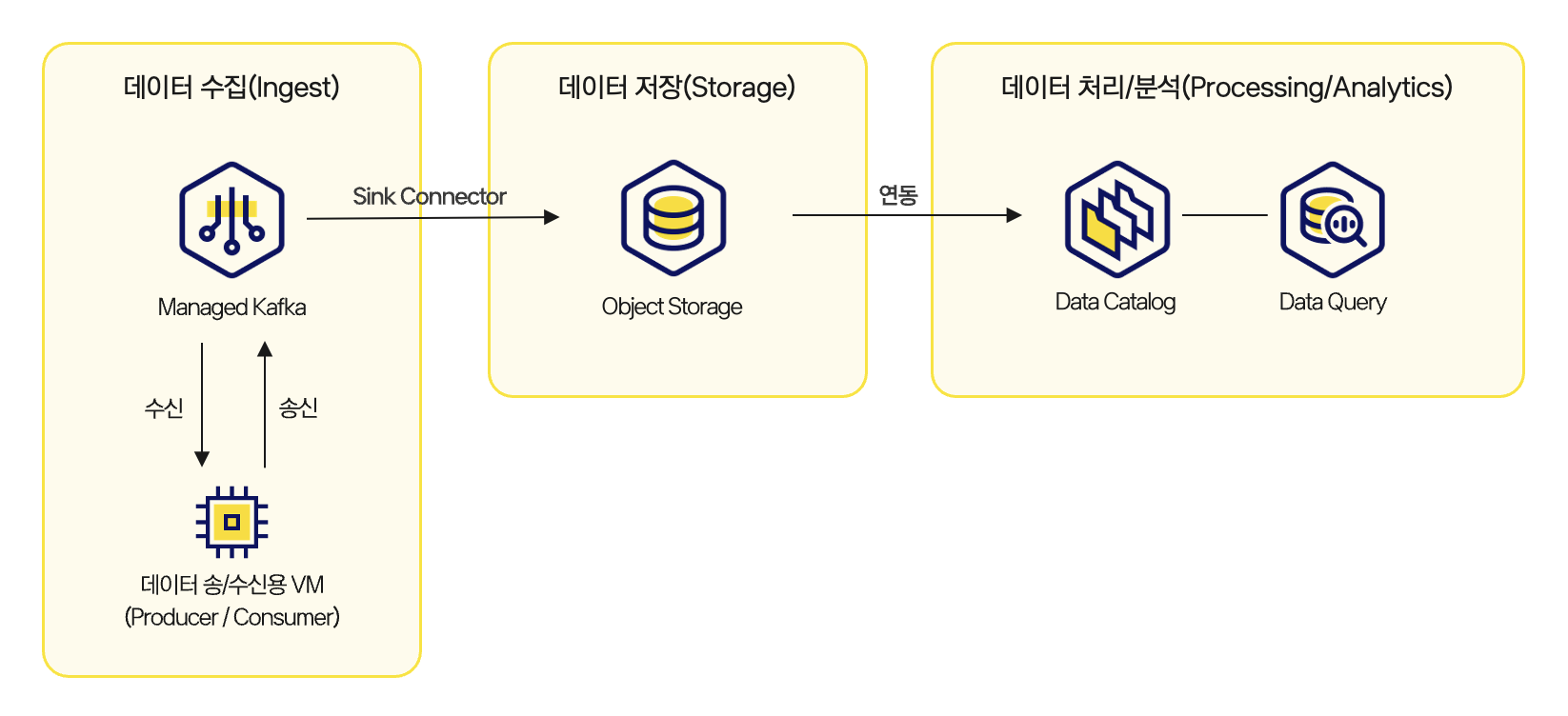
This series consists of three parts and guides you step by step through the entire process, from receiving real-time messages to storage and analysis. It is designed so that you can connect Kafka, Object Storage, Data Catalog, and Data Query, understand the overall structure through which data flows, and implement it directly.

architect Architecture for building a real-time data pipeline


Part 1: Build a structure for receiving Kafka messages

In the first tutorial, you create a Kafka cluster and configure an environment for sending and receiving messages through topics. You create Kafka topics, configure producers and consumers, and send and receive messages to establish the foundation for real-time data collection. This process focuses on understanding the basic structure of an event-driven system and creating the starting point of message flow.

👉 View the message processing through Kafka tutorial

Part 2: Store received messages in Object Storage

The second tutorial covers the flow of periodically collecting messages received through Kafka and storing them in Object Storage. Messages are collected at regular intervals and stored as a single file, and the stored files are used later as data sources for analysis. In this process, you can also consider the boundary between streaming and batch and how file formats and structures should be designed.

👉 View the tutorial for loading Kafka data into Object Storage

Part 3: Real-time analysis with Data Catalog and Data Query

The final tutorial configures an environment where data stored in Object Storage is registered in Data Catalog and SQL-based analysis can be performed through Data Query. Tables registered in the catalog are managed by partition, and new data can be automatically reflected through periodic synchronization settings. The most important part of this stage is converting real-time data collected through Kafka into a structure that can be analyzed immediately without a separate complex pipeline.

👉 View the tutorial for analyzing Kafka messages using Data Catalog and Data Query


This real-time data pipeline tutorial series is not a simple code example. It is written based on architecture and settings that can be used as-is in operating environments. By directly following the entire process of receiving Kafka messages, storing them in Object Storage, and connecting them to analysis with Data Catalog and Data Query, you can quickly build practical intuition for designing real-time services, monitoring systems, and event-based statistics pipelines.

If you are designing a Kafka-based real-time data pipeline for the first time or want to expand an existing pipeline on KakaoCloud, this tutorial will be a good reference.

🖥️ Try it now!
View the Kafka-based real-time data pipeline tutorial series at a glance

Secrets Manager and KMS services released

· 5 min read
Miguel (김현덕)
Service Manager
security-release

As cloud-based services expand, operational efficiency and scalability have improved significantly, but security requirements have also become more sophisticated. In particular, sensitive information such as authentication information or credentials, which is essential inside systems but can directly lead to security incidents if exposed externally, can no longer be considered safe simply by hiding it. It must be managed systematically, including how it is stored, who accesses it, and how it is renewed and destroyed.

Encryption keys that protect encrypted data must also be managed separately and securely. If even one key is leaked, the meaning of all security can disappear.

To respond to these security needs, KakaoCloud has released two new security services: Secrets Manager and KMS (Key Management Service). In this post, we introduce how these two services can securely separate and manage secrets and keys while improving both security and operational efficiency.

🔐 How to manage secrets securely: Secrets Manager

When operating a service, there is information that must be protected. Examples include database usernames and passwords, authentication keys for external APIs, and tokens used for communication between services. This information is generally called a secret, and it is a security credential required for applications to communicate safely with external or internal systems. If these secrets are exposed, they can lead to serious security incidents such as unauthorized access or data theft.

KakaoCloud Secrets Manager is a service that securely stores secrets in encrypted form and helps users retrieve them safely only when needed. Traditional methods such as hardcoding secrets in code or setting them as environment variables on operating servers are vulnerable in terms of security and make it difficult to track change history.

With Secrets Manager, however, secrets can be managed centrally in an integrated repository, and a version is automatically created every time a change is made, allowing change history to be tracked systematically. For example, even if an incorrect value is saved by mistake, it can be rolled back easily to a previous version. If needed, only a specific version can be deactivated or destroyed. Currently active secrets remain in the Active state, and availability is clearly distinguished by status.

In addition, integration with IAM allows secret access permissions to be controlled granularly by user or service account. For example,

  • Secrets Manager Project Manager can perform all management tasks such as creating, modifying, and deleting secrets.
  • Secrets Manager Project Viewer can be configured to only view secret lists, versions, and status.

In this way, permission separation enables safer and more flexible secret operations.

🔑 How to encrypt data and handle keys securely: KMS

As important as data encryption is how securely the "keys" that decrypt that data are managed. Databases containing customer information, sensitive logs, and files in cloud storage must all be protected through encryption, and the creation and operation of encryption keys for this purpose must be carried out systematically.

KakaoCloud KMS (Key Management Service) is a service that helps users create, securely store, rotate, and destroy encryption keys used to encrypt data or create digital signatures.

Keys created in KMS can be configured to undergo periodic automatic rotation, and can be immediately deactivated or destroyed when a security event occurs. One key is managed in multiple versions, and even when a new version is created, previous versions are retained so that past data can still be decrypted without issue.

KMS supports industry-standard algorithms such as AES and RSA, and keys can be clearly distinguished as available or unavailable based on their Active, Deactivated, or Destroyed status. It also integrates with KakaoCloud IAM so that access to keys can be controlled granularly by user or service account. Depending on the assigned role,

  • KMS Project Manager has full management permissions, including key creation, status changes, and policy configuration.
  • KMS Project Viewer has permission to view key metadata and status information.

Because permissions can be separated and configured based on roles, operational stability and security control can both be secured. In addition, key creation, usage, and destruction history are automatically recorded through Cloud Trail, making them useful for security audits and compliance response.

✅ Raise your security level

Secrets Manager and KMS are newly added services in the existing Security category. They provide a security system that centrally manages secrets and encryption keys and implements more precise permission control through integration with IAM.

Protect sensitive information and build a key management system with just a few clicks in the KakaoCloud console. KakaoCloud will continue strengthening features in line with customer security requirements and providing an integrated security operations environment through integration with various services.

For detailed descriptions and API guides for Secrets Manager and KMS, see the technical documentation below. Thank you.

👉 View Secrets Manager documentation 👉 View KMS documentation

Pub/Sub, the start of more precise role management

· 3 min read
Chloe (이다예슬)
Service Manager
pub-sub

As services grow and users increase, clearly distinguishing who can perform which tasks becomes increasingly important. Beyond simple permission assignment, it is time for a more precise permission management system that considers both operational efficiency and security.

Through the IAM update last July, KakaoCloud expanded service-specific dedicated permissions and enabled more granular role control at the organization and project levels.

Now, Pub/Sub continues this direction.

Core of this update: separating permissions by role

Since its initial release, Pub/Sub has stably supported event delivery between applications and real-time data streaming as a serverless message queue. In particular, after the GA release, continuous improvements were made, including Object Storage integration, more granular subscription statuses, and SLA application.

In this update, a role-based access control (RBAC) system has been newly introduced to Pub/Sub to improve operational efficiency and security. Previously, permissions were granted collectively according to organization- or project-level role types. Now, detailed permissions such as message publishing, receiving, and resource viewing can be clearly separated based on the following four Pub/Sub-specific roles.

Role nameDescription
Pub/Sub ManagerHas full management permissions, including creating, modifying, and deleting topics and subscriptions, and publishing and receiving messages
Pub/Sub PublisherCan publish messages to topics
Pub/Sub SubscriberCan receive and process messages through subscriptions
Pub/Sub ViewerCan only view topics and subscriptions

Among these, the Pub/Sub Manager role is the highest-level permission that includes Publisher, Subscriber, and Viewer permissions, and it also includes advanced features such as Object Storage export channel settings and subscription seek.

Changes to the Project Reader role

With the introduction of this role system, starting on September 19, 2025, Pub/Sub message receiving and processing permissions will be excluded from the Project Reader role. In other words, users who need to process messages must be granted the Pub/Sub Subscriber role separately. This change is intended to reduce unnecessary permission grants and make service operations safer according to the Principle of Least Privilege.

KakaoCloud will continue improving each service's roles and permission systems to be more precise and more practical. We will help ensure that only the permissions necessary for service operations are granted safely and that both administrators and users clearly understand their roles and responsibilities.

Thank you.

Want to learn more about Pub/Sub?
👉 View Pub/Sub documentation

KakaoCloud Data Query officially released as GA

· 4 min read
Chloe (이다예슬)
Service Manager
data-query

KakaoCloud's serverless interactive query service, Data Query, has finally been officially released as GA (General Availability). This GA version can be seen as a release in which features, performance, and the pricing system have been refined overall through numerous customer cases during internal beta testing and preview stages, so it can be used reliably in real customer environments.

Data Query is a serverless query engine that lets users query data stored in Object Storage directly using SQL without managing separate infrastructure. Users can explore large-scale data with a single query without building a data warehouse themselves or worrying about complex cluster operations.

Simpler and more transparent pricing

In the GA version, a data-scan-based pay-as-you-go pricing model is applied. Fees are charged at KRW 5,850 per TiB based on the amount of data scanned when a query is executed, and no cost is incurred for metadata queries or DDL statements (CREATE, DROP, SHOW TABLE).

A particularly notable change in this version is that the billing policy for failed and canceled queries has been clarified. If a user cancels a query directly, only the data scanned up to the cancellation point is charged. If a system timeout occurs, fees are charged based on the scanned amount immediately before the timeout. This pricing policy helps ensure that unnecessary charges do not occur from an actual operator's perspective, and allows users to safely try experimental queries or large-scale exploration tasks.

Data Query is also most efficient when used together with Object Storage. Because data can be queried as-is without separate replication or movement, no additional overhead occurs beyond standard Object Storage pricing. As a result, operators can secure flexibility in data analytics while reducing unnecessary costs.

Real example: log analysis based on a data lake

Data Query works closely with Object Storage and enables analysis in the same way even as data scale grows. One of the most frequently mentioned cases during the beta service stage was service log analysis. One customer stored tens of TB of service logs in Object Storage and used Data Query to explore abnormal traffic patterns in near real time. With the existing approach, logs had to be collected, loaded, and then ingested into a separate analysis system. With the GA version of Data Query, however, results can be checked directly with SQL queries without separate ETL.

For example, users can quickly check the distribution of error codes concentrated during a specific time period or instantly analyze API response times by user segment. This usage clearly shows the value of a serverless query service in a data lake architecture.

Data analysis closer to real operations

The GA release of Data Query is an important starting point for KakaoCloud's expansion into the data platform area. You can now explore data stored in Object Storage directly without separately building or managing a query-only cluster. In particular, by providing a predictable cost model rather than a complex billing structure, it can improve stability and efficiency in actual service operations. After this GA release, support for various additional data sources will continue to expand, and additional features such as IAM Role integration and more sophisticated query optimization will be provided sequentially.

Data analysis is no longer the role of only dedicated teams. An environment has been prepared where various users, including operators, developers, and planners, can immediately explore the data they need through Data Query and make decisions quickly.
Try the GA version of Data Query now and experience the changed data analytics experience directly.

Want to learn more about Data Query?
👉 View Data Query documentation

IAM update: Check my roles and use dedicated permission systems

· 4 min read
Martin (왕현수)
Service Manager
Management Update

When collaborating in a cloud environment, questions like these often come up.

"What permissions do I have in this project?"
"Why can't I access this setting?"
"What role did we assign to this user?"

In this update, a feature has been added so that each user can directly check their own role information to answer these questions. In addition, a new dedicated role system for managing IAM and projects, excluding cloud resources, has been introduced, allowing permissions to be configured and operated more precisely.

🖥️ Easily check your role information

One of the biggest changes in this update is that users can now directly check their own role information in the console.

Previously, users had to ask an administrator separately to confirm "what role I have" or "what settings I can access." This was especially difficult when participating in multiple projects at the same time, because it was hard to clearly understand the permission scope.

Now, however, the console provides a feature that clearly distinguishes and displays organization roles and project roles.

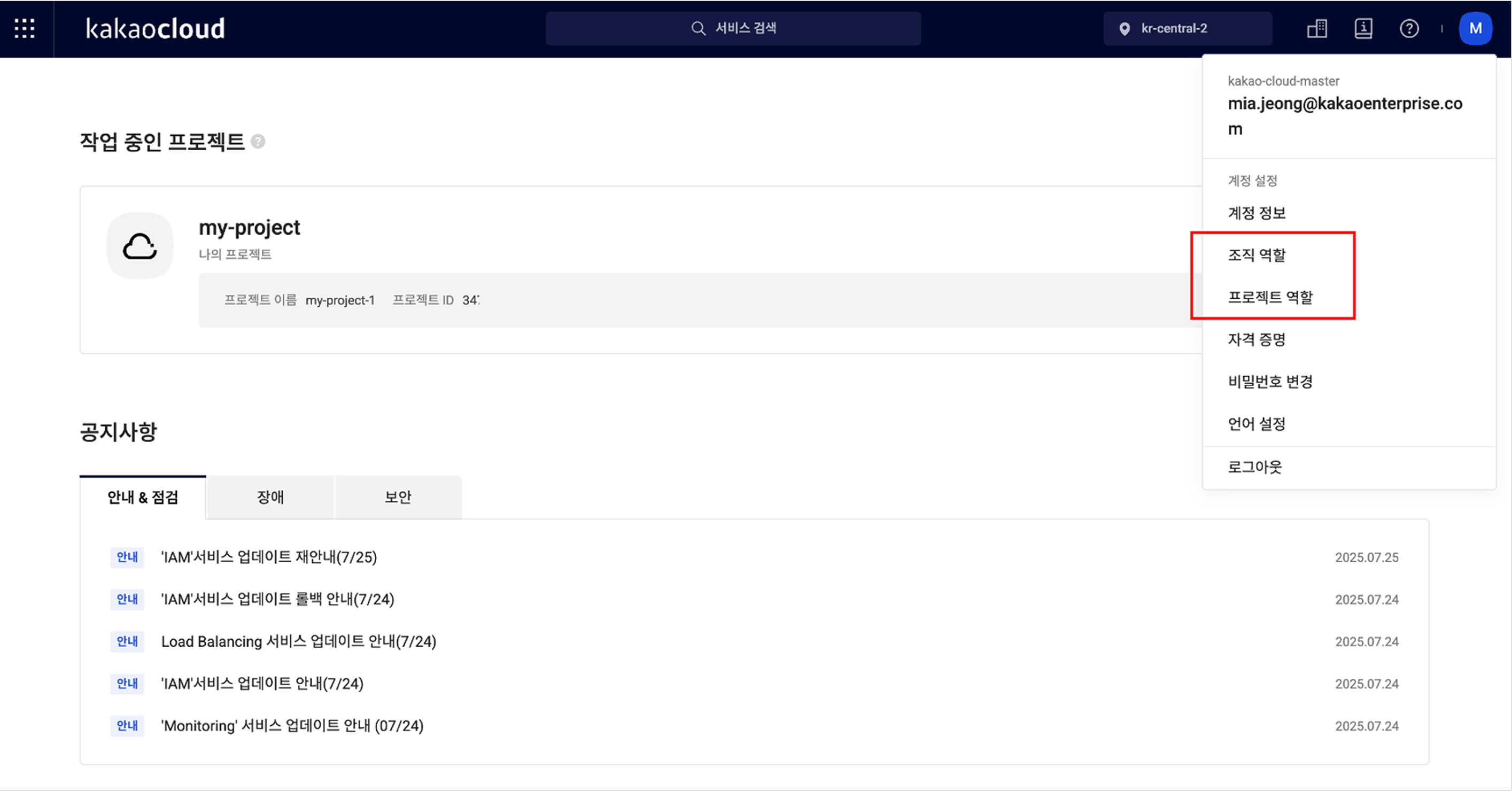
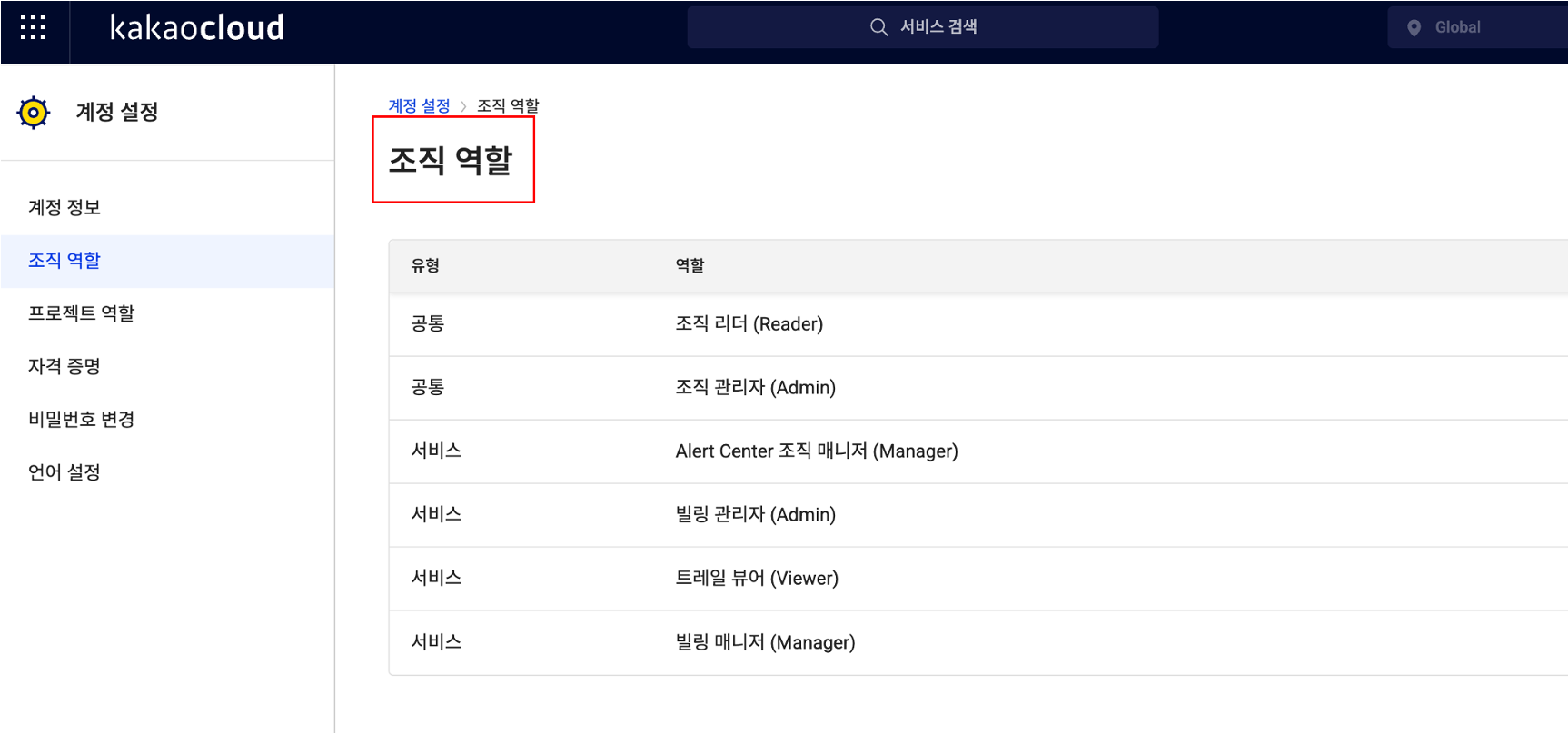
org role

First, organization-level roles can be checked by selecting Organization roles from the profile menu at the top right of the console. In addition to the role names assigned to you, it also shows whether they are common roles or service roles limited to a specific service, allowing you to understand your current permissions at a glance.

org role

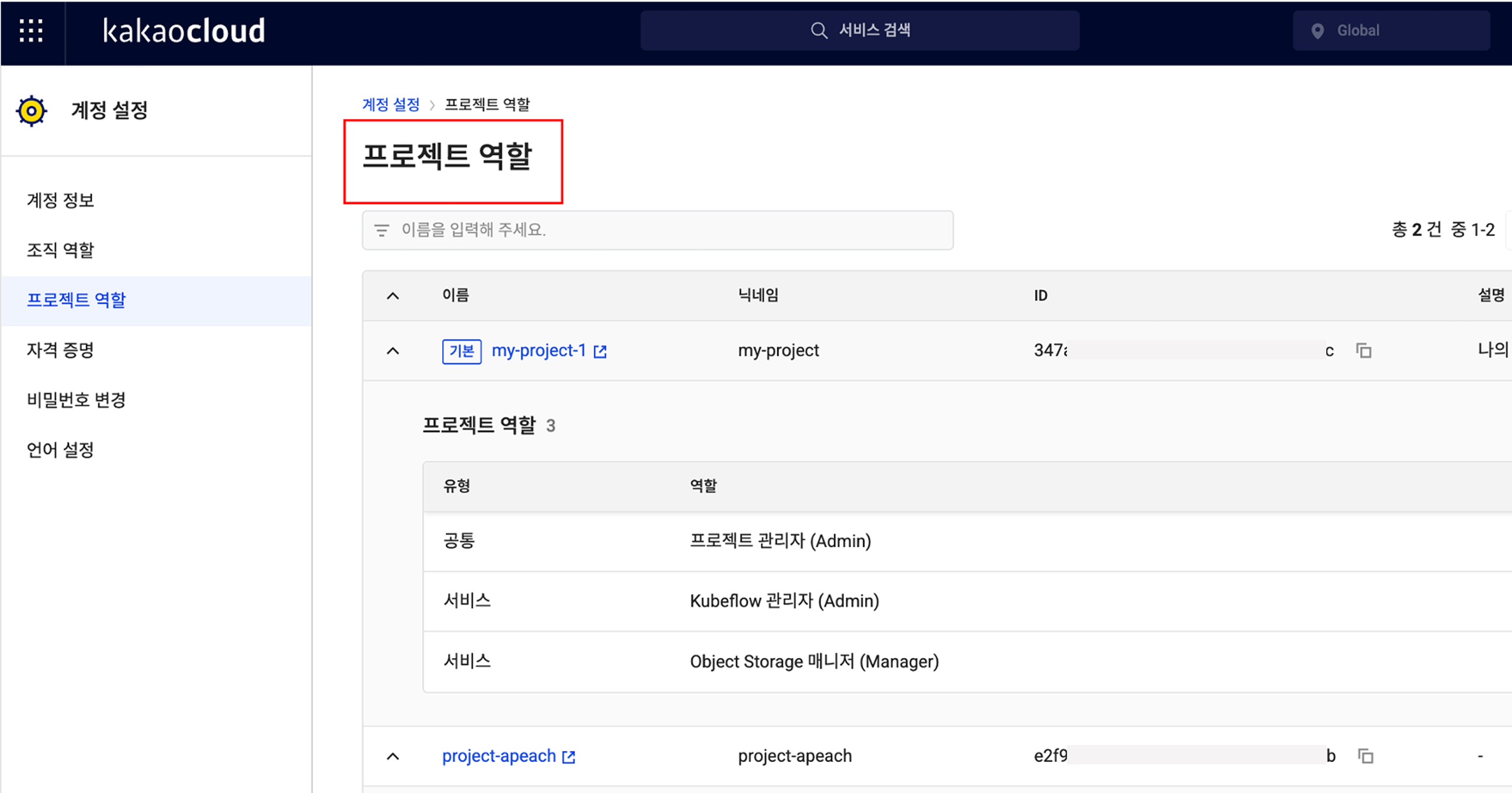
The same applies to project-level roles. In the Project roles menu at the same location, you can check the list of projects you belong to and see which roles are assigned within each project. The project name, nickname, ID, description, role type, and role name are provided together, so even if you participate in multiple projects, you can clearly understand the scope of your permissions.

project role

🎉 New roles added for IAM and project management features

This update also includes important changes to the role system.

Previously, the system consisted only of default roles such as Organization Admin, Project Admin, Member, and Reader, making it difficult to subdivide roles and responsibilities in real operating environments. For example, even if you wanted to grant a specific user permission to manage only IAM settings, Organization Admin or Project Admin roles also included resource management permissions, creating concerns.

To reflect these practical needs, dedicated roles specialized for IAM services and project management features have been newly introduced.

  • IAM Organization Admin has permission to assign or remove roles for users in the IAM service.
  • IAM Organization Viewer can view role information but cannot modify it directly.
  • IAM Project Admin can assign or modify user permissions for a specific project.
  • IAM Project Viewer has read-only permission to view role information for the project.

These dedicated roles can be assigned independently from existing organization/project administrators, allowing management responsibility for users to be subdivided more precisely.
👉 Learn more about IAM and project management roles

💡 Improving usability and clarifying responsibility

This IAM update is meaningful not simply because a feature was added, but because it provides a system that clarifies roles and responsibilities within an organization and distributes permissions efficiently.

Administrators no longer need to say, "I assigned the role, so please check whether you can access it." Instead, they can say: "Check and use the permissions you need directly in the console." In other words, the flow changes from a verification request to guidance for autonomous verification.

In addition, by using the new roles specialized for IAM and project management, you can assign service-specific owners while granting only the permissions they truly need. This strengthens security policies and makes permission operations more efficient.

Going forward, KakaoCloud plans to further subdivide service-specific role systems, including IAM. Through this, organizations can better follow the Principle of Least Privilege, administrators can reduce operational burden by granting customized permissions by task, and users can more clearly understand their own roles and responsibilities.

Want to check more details in the IAM documentation?
👉 View IAM role management documentation

Maintenance released for predictable cloud operations

· 3 min read
Irene (윤영지)
Service Manager
Monitoring Flow

If you have operated a cloud environment, you may have experienced this at least once: a missed update being pointed out in a security vulnerability report, or anxiously watching the monitor when a server restarts at an unwanted time while users are flooding in.

In fact, this is a reality many operators face. As cloud environments become increasingly complex and security threats more sophisticated, the burden that update and patch management places on operators is growing noticeably.

AWS, Azure, and Google Cloud also provide maintenance services to address missed security patches, operational time constraints, and insufficient stability in large-scale environments, helping operators focus on their essential work.

KakaoCloud also understands the anxiety and burden operators experience. In July 2025, we introduced the Maintenance service, tailored to the environment of domestic customers.🎉 🎉 🎉

Changes operators can experience directly

Maintenance goes beyond simply automating updates. It provides stability and efficiency that operators can experience directly. Let's look at a few representative situations.

First is the case of security patches. Previously, operators always had to worry about when to apply patches and how they would affect services. Now, those concerns can be reduced.
Maintenance automatically detects when new security updates are needed and lets operators schedule them for a selected time window. When an update is complete, operators can immediately check success or failure through email notifications, and if a failure occurs, they can quickly reschedule. This helps reduce the risk of service interruption.

The effect is also clear in database operations. For example, when a MySQL instance needs to be upgraded to the latest version, operators previously had to manage downtime directly and watch the process with concern. With Maintenance, however, operators only need to specify the scheduled time and task details. Maintenance automatically performs the upgrade at the specified time and provides results and status in real time, enabling stable upgrades without separate manual intervention.

In this way, Maintenance helps systematically and predictably manage tasks that directly affect service stability, such as security, database, and system updates.

How to use Maintenance

The usage flow of Maintenance is simple.

  1. Check update targets Review automatically detected upgrade targets or user-registered maintenance task lists, and check recommended schedules and expected impact in advance.
  2. Schedule tasks Set the execution date and time for each task, and schedule it during periods of low service usage to secure operational stability.
  3. Monitor progress When the scheduled time arrives, the task runs automatically, and you can check progress in real time.
  4. Check results and follow up Check the success status and detailed results of completed tasks, and retry or change the schedule if needed.

All of these processes can be performed in an intuitive console UI, allowing operators to continue maintenance conveniently without complex procedures.

Predictable maintenance that reduces uncertainty

The key to cloud operations is always stability and predictability. Maintenance improves operational efficiency by automating repetitive tasks, reduces uncertainty by notifying users in advance of interruption risks that may occur during updates, and further strengthens stability through staged updates.

Currently, maintenance is supported for MySQL instances and will be expanded to more managed services, including PostgreSQL, in the future.

Reduce unnecessary operational risk and raise service stability to the next level with KakaoCloud Maintenance.

You can find more information about Maintenance in the technical documentation.
👉 Understand key concepts of Maintenance

KakaoCloud IAM onboarding video guide

· 4 min read
Martin (왕현수)
Service Manager
Kali (명시온)
Service Manager
new iam onboarding video

Using the cloud is like operating a virtual building with dozens of keys. 🔐
If it is not clear who can enter which room and which doors they can open, confusion quickly follows.
Deciding who receives these keys and under what conditions is exactly what IAM (Identity and Access Management) does. In other words, IAM is a service that grants only the permissions needed according to each user's role, helping manage resources efficiently and reduce unnecessary access.

However, for those encountering IAM for the first time, the concept may feel somewhat complex and burdensome.
To help users understand and use KakaoCloud IAM more accurately, the content planning team created a four-part onboarding video series.
In this post, we briefly summarize the key content of each video.

🎬 Part 1. Getting started with IAM - Concepts and basic structure

The first video in the IAM onboarding series introduces the basic concepts of IAM and the structure of projects and organizations.
Even users new to IAM can easily understand the overall IAM structure through this video. Like looking at a city map, view the big picture of what permissions should be assigned to each area.

🎬 Part 2. IAM groups and service accounts - Improving user management efficiency

Part 2 introduces two features you must know to operate IAM more conveniently and systematically: IAM groups and service accounts.

  • IAM groups are a useful feature that groups users who need the same permissions into one user group and configures the required permissions all at once. For example, if you group users by teams such as development, operations, or marketing and configure the required permissions for each team at the group level, when a new team member joins, permissions are automatically granted simply by adding the member to the group. This enables much more efficient user management.
  • Service accounts are non-user accounts used by applications or automation scripts to access or control resources within a project, rather than actual IAM user accounts. They can issue API tokens and call KakaoCloud APIs instead of using IAM user accounts.

By using these two features appropriately, user management and system permission settings can be operated more systematically and securely. See the video for details.

🎬 Part 3. Tracking IAM change history with Cloud Trail

Initial IAM setup is important, but continuously checking and managing change history is also important. In Part 3, we introduce how to use KakaoCloud Cloud Trail to track who changed which IAM settings and when, at the event level.

🎬 Part 4. Reviewing IAM operational best practices

The final video introduces five best practices for operating IAM stably. Check whether all five operational tips below are applied in your organization.

  • Grant only the minimum permissions needed, without unnecessary permissions.
  • Use Cloud Trail to regularly check change history.
  • Regularly review and clean up departed-user and dormant accounts.
  • Clearly separate user accounts and service accounts for operations.
  • Integrate with Alert Center to quickly detect and respond to anomalies.

How was it?
IAM is more than a simple permission management tool. It is an important standard for securely protecting resources in an organization and clearly separating roles and responsibilities.
If you understand IAM's basic structure and operating methods well, you can continue providing stable and reliable services even in complex cloud environments.

If you want to learn more about KakaoCloud IAM, see the links below. Thank you :)

Resource Explorer released: distributed resources in one place

· 4 min read
Kali (명시온)
Service Manager
Resource Explorer

As cloud environments grow, one question naturally follows: "How many resources are we actually using right now?"
Where are the servers, how many volumes are connected, how many public IPs are in use... Checking each service one by one and organizing everything in a spreadsheet takes time and is prone to mistakes.

To resolve this inconvenience, KakaoCloud has officially released Resource Explorer, a service that makes it easier to view and manage cloud resources.
Resource Explorer is a service that lets you view various resources such as instances, Block Storage, public IPs, and load balancers in one integrated screen by KakaoCloud project. You can search resources by various criteria such as name, ID, status, and tags, and move to the details page of the corresponding resource with one click to continue the tasks you need.

In this post, we announce the release of Resource Explorer and briefly introduce its key features and use cases.

🏷️ How to distinguish resources by "context" - tags!

The ability to classify and filter resources based on tags is especially useful for users.

"Who created this instance?" "Were there this many volumes running?" "Was this for testing or production?"

The simplest and most effective way to answer these questions is tags. Resource Explorer helps you systematically organize and explore cloud resources around this tag feature.

You can assign desired metadata to each resource as key:value tags and give them clear meaning and purpose, as shown below.

  • Project:Alpha – Belongs to a specific project
  • Environment:Production – Production environment
  • Owner:ML Team – Responsible organization
  • Billing:2505 – Cost management

Previously, resources were distinguished only by name or resource ID. Now you can understand why a resource exists and what intent it was created with through tags. This meaning-based organization enables much faster and more accurate exploration than a simple list.

For example,

✅ Want to quickly view only AI infrastructure in production? → Filter by Environment:Production, Owner:AI Team!

✅ Want to view only test servers created last month? → Check immediately with the Environment:Dev, CreateDate:2025-04 tags!

Users can freely create custom tags by combining the keys and values they want, and can easily add tags to selected resources or edit existing tags. System tags automatically attached when resources are created, such as kc:platform, can also be used together.

Check the types of tags here!


In addition, Resource Explorer provides several features that help cloud operators resolve frequently encountered situations faster and more efficiently.

📂 Understand many resources at a glance - Integrated view

Previously, to check resources scattered across services, you had to move between consoles and view them one by one. Now, in Resource Explorer, you can check instances, Block Storage, public IPs, load balancers, and backups all at once. Because you can view the entire resource structure within a project, it can be used as a starting point for asset identification.

"I need to extract a list of all running VMs and public IPs." → Just select the project and the list is generated automatically!

Finding one or two resources among many can take more time than expected. Resource Explorer provides an exploration feature that lets you combine various conditions such as name, ID, tag, region, and creation date, save search conditions, and quickly reuse them.

"I want to see only Block Storage created last month with 'db' in the name." → Combine conditions to filter and get results in seconds!


🚀 Cloud resource management is now lighter and smarter

Resource Explorer is like the "eyes" of cloud operators.👀 It finds resources that were not visible, visualizes structures that were difficult to understand, and makes reporting and response flows much faster.

Resource Explorer can be used immediately in the KakaoCloud console without separate configuration.
Start KakaoCloud now and experience various services directly.