Advanced Managed Prometheus released for high-performance managed monitoring

· 4 min read
Evan (진은용)
Service Manager
Advanced Managed Prometheus

Hello.
On December 26, 2024, KakaoCloud's new service, Advanced Managed Prometheus, was released. 🎉

If you have experienced difficulties with complex monitoring setup or unexpected failure handling in cloud environments, Advanced Managed Prometheus is a service worth watching.

Advanced Managed Prometheus is a high-performance managed monitoring service that can efficiently collect, store, and analyze metric data in cloud-native environments. It is designed to reliably process large-scale data generated from Kubernetes, Virtual Machine, applications, and more, and provides scalability and stability optimized for cloud environments based on Prometheus's core features.

What is Prometheus?
Prometheus Logo

Prometheus is a project that began at SoundCloud in 2012 and is now an official project of the Cloud Native Computing Foundation (CNCF). It provides metric-based monitoring and collects, stores, and analyzes system and application performance data. In particular, it efficiently stores and queries data based on a time-series database. With scalability, reliability, and flexibility, Prometheus is an essential monitoring tool in cloud-native environments.

What is Advanced Managed Prometheus?

Now let's take a closer look at the key features and characteristics of KakaoCloud Advanced Managed Prometheus.
Advanced Managed Prometheus is a service that optimizes the powerful features of Prometheus for cloud-native environments and provides real-time metric collection and monitoring without complex configuration.

In large-scale environments, users may face limitations in data storage capacity and processing speed, difficulties in cluster configuration and maintenance, and problems where failures are not detected in advance. Advanced Managed Prometheus was designed to solve these operational difficulties. The service collects metric data in real time without the risk of data delay or loss. It also automates Prometheus installation, configuration, and backup, reducing operational burden and helping users focus on business logic and performance optimization instead of infrastructure management.

In Kubernetes environments in particular, it effectively manages large-scale container-based workloads and greatly improves visibility into cloud-native applications.

Key features of Advanced Managed Prometheus

1. Automated operations management

  • Automates Prometheus installation, upgrades, and backups to minimize operational burden.
  • Users can build a stable monitoring environment without complex configuration.

2. Scalable data storage

  • Large-scale metric data can be retained and processed reliably.
  • It responds flexibly to growing data volumes while maintaining performance.

3. Real-time alerts and Alert Center integration

  • By integrating with KakaoCloud Alert Center, you can configure threshold alerts for key metrics and logs.
  • When an issue occurs, immediate notification messages help you respond quickly.

4. Integrated monitoring

  • You can monitor and manage various resources such as Kubernetes, VMs, and applications in an integrated way.
  • Operational efficiency improves because all resources can be viewed at a glance.

5. Real-time dashboard and visualization

  • By integrating with Grafana, it provides real-time dashboard and visualization features.
  • Complex metric data can be analyzed and understood intuitively.

Usage purposes and examples

Advanced Managed Prometheus is especially useful in the following situations.

  • Monitoring large-scale workloads in Kubernetes clusters
  • Analyzing resource usage for VMs and applications
  • Collecting real-time metric data and managing alerts
  • Building a stable monitoring environment while minimizing operational burden

Closing

KakaoCloud Advanced Managed Prometheus is designed to make monitoring and alerts easier and more stable to operate in cloud-native environments. In fact, Advanced Managed Prometheus was created based on requests and feedback from many customers. We thought deeply about how to reduce complex monitoring setup and maintenance burden and help users manage infrastructure more effectively.

Select Advanced Managed Prometheus in the KakaoCloud console and easily build a monitoring environment. For more details, see the How-to Guides documentation.

Thank you.

Pub/Sub service generally available

· 4 min read
Chloe (이다예슬)
Service Manager
Pub/Sub

On November 19, 2024, KakaoCloud Pub/Sub was finally released as a generally available (GA) service! 🎉

During the beta service period, we made various updates with the goals of strengthening stability and improving usability, and by reflecting valuable customer feedback, we are now able to provide stronger and more advanced features. With the generally available Pub/Sub service, you can now manage and process large-scale data more efficiently. In today's post, we briefly introduce the key features of Pub/Sub and major improvements included in the GA release.

What is Pub/Sub?

KakaoCloud Pub/Sub is a serverless message queue service designed for high-volume events and data analytics. You can classify and manage messages or events through topics, and use subscriptions so that subscribers can receive and process messages published to topics.

Users can simplify messaging structures and optimize real-time data processing by using Pub/Sub. In particular, it provides solutions optimized for various business environments such as event notifications between applications, data streaming, and asynchronous job processing. In this way, KakaoCloud Pub/Sub provides a powerful foundation for implementing an efficient and scalable messaging system that can meet diverse business requirements.

Major improvements and notes for the Pub/Sub GA release

This GA release of Pub/Sub includes the following improvements to increase stability and usability.

1. New feature added

  • The Object Storage subscription type has been added. This lets you send messages to an Object Storage bucket and stably store and use large volumes of messages.

2. Feature improvements and stability enhancements

  • Enhanced API and SDK support
    • Support has been strengthened so that topics and subscriptions can be created and deleted using APIs and SDKs. For details, see the API Reference and SDK Reference in the technical documentation.
  • More granular subscription status values
    • Status values have been subdivided further, improving message management efficiency.
  • Cloud Trail and Alert Center event items added
    • Monitoring and notification management have been further strengthened.
  • Expanded monitoring items
    • Monitoring items for topics and subscriptions have been expanded, allowing message processing status to be checked and managed in more detail.

3. SLA applied

  • With the GA release, an SLA (Service Level Agreement) has been applied, enabling a more stable and reliable service.

4. Notice of transition to paid service

  • As of November 20, 2024, Pub/Sub has transitioned to a paid service, and usage fees apply. Customers already using Pub/Sub should review the pricing policy in detail.

Closing

Experience business innovation with Pub/Sub

With KakaoCloud Pub/Sub, you can maximize data processing efficiency and automate various workflows to raise business competitiveness to the next level. For details about the service, see the Pub/Sub technical documentation. If you have any questions, please contact us anytime through KakaoCloud 1:1 inquiry.

Thank you.

Advanced Managed Kafka service released for high-volume real-time streaming

· 3 min read
Kali (명시온)
Service Manager
Advanced Managed Kafka

KakaoCloud's new service, Advanced Managed Kafka, has been released.

Advanced Managed Kafka is a fully managed service designed to let users benefit from real-time data streaming while minimizing the operational burden of Kafka.

In today's environment, where data is collected and analyzed in real time, many companies adopt Apache Kafka as a data streaming tool. Kafka has excellent performance and flexibility, but it is a complex system that requires advanced configuration and continuous monitoring. Operating and managing Kafka directly requires significant technical burden and time. KakaoCloud developed Advanced Managed Kafka, a fully managed service designed to minimize the operational burden for Kafka users while allowing them to benefit from real-time data streaming.

Now let's take a closer look at the key features and characteristics of Advanced Managed Kafka.

What is Advanced Managed Kafka?

Advanced Managed Kafka is a cloud-based service that lets you easily operate Kafka clusters from creation to management. It is suitable for applications that require real-time data streaming, and users can build a stable message queue and streaming environment without complex Kafka configuration.

Key features of Advanced Managed Kafka

The basic concepts of Advanced Managed Kafka are Cluster and Broker.

A cluster is a core component of the Kafka environment. Advanced Managed Kafka automatically allocates and manages the required resources through simple settings, greatly reducing the complexity of Kafka cluster operations. A broker is a component of a cluster and is responsible for storing and delivering messages.

In Advanced Managed Kafka, broker management can optimize cluster performance and increase data availability.

1. Easy Kafka environment setup

When creating a cluster through Advanced Managed Kafka, you only need to enter simple required information such as cluster name, region and network, number of broker nodes, and volume size. The cluster is then automatically deployed according to the resources configured by the user and prepared for operation.

2. Cluster scaling

When data throughput increases, you may need to scale the cluster to improve processing performance. Advanced Managed Kafka helps users easily increase the number of broker nodes.

3. Volume expansion

When storage space becomes insufficient due to data growth, you may need to expand the volume. Advanced Managed Kafka helps users easily expand volume size.

4. Real-time monitoring and fast response

Advanced Managed Kafka provides features for monitoring key performance metrics of clusters and brokers in real time. Through metrics such as broker, memory, and disk usage and network I/O, you can check cluster status and performance at a glance and improve operational stability by managing clusters before issues occur.

Closing

Advanced Managed Kafka provides various tools to stably manage real-time streaming data and flexibly operate clusters and brokers. This allows services where data flow is important to secure both high performance and stability.

Select Advanced Managed Kafka in the KakaoCloud console and easily build a Kafka environment. You can find more details in KakaoCloud's How-to Guides documentation.

You may also want to refer to the tutorial Message processing through Kafka, which covers the process of building a Kafka environment after creating a cluster and sending and receiving messages.

Thank you.

Monitoring Flow service released for workflow monitoring automation

· 5 min read
Irene (윤영지)
Service Manager
Monitoring Flow

KakaoCloud's new service, Monitoring Flow, has been released.

As the name suggests, Monitoring Flow is a service focused on monitoring application status in real time and automating complex business flows to resolve inefficient issues in systems.

If you have experience with monitoring in an existing cloud environment, you may agree that building a monitoring system, automating processes, and integrating systems require considerable time and resources. Although many companies are working to solve these problems, the reality is that they still struggle with manual work and inefficient management. KakaoCloud developed Monitoring Flow as a solution that presents a new monitoring standard for system management and makes it easy to solve complex problems in cloud environments.

Now let's take a closer look at how Monitoring Flow works and what features it provides.

What is Monitoring Flow?

Monitoring Flow is a service that helps monitor application status in real time through APIs and automate user-defined workflows. Users can create monitoring scenarios directly and schedule them to run automatically at desired times. Monitoring Flow is especially strong in that workflows can be intuitively designed and managed easily in the KakaoCloud console without writing code. This enables not only IT experts but also non-experts to easily build monitoring processes.

] In addition, through integration with Alert Center, you can set thresholds for key metrics and receive notifications that match the conditions. For example, if the response time of a specific server exceeds the configured threshold, a notification is automatically sent so that the person in charge can resolve the issue immediately. By using these features, you can greatly improve the stability and efficiency of system operations.

How Monitoring Flow works

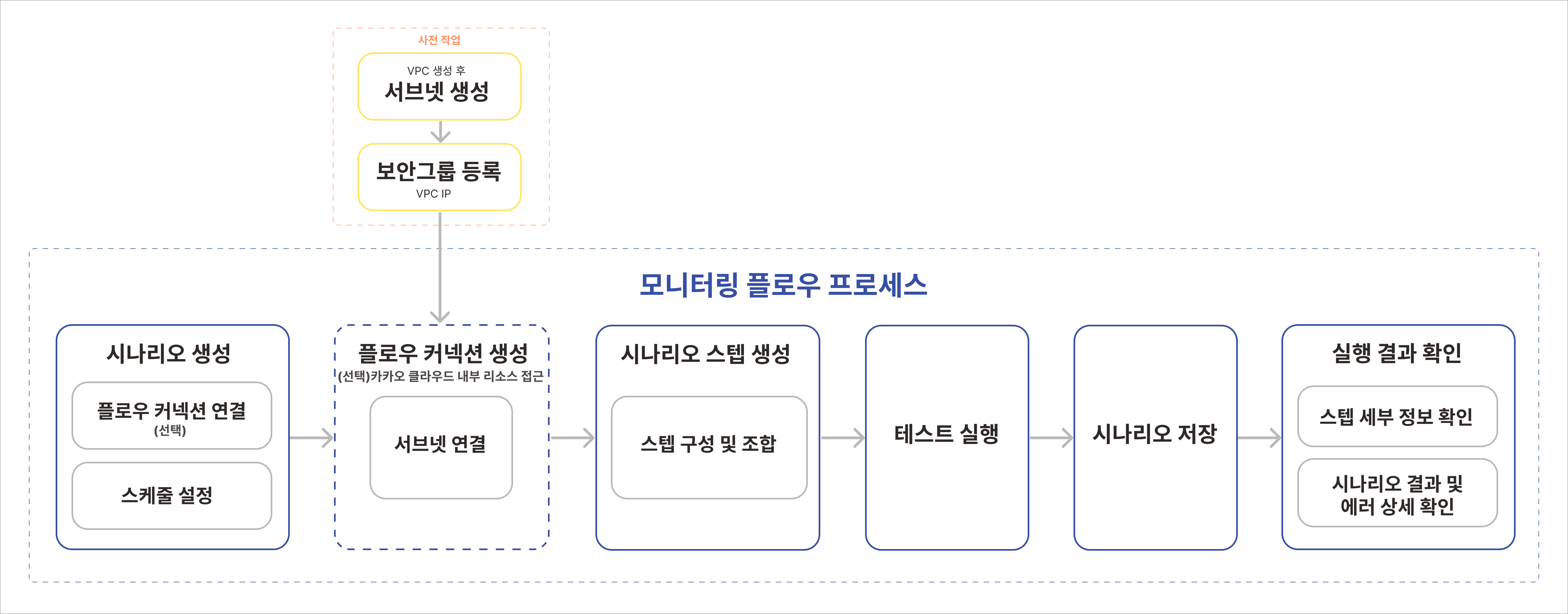
The basic concepts of Monitoring Flow are Step, Scenario, and Flow Connection.

A step is the smallest unit that composes a workflow in Monitoring Flow and represents a single task. A scenario means a workflow, and it automatically executes a defined work flow composed of various steps according to a schedule. A flow connection is a channel that connects subnets in a VPC, enabling monitoring of KakaoCloud internal resources. Because resources can be accessed for the subnets of the VPC registered in the flow connection during monitoring, flow connection registration is required.

Monitoring Flow process Monitoring Flow process
Monitoring Flow constructs a workflow based on steps configured by the user and executes the tasks defined in each step sequentially. Because the process proceeds through various paths depending on conditions, you can easily identify workflow progress and points where errors occur. In addition, you can monitor system status in real time and respond quickly through preconfigured notification policies.

Monitoring Flow features

Monitoring Flow provides users with various features such as intuitive workflow design, real-time monitoring, and serverless architecture, helping them efficiently manage complex cloud environments. Detailed features of Monitoring Flow are as follows.

1. Intuitive workflow visualization

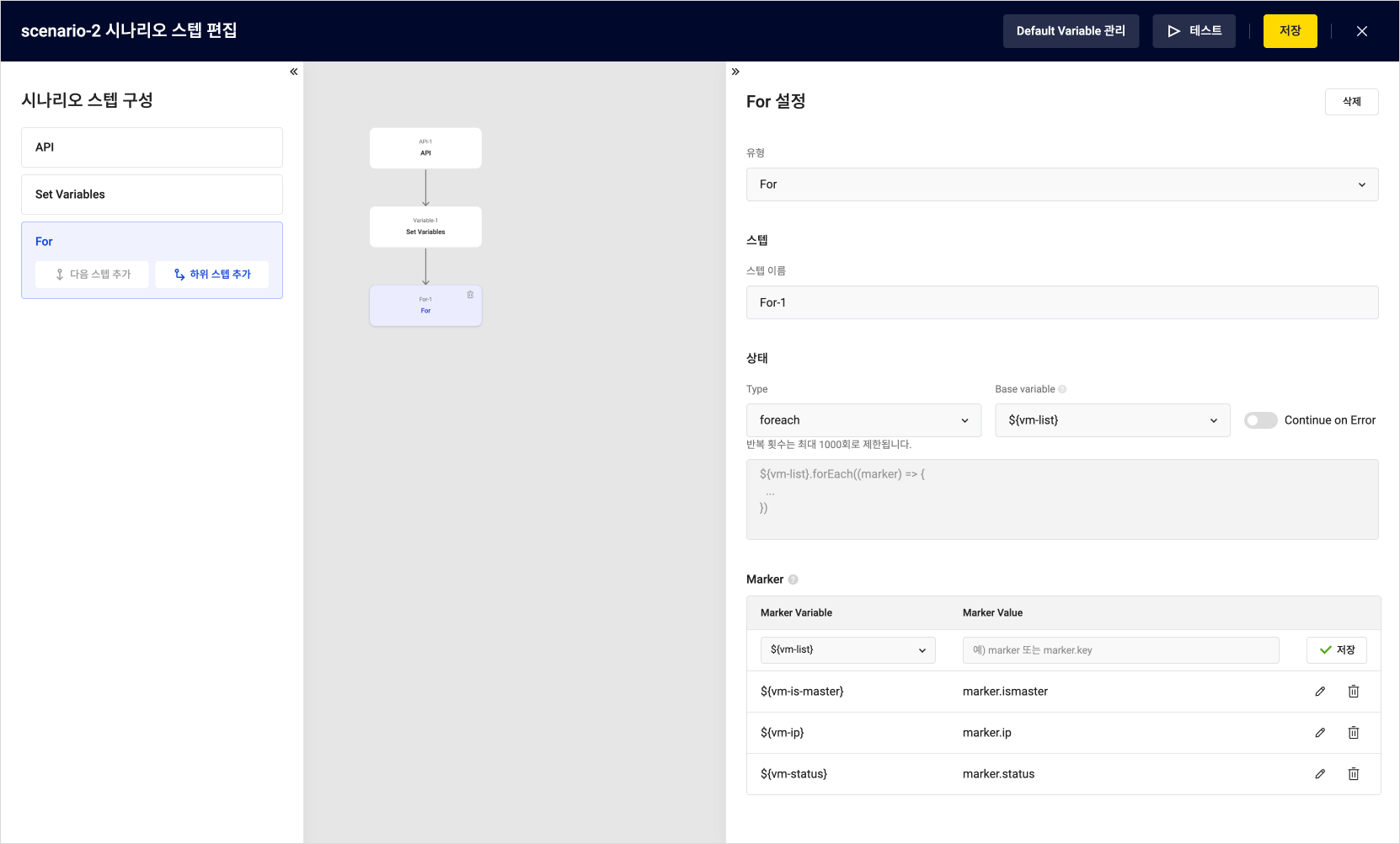
Monitoring Flow visually represents user-defined scenarios with an intuitive UI and drag-and-drop method, and supports easy configuration of complex workflows. This lets users understand the status and progress of each step at a glance, quickly identify and resolve issues, and makes workflows accessible even to users without development experience, lowering the barrier to workflow management and enabling fast prototyping and operation.

Monitoring Flow's intuitive UI in the web console Configuration in the Monitoring Flow web console

2. Process structuring and automation

Monitoring Flow lets you design complex workflows by dividing them into multiple steps and setting conditions for each step so that processes can proceed through various paths. This allows users to manage workflows flexibly according to conditions and automate repetitive tasks to improve operational efficiency.

3. Serverless architecture

Monitoring Flow runs in a serverless environment that does not require server management, so users can build and run workflows without worrying about infrastructure management. Because costs are charged only for usage, it is cost-efficient and suitable for small and medium-sized businesses with limited resources.

4. Integration with various services

Monitoring Flow integrates with various KakaoCloud services, allowing workflow execution results to be integrated with other systems or important notifications to be managed automatically. These integration features enable efficient resource management and fast issue response in complex work environments.

5. Real-time monitoring and fast response

Monitoring Flow provides a feature for monitoring workflow execution status in real time. Users can check errors that occur at each step in real time and respond quickly when an issue occurs. This improves operational stability and minimizes downtime.

Closing

KakaoCloud Monitoring Flow is a powerful tool that lets you conveniently manage system monitoring and process automation in one platform. The intuitive UI and various features introduced in this post can greatly improve the stability and efficiency of system operations.

Select Monitoring Flow in the KakaoCloud console and easily design the workflow you want. You can find more detailed instructions in KakaoCloud's How-to Guides documentation.

Thank you.

MemStore, KakaoCloud's new in-memory data storage service

· 3 min read
Kate (김소희)
Service Manager
Memstore

Starting in August, KakaoCloud will release MemStore, a new in-memory data storage service, replacing the existing Redis® service. This service name change was decided to respond quickly to the recent Redis® license change and provide users with improved features and stability.

Why MemStore?

In March this year, Redis Labs announced that it would change the existing BSD 3-Clause license to a dual license model called Redis Source Available License v2 (RSALv2) and Server Side Public License v1 (SSPLv1). As a result, a separate license is required to use Redis® commercially, affecting multiple cloud service providers including KakaoCloud.
In response to this change and to provide sustainable service, KakaoCloud is introducing MemStore, a managed cache database service.

Key features and benefits of MemStore

KakaoCloud MemStore preserves the performance and features of the existing Redis® service while including cache database features that will be further expanded in the future.

  • High performance and stability: MemStore stores all data in memory, providing high-speed data access and processing.
  • Automatic backup and restore: Data is periodically backed up to separate storage so it can be easily restored in case of data loss. Snapshot and backup features are provided to protect user data from unexpected situations.
  • Enhanced security: Security features are strengthened in line with the new license model, placing customer data safety first. In addition, virtual private cloud (VPC) network and security group connection features provide a secure database operating environment by controlling access from outside specific IP ranges.
  • Redundant configuration and high availability: High availability is ensured through an Active-Standby redundant configuration. If a failure occurs on the Active server, the Standby server immediately takes over operations to minimize service interruption.

Support for existing users

Redis® service resources of existing KakaoCloud users are automatically converted to MemStore without service impact. In addition, all services that can be used together with Redis® (Cloud Trail, Alert Center, Monitoring, and others) can be used without impact from the MemStore service name change.

Through MemStore, KakaoCloud will work to provide customers with a better service experience and build a sustainable service environment that keeps pace with the latest technology trends.

For more information, see the KakaoCloud website and technical documentation.
Thank you.

Redis® is a trademark of Redis Ltd. MemStore is based on open-source Redis® version 7.2 or earlier.

Maximizing DevOps efficiency with GitOps on KakaoCloud

· 6 min read
GitOps

Hello! In this post, we introduce how to improve development and operations environments through GitOps on KakaoCloud.

GitOps, based on DevOps principles, refers to the process of using a Git repository as a single source of truth to track all changes and declaratively manage infrastructure, thereby maintaining consistency between infrastructure and applications. As a way to automate deployment and management of infrastructure and applications and maximize efficiency, GitOps has become one of the key methods for responding to rapidly changing market requirements as cloud-native environments spread.

In actual development environments, GitOps means managing infrastructure and application deployment using a Git repository as a single source of truth. Infrastructure is defined declaratively, all changes are tracked through Git, and deployments are automated. This series of tasks ensures that code stored in Git stays synchronized with the actual state of infrastructure and applications.

Why implement GitOps?

In practice, GitOps provides a wide range of benefits in modern software development and operations. First, declarative infrastructure lets you define the desired state of infrastructure as code. For example, if the configuration of a specific server is written as code, that configuration can be applied consistently at any time, maintaining consistency in infrastructure management. Through the version control principle of storing all configuration files in Git to track changes and manage versions, you can easily understand change history and roll back to a previous state when an issue occurs. Automated deployment applies changes to infrastructure automatically after code changes are approved, and because changes are tested and deployed through CI/CD pipelines, infrastructure management becomes more efficient.

Through these processes, GitOps greatly improves stability and reliability because infrastructure and applications defined as code can be deployed predictably and consistently. It can minimize human error, and changes are quickly tested and deployed through CI/CD pipelines, providing a fast feedback loop that enables issues to be resolved quickly. In terms of reducing operational costs, automated deployment and management reduce manual work and allow developers to focus on writing actual code, maximizing efficiency.

Resources required to implement GitOps

Several important resources are needed to implement GitOps.

  1. Git repository: A Git repository is needed to store all infrastructure code and manage versions. Common examples include the widely used GitHub, GitLab, and AWS CodeCommit.
  2. GitOps deployment tool: A deployment tool is needed to automatically deploy changes and continuously synchronize infrastructure and application states. Examples include ArgoCD, Flux, Jenkins X, and GitHub Actions.
  3. Kubernetes: GitOps is mainly used with container orchestration platforms such as Kubernetes. Therefore, a Kubernetes environment must be prepared in advance.
  4. Container Registry: A secure registry is needed to store and deploy container images.

Implementing GitOps on KakaoCloud

KakaoCloud provides cost-effective cloud infrastructure so customers can use cloud resources in an economically efficient way. KakaoCloud managed services reduce operational costs through automated features and help minimize unnecessary costs through flexible pay-as-you-go pricing.

You can use the following resources to implement a GitOps environment on KakaoCloud.

  • Kubernetes Engine: KakaoCloud provides Kubernetes Engine, a managed Kubernetes service, to make it easy to deploy and manage Kubernetes clusters. It ensures high availability and scalability, reducing the burden of infrastructure operations and letting you focus on development. Based on the benefits provided by Kubernetes Engine, you can build a GitOps environment and declaratively manage Kubernetes resources, maintaining change consistency and maximizing operational efficiency through automated deployment.

  • Container Registry: KakaoCloud provides a secure and reliable Container Registry service that lets you store, manage, and deploy container images. Container Registry integrates smoothly with CI/CD pipelines, enabling automated build, test, and deployment.

Usage example for implementing a GitOps environment

As a simple example, let's describe how a fictional Company A can build GitOps on KakaoCloud. Company A uses GitHub to version-control all infrastructure configuration and application code, and has built a CI/CD pipeline with GitHub Actions.

Company A's GitOps implementation process

Step 1. Code commit and automatic build

  • Company A's development team commits code to GitHub whenever adding a new feature or fixing a bug.
  • GitHub Actions is triggered to automatically build and test the code.
  • When the build succeeds, a container image is created and pushed to KakaoCloud Container Registry.

Step 2. Automatic deployment and infrastructure specification update

  • The infrastructure specification repository is updated by using a pipeline tool or directly.
  • When the infrastructure specification repository is updated, ArgoCD, the GitOps tool, detects it.
  • ArgoCD checks the updated specifications and automatically deploys changes to the Kubernetes cluster.

Step 3. Environment reflection

  • When the specifications for the development environment are updated, deployment proceeds to the development environment.
  • When the specifications for the production environment are updated, deployment proceeds to the production environment.

Through this series of processes, Company A was able to manage development and operations processes efficiently, significantly shorten deployment time, and reduce operational costs. You can check the detailed method for implementing this example on KakaoCloud.

Tutorial for configuring a GitOps environment

You can find the example GitOps environment configuration described above in detail in a tutorial in KakaoCloud technical documentation. The Build GitOps in a KakaoCloud Kubernetes environment tutorial explains how to set up a GitOps pipeline using the managed Kubernetes service Kubernetes Engine and Container Registry.

gitops-overview Tutorial architecture

Closing

As described above, GitOps is a powerful approach that can significantly improve development and operations processes by automating infrastructure and application deployment and management. Of course, introducing GitOps can involve initial setup and a learning curve. Sufficient planning and preparation are required, and it can take time until all team members become familiar with the new workflow. Therefore, it is recommended to introduce GitOps according to your situation and optimize the necessary tools and processes.

Please remember that, as shown in the GitOps pipeline tutorial, you can build a better development and operations environment with automated processes and consistent deployment management by using KakaoCloud services. We hope you experience improved productivity and cost savings directly.

KakaoCloud English console support is now available

· 2 min read
Mia (정혜원)
Technical Contents Manager
KakaoCloud Releases English Console

Hello, KakaoCloud users!

Today, a language setting feature has been added to the KakaoCloud console, and English console service has begun. Accordingly, English guides are also provided in the technical documentation.

Users can choose Korean, English, or the browser default option through the newly added language setting tab in the console. For details on how to select a language in the console, see the Console language setting guide. For the technical documentation, you can set your preferred language, Korean or English, through the language setting tab in the top menu.

This improvement has been applied to the main screens and services of the console. It has first been applied to Dashboard, Settings, BCS (Virtual Machine, Bare Metal Server, GPU) services, VPC, Transit Gateway, and IAM. We plan to provide multilingual support across all areas in the future with user convenience in mind.

The KakaoCloud team is pleased to be able to provide services to a broader user base through this English service. We will continue doing our best to meet the diverse needs of our users. If you need more detailed help, please contact the Helpdesk.

Thank you!

Building MLOps workflows with Kubeflow

· 7 min read
Update Kubeflow


Hello. In this post, we introduce Kubeflow, a core platform for machine learning operations.

Kubeflow is an open-source project designed to reduce the complexity of machine learning and help data scientists and developers develop and deploy machine learning models more easily and quickly. In the first sentence introducing Kubeflow on the official Kubeflow site, it is described as a project that helps comprehensively manage and operate various open-source tools for machine learning on Kubernetes.

Starting from TensorFlow Extended (TFX), which Google used internally in the past, Kubeflow has now expanded into one of the most widely known end-to-end solutions for running machine learning workflows in various Kubernetes-based environments.

One of Kubeflow's most innovative approaches is the integration of AutoML and Kubeflow Pipelines. This allows users to automate and optimize the training, evaluation, and deployment stages of models, reducing repetitive work in machine learning projects. In addition, multi-tenant support has been strengthened so that multiple teams can effectively share the same Kubeflow instance while isolating resources. The Kubeflow service provided by KakaoCloud is also designed to maximize the efficiency of machine learning work and make it easy for users to access.

In this post, we introduce Kubeflow's major components, latest features, and various tutorial scenarios for using Kubeflow on KakaoCloud.

Kubeflow features

Kubeflow supports the following tasks in Kubernetes environments with the goal of flexible scaling and easy, convenient production deployment of machine learning models.

  • Easy, repeatable, and portable deployment: Pipelines created through Kubeflow make deployment easier across multiple environments, including cloud and on-premises environments.
  • Independent microservice deployment and management system: Based on a microservices architecture, Kubeflow enables independent management of each component.
  • Responsive scaling based on user requirements: Resources are automatically scaled according to user requirements to ensure optimal performance.

Key Kubeflow components

Kubeflow consists of multiple open-source components such as Central Dashboard, Jupyter Notebooks, Tensorboard, and Pipelines, each supporting a specific stage of the machine learning workflow. These components are designed to help users manage machine learning projects more efficiently.


Source: Kubeflow Ecosystem

Using these key components on Kubernetes, Kubeflow efficiently supports the entire process from machine learning model development and deployment to resource management.

Key Kubeflow componentDescription
Central Dashboard   Provides a dashboard web console for accessing and monitoring multiple components.
NotebooksProvides a Jupyter Notebook environment where data scientists can code directly within a cluster.
TensorboardCreates and manages Tensorboard Server, a tool for visualizing model training processes and training data provided by frameworks such as Tensorflow and PyTorch.
PipelinesSimplifies complex machine learning workflows through scalable Docker-based pipelines.
KatibAutomates hyperparameter tuning for model training through AutoML components such as Katib.
Training OperatorSupports various machine learning frameworks and enables flexible training jobs.
KServeEnables efficient model deployment and serving through model-serving add-ons such as KServe, and provides them as real-time APIs internally and externally.

KakaoCloud Kubeflow

KakaoCloud supports the latest features, including Kubeflow 1.6, and provides an optimized cloud environment that enables users to perform machine learning tasks easily and quickly. In particular, KakaoCloud Kubeflow has the following features.

Support for all Kubeflow 1.6 features

KakaoCloud Kubeflow lets you use all major Kubeflow components and add-ons introduced above. You can also install and use frameworks and libraries such as Tensorflow, PyTorch, Apache MXNet, MPI, XGBoost, Chainer, HuggingFace, and OpenAI SDK.

Granular access management

By providing RBAC, users can be assigned namespaces according to their tasks and roles, and permissions can be managed efficiently by user or group. Administrators can also assign quota features by namespace and allocate CPU, memory, GPU memory, and storage resources according to configured usage.

Flexible storage options

In addition to the independent MinIO type, KakaoCloud supports storage repositories of the Object Storage type, enabling more flexible serving of model result files.

Optimized for Nvidia MIG instances

KakaoCloud Kubeflow provides optimized MIG (Multi Instance GPU) instances based on Nvidia A100. MIG instance settings allow GPU resources to be partitioned, enabling users to run multiple workloads efficiently on the same GPU.

Multi File Storage support

Users can dynamically use as much independent File Storage as needed by user or group, making it easier to share files between work pipelines and notebooks.

Usage examples with Kubeflow

KakaoCloud technical documentation provides rich Kubeflow tutorials that cover various stages of machine learning projects, from Jupyter Notebook setup to building parallel training models and creating model-serving APIs. By referring to these tutorials, you can learn about efficient model development, training, optimization, and deployment using KakaoCloud Kubeflow.

The Kubeflow-related tutorials currently available in KakaoCloud technical documentation are as follows.

Closing

Kubeflow is currently one of the most widely used open-source MLOps platforms in Korea and abroad. As a result, educational content, experience cases, and example source code are relatively abundant, helping data scientists and working analysts who are using it for the first time adapt quickly.

KakaoCloud Kubeflow provides GPU optimization and powerful resource management features through easy provisioning that takes advantage of the cloud environment. We will continue improving the Kubeflow service so KakaoCloud users can fully benefit from an MLOps platform with machine learning efficiency and enhanced security. If you are considering using a Kubeflow service for machine learning, be sure to try KakaoCloud's service.

Thank you.

t1i instances with burstable performance

· 5 min read
Sandy (차신영)
Technical Contents Manager
New Release t1i


Hello, we are sharing updates about the BCS (Beyond Compute Service) instance family.
KakaoCloud released t1i burstable instances last September. In this post, we will look at the credit feature and burstable performance applied to t1i instances starting January 25, 2024.

Understanding t1i instances

Before taking a closer look at burstable performance, it is helpful to understand t1i instances in KakaoCloud Beyond Cloud Compute (BCS).
t1i instances, a type of KakaoCloud general-purpose instance, are designed for workloads that do not require consistently high CPU performance but need to deliver high performance in specific situations. These instances provide burstable CPU performance controlled by credits, offering an appropriate balance between high performance and cost.

How burstable performance works

The English word "burstable" is a compound of "burst" and "able." In cloud computing, burst means the ability to temporarily exceed a defined baseline performance level and deliver higher performance. Therefore, equipping an instance with burstable performance means that the instance provides baseline CPU performance but has the ability to burst beyond that baseline.

In KakaoCloud, the t1i general-purpose instance provides this burstable performance. It demonstrates its value by offering a cost-effective solution for workloads where the CPU is usually idle but occasionally requires high CPU performance.


Then how do KakaoCloud t1i instances provide this burstable feature?
The answer is CPU credits. t1i instances continuously receive CPU credits, and the credit rate varies depending on the instance size.

(Example of credit rate)
1 CPU credit = 1 vCPU x 100% utilization x 1 minute = 1 vCPU x 50% utilization x 2 minutes = 2 vCPUs x 25% utilization x 2 minutes

Credits are consumed when an instance runs above its baseline CPU utilization, and unused CPU credits during low workloads are saved for future bursts. This makes it possible to handle unexpected loads smoothly.

(Credit consumption relationship)
CPU utilization below baseline: accrued credits > consumed credits
CPU utilization equal to baseline: accrued credits = consumed credits
CPU utilization above baseline: accrued credits < consumed credits

For a detailed explanation of credit calculation, see the user guide.

Example use cases for t1i instances

t1i instances that provide burstable performance can be an optimal choice in terms of cost efficiency and flexibility. They are especially useful in the following business situations.

  • Variable workloads: When workloads are inconsistent and CPU usage fluctuates over time, t1i instances provide baseline performance while offering the flexibility to increase performance when needed.
  • Development and test environments: Development and test environments often require high performance only at certain times. t1i instances can be a cost-effective choice for these environments.
  • Low-latency interactive applications: For applications that require user interaction, response time is important. t1i instances can instantly adjust performance when needed and improve user experience.
  • Small and medium-sized databases: Suitable for databases that require consistent performance but occasionally need high performance. Burstable performance can be used during database maintenance tasks or unexpected traffic increases.
  • Background processing jobs: For scheduled batch jobs or background processing jobs, t1i instances can reduce costs when consistently high performance is not required.

Best practices

To use t1i instances smartly, several strategic management and planning practices are needed. We hope the following best practices help you use t1i instances and maximize application performance.

  • Monitor CPU credit balance: You can collect and view key metrics through KakaoCloud Monitoring. Monitor CPU credit balance regularly so that instances can burst when needed.
  • Choose an appropriate instance size: Select an appropriate t1i instance size, such as t1i.nano, t1i.medium, or t1i.2xlarge, according to different workload requirements to optimize cost and performance.
  • Understand workload patterns: Analyze CPU usage patterns of workloads and improve operational efficiency by balancing CPU credit accumulation and consumption rates for the instance.

Closing

On January 25, 2024, the powerful feature of "burstable" performance was added as a milestone for KakaoCloud t1i instances, providing more flexible and cost-effective compute performance.
The burstable feature is especially meaningful because KakaoCloud is the first domestic CSP to release it. We want to emphasize that KakaoCloud t1i instances are not just an instance type, but a strategic asset that can use resources cost-effectively. Use the power of burstable performance to experience operations that ensure high performance during peak hours while avoiding unnecessary costs during idle time.
For detailed specifications and information about t1i instances, see Burstable instances in the user guide.

Notice

The above overview of burstable instances was written based on information available in January 2024. For the latest information about KakaoCloud BCS instances, see BCS instances.

New BCS p1i and m3az instances released

· 2 min read
Mia (정혜원)
Technical Contents Manager
Notice

The following announcement for p1i and m3az instances was written based on information available in December 2023. For the latest information about KakaoCloud Beyond Compute Service, see Specifications by instance type.

Hello, we are sharing updates about the BCS (Beyond Compute Service) instance families.

KakaoCloud continues to introduce BCS instance types that better match users' diverse workload specifications. In this post, we introduce the recently released p1i family, which supports accelerated computing, and the general-purpose m3az family.


1. p1i instances for high-performance computing

p1i is an instance family optimized for high-performance computing such as machine learning and HPC. It is equipped with Gold 5120 Skylake Intel Xeon Scalable processors and supports up to 56 vCPUs and 512 GiB of memory. p1i instances are currently provided as Bare Metal Server types, with up to four NVIDIA V100 Tensor Core GPUs.

Selecting a p1i instance in the console Selecting a p1i instance in the console


2. m3az instances optimized for single-threaded CPU environments

The m3az instance family is a general-purpose instance family equipped with the latest 4th Gen AMD EPYC 9004 series processors. It provides a single-threaded CPU environment and is optimized for specific workloads such as games and healthcare. m3az instances provide memory and vCPU options in various sizes. They also provide network bandwidth up to 12.5 Gbps.

Selecting an m3az instance in the console Selecting an m3az instance in the console


The two new instance families, p1i and m3az, are available in the kr-central-2 region. For more information, see the BCS instance types documentation.

We hope you experience more efficient and powerful cloud computing with KakaoCloud's diverse BCS instance services.
Thank you.