Hadoop Eco Dataflow clusters now available

· 3 min read
Sandy (차신영)
Technical Contents Manager
Notice

The following overview of Hadoop Eco was written based on information available in December 2023. For the latest information about KakaoCloud Hadoop Eco, see Hadoop Eco.

Gartner, a global information technology (IT) research and consulting company, researches and announces Data & Analytics (D&A) trends every year.
According to this year's Gartner report (Gartner Identifies the Top 10 Data and Analytics Trends for 2023), data and analytics teams must do more than manage data resources and generate insights from them. Beyond simply collecting massive amounts of data, they are required to collect the right data with the right tools at the right time and derive business insights from it. To do this, the report suggests that enterprise data and analytics teams should follow trends such as value optimization, data sharing, observability, data and analytics sustainability, and data fabric.

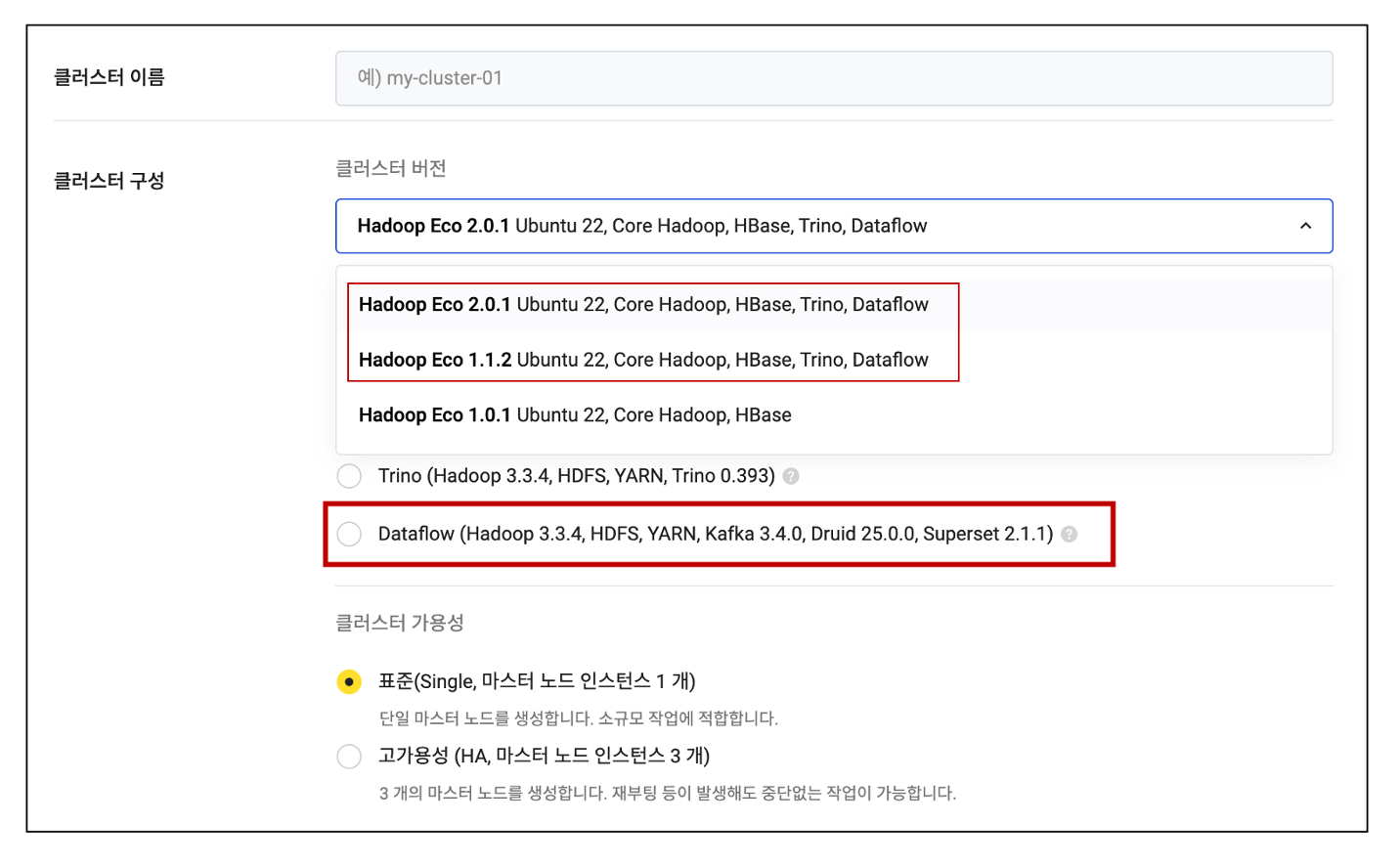
To continue keeping pace with rapidly evolving data analytics trends, KakaoCloud added the new Dataflow cluster type to Hadoop Eco in November 2023. Previously, Hadoop Eco provided Core Hadoop, HBase, and Trino types. With the addition of Dataflow clusters, data collection and analysis through Hadoop, Kafka, Druid, and Superset is now possible.
Dataflow provided by Apache Beam is one of the unified batch and streaming data processing models widely chosen by users around the world. Dataflow is a fully managed open-source framework optimized for streaming data analytics that minimizes latency, processing time, and cost through autoscaling and batch processing, and it supports a wide range of frameworks (Flink, Spark, and more) and multiple languages.

With the newly added Dataflow clusters in KakaoCloud Hadoop Eco, users can experience the following benefits.

  • More efficient data collection and analysis: Efficiently collect data through Kafka and analyze data in real time using Druid and Superset.
  • Various analysis tools provided: Visualize data and perform diverse analysis tasks through Druid and Superset.
  • Scalability and high availability: Standard (Single) and high availability (HA) types are provided with cluster operation stability in mind.
    In Standard (Single) mode, one master node instance runs one resource manager and one name node, making it suitable for small-scale jobs. In the high availability (HA) type, three master node instances are provided, and the resource manager and name node run in HA mode. Uninterrupted work is possible even when three master nodes are created or rebooted.

Selecting a Dataflow cluster in the console Selecting a Dataflow cluster


Try Dataflow, the unified batch and streaming data processing model provided by Apache Beam, in KakaoCloud Hadoop Eco.
Thank you.

Related documentation

In the Real-time web server log analysis and monitoring using Hadoop Eco Dataflow hands-on tutorial, you can learn in detail how to use Dataflow clusters to collect and analyze data efficiently.

Network Load Balancer TLS listener and Access Log activation features added

· 3 min read
Romy (이새롬)
Technical Contents Manager
Notice

The following announcement for new Load Balancing features was written based on information available in November 2023. For the latest information about KakaoCloud Load Balancing, see Load Balancing.

Hello, we are introducing two major releases for KakaoCloud Load Balancing.

1. TLS listener added to Network Load Balancer (NLB)

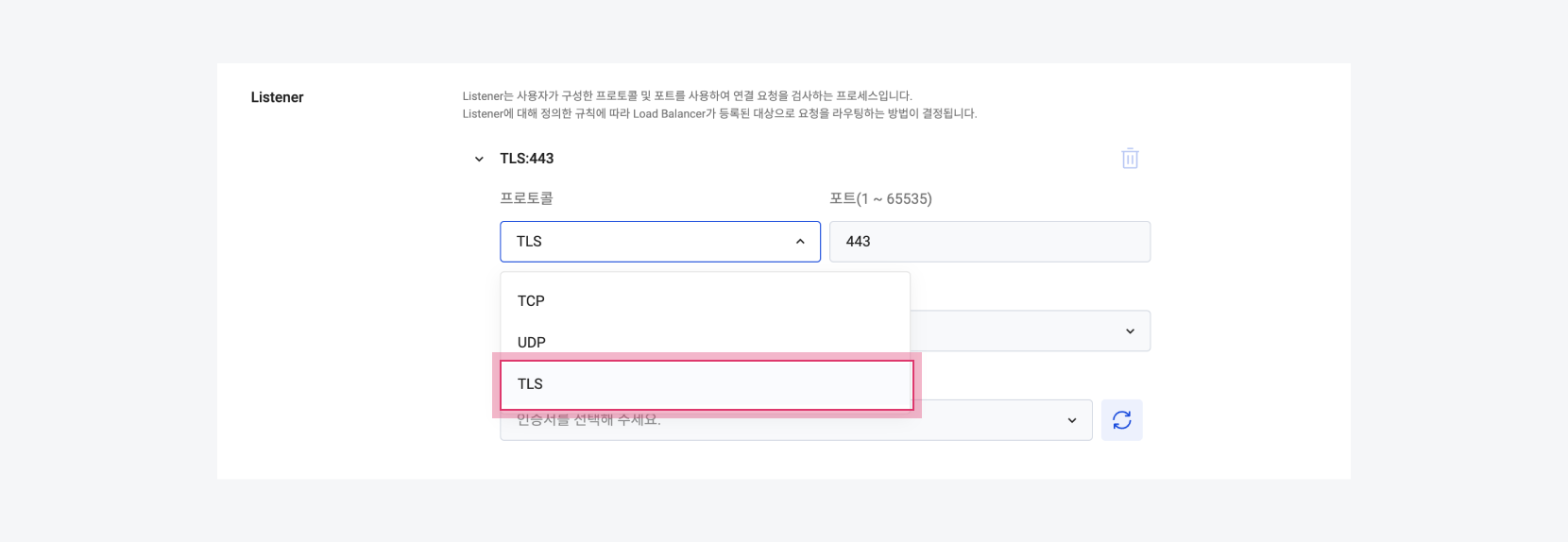
TLS has been added to the NLB listener protocol among KakaoCloud load balancer types.

Selecting the TLS protocol Selecting the TLS protocol
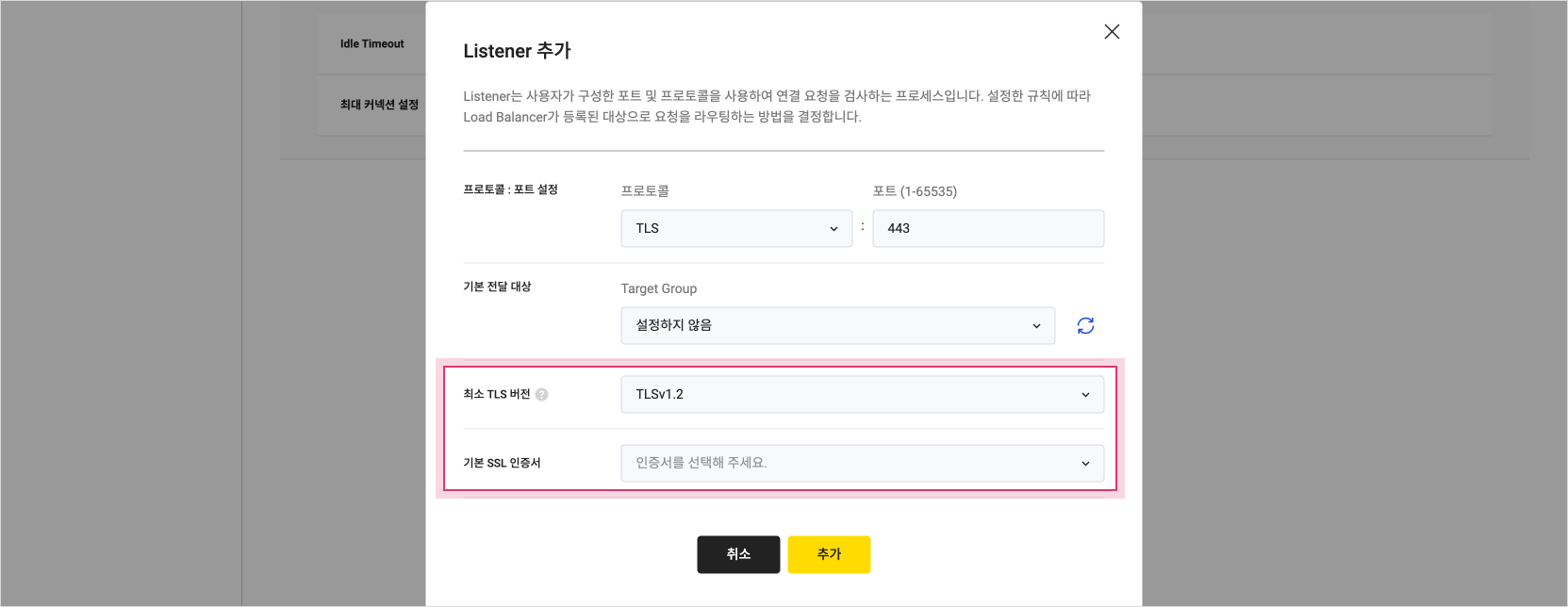
A TLS listener can offload encryption and decryption work to the load balancer. To use a TLS listener, you must deploy and specify at least one server certificate on the load balancer. This certificate is called the default SSL certificate, and after creating a TLS listener in the console, you can replace it or add a new certificate. KakaoCloud NLB supports TLS versions from 1.0 through 1.2.

Selecting the minimum TLS version and setting the default SSL certificate Selecting the minimum TLS version and setting the default SSL certificate

For instructions on creating a TLS listener, see the linked document.

2. Access Log activation feature provided

An Access Log activation feature has been added to all KakaoCloud load balancer types.
Access Logs are information collected to analyze traffic patterns sent to a load balancer and troubleshoot issues.

Access Log is an optional feature that users can select, and it is set to Disabled by default in the console. If you change the Access Log feature to Enabled and activate it, compressed files of captured logs can be stored in a specified Object Storage bucket. The Object Storage bucket must be located in the same region, and the encryption setting for the bucket must be set to Disabled. When configuring Access Log in the console, you can find a detailed configuration guide in the pop-up window shown below.

Object Storage bucket guidance when configuring Access Log Object Storage bucket guidance when configuring Access Log
For reference, networking costs are not charged for transferring log files, but Object Storage costs are charged.

For a more detailed explanation of Access Log, see the linked document.

We will continue working to provide safer and more convenient cloud services.

Thank you.

Reader role added to the IAM permission system

· 3 min read
Mia (정혜원)
Technical Contents Manager
Notice

The following announcement for a new IAM service role was written based on information available in November 2023. For the latest information about KakaoCloud IAM, see IAM.

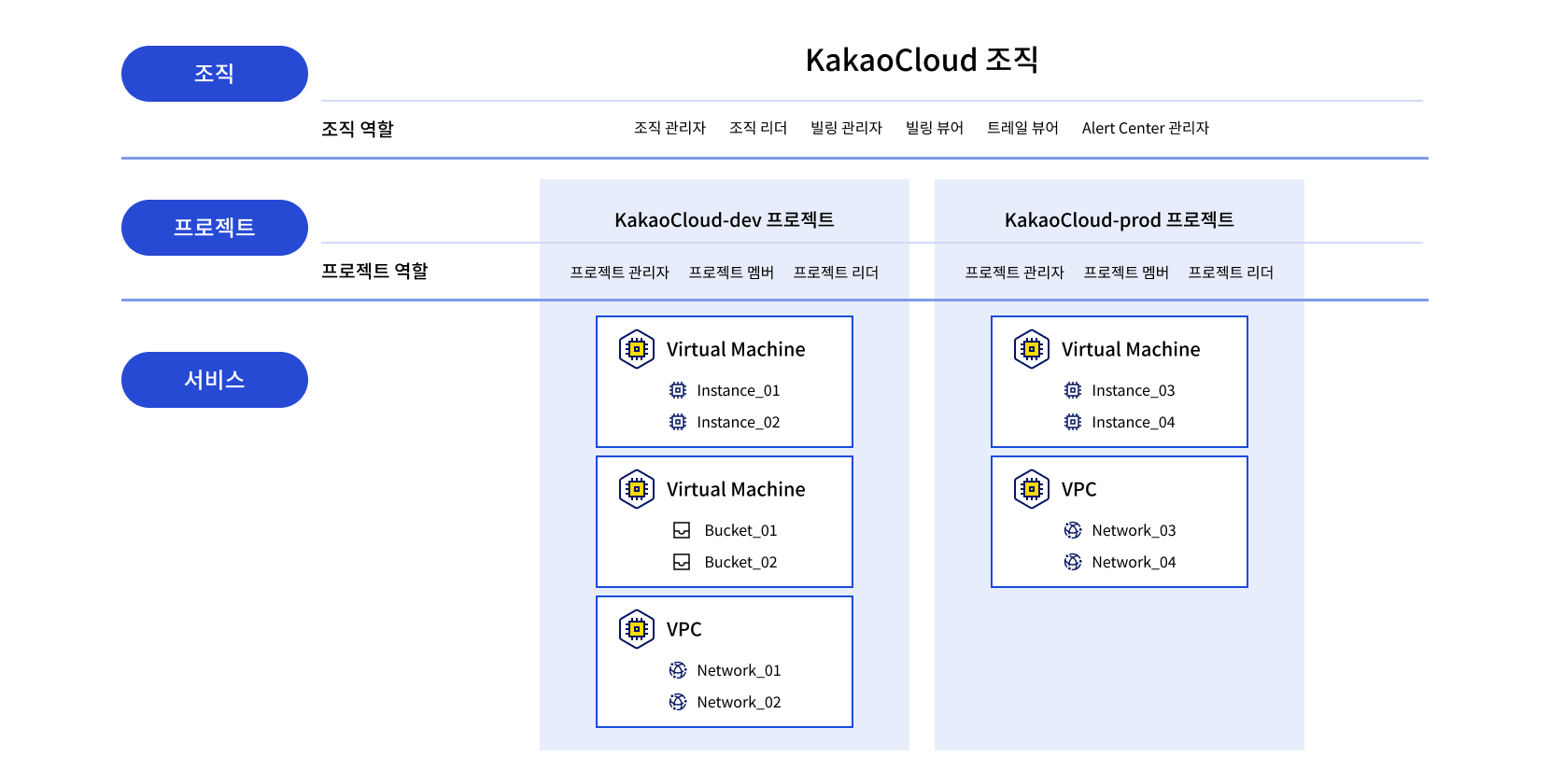
Figure. KakaoCloud resource hierarchy KakaoCloud resource hierarchy
Hello, KakaoCloud IAM (Identity and Access Management) is a service that lets you manage access and control permissions for cloud resources and user groups.

Recently, KakaoCloud released the Reader role for both the 'Organization' and 'Project' levels in IAM.

An 'Organization' is the top-level concept in the KakaoCloud hierarchy and can be viewed as a cloud domain. A 'Project' is a group that can own service-level resources and is a lower-level hierarchy within an organization. At both the organization and project levels, the Reader role is fundamentally granted only permission to view information or resources within the corresponding group.

  • A user granted Reader permission at the organization level can view the organization's information and all project information within that organization. However, the user cannot view or manage resources other than project information. It is an organization-level role with minimal permissions compared with Organization Owner and Organization Admin.

  • Project Reader is also a permission configured only to view resources by project. It is one permission level lower than Project Member and can view resources owned within the project. To create, read, update, or delete resources beyond resource viewing, a user must be granted Project Member or higher permissions.

With the addition of the Reader role at the organization and project levels, permissions can now be created more granularly based on users' affiliations and responsibilities within an organization. The changed IAM role system applies equally to all KakaoCloud regions.

For more information about role management in KakaoCloud, see the IAM role management documentation.

We will continue working to provide safer and more convenient cloud services.

Thank you.

Storage Viewer role added to Object Storage

· 2 min read
Sandy (차신영)
Technical Contents Manager
Notice

The following announcement for a new Object Storage feature was written based on information available in October 2023. For the latest information about KakaoCloud Object Storage, see Object Storage.

Hello, we are announcing changes to the Object Storage permission system.

The permission system of Object Storage is slightly different from the IAM permission system. Unlike IAM, Object Storage has detailed roles so that permissions can be configured not only for buckets but also for individual objects.

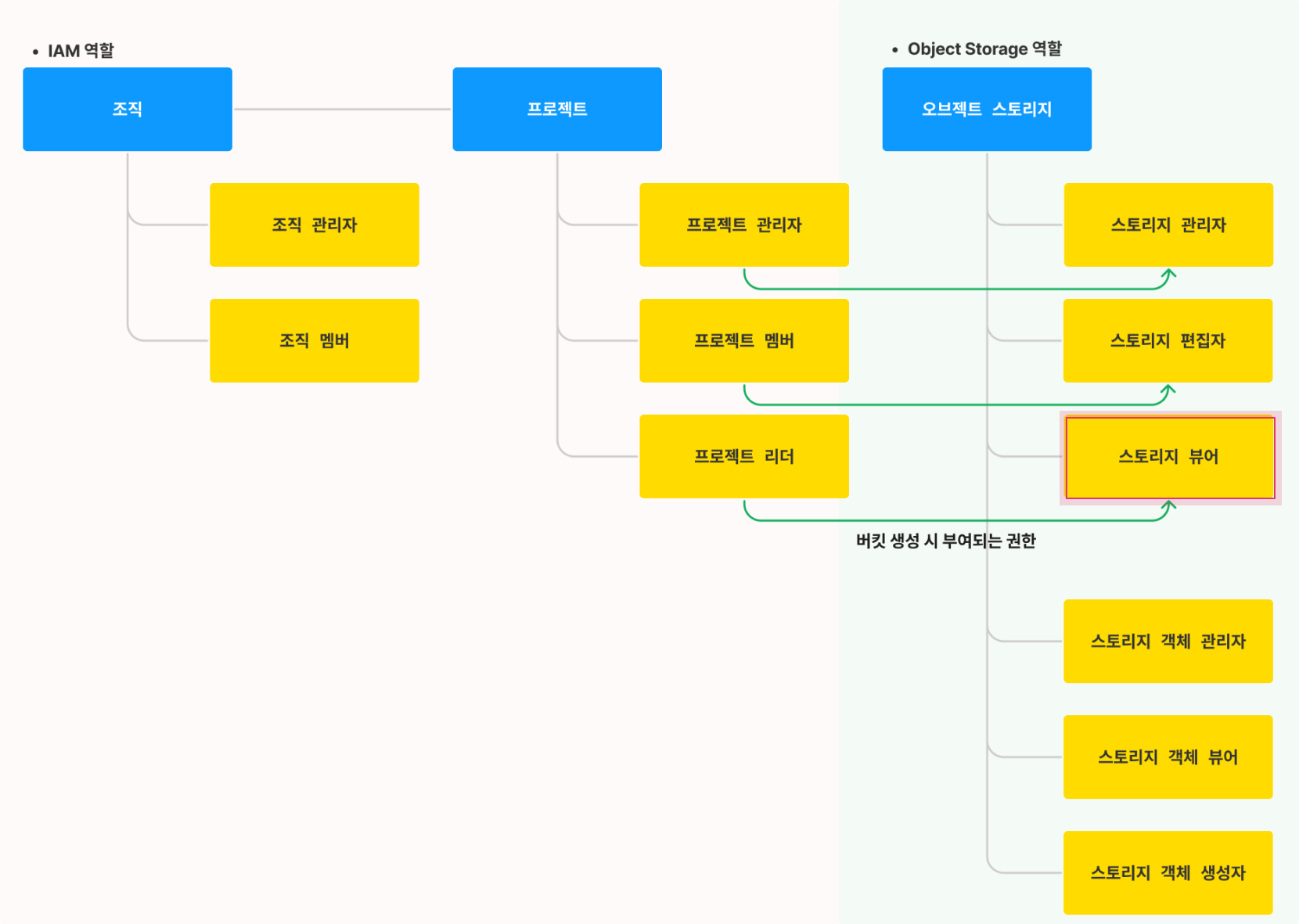
In this release, the "Storage Viewer" role has been added to Object Storage permission settings. This role is granted permission to view bucket metadata information and object metadata.

With this change, users with the "Project Reader" permission in IAM roles are granted the "Storage Viewer" permission in Object Storage. In addition, "Project Admin" in IAM roles is granted the "Storage Admin" permission in Object Storage roles, and "Project Member" is granted the "Storage Editor" permission. This part remains unchanged from before.

For more detailed role definitions, see the following image comparing IAM and Object Storage roles. This role system applies to both kr-central-1 and kr-central-2.

Permission setting architecture Permission setting architecture
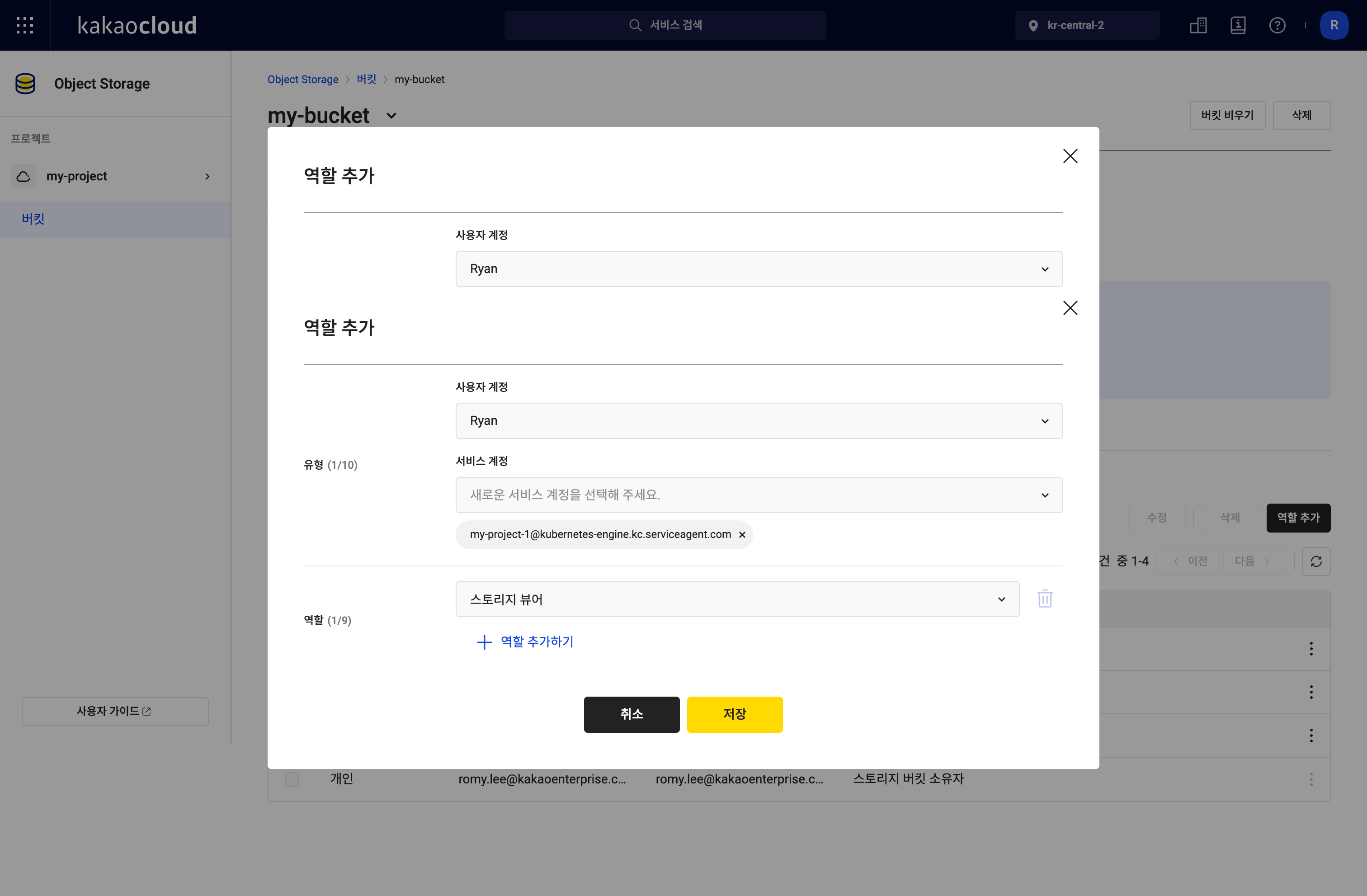
In the console, you can add or modify the new "Storage Viewer" role for members in the [Add role] pop-up window in the same way as before.

Bucket role settings Bucket role settings

For instructions on creating and managing buckets with detailed role configuration, see the detailed tutorial guide.

KakaoCloud users can use object-based storage optimized for storing and processing large volumes of data as objects in Object Storage. For more information about Object Storage, which enables more precise permission management through role-based access control, see the technical documentation.

We will continue working to provide safer and more convenient cloud services.

Thank you.

Transit Gateway sharing feature released

· 2 min read
Romy (이새롬)
Technical Contents Manager
Notice

The following announcement for a new Transit Gateway feature was written based on information available in October 2023. For the latest information about KakaoCloud Transit Gateway, see Transit Gateway.

Hello, a "sharing" feature that lets you share Transit Gateways across projects has been added to the Transit Gateway service.

With the sharing feature in Transit Gateway, you can now share a Transit Gateway across projects and configure communication between VPCs in different projects.

Assume you are using two projects, A and B, as shown in the following diagram. Previously, the administrator of this organization placed a Transit Gateway in each project and managed the VPCs for each project. With this sharing feature, however, the Transit Gateway in project A can also be used from project B. In other words, all VPCs in both projects can be managed conveniently through one shared Transit Gateway.

Unlike the simplified diagram provided to aid understanding, if you need a complex network configuration that connects dozens or hundreds of on-premises and VPC environments in practice, this feature can greatly simplify management points and significantly reduce operational costs.

Understanding the Transit Gateway sharing feature Understanding the Transit Gateway sharing feature

For a detailed usage example that implements VPC connectivity through Transit Gateway sharing across projects, see the detailed tutorial guide.

KakaoCloud users can use Transit Gateway to improve the efficiency of operating and managing multiple VPCs and respond flexibly to future network scalability needs. Please also remember that Transit Gateway is basically a kr-central-2 regional service, and only users with the Project Admin role can access it. For more information about Transit Gateway, see the technical documentation.

We will continue working to provide safer and more convenient cloud services.

Thank you.

Bare Metal Server nodes now available in Kubernetes Engine

· 2 min read
Mia (정혜원)
Technical Contents Manager
Notice

The following announcement for a new Kubernetes Engine feature was written based on information available in October 2023. For the latest information about KakaoCloud Kubernetes Engine, see Kubernetes Engine.

Hello, Kubernetes Engine, KakaoCloud's managed Kubernetes service, now provides Bare Metal Server nodes.

KakaoCloud users can now configure node pools in the console by choosing from three node pool types, including Virtual Machine and Bare Metal Server.

To use Bare Metal Server nodes in Kubernetes Engine, follow these steps.

  1. In the KakaoCloud console, select the Kubernetes Engine service.
  2. On the Cluster tab, select the cluster where you want to create a node pool. If no cluster has been created yet, create a cluster first.
  3. On the cluster details page, click the Node pool tab, then click [Create node pool] on the right.
  4. On the [Create node pool] screen, you can see a screen where you can select the node pool type as shown below.

Image

  1. Select the Bare Metal Server type and enter the information required for configuration to create a node pool easily.

Other recent improvements to Kubernetes Engine are as follows.


  • To ensure high availability for multi-availability-zone clusters, selecting at least one subnet in each availability zone is now required when creating a new cluster (applied to kr-central-2).
  • The API server endpoint for newly created clusters has been changed to port 443 (applied to kr-central-1).

For more information about Kubernetes Engine, see the technical documentation. We will continue working to provide safer and more convenient cloud services.

We will continue working to provide safer and more convenient cloud services.

Thank you.

News about the new technical documentation site

· 3 min read
Mia (정혜원)
Technical Contents Manager

Hello, we are pleased to announce the renewal of the new technical documentation site containing KakaoCloud from A to Z.

What is KakaoCloud technical documentation?

KakaoCloud technical documentation is a platform that provides broad information about KakaoCloud services and technologies. Its primary purpose is to help users and developers make the most of KakaoCloud's powerful services. Through this platform, you can gain a deeper understanding of KakaoCloud services and technologies and expand your technical insights.

What has changed?

  1. The previously separate user guide and technical documentation have been integrated into one site.

    The previous KakaoCloud technical documentation was operated as two separate sites: the user guide and the technical documentation. Through this renewal, the two sites have been integrated into one, significantly improving the accessibility and convenience of technical documentation, including service guides and hands-on tutorials.

    Image

  2. The GNB structure has been changed to focus on user behavior.

    The previous GNB (*Global Navigation Bar), which was organized around services, has been changed to a user-behavior-oriented structure. The previous [User Guide] - [Search bar] structure has been improved to [Get started] - [Services] - [Tutorials] - [Blog] - [Search bar] - [Contact us], making it easier for users to find the information they are looking for.

  3. A new "Get started" page has been added for new users.

    The 'Get started' page contains useful content for users who are new to KakaoCloud. It provides essential guides, including basic concepts every cloud user should know, service features, and console environment setup.

    Image

  4. A blog page has been added.

    In addition to guide-style documents, you can easily find useful information and tips for users, such as the latest release notes and instance selection guides, on the blog page.

    Image

How do I get started with KakaoCloud?

You can start using services by signing up directly on the KakaoCloud site, or begin conveniently and safely through consulting from KakaoCloud cloud experts. New customers receive free credits that can be used to run, test, and deploy workloads.

The KakaoCloud team hopes to create more points of connection with our users. We hope you start your cloud journey through the KakaoCloud technical documentation site and gain technical insights along the way.

We appreciate your support and interest.

Thank you.

BCS instance selection guide as of September 2023

· 3 min read
Romy (이새롬)
Technical Contents Manager
Notice

The following instance overview was written based on information available in September 2023. For the latest instance types and attributes of KakaoCloud Beyond Compute Service, see Specifications by instance type.

Hello, in this post we introduce the instances provided by KakaoCloud Beyond Compute Service (BCS).

An instance is composed of a combination of CPU, memory, storage, and networking capacity, and cloud service providers (CSPs) provide a wide range of instance choices based on users' business requirements, budgets, and constraints.

BCS is KakaoCloud's compute service and provides instance types optimized for a variety of usage environments. KakaoCloud BCS instances are broadly classified into five types.


The following table compares BCS instance attributes at a glance as of September 2023.


Itemm2at1ic2a   r2agn1ip2a   p2anp2i   gf1ivt1a
Workload typeGeneral purposeGeneral purposeCompute
optimized
Memory
optimized
Accelerated
computing
Accelerated
computing
Accelerated
computing
Accelerated
computing
Accelerated
computing
Video
transcoding
CPU vendorAMDIntelAMDAMDIntelAMD-XilinxAMDIntelIntelAMD
CPU nameEPYC
7643
Xeon Gold
5120
(Skylake),
5220
(Cascade
Lake)
EPYC
7643
EPYC
7643
Xeon Gold 5220R (Cascade Lake)EPYC
7513
EPYC
7763
Xeon Gold 6338 (Ice lake)Xeon Gold 6430 (Sapphire Rapids)EPYC
7643
Architecturex86_64x86_64x86_64x86_64x86_64x86_64x86_64x86_64x86_64x86_64
vCPU2~962~82~962~964~6412825612818~7216~128
Memory8~384GiB0.5~32GiB4~192GiB16~768GiB16~256GiB1536GiB2048GiB1024GiB128~512GiB48~384GiB
Bare metal optionXXXOXOOOXX
Hardware-based
encryption support
OXOOXOOXXO
Storage
NVMe support
OXXOXOXOXX
Disk
interface type
PCIePCIePCIePCIe, NVMePCIePCIe, NVMePCIePCIe, NVMePCIePCIe
Local SSD support
(bare metal)
XXXOXOOOXX
Maximum local SSD
(bare metal)
1600GiB3200GiB2080GiB3200GiB
Network performance~25Gbps~5Gbps~25Gbps~25Gbps~50Gbps~50Gbps~100Gbps~50Gbps~50Gbps~50Gbps
HW typeGPUGPUGPUGPUNPUFPGA
Maximum HW count488448
HW vendorNVIDIANVIDIANVIDIANVIDIAFuriosaAIAMD-Xilinx
HW nameT4
Tensor Core
A100 Tensor CoreA100 Tensor CoreA100 Tensor CoreWarboyAlveoU30

After identifying the suitable BCS instance type, learn how to create and manage instances.
You can find more usage examples in hands-on tutorials.
For more information about BCS instances, see Instance overview.

We will continue working to provide safer and more convenient cloud services.

Thank you.

MySQL service released in the kr-central-2 region

· 2 min read
Sandy (차신영)
Technical Contents Manager
Notice

The following announcement for the MySQL service was written based on information available in September 2023. For the latest information about KakaoCloud MySQL, see MySQL.

Hello, KakaoCloud's MySQL service is now available in the kr-central-2 region.

KakaoCloud MySQL is a fully managed database service built on an open-source relational database management system (RDBMS).

This release of KakaoCloud MySQL includes support for automatic instance recovery, adding read-only instances (read replicas), and high availability.

Key features and supported items of the MySQL service are as follows.

  • High availability and Multi-AZ support: Ensures high availability and lets you create an instance group by selecting subnets through a Multi-AZ configuration.
  • Auto Failover: Supports not only manual failover but also automatic failover. When a system failure occurs, the database can automatically switch to another node to minimize service interruption.
  • MySQL 8.0.34 support: Lets you use the latest features and security updates of MySQL 8.0.34.
  • Support for m2a and r2a instance specifications: Lets you choose an instance that fits your workload and expect resource optimization and performance improvement.

For more information, see the MySQL page.

We will continue working to provide safer and more convenient cloud services.

Thank you.

BCS general-purpose t1i instances released

· 3 min read
Mia (정혜원)
Technical Contents Manager
Notice

The following announcement for t1i instances was written based on information available in September 2023. For the latest instance types and attributes of KakaoCloud Beyond Compute Service, see General-purpose instances.

Hello, KakaoCloud's general-purpose instances are now available in the kr-central-2 region.

t1i instances run on 2nd Gen Intel Xeon Scalable processors (Cascade Lake 5220 or Skylake 5120) with frequencies up to 3.9 GHz, and provide the most cost-effective option among KakaoCloud instance families.

t1i instances provide a balanced mix of compute, memory, and network resources, and are designed for general-purpose workloads that maintain low average CPU usage but experience temporary spikes. They provide up to 8 vCPUs and 32 GiB of memory, and support network bandwidth of up to 5 Gbps.

t1i instances start from as low as KRW 5.5 per hour for t1i.nano, and before burst is provided, CPU-credit-based utilization is additionally relaxed by up to 15 to 20%.


Detailed specifications and pricing for t1i instances are as follows.

  • 2nd Gen Intel Xeon Scalable processors (Cascade Lake 5220 or Skylake 5120) up to 3.9 GHz
  • Network bandwidth up to 5 Gbps
  • Instance sizes supporting up to 8 vCPUs and 32 GiB of memory
  • Support for Intel instruction sets (AVX, AVX2, AVX-512)
  • Support for Intel Turbo Boost Technology 2.0
  • Burstable CPU controlled by CPU credits and consistent baseline performance (planned for future availability)
Instance type      vCPUMemory (GiB)Network bandwidth (Gbps)Hourly price         Monthly price (based on 30 days)
  
t1i.nano2    0.5    Up to 5     KRW 5.5    KRW 3,960
t1i.micro21Up to 5KRW 11.1     KRW 7,992
t1i.small22Up to 5KRW 22.1     KRW 15,912
t1i.medium24Up to 5KRW 44.2     KRW 31,824
t1i.large28Up to 5KRW 88.4     KRW 63,648
t1i.xlarge416Up to 5KRW 176.8     KRW 127,296
t1i.2xlarge832Up to 5KRW 353.6    KRW 254,592

For more information, see the General-purpose instances page.

We will continue working to provide safer and more convenient cloud services.

Thank you.