7 posts tagged with "bcs"

View All Tags

KakaoCloud service updates - VM and Hadoop performance improvements, IAM security settings, and more


· 4 min read
Mia (정혜원)
Technical Contents Manager
update

This year, KakaoCloud is continuing to move forward without pause to provide users with a more convenient and secure cloud environment. With the warm arrival of spring, we are sharing a roundup of major service updates from March.

If the recently announced user-centered console renewal was a major change to screen structure and experience (UX), this post focuses on service feature enhancements that strengthen the foundation. Along with work to improve system stability, review the details of this update, which further improves resource management efficiency and security.


🖥️ Infrastructure management efficiency and service scalability

  • GPU service integrated into Virtual Machine (VM): For more intuitive resource management, the previously separate GPU service has been integrated into the Virtual Machine service.

    • Integrated environment provided: You can now select and manage general instances and GPU instances within the same workflow when creating a VM.
    • Automatic notification policy conversion: As part of the service integration, Alert Center notification policies previously configured in the GPU service have been safely and automatically converted into Virtual Machine service policies. You can continue using the existing monitoring environment without separate reconfiguration.
  • Virtual Machine supports "start credits" for t1i instances: To improve workload processing efficiency, the start credit feature has been added to t1i, a burstable instance type. Instances can now temporarily maintain high CPU utilization during boot, dramatically improving initial startup speed.

  • Hadoop Eco expands node volume size up to 16 TB: To support large-scale data analysis, the maximum volume size per node (master, worker, task) in Hadoop Eco has been significantly increased from 5 TB to up to 16 TB. Analyze larger volumes of data without storage constraints.

  • Object Storage product name changed: To make it easier for users to recognize the storage services they are using, Object Storage product names have been changed as follows. Pricing remains the same, and changes will be applied sequentially starting with March billing statements.

    • Data capacity: Hot Bucket → Standard Storage Class
    • API calls: The Standard- prefix is added before existing request names (for example, Standard-PUT, Standard-GET, and so on)

🔑 Security enhancements

  • IAM security settings enhanced: To protect valuable organizational resources, various security settings have been added to Account settings and IAM service items in the console.

    • Password reauthentication when deleting resources: When deleting a user account or project service account, a password reauthentication step has been added to prevent simple mistakes.
    • Immediate session and token expiration option: When changing a password, all currently logged-in sessions and issued access tokens can be invalidated immediately. This helps respond quickly to security incidents in emergency situations where account leakage is suspected.
    • Expanded Cloud Trail audit logs: 17 new event types have been added so that security policy and account management history can be tracked in more detail.

🛠️ Improved developer convenience

  • New OpenAPI support for MySQL: OpenAPI support for developers has been expanded further. With this update, MySQL OpenAPI has been newly added, allowing KakaoCloud MySQL to be controlled directly by API and used for management automation. For detailed OpenAPI updates, see OpenAPI Changelogs.

That is all for this update. In addition to the feature improvements introduced here, detailed changes for each service and previous update history can be found in the service-specific release notes in the technical documentation.

KakaoCloud will continue doing its best to provide stable infrastructure and user-centered features.
If you have any questions about using the service, please contact KakaoCloud Support anytime.


👉 Start KakaoCloud now

Troubleshooting instances that cannot be accessed by SSH using OpenAPI

· 5 min read
Erin (오예진)
Cloud Engineer
update

An SSH port configuration becoming tangled while changing the port on an operating server, a forgotten password after a long period without access, or a sudden file system error that prevents booting... These are alarming situations that any cloud operator may have experienced at least once.

When the newly configured port does not work and even the existing port 22 is closed, leaving only repeated Connection refused or Connection timeout messages, the instance becomes isolated: alive, but uncontrollable.

In such a frustrating situation where the instance is in the Active state but there is no way to enter it internally, this post introduces two methods for recovery using OpenAPI while minimizing the risk of data loss, based on the troubleshooting guides in KakaoCloud technical documentation.

💡 Method 1. Automatic recovery with a user script (user_data)

This method is especially useful when "software configuration" issues occur, such as an SSH port configuration error, an unregistered SELinux policy, or a forgotten SSH password. Instead of an in-place method that attempts to fix the problem inside the affected instance, it aims for an immutable-infrastructure-based replacement method that recreates resources with a script containing normal configuration.

📍 Recovery flow
Create an image of the existing instance → Write a recovery user script → Provision a new instance with the script injected

🩺 Detailed checks and recovery procedure

Step 1. Create a snapshot: Check the existing specifications with Get instance, then create an image of the current root volume state with Create image.
- Tip: We recommend stopping the instance before proceeding so that residual data in memory can be recorded safely.

Step 2. Write a recovery script: Write a user script (user_data) that restores the port to 22 or configures a new password/key pair. This script runs when the instance first boots, and must be Base64 encoded for the API request.

Step 3. Provision the instance: Call Create instance with the recovery script attached to the image created earlier. As soon as the instance is created, the injected script runs, correcting the blocked port configuration or immediately restoring account access.

The biggest advantage of this method is that even in an "isolated situation" where an operator cannot enter the instance, settings can be automatically corrected remotely from outside. By quickly replacing the failed instance with a verified environment instead of repairing it directly, recovery time objective (RTO) can be significantly shortened.

▶︎ Troubleshooting guide for restoring access after changing the SSH port

💡 Method 2. Directly inspect the root volume

File system corruption or network configuration file errors that cannot be resolved with a user script require a more direct approach. This is a kind of rescue mode strategy in which the affected volume is temporarily treated as a "sub disk" so an engineer can directly modify its contents.

📍 Recovery flow
Create a root volume snapshot → Attach to an inspection instance → Repair data and detach → Recover with a new instance

🩺 Detailed checks and recovery procedure

Step 1. Snapshot and restore the volume: To prevent damage to the original data, create a snapshot of the affected root volume and restore a new volume based on it. This secures a safe working environment.

Step 2. Attach the inspection volume: Designate another normally operating instance as the "rescue" instance, and attach the restored volume to that instance.

Step 3. Mount and repair data: Mount the volume on the inspection instance and directly fix the problem area. Key checks and actions include the following.

  • Network: Immediately fix typos or configuration errors in files under /etc/netplan or /etc/sysconfig/network-scripts.
  • File system: After unmounting, check and repair disk errors with commands such as xfs_repair or fsck. There may be various other causes depending on system logs and configuration environments, so detailed diagnosis is required.

Step 4. Create an image and provision: After solving the problem, detach the volume, then create a new image based on that volume. Finally, deploy a normalized new instance using this image to complete recovery.

The core of this method is to use the environment of a normal instance to directly fix the problematic parts, such as the file system and network settings, instead of forcibly recovering the failed instance. After all fixes are complete, the volume is converted back into an image and redeployed as a new instance with the defects resolved.

▶︎ Troubleshooting guide for instance recovery through root volume inspection

📝 Recovery golden rules operators should remember

The core of recovery that operators should learn in practice goes beyond simply using individual features. It is about structurally preparing a system-level recovery framework. Above all, by using a cloud-based flow that connects image creation, configuration correction, and redeployment, you can secure a recovery path even when access is blocked.

In this process, data protection is the basic premise. Making it a habit to stop the instance and create a snapshot before recovery work can minimize the risk of data loss. After recovery is complete, it is also advisable to clean up temporary snapshots, restored volumes, and existing instances to avoid unnecessary costs.

Failures occur without warning, but recovery procedures can be prepared in advance. By using KakaoCloud troubleshooting guides together with OpenAPI, you can secure reproducible recovery paths for most access failure situations. Refer to the technical documentation now and review automated recovery scenarios suitable for your infrastructure environment.

👉 Start KakaoCloud now

t1i instances with burstable performance

· 5 min read
Sandy (차신영)
Technical Contents Manager
New Release t1i


Hello, we are sharing updates about the BCS (Beyond Compute Service) instance family.
KakaoCloud released t1i burstable instances last September. In this post, we will look at the credit feature and burstable performance applied to t1i instances starting January 25, 2024.

Understanding t1i instances

Before taking a closer look at burstable performance, it is helpful to understand t1i instances in KakaoCloud Beyond Cloud Compute (BCS).
t1i instances, a type of KakaoCloud general-purpose instance, are designed for workloads that do not require consistently high CPU performance but need to deliver high performance in specific situations. These instances provide burstable CPU performance controlled by credits, offering an appropriate balance between high performance and cost.

How burstable performance works

The English word "burstable" is a compound of "burst" and "able." In cloud computing, burst means the ability to temporarily exceed a defined baseline performance level and deliver higher performance. Therefore, equipping an instance with burstable performance means that the instance provides baseline CPU performance but has the ability to burst beyond that baseline.

In KakaoCloud, the t1i general-purpose instance provides this burstable performance. It demonstrates its value by offering a cost-effective solution for workloads where the CPU is usually idle but occasionally requires high CPU performance.


Then how do KakaoCloud t1i instances provide this burstable feature?
The answer is CPU credits. t1i instances continuously receive CPU credits, and the credit rate varies depending on the instance size.

(Example of credit rate)
1 CPU credit = 1 vCPU x 100% utilization x 1 minute = 1 vCPU x 50% utilization x 2 minutes = 2 vCPUs x 25% utilization x 2 minutes

Credits are consumed when an instance runs above its baseline CPU utilization, and unused CPU credits during low workloads are saved for future bursts. This makes it possible to handle unexpected loads smoothly.

(Credit consumption relationship)
CPU utilization below baseline: accrued credits > consumed credits
CPU utilization equal to baseline: accrued credits = consumed credits
CPU utilization above baseline: accrued credits < consumed credits

For a detailed explanation of credit calculation, see the user guide.

Example use cases for t1i instances

t1i instances that provide burstable performance can be an optimal choice in terms of cost efficiency and flexibility. They are especially useful in the following business situations.

  • Variable workloads: When workloads are inconsistent and CPU usage fluctuates over time, t1i instances provide baseline performance while offering the flexibility to increase performance when needed.
  • Development and test environments: Development and test environments often require high performance only at certain times. t1i instances can be a cost-effective choice for these environments.
  • Low-latency interactive applications: For applications that require user interaction, response time is important. t1i instances can instantly adjust performance when needed and improve user experience.
  • Small and medium-sized databases: Suitable for databases that require consistent performance but occasionally need high performance. Burstable performance can be used during database maintenance tasks or unexpected traffic increases.
  • Background processing jobs: For scheduled batch jobs or background processing jobs, t1i instances can reduce costs when consistently high performance is not required.

Best practices

To use t1i instances smartly, several strategic management and planning practices are needed. We hope the following best practices help you use t1i instances and maximize application performance.

  • Monitor CPU credit balance: You can collect and view key metrics through KakaoCloud Monitoring. Monitor CPU credit balance regularly so that instances can burst when needed.
  • Choose an appropriate instance size: Select an appropriate t1i instance size, such as t1i.nano, t1i.medium, or t1i.2xlarge, according to different workload requirements to optimize cost and performance.
  • Understand workload patterns: Analyze CPU usage patterns of workloads and improve operational efficiency by balancing CPU credit accumulation and consumption rates for the instance.

Closing

On January 25, 2024, the powerful feature of "burstable" performance was added as a milestone for KakaoCloud t1i instances, providing more flexible and cost-effective compute performance.
The burstable feature is especially meaningful because KakaoCloud is the first domestic CSP to release it. We want to emphasize that KakaoCloud t1i instances are not just an instance type, but a strategic asset that can use resources cost-effectively. Use the power of burstable performance to experience operations that ensure high performance during peak hours while avoiding unnecessary costs during idle time.
For detailed specifications and information about t1i instances, see Burstable instances in the user guide.

Notice

The above overview of burstable instances was written based on information available in January 2024. For the latest information about KakaoCloud BCS instances, see BCS instances.

New BCS p1i and m3az instances released

· 2 min read
Mia (정혜원)
Technical Contents Manager
Notice

The following announcement for p1i and m3az instances was written based on information available in December 2023. For the latest information about KakaoCloud Beyond Compute Service, see Specifications by instance type.

Hello, we are sharing updates about the BCS (Beyond Compute Service) instance families.

KakaoCloud continues to introduce BCS instance types that better match users' diverse workload specifications. In this post, we introduce the recently released p1i family, which supports accelerated computing, and the general-purpose m3az family.


1. p1i instances for high-performance computing

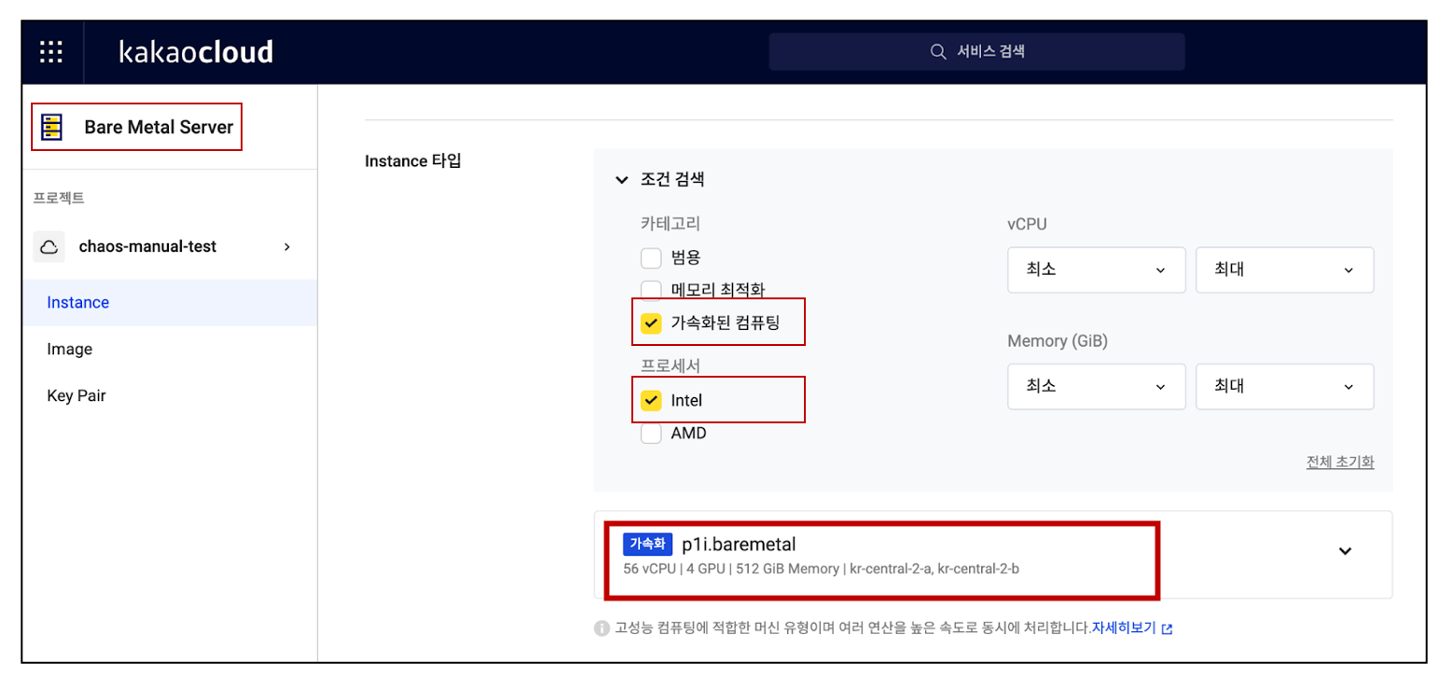
p1i is an instance family optimized for high-performance computing such as machine learning and HPC. It is equipped with Gold 5120 Skylake Intel Xeon Scalable processors and supports up to 56 vCPUs and 512 GiB of memory. p1i instances are currently provided as Bare Metal Server types, with up to four NVIDIA V100 Tensor Core GPUs.

Selecting a p1i instance in the console Selecting a p1i instance in the console


2. m3az instances optimized for single-threaded CPU environments

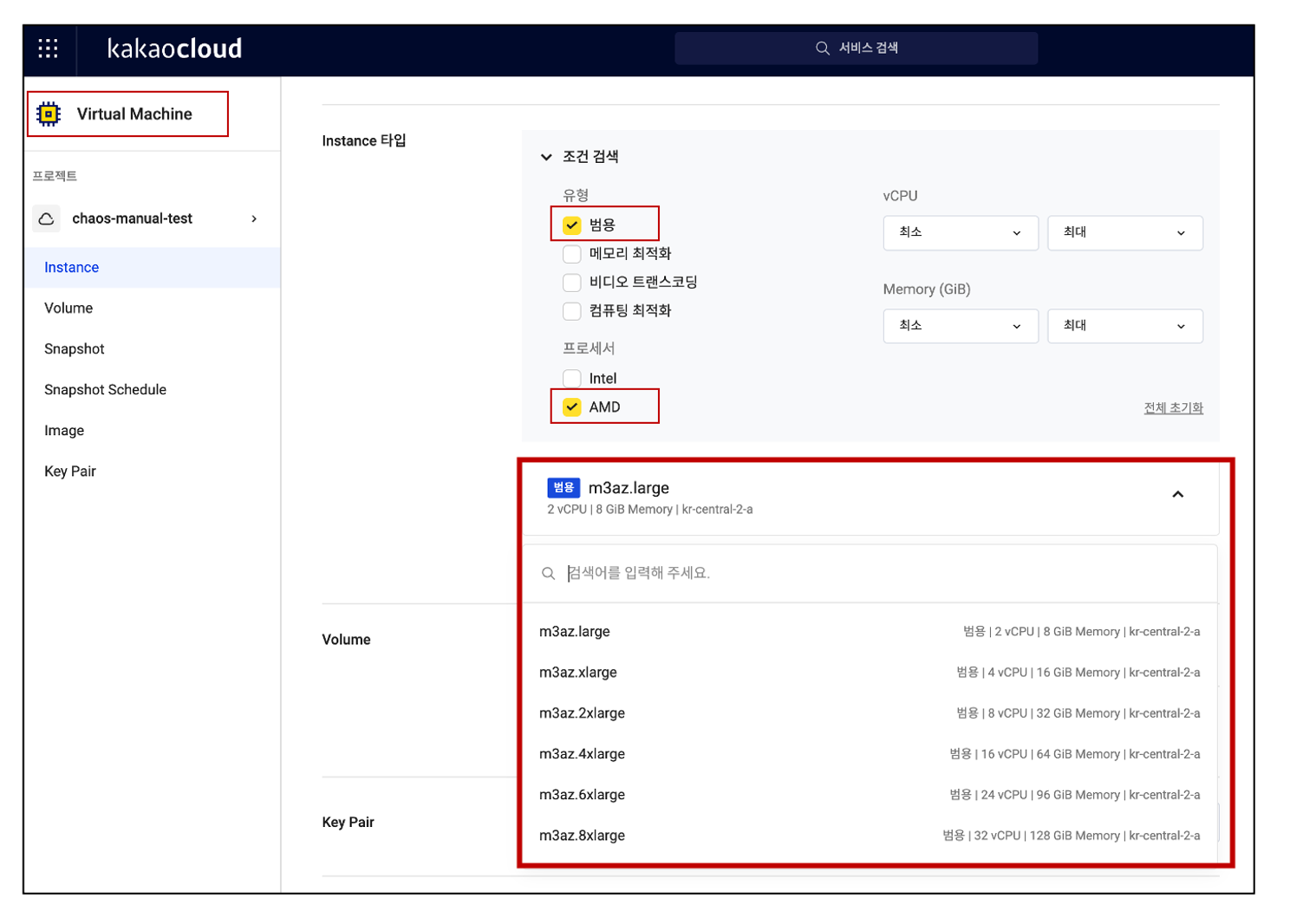
The m3az instance family is a general-purpose instance family equipped with the latest 4th Gen AMD EPYC 9004 series processors. It provides a single-threaded CPU environment and is optimized for specific workloads such as games and healthcare. m3az instances provide memory and vCPU options in various sizes. They also provide network bandwidth up to 12.5 Gbps.

Selecting an m3az instance in the console Selecting an m3az instance in the console


The two new instance families, p1i and m3az, are available in the kr-central-2 region. For more information, see the BCS instance types documentation.

We hope you experience more efficient and powerful cloud computing with KakaoCloud's diverse BCS instance services.
Thank you.

BCS instance selection guide as of September 2023

· 3 min read
Romy (이새롬)
Technical Contents Manager
Notice

The following instance overview was written based on information available in September 2023. For the latest instance types and attributes of KakaoCloud Beyond Compute Service, see Specifications by instance type.

Hello, in this post we introduce the instances provided by KakaoCloud Beyond Compute Service (BCS).

An instance is composed of a combination of CPU, memory, storage, and networking capacity, and cloud service providers (CSPs) provide a wide range of instance choices based on users' business requirements, budgets, and constraints.

BCS is KakaoCloud's compute service and provides instance types optimized for a variety of usage environments. KakaoCloud BCS instances are broadly classified into five types.


The following table compares BCS instance attributes at a glance as of September 2023.


Itemm2at1ic2a   r2agn1ip2a   p2anp2i   gf1ivt1a
Workload typeGeneral purposeGeneral purposeCompute
optimized
Memory
optimized
Accelerated
computing
Accelerated
computing
Accelerated
computing
Accelerated
computing
Accelerated
computing
Video
transcoding
CPU vendorAMDIntelAMDAMDIntelAMD-XilinxAMDIntelIntelAMD
CPU nameEPYC
7643
Xeon Gold
5120
(Skylake),
5220
(Cascade
Lake)
EPYC
7643
EPYC
7643
Xeon Gold 5220R (Cascade Lake)EPYC
7513
EPYC
7763
Xeon Gold 6338 (Ice lake)Xeon Gold 6430 (Sapphire Rapids)EPYC
7643
Architecturex86_64x86_64x86_64x86_64x86_64x86_64x86_64x86_64x86_64x86_64
vCPU2~962~82~962~964~6412825612818~7216~128
Memory8~384GiB0.5~32GiB4~192GiB16~768GiB16~256GiB1536GiB2048GiB1024GiB128~512GiB48~384GiB
Bare metal optionXXXOXOOOXX
Hardware-based
encryption support
OXOOXOOXXO
Storage
NVMe support
OXXOXOXOXX
Disk
interface type
PCIePCIePCIePCIe, NVMePCIePCIe, NVMePCIePCIe, NVMePCIePCIe
Local SSD support
(bare metal)
XXXOXOOOXX
Maximum local SSD
(bare metal)
1600GiB3200GiB2080GiB3200GiB
Network performance~25Gbps~5Gbps~25Gbps~25Gbps~50Gbps~50Gbps~100Gbps~50Gbps~50Gbps~50Gbps
HW typeGPUGPUGPUGPUNPUFPGA
Maximum HW count488448
HW vendorNVIDIANVIDIANVIDIANVIDIAFuriosaAIAMD-Xilinx
HW nameT4
Tensor Core
A100 Tensor CoreA100 Tensor CoreA100 Tensor CoreWarboyAlveoU30

After identifying the suitable BCS instance type, learn how to create and manage instances.
You can find more usage examples in hands-on tutorials.
For more information about BCS instances, see Instance overview.

We will continue working to provide safer and more convenient cloud services.

Thank you.

BCS general-purpose t1i instances released

· 3 min read
Mia (정혜원)
Technical Contents Manager
Notice

The following announcement for t1i instances was written based on information available in September 2023. For the latest instance types and attributes of KakaoCloud Beyond Compute Service, see General-purpose instances.

Hello, KakaoCloud's general-purpose instances are now available in the kr-central-2 region.

t1i instances run on 2nd Gen Intel Xeon Scalable processors (Cascade Lake 5220 or Skylake 5120) with frequencies up to 3.9 GHz, and provide the most cost-effective option among KakaoCloud instance families.

t1i instances provide a balanced mix of compute, memory, and network resources, and are designed for general-purpose workloads that maintain low average CPU usage but experience temporary spikes. They provide up to 8 vCPUs and 32 GiB of memory, and support network bandwidth of up to 5 Gbps.

t1i instances start from as low as KRW 5.5 per hour for t1i.nano, and before burst is provided, CPU-credit-based utilization is additionally relaxed by up to 15 to 20%.


Detailed specifications and pricing for t1i instances are as follows.

  • 2nd Gen Intel Xeon Scalable processors (Cascade Lake 5220 or Skylake 5120) up to 3.9 GHz
  • Network bandwidth up to 5 Gbps
  • Instance sizes supporting up to 8 vCPUs and 32 GiB of memory
  • Support for Intel instruction sets (AVX, AVX2, AVX-512)
  • Support for Intel Turbo Boost Technology 2.0
  • Burstable CPU controlled by CPU credits and consistent baseline performance (planned for future availability)
Instance type      vCPUMemory (GiB)Network bandwidth (Gbps)Hourly price         Monthly price (based on 30 days)
  
t1i.nano2    0.5    Up to 5     KRW 5.5    KRW 3,960
t1i.micro21Up to 5KRW 11.1     KRW 7,992
t1i.small22Up to 5KRW 22.1     KRW 15,912
t1i.medium24Up to 5KRW 44.2     KRW 31,824
t1i.large28Up to 5KRW 88.4     KRW 63,648
t1i.xlarge416Up to 5KRW 176.8     KRW 127,296
t1i.2xlarge832Up to 5KRW 353.6    KRW 254,592

For more information, see the General-purpose instances page.

We will continue working to provide safer and more convenient cloud services.

Thank you.

BCS compute-optimized c2a instances released

· 2 min read
Sandy (차신영)
Technical Contents Manager
Notice

The following announcement for c2a instances was written based on information available in September 2023. For the latest instance types and attributes of KakaoCloud Beyond Compute Service, see Compute-optimized instances.

Hello, we are sharing the release of KakaoCloud's compute-optimized instances.

The newly released compute-optimized instance family from KakaoCloud is the c2a family, equipped with 3rd Gen AMD EPYC 7003 series 7643 processors that run at frequencies up to 3.6 GHz.

c2a instances are designed for compute-intensive workloads that require high-performance compute specifications, with a 1:2 vCPU-to-memory ratio. They provide up to 96 vCPUs and up to 192 GB of memory, and support high network bandwidth of up to 25 Gbps.

Compared with existing general-purpose instances, c2a instances can be a cost-effective option for compute-intensive workloads. They can be used broadly for latency-sensitive workloads, batch processing workloads, media transcoding, high-performance web servers, high-performance computing (HPC), scientific modeling, dedicated game server and ad server engines, and many other applications that require high-performance compute capabilities.

Detailed specifications and pricing for c2a instances are as follows.

  • Processor: 3rd Gen AMD EPYC 7003 series 7643
  • Frequency: Up to 3.6 GHz
  • vCPU count: Up to 96
  • Memory: Up to 192 GB
  • Network bandwidth: Up to 25 Gbps
Instance typevCPUMemory (GiB)Network bandwidth (Gbps)Hourly priceMonthly price (based on 30 days)
c2a.large2    4      Up to 10          KRW 82KRW 59,040    
c2a.xlarge4  8Up to 10   KRW 164KRW 118,080
c2a.2xlarge8  16Up to 10   KRW 327KRW 235,440
c2a.4xlarge16  32Up to 10   KRW 655KRW 471,600
c2a.8xlarge32  64Up to 10   KRW 1,309KRW 942,480
c2a.12xlarge48  9612.5   KRW 1,964KRW 1,414,080
c2a.16xlarge64  12812.5   KRW 2,618KRW 1,884,960
c2a.24xlarge96  19225   KRW 3,928KRW 2,828,160

For more information, see the Compute-optimized instances page.

We will continue working to provide safer and more convenient cloud services.

Thank you.