Start KakaoCloud CI/CD pipelines with Codeflow and Deployflow



Deploying applications is no longer a simple task of copying source code to a server and running it. Code changes need to go through review, build outputs need to be managed as images, and deployment manifests must continuously stay aligned with the actual cluster state. In production environments, teams often need to validate a new version first, complete an approval process if required, and then shift traffic instead of exposing the new version immediately.
This process is familiar to both development and operations teams, but when it is spread across multiple tools and consoles, even tracking a small change requires a lot of context. It becomes difficult to follow which commit was built into which image, which manifest reflected that image, and which version is actually deployed to the cluster.
KakaoCloud has launched Codeflow and Deployflow to connect this development-to-deployment process more efficiently. When used together, the two services let you configure a CI/CD pipeline within KakaoCloud, from code changes and image builds to manifest updates and Kubernetes cluster deployment.
In this post, we follow how a single code change becomes an actual deployment and look at the role each service plays.
Why Codeflow and Deployflow
Many teams already operate CI/CD by combining Git repositories, CI tools, image repositories, and deployment tools. However, as cloud environments grow, simply connecting tools is not enough. Teams need to track code changes and deployment results with the same context, and naturally include pre-deployment review and approval processes.
Codeflow and Deployflow are especially useful in the following cases.
- You want to connect source management, builds, image storage, and Kubernetes deployment within KakaoCloud.
- You want a clear record of how a code change leads to an image and manifest.
- You need to review changes and complete an approval process before deployment.
- You want to expose new versions gradually with deployment strategies such as Blue/Green or Canary.
In other words, the core value of Codeflow and Deployflow is not just automating builds and deployments. It is about creating a traceable and reviewable structure from code changes to production rollout.
From code changes to deployment in one flow
Suppose you make a small change, such as updating the color of an application screen. Previously, you might have needed to check the code repository, build tool, image repository, and deployment tool separately. With Codeflow and Deployflow, you can view this process in three broad steps.
Code change
  └─ Review and automation in Codeflow
      └─ Deployment status check and cluster sync in Deployflow
Developers can check code changes and workflow execution results in Codeflow, while operators can review deployment targets and synchronization status in Deployflow. This makes it easier to consistently follow the process between "the code changed" and "the change was applied to production."
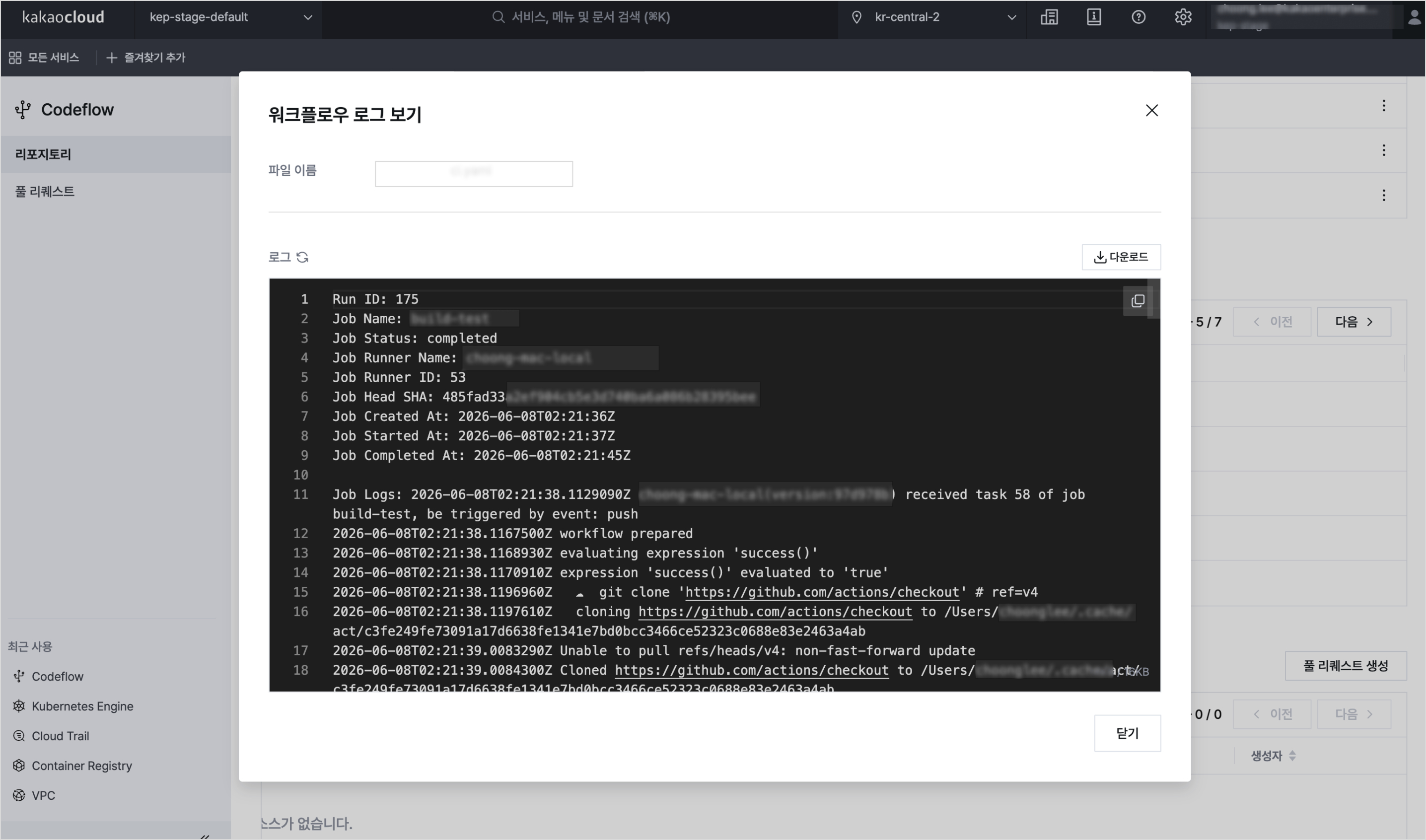 Example of Codeflow workflow run logs
Codeflow: Code management and automation
Codeflow is where source code management and development automation begin. You can manage source code and configuration files in repositories, separate change scopes with branches and tags, and operate review and merge processes through pull requests.
You can also automate repeated tasks using workflows and self-hosted runners. Workflow files are defined in YAML format under the .codeflow/workflows path in a repository, and runners execute jobs in an environment prepared by the user. You can use them to automate tasks required before and after deployment, such as builds, tests, image creation, and manifest updates.
In this way, Codeflow goes beyond the role of a code repository and helps connect automation tasks required after code changes into a single process.
Deployflow: Deployment status and strategy management
Deployflow is the center of deployment operations. Based on applications, you can manage deployment target clusters, namespaces, source repositories, deployment methods, and approval settings. It supports Kubernetes standard configuration methods such as Raw Manifest, Kustomize, and Helm charts, and you can connect manifests stored in a Codeflow repository as a deployment source.
After a deployment is executed, you can review synchronization status and resource status. If the target manifest and current cluster state differ, you can compare and apply changes. When an approval process is configured, reviewers can inspect changes before sync or rollback execution.
Deployflow also manages deployment strategies and history. You can use strategies such as Blue/Green and Canary to roll out a new version gradually, and check resource relationships, revisions, failure reasons, and previous deployment records in the topology and history views.
Deployflow is designed to cover not only deployment execution, but also pre-deployment review, in-progress status checks, and post-deployment history management from an operations perspective.
Build it yourself with tutorials
CI/CD is much easier to understand by connecting the pieces yourself. Along with this release, KakaoCloud has prepared hands-on tutorials for configuring a basic pipeline.
The Build a CI/CD pipeline with Codeflow and Deployflow tutorial connects a Codeflow repository, Codeflow workflows, a self-hosted runner, Container Registry, and Deployflow Raw Manifest deployment.
The tutorial starts by pushing an example application to a Codeflow repository. Then you configure a workflow and self-hosted runner to build a container image, store the built image in Container Registry, and finally connect the repository's manifest path as the deployment source in a Deployflow application. This lets you follow the full path from code change to cluster deployment.
📦 Prepare the example application
  └─ Push code and manifests to a Codeflow repository
      └─ ⚙️ Configure workflows and a self-hosted runner
          └─ 🏗️ Build an image and push it to Container Registry
              └─ 🚀 Deploy to a Kubernetes Engine cluster with Deployflow
After completing the tutorial, you can directly confirm how a change that starts in Codeflow is applied to a Kubernetes Engine cluster through Deployflow. If you are connecting the two services for the first time, we recommend starting with this tutorial.
Up to the 🔵Blue / 🟢Green deployment strategy
After configuring a basic CI/CD pipeline, the next step is to learn how to deploy new versions more safely. In production environments, you may need a strategy that prepares a new version separately, validates its status, and then shifts traffic instead of sending all traffic to the new version immediately.
The Implement a Blue/Green deployment strategy with Deployflow tutorial continues from the cicd-app-demo application created in the previous CI/CD tutorial. You can practice deploying a new Green version while the Blue version handles current traffic, checking readiness, and then switching traffic.
🔵 Blue version running
  └─ 🟢 Green version prepared
      └─ Verify Green Pod status
          └─ 🔁 Switch traffic
              └─ ✅ Promote the Green version
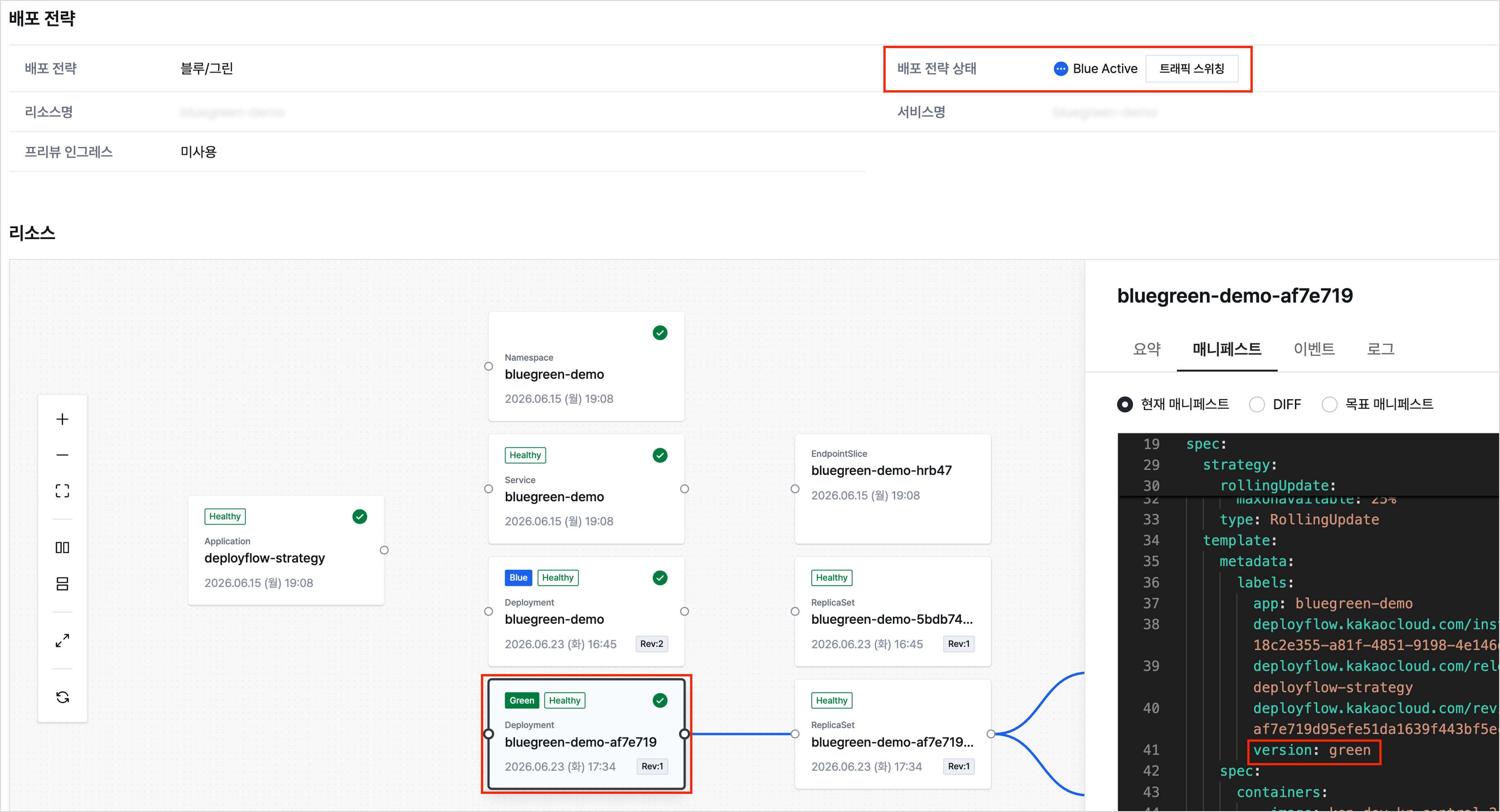 Example of the Deployflow deployment strategy screen
Through this process, you can see how to prepare a new version while keeping the existing version, check its status, and switch the traffic target on the same service endpoint. If you want to go one step beyond basic deployment automation and understand how deployment strategies connect with real operations, continue with this tutorial.
Start now
If you are using Codeflow and Deployflow for the first time, start by configuring a basic pipeline with the Build a CI/CD pipeline with Codeflow and Deployflow tutorial. Then continue with the Implement a Blue/Green deployment strategy with Deployflow tutorial using the same example application to naturally extend from basic deployment automation to traffic switching strategies.
Codeflow and Deployflow are Developer Tools services designed to more clearly connect the process of developing and deploying applications on KakaoCloud. KakaoCloud will continue to enhance development and deployment tools so that code changes, automation, deployment, and operational checks can flow together more naturally.
👉 View Codeflow and Deployflow services
👉 Start KakaoCloud now