6 posts tagged with "iam"

View All Tags

KakaoCloud service updates - VM and Hadoop performance improvements, IAM security settings, and more

· 4 min read
Mia (정혜원)
Technical Contents Manager
update

This year, KakaoCloud is continuing to move forward without pause to provide users with a more convenient and secure cloud environment. With the warm arrival of spring, we are sharing a roundup of major service updates from March.

If the recently announced user-centered console renewal was a major change to screen structure and experience (UX), this post focuses on service feature enhancements that strengthen the foundation. Along with work to improve system stability, review the details of this update, which further improves resource management efficiency and security.


🖥️ Infrastructure management efficiency and service scalability

  • GPU service integrated into Virtual Machine (VM): For more intuitive resource management, the previously separate GPU service has been integrated into the Virtual Machine service.

    • Integrated environment provided: You can now select and manage general instances and GPU instances within the same workflow when creating a VM.
    • Automatic notification policy conversion: As part of the service integration, Alert Center notification policies previously configured in the GPU service have been safely and automatically converted into Virtual Machine service policies. You can continue using the existing monitoring environment without separate reconfiguration.
  • Virtual Machine supports "start credits" for t1i instances: To improve workload processing efficiency, the start credit feature has been added to t1i, a burstable instance type. Instances can now temporarily maintain high CPU utilization during boot, dramatically improving initial startup speed.

  • Hadoop Eco expands node volume size up to 16 TB: To support large-scale data analysis, the maximum volume size per node (master, worker, task) in Hadoop Eco has been significantly increased from 5 TB to up to 16 TB. Analyze larger volumes of data without storage constraints.

  • Object Storage product name changed: To make it easier for users to recognize the storage services they are using, Object Storage product names have been changed as follows. Pricing remains the same, and changes will be applied sequentially starting with March billing statements.

    • Data capacity: Hot Bucket → Standard Storage Class
    • API calls: The Standard- prefix is added before existing request names (for example, Standard-PUT, Standard-GET, and so on)

🔑 Security enhancements

  • IAM security settings enhanced: To protect valuable organizational resources, various security settings have been added to Account settings and IAM service items in the console.

    • Password reauthentication when deleting resources: When deleting a user account or project service account, a password reauthentication step has been added to prevent simple mistakes.
    • Immediate session and token expiration option: When changing a password, all currently logged-in sessions and issued access tokens can be invalidated immediately. This helps respond quickly to security incidents in emergency situations where account leakage is suspected.
    • Expanded Cloud Trail audit logs: 17 new event types have been added so that security policy and account management history can be tracked in more detail.

🛠️ Improved developer convenience

  • New OpenAPI support for MySQL: OpenAPI support for developers has been expanded further. With this update, MySQL OpenAPI has been newly added, allowing KakaoCloud MySQL to be controlled directly by API and used for management automation. For detailed OpenAPI updates, see OpenAPI Changelogs.

That is all for this update. In addition to the feature improvements introduced here, detailed changes for each service and previous update history can be found in the service-specific release notes in the technical documentation.

KakaoCloud will continue doing its best to provide stable infrastructure and user-centered features.
If you have any questions about using the service, please contact KakaoCloud Support anytime.

👉 Start KakaoCloud now

IAM update: Check my roles and use dedicated permission systems

· 4 min read
Martin (왕현수)
Service Manager
Management Update

When collaborating in a cloud environment, questions like these often come up.

"What permissions do I have in this project?"
"Why can't I access this setting?"
"What role did we assign to this user?"

In this update, a feature has been added so that each user can directly check their own role information to answer these questions. In addition, a new dedicated role system for managing IAM and projects, excluding cloud resources, has been introduced, allowing permissions to be configured and operated more precisely.

🖥️ Easily check your role information

One of the biggest changes in this update is that users can now directly check their own role information in the console.

Previously, users had to ask an administrator separately to confirm "what role I have" or "what settings I can access." This was especially difficult when participating in multiple projects at the same time, because it was hard to clearly understand the permission scope.

Now, however, the console provides a feature that clearly distinguishes and displays organization roles and project roles.

org role

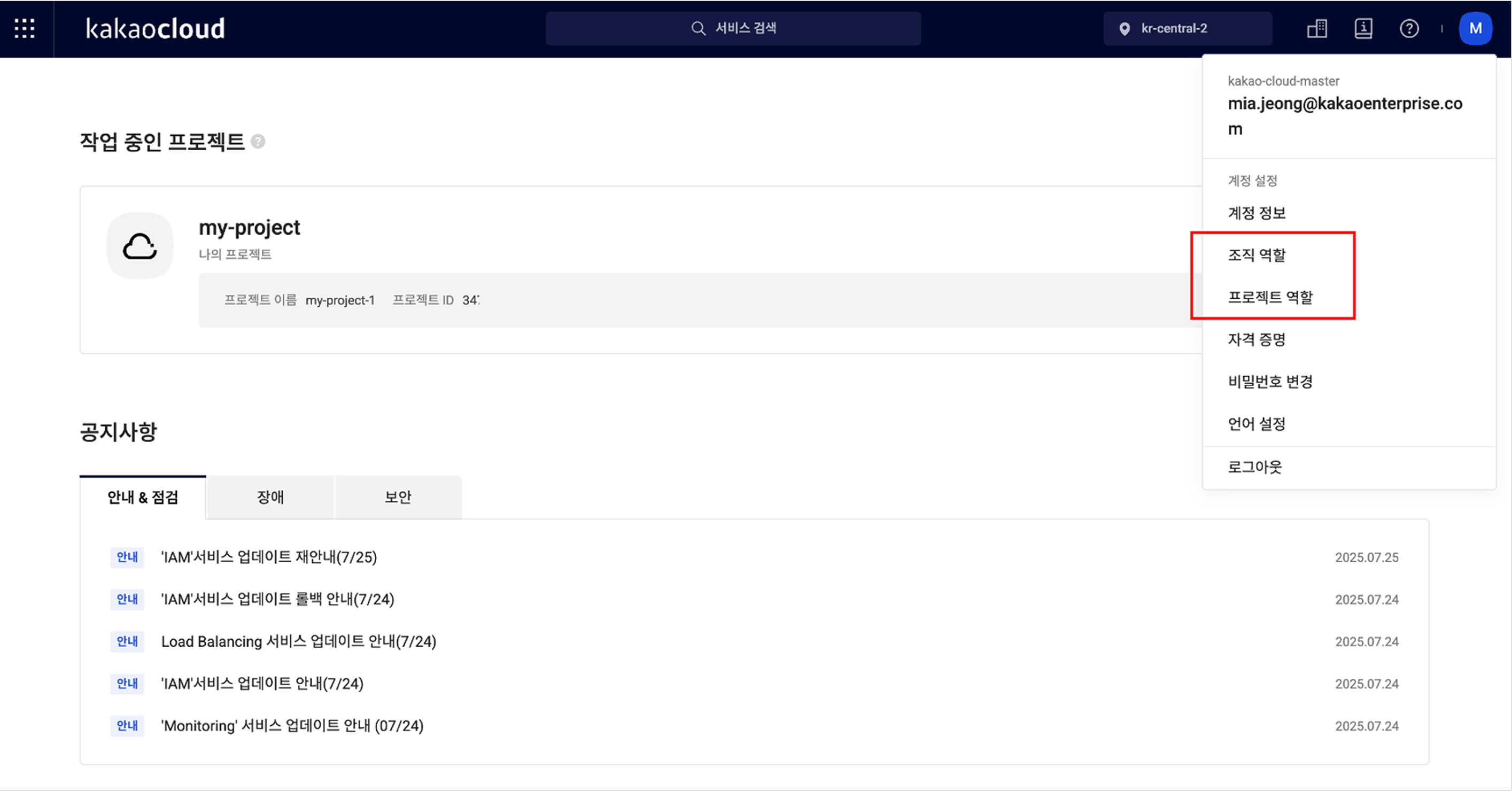
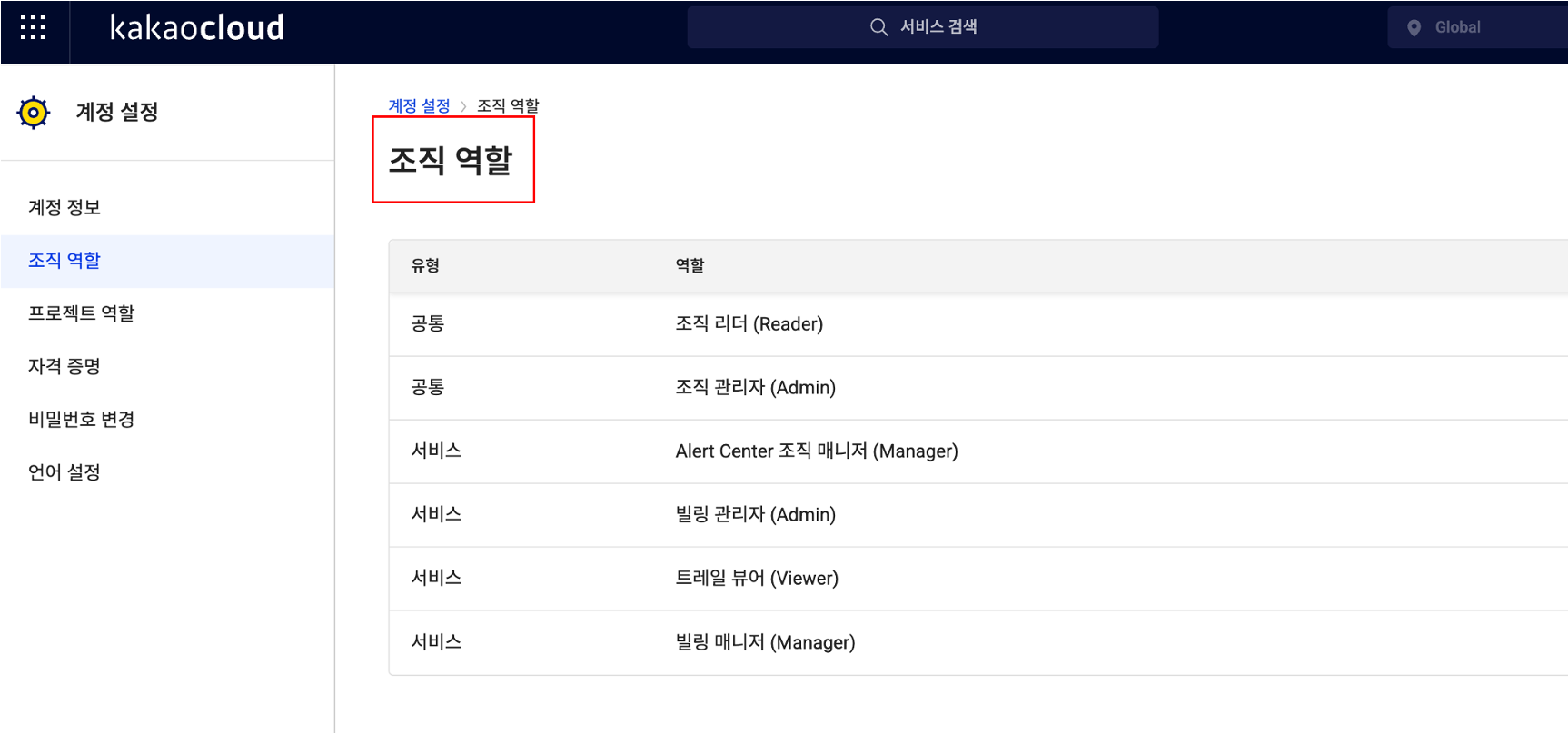
First, organization-level roles can be checked by selecting Organization roles from the profile menu at the top right of the console. In addition to the role names assigned to you, it also shows whether they are common roles or service roles limited to a specific service, allowing you to understand your current permissions at a glance.

org role

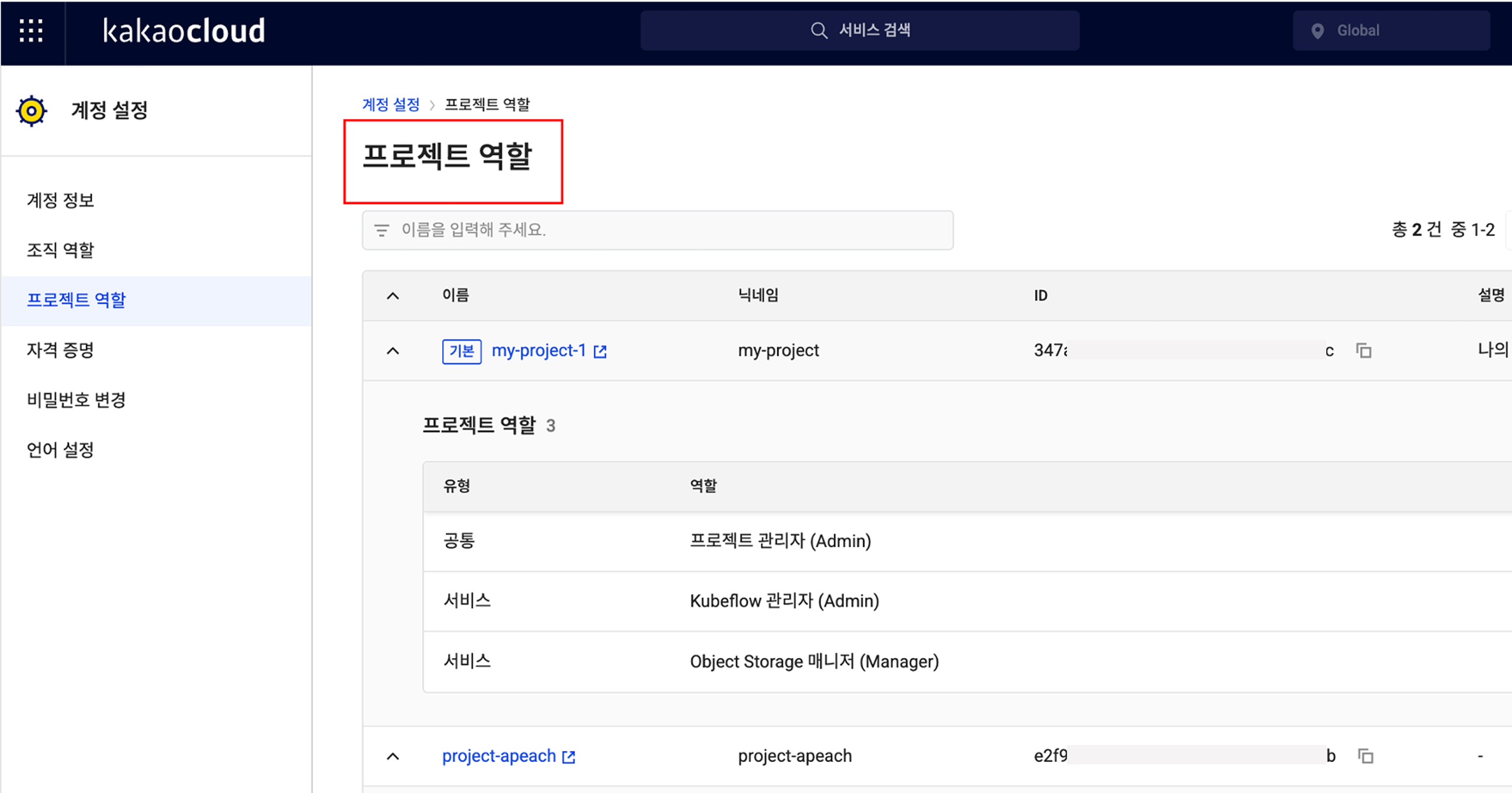
The same applies to project-level roles. In the Project roles menu at the same location, you can check the list of projects you belong to and see which roles are assigned within each project. The project name, nickname, ID, description, role type, and role name are provided together, so even if you participate in multiple projects, you can clearly understand the scope of your permissions.

project role

🎉 New roles added for IAM and project management features

This update also includes important changes to the role system.

Previously, the system consisted only of default roles such as Organization Admin, Project Admin, Member, and Reader, making it difficult to subdivide roles and responsibilities in real operating environments. For example, even if you wanted to grant a specific user permission to manage only IAM settings, Organization Admin or Project Admin roles also included resource management permissions, creating concerns.

To reflect these practical needs, dedicated roles specialized for IAM services and project management features have been newly introduced.

  • IAM Organization Admin has permission to assign or remove roles for users in the IAM service.
  • IAM Organization Viewer can view role information but cannot modify it directly.
  • IAM Project Admin can assign or modify user permissions for a specific project.
  • IAM Project Viewer has read-only permission to view role information for the project.

These dedicated roles can be assigned independently from existing organization/project administrators, allowing management responsibility for users to be subdivided more precisely.
👉 Learn more about IAM and project management roles

💡 Improving usability and clarifying responsibility

This IAM update is meaningful not simply because a feature was added, but because it provides a system that clarifies roles and responsibilities within an organization and distributes permissions efficiently.

Administrators no longer need to say, "I assigned the role, so please check whether you can access it." Instead, they can say: "Check and use the permissions you need directly in the console." In other words, the flow changes from a verification request to guidance for autonomous verification.

In addition, by using the new roles specialized for IAM and project management, you can assign service-specific owners while granting only the permissions they truly need. This strengthens security policies and makes permission operations more efficient.

Going forward, KakaoCloud plans to further subdivide service-specific role systems, including IAM. Through this, organizations can better follow the Principle of Least Privilege, administrators can reduce operational burden by granting customized permissions by task, and users can more clearly understand their own roles and responsibilities.

Want to check more details in the IAM documentation?
👉 View IAM role management documentation

KakaoCloud IAM onboarding video guide

· 4 min read
Martin (왕현수)
Service Manager
Kali (명시온)
Service Manager
new iam onboarding video

Using the cloud is like operating a virtual building with dozens of keys. 🔐
If it is not clear who can enter which room and which doors they can open, confusion quickly follows.
Deciding who receives these keys and under what conditions is exactly what IAM (Identity and Access Management) does. In other words, IAM is a service that grants only the permissions needed according to each user's role, helping manage resources efficiently and reduce unnecessary access.

However, for those encountering IAM for the first time, the concept may feel somewhat complex and burdensome.
To help users understand and use KakaoCloud IAM more accurately, the content planning team created a four-part onboarding video series.
In this post, we briefly summarize the key content of each video.

🎬 Part 1. Getting started with IAM - Concepts and basic structure

The first video in the IAM onboarding series introduces the basic concepts of IAM and the structure of projects and organizations.
Even users new to IAM can easily understand the overall IAM structure through this video. Like looking at a city map, view the big picture of what permissions should be assigned to each area.

🎬 Part 2. IAM groups and service accounts - Improving user management efficiency

Part 2 introduces two features you must know to operate IAM more conveniently and systematically: IAM groups and service accounts.

  • IAM groups are a useful feature that groups users who need the same permissions into one user group and configures the required permissions all at once. For example, if you group users by teams such as development, operations, or marketing and configure the required permissions for each team at the group level, when a new team member joins, permissions are automatically granted simply by adding the member to the group. This enables much more efficient user management.
  • Service accounts are non-user accounts used by applications or automation scripts to access or control resources within a project, rather than actual IAM user accounts. They can issue API tokens and call KakaoCloud APIs instead of using IAM user accounts.

By using these two features appropriately, user management and system permission settings can be operated more systematically and securely. See the video for details.

🎬 Part 3. Tracking IAM change history with Cloud Trail

Initial IAM setup is important, but continuously checking and managing change history is also important. In Part 3, we introduce how to use KakaoCloud Cloud Trail to track who changed which IAM settings and when, at the event level.

🎬 Part 4. Reviewing IAM operational best practices

The final video introduces five best practices for operating IAM stably. Check whether all five operational tips below are applied in your organization.

  • Grant only the minimum permissions needed, without unnecessary permissions.
  • Use Cloud Trail to regularly check change history.
  • Regularly review and clean up departed-user and dormant accounts.
  • Clearly separate user accounts and service accounts for operations.
  • Integrate with Alert Center to quickly detect and respond to anomalies.

How was it?
IAM is more than a simple permission management tool. It is an important standard for securely protecting resources in an organization and clearly separating roles and responsibilities.
If you understand IAM's basic structure and operating methods well, you can continue providing stable and reliable services even in complex cloud environments.

If you want to learn more about KakaoCloud IAM, see the links below. Thank you :)

Introducing IAM roles dedicated to Alert Center

· 4 min read
Kali (명시온)
Service Manager
Management Update

📢 Alert Center permissions have been subdivided!

KakaoCloud Alert Center permission management has been improved so that more precise roles can be configured at the organization and project levels. This makes it possible to grant appropriate permissions to each user and operate notification policies more safely and efficiently.

In this post, we introduce what IAM roles dedicated to Alert Center are and how to use them effectively.

🔐 IAM and Alert Center permission structure

KakaoCloud IAM (Identity and Access Management) is a service that controls access permissions for cloud resources. IAM uses RBAC (Role-Based Access Control) so that only users granted specific roles can access the resources they need.

Previously, permissions for Alert Center resources could not be subdivided by organization or project, making it difficult to grant appropriate permissions to users who needed to manage only notifications for a specific organization or project. With this improvement, manager and viewer roles can now be assigned separately at the organization and project levels, enabling more flexible permission management.

In other words, if a user is responsible for managing Alert Center for the entire organization, an organization-level role can be granted; if a user needs to manage only notifications for a specific project, a project-level role can be granted.

🏢 Introducing roles dedicated to Alert Center

🏛️ Role management at the organization level

Organization-level Alert Center roles have permission to manage notifications generated by IAM and Billing services. To manage Alert Center resources within an organization, you must grant the Alert Center Organization Manager or Alert Center Organization Viewer role.

Organization Managers can view all Alert Center resources and directly manage notification policies and receiving channels. Organization Viewers can view all resources but cannot change settings. If Alert Center notification settings need to be changed, grant the Manager role; if only monitoring is needed, grant the Viewer role.

📌 Role management at the project level

Alert Center is used not only at the organization level but also at the project level. Project-level Alert Center roles have permission to manage notifications such as metrics, logs, and events generated in individual projects. If you need to manage notifications generated in a specific project, grant the Alert Center Project Manager or Alert Center Project Viewer role.

Project Managers can view all Alert Center resources in the project and manage notification policies and receiving channels. Project Viewers can view all resources but cannot change settings.

🚨 Changes starting March 18

With the introduction of the new permission system, appropriate roles must be assigned to use Alert Center features starting March 18.

✔️ Only organization or project administrators, or users with Alert Center roles, can manage resources.
✔️ Users without permissions can only view Alert Center resources and cannot view the recipient list of the default receiving channel.
✔️ Until March 18, resources in Alert Center can be created and deleted without roles, the same as before. In other words, to configure notification policies in Alert Center after March 18, appropriate roles must be assigned in advance at the organization or project level.

🔎 Use Alert Center more safely and flexibly

Although new roles dedicated to Alert Center have been added, users with existing IAM project roles can still use some features.

For example, users with the Project Member or Project Reader role can still view notification policies, receiving channels, and sending history in Alert Center. However, they cannot view the recipient list within receiving channels. In other words, basic monitoring is possible, but the new Alert Center roles are required for detailed notification management.

Alert Center is a service that detects various events and logs generated by cloud services and provides notifications. Through this subdivision of IAM roles, safer and more efficient permission management is possible at the organization and project levels. Please configure the required roles properly for stable system operations.

For more details, see Alert Center > Key concepts.

Thank you!

Reader role added to the IAM permission system

· 3 min read
Mia (정혜원)
Technical Contents Manager
Notice

The following announcement for a new IAM service role was written based on information available in November 2023. For the latest information about KakaoCloud IAM, see IAM.

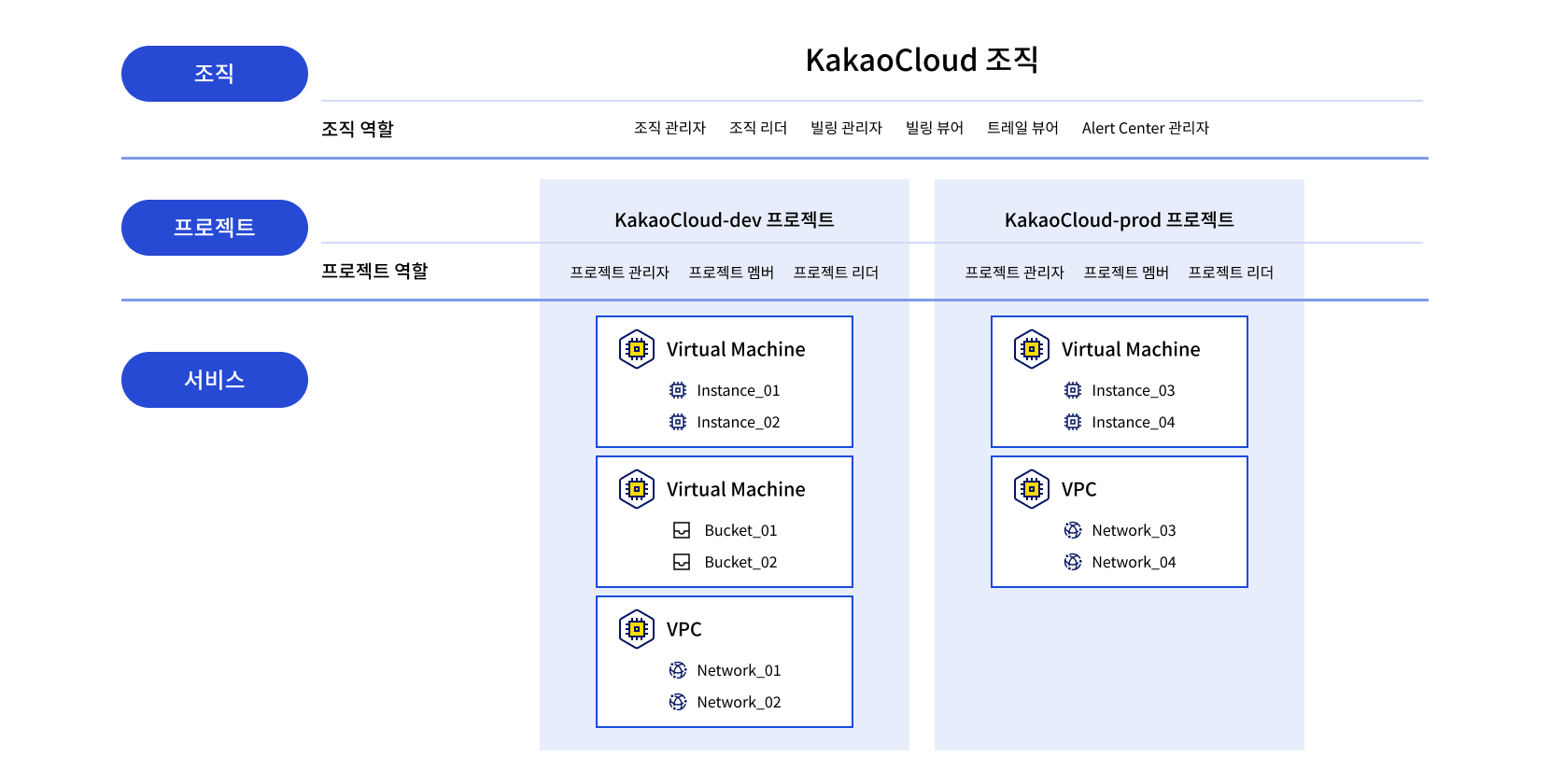
Figure. KakaoCloud resource hierarchy KakaoCloud resource hierarchy

Hello, KakaoCloud IAM (Identity and Access Management) is a service that lets you manage access and control permissions for cloud resources and user groups.

Recently, KakaoCloud released the Reader role for both the 'Organization' and 'Project' levels in IAM.

An 'Organization' is the top-level concept in the KakaoCloud hierarchy and can be viewed as a cloud domain. A 'Project' is a group that can own service-level resources and is a lower-level hierarchy within an organization. At both the organization and project levels, the Reader role is fundamentally granted only permission to view information or resources within the corresponding group.

  • A user granted Reader permission at the organization level can view the organization's information and all project information within that organization. However, the user cannot view or manage resources other than project information. It is an organization-level role with minimal permissions compared with Organization Owner and Organization Admin.

  • Project Reader is also a permission configured only to view resources by project. It is one permission level lower than Project Member and can view resources owned within the project. To create, read, update, or delete resources beyond resource viewing, a user must be granted Project Member or higher permissions.

With the addition of the Reader role at the organization and project levels, permissions can now be created more granularly based on users' affiliations and responsibilities within an organization. The changed IAM role system applies equally to all KakaoCloud regions.

For more information about role management in KakaoCloud, see the IAM role management documentation.

We will continue working to provide safer and more convenient cloud services.

Thank you.

Storage Viewer role added to Object Storage

· 2 min read
Sandy (차신영)
Technical Contents Manager
Notice

The following announcement for a new Object Storage feature was written based on information available in October 2023. For the latest information about KakaoCloud Object Storage, see Object Storage.

Hello, we are announcing changes to the Object Storage permission system.

The permission system of Object Storage is slightly different from the IAM permission system. Unlike IAM, Object Storage has detailed roles so that permissions can be configured not only for buckets but also for individual objects.

In this release, the "Storage Viewer" role has been added to Object Storage permission settings. This role is granted permission to view bucket metadata information and object metadata.

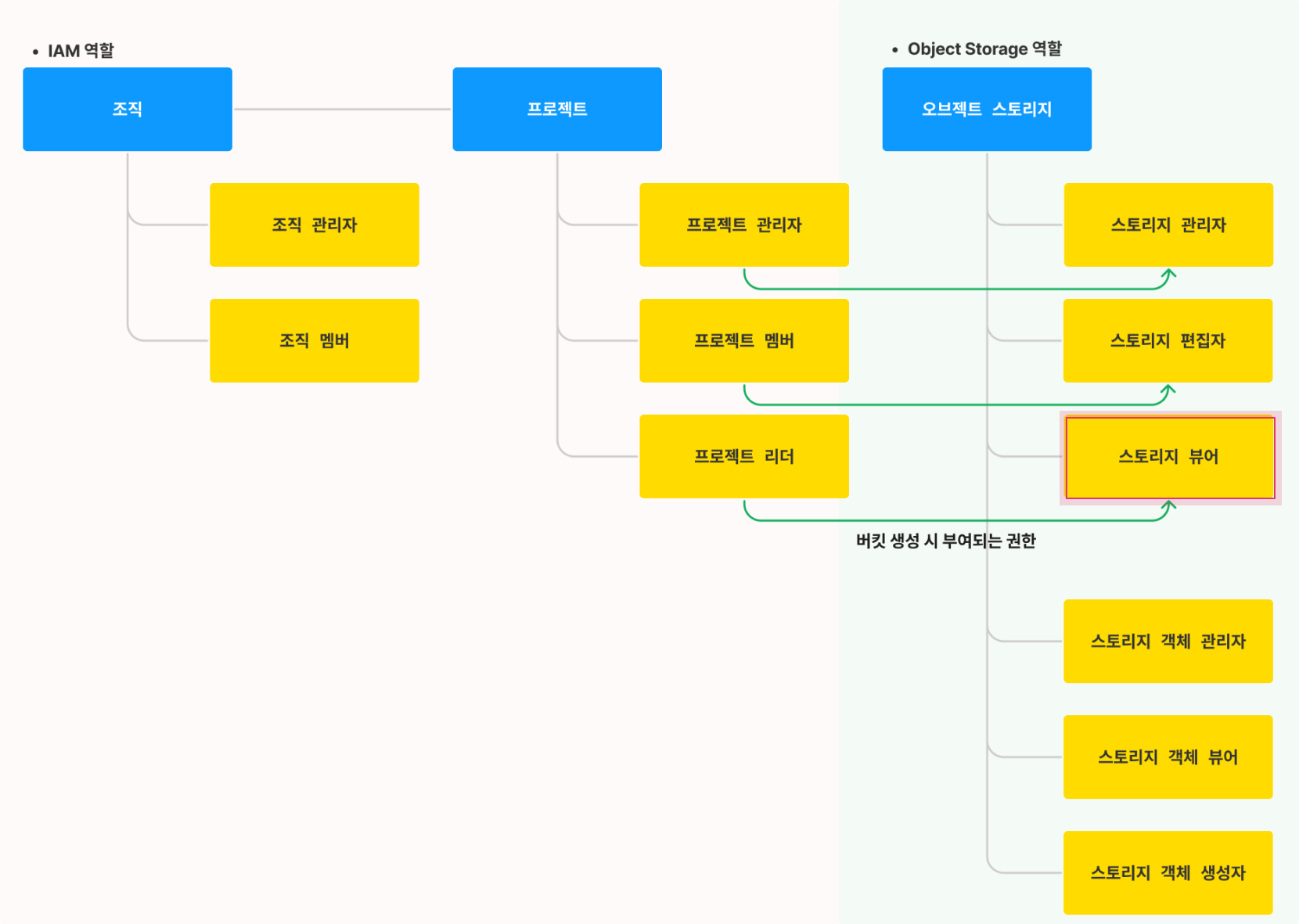
With this change, users with the "Project Reader" permission in IAM roles are granted the "Storage Viewer" permission in Object Storage. In addition, "Project Admin" in IAM roles is granted the "Storage Admin" permission in Object Storage roles, and "Project Member" is granted the "Storage Editor" permission. This part remains unchanged from before.

For more detailed role definitions, see the following image comparing IAM and Object Storage roles. This role system applies to both kr-central-1 and kr-central-2.

Permission setting architecture Permission setting architecture
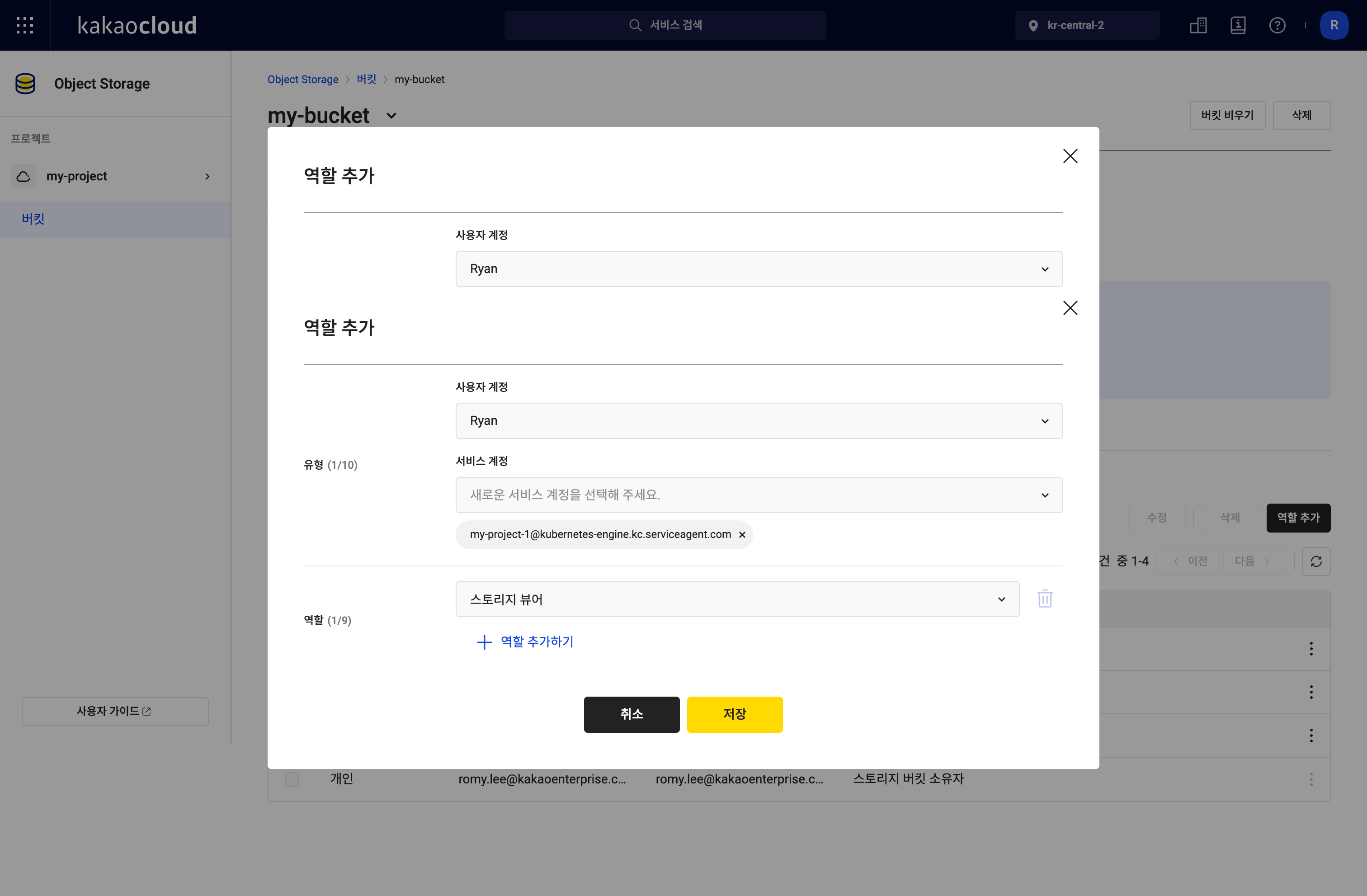
In the console, you can add or modify the new "Storage Viewer" role for members in the [Add role] pop-up window in the same way as before.

Bucket role settings Bucket role settings

For instructions on creating and managing buckets with detailed role configuration, see the detailed tutorial guide.

KakaoCloud users can use object-based storage optimized for storing and processing large volumes of data as objects in Object Storage. For more information about Object Storage, which enables more precise permission management through role-based access control, see the technical documentation.

We will continue working to provide safer and more convenient cloud services.

Thank you.