Building a Kafka-based real-time data pipeline


Logs, user events, and transaction information generated by services. Storing this data is important, but it becomes a truly "meaningful flow" only when it can be analyzed quickly.
The Kafka-based real-time data pipeline tutorial series introduced here is a hands-on tutorial that lets you directly follow how to implement this "flow of data" on KakaoCloud.
This series consists of three parts and guides you step by step through the entire process, from receiving real-time messages to storage and analysis. It is designed so that you can connect Kafka, Object Storage, Data Catalog, and Data Query, understand the overall structure through which data flows, and implement it directly.
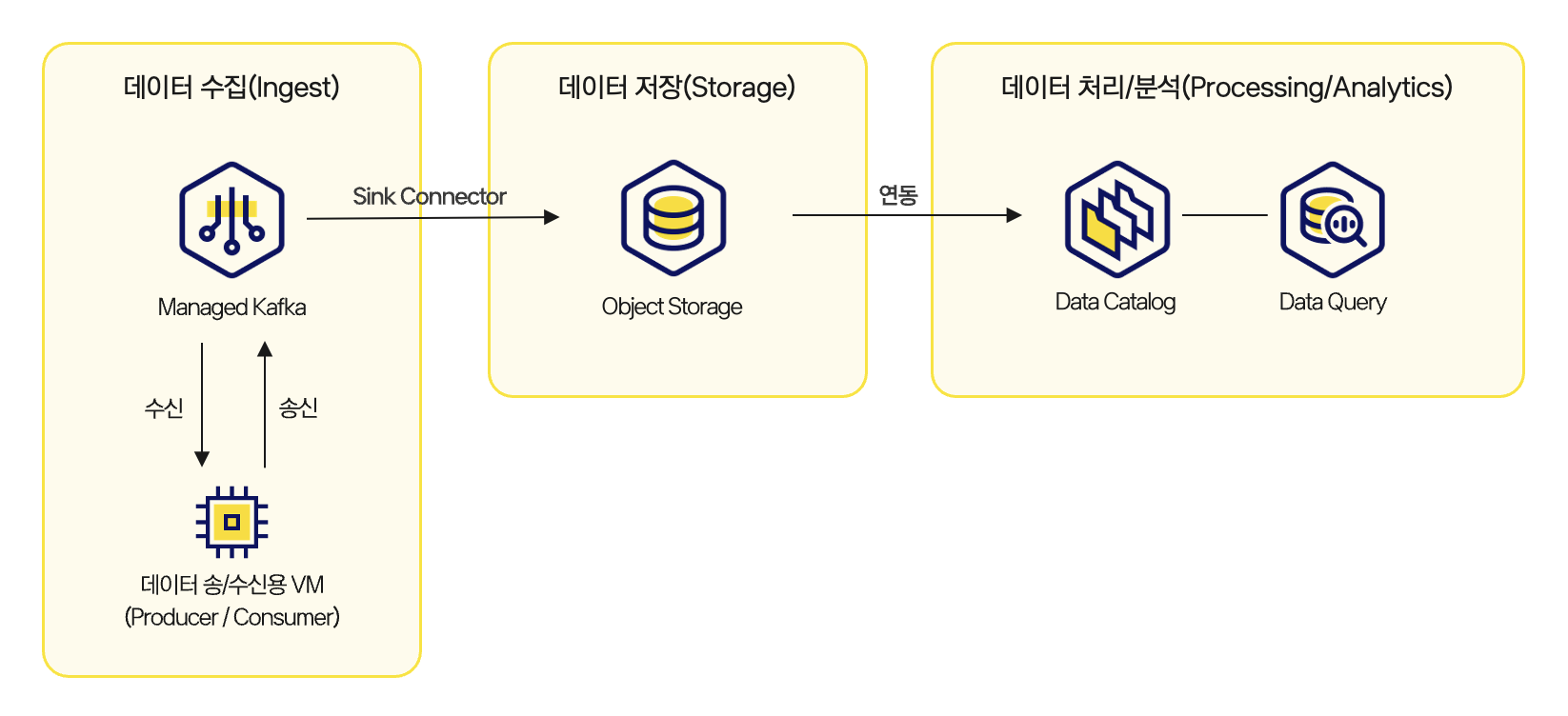 Architecture for building a real-time data pipeline
Part 1: Build a structure for receiving Kafka messages
In the first tutorial, you create a Kafka cluster and configure an environment for sending and receiving messages through topics. You create Kafka topics, configure producers and consumers, and send and receive messages to establish the foundation for real-time data collection. This process focuses on understanding the basic structure of an event-driven system and creating the starting point of message flow.
👉 View the message processing through Kafka tutorial
Part 2: Store received messages in Object Storage
The second tutorial covers the flow of periodically collecting messages received through Kafka and storing them in Object Storage. Messages are collected at regular intervals and stored as a single file, and the stored files are used later as data sources for analysis. In this process, you can also consider the boundary between streaming and batch and how file formats and structures should be designed.
👉 View the tutorial for loading Kafka data into Object Storage
Part 3: Real-time analysis with Data Catalog and Data Query
The final tutorial configures an environment where data stored in Object Storage is registered in Data Catalog and SQL-based analysis can be performed through Data Query. Tables registered in the catalog are managed by partition, and new data can be automatically reflected through periodic synchronization settings. The most important part of this stage is converting real-time data collected through Kafka into a structure that can be analyzed immediately without a separate complex pipeline.
👉 View the tutorial for analyzing Kafka messages using Data Catalog and Data Query
This real-time data pipeline tutorial series is not a simple code example. It is written based on architecture and settings that can be used as-is in operating environments. By directly following the entire process of receiving Kafka messages, storing them in Object Storage, and connecting them to analysis with Data Catalog and Data Query, you can quickly build practical intuition for designing real-time services, monitoring systems, and event-based statistics pipelines.
If you are designing a Kafka-based real-time data pipeline for the first time or want to expand an existing pipeline on KakaoCloud, this tutorial will be a good reference.
🖥️ Try it now!
View the Kafka-based real-time data pipeline tutorial series at a glance


 KakaoCloud CDC pipeline architecture