26 posts tagged with "kakaocloud"

View All Tags

Get started with Infinite File Storage, a shared file system without fixed capacity limits

· 7 min read
Martin (왕현수)
Service Manager
Infinite File Storage

As services grow, operating file storage becomes more than simply securing enough capacity. Multiple servers need to read and write the same files, access methods vary by operating system, and data must be separated by team or application. When rapidly growing data is added to the equation, an operating plan based on a fixed storage capacity can quickly reach its limits.

Infinite File Storage, newly added to KakaoCloud File Storage, is a scalable shared file system designed for these environments. You can create multiple shared volumes in a single file system, and both SMB and NFS protocols are supported so files can be shared across various client environments, including Windows, Linux, and macOS.

note

As of May 2026, Infinite File Storage is provided as Beta. During the Beta period, some features, availability, and operating policies may change. Before applying it to a production environment, check the latest documentation and service announcements.

Why do you need a shared file system?

File-based workloads remain essential to many services. This is because many types of data must preserve file and directory structures, such as user-uploaded content, documents managed by operations teams, application logs and analytics data, and configuration files referenced by multiple servers.

If this data is distributed across each server's local disk, operational complexity increases. File replication or synchronization between servers becomes necessary, and it is difficult to consistently manage the latest file state and access permissions. Especially in environments where multiple Virtual Machine instances or Kubernetes Engine clusters need to use the same data, a shared file system can significantly reduce operational burden.

Key features of Infinite File Storage

Infinite File Storage is a file system focused on operating according to actual usage and sharing structure, rather than creating storage after estimating a large capacity in advance.

1. Scalable structure without fixed capacity limits

An Infinite file system is provided as a scalable structure that can be used without a fixed storage size limit. It is suitable for services where data growth is difficult to predict, or environments where file storage volume fluctuates greatly during specific periods such as events or seasons. You can reduce the burden of allocating excessive spare capacity or repeatedly planning expansions whenever storage runs low. Because billing is also based on actual usage, you can manage the cost structure more flexibly.

2. Simultaneous support for SMB and NFS

Infinite File Storage provides SMB and NFS file services. You can use NFS for Linux/UNIX-based servers and SMB for Windows-based environments, choosing the protocol that fits the operating system and workload characteristics.

  • NFS: Suitable for configuring shared volumes for Linux servers, Kubernetes Engine workloads, analytics, and batch applications. For the mount procedure, see Mount an NFS file system.
  • SMB: Suitable for Windows-based work environments and user- or group-based file sharing integrated with Active Directory. For the mount procedure, see Mount an SMB file system.

SMB file systems can be configured for user- and group-level permission management based on Active Directory integration, making them useful for collaborative storage within an organization or department-specific shared folders.

3. Manage multiple shared volumes in one file system

In Infinite File Storage, you can create multiple shared volumes in a single file system. A shared volume is a logical storage unit used to separate data by service or application, and each volume provides an independent access point. For how to create and configure permissions, see Manage shared volumes.

For example, you can divide volumes in one Infinite file system as follows.

Shared volumeExample use
content-prodStore production content used by a service
content-stageStore content for review and staging environments
analytics-inputStore source files used for analytics jobs
team-shareShared folder for an operations team or collaborating organization

With this configuration, you can operate one file system while separating data boundaries and access paths by workload.

4. Access control by file service type

An important part of a shared file system is "who can access it, from where, and with what permissions." Infinite File Storage provides different access control methods depending on the file service type.

  • NFS: Configure access permissions based on IP addresses or IP ranges
  • SMB: Configure shared volume access permissions by user or group

For NFS-based workloads, you can restrict the access scope based on the IP addresses of application servers or Kubernetes Worker Nodes. To use it as a dynamic persistent volume in Kubernetes, also see Configure NFS Client Provisioner. For SMB-based workloads, you can control shared folder access based on your organization's user and group permission policies.

Comparison of the two file systems

KakaoCloud File Storage provides Infinite file systems and Basic file systems depending on the use case. Both are shared file systems, but they are suited to different operating models.

CategoryInfinite file systemBasic file system
Capacity structureScalable structure without fixed limitsBased on capacity configured in advance, up to 16 TiB
Billing methodBased on actual used capacityBased on created capacity
ProtocolsSMB, NFSNFS
Sharing structureMultiple shared volumes can be created in one file systemOperated by file system
Access controlSMB account-based, NFS IP-basedNFS IP-based
Suitable environmentEnvironments where data growth is difficult to predict and multiple shared volumes and multi-OS access are requiredEnvironments that need to operate an NFS-based file system reliably within a fixed capacity

If you need to set capacity in advance and operate simply based on NFS, Basic file system is suitable. Conversely, if data growth is difficult to predict, or you need multiple shared volumes and the option to use SMB or NFS, consider Infinite file system.

Things to check before you start

Before adopting Infinite File Storage, review the following items first.

  • Client operating system and protocol: Prioritize NFS for Linux/UNIX systems and SMB for Windows-based environments.
  • Network access path: Check whether the Virtual Machine instances, Kubernetes Worker Nodes, and Windows clients that access the file system can communicate in the same network environment.
  • Access control criteria: Design policies based on IP addresses for NFS and user or group permissions for SMB.
  • Shared volume separation criteria: Decide how to divide shared volumes by service, environment, team, and data type.
  • File operation patterns: Design the directory structure to avoid large-scale file creation and deletion, recursive commands, or excessive concentration of files in a single directory.

Before creating an SMB file system, you must also check the prerequisites for Active Directory integration. A domain name, DNS server, service account with domain join permissions, network ports, and other items are required. See SMB file system prerequisites and File system service ports.

Wrap-up

Infinite File Storage Beta is a new option for operating file-based workloads more flexibly. Its scalable structure without fixed capacity limits, usage-based billing, support for SMB and NFS, multiple shared volumes, and access control features can be applied to service data sharing, collaborative storage, Kubernetes shared volumes, and file-based analytics data storage.

For detailed concepts and usage, see the File Storage documentation.

Thank you.

👉 Start KakaoCloud now

KakaoCloud service updates - VM and Hadoop performance improvements, IAM security settings, and more

· 4 min read
Mia (정혜원)
Technical Contents Manager
update

This year, KakaoCloud is continuing to move forward without pause to provide users with a more convenient and secure cloud environment. With the warm arrival of spring, we are sharing a roundup of major service updates from March.

If the recently announced user-centered console renewal was a major change to screen structure and experience (UX), this post focuses on service feature enhancements that strengthen the foundation. Along with work to improve system stability, review the details of this update, which further improves resource management efficiency and security.


🖥️ Infrastructure management efficiency and service scalability

  • GPU service integrated into Virtual Machine (VM): For more intuitive resource management, the previously separate GPU service has been integrated into the Virtual Machine service.

    • Integrated environment provided: You can now select and manage general instances and GPU instances within the same workflow when creating a VM.
    • Automatic notification policy conversion: As part of the service integration, Alert Center notification policies previously configured in the GPU service have been safely and automatically converted into Virtual Machine service policies. You can continue using the existing monitoring environment without separate reconfiguration.
  • Virtual Machine supports "start credits" for t1i instances: To improve workload processing efficiency, the start credit feature has been added to t1i, a burstable instance type. Instances can now temporarily maintain high CPU utilization during boot, dramatically improving initial startup speed.

  • Hadoop Eco expands node volume size up to 16 TB: To support large-scale data analysis, the maximum volume size per node (master, worker, task) in Hadoop Eco has been significantly increased from 5 TB to up to 16 TB. Analyze larger volumes of data without storage constraints.

  • Object Storage product name changed: To make it easier for users to recognize the storage services they are using, Object Storage product names have been changed as follows. Pricing remains the same, and changes will be applied sequentially starting with March billing statements.

    • Data capacity: Hot Bucket → Standard Storage Class
    • API calls: The Standard- prefix is added before existing request names (for example, Standard-PUT, Standard-GET, and so on)

🔑 Security enhancements

  • IAM security settings enhanced: To protect valuable organizational resources, various security settings have been added to Account settings and IAM service items in the console.

    • Password reauthentication when deleting resources: When deleting a user account or project service account, a password reauthentication step has been added to prevent simple mistakes.
    • Immediate session and token expiration option: When changing a password, all currently logged-in sessions and issued access tokens can be invalidated immediately. This helps respond quickly to security incidents in emergency situations where account leakage is suspected.
    • Expanded Cloud Trail audit logs: 17 new event types have been added so that security policy and account management history can be tracked in more detail.

🛠️ Improved developer convenience

  • New OpenAPI support for MySQL: OpenAPI support for developers has been expanded further. With this update, MySQL OpenAPI has been newly added, allowing KakaoCloud MySQL to be controlled directly by API and used for management automation. For detailed OpenAPI updates, see OpenAPI Changelogs.

That is all for this update. In addition to the feature improvements introduced here, detailed changes for each service and previous update history can be found in the service-specific release notes in the technical documentation.

KakaoCloud will continue doing its best to provide stable infrastructure and user-centered features.
If you have any questions about using the service, please contact KakaoCloud Support anytime.

👉 Start KakaoCloud now

New KakaoCloud console released

· 8 min read
Sandy (차신영)
Technical Contents Manager
New console update

On March 13, 2026, a new console containing more than a year of intense collaboration and consideration was released. 🎉
"I want to preview as much information and as many features as possible on one screen." This one comment from a customer became the starting point for the major KakaoCloud console renewal.

This console renewal is significant because it is not simply a UI/UX redesign. It redesigned the entire KakaoCloud console, including performance structure, data processing methods, and screen design philosophy. A console that minimizes screen transitions, predicts and places needed features in advance, and reflects changes in real time is now possible in the new KakaoCloud console.

Reorganized as a data-centric console

The core of this renewal is that the new console has been reorganized based on the design principle of a data-centric console.
In the new console, information density has been precisely redesigned so operational efficiency does not decline even as service complexity increases.
Font size, letter spacing, and line height were optimized at the pixel level to remove unnecessary whitespace and create an environment where key indicators can be identified at a glance without scrolling.
In addition, rather than focusing on aesthetic design, design guidelines that prioritize data hierarchy and readability were applied so operators can maintain workflow and context among many resources.
Let's look at the major features changed in the new console.

Customizable dashboard

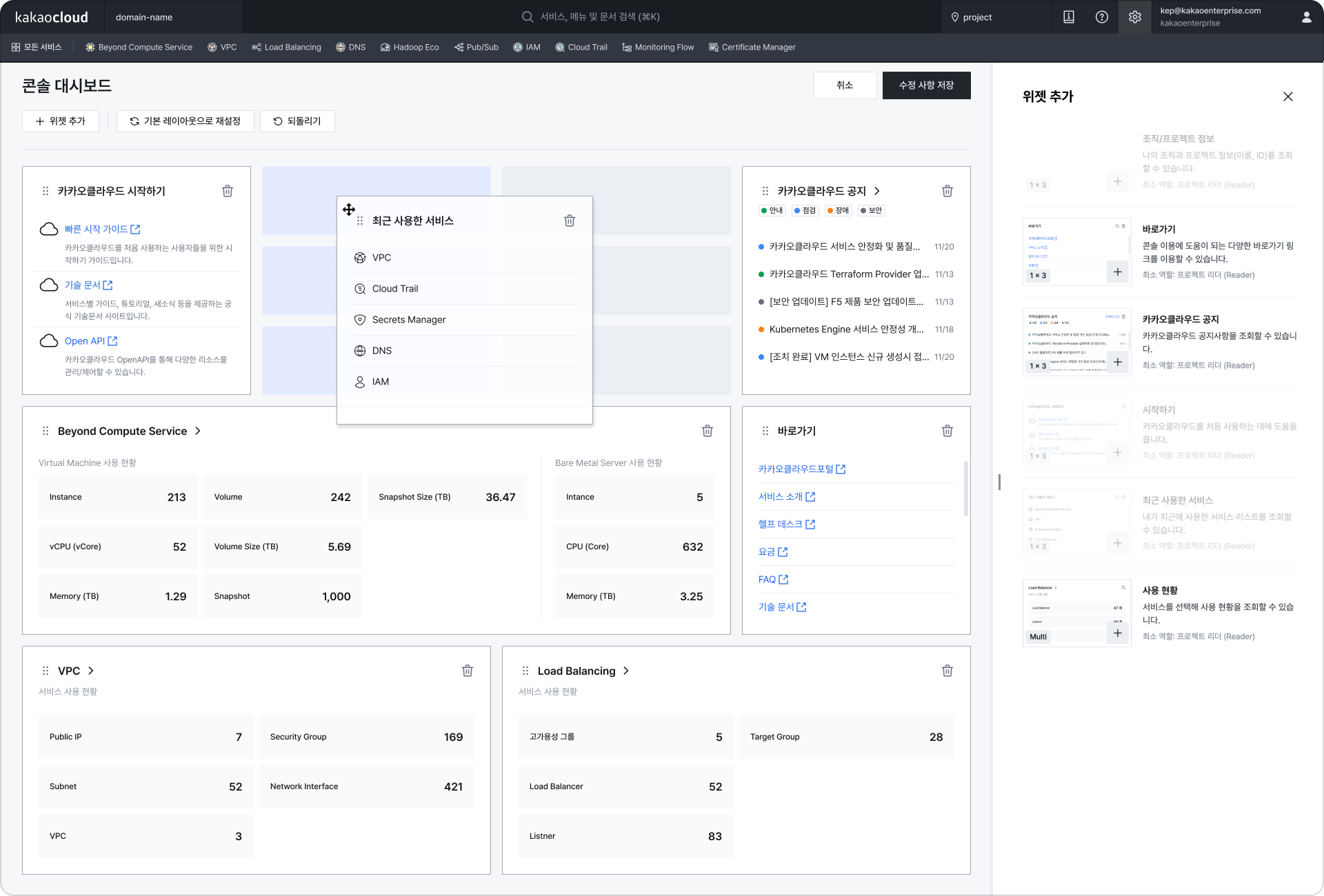
The first screen users enter after logging in to the KakaoCloud console is the dashboard. The previous dashboard provided only fixed information, making personalized configuration difficult. In the new console, the dashboard has been redesigned around widgets, allowing users to freely add, delete, or rearrange the information cards they need through drag and drop.
In particular, reflecting usage patterns of customers who use the console continuously as a monitoring screen, we completed a structure that lets users understand major service information or useful information at a glance from an operations perspective.

2 Widget-based dashboard configuration

Improved resource exploration experience

Screen convenience features for exploring resource information on one screen have also been greatly expanded.
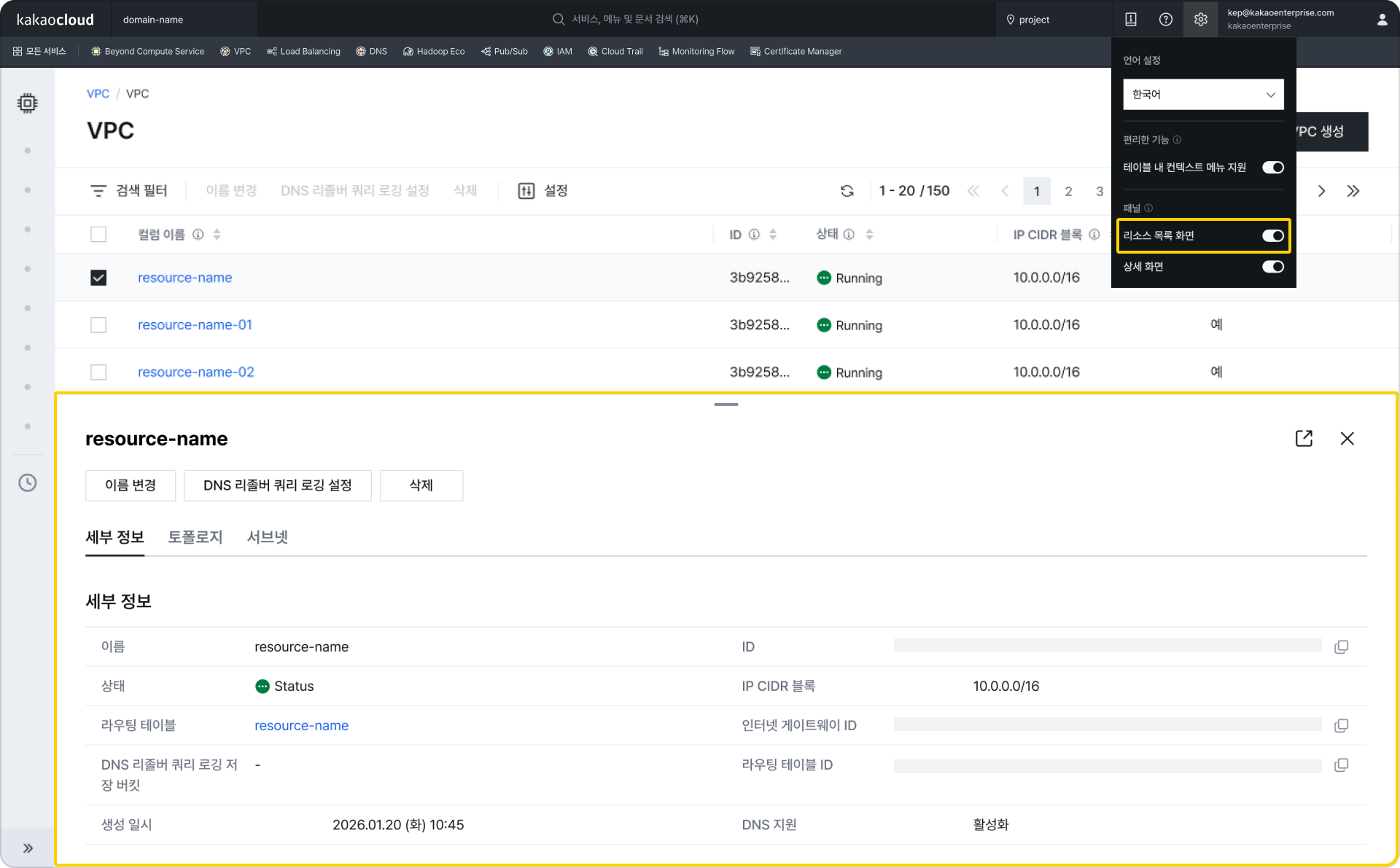
In the previous console, checking resource details required screen transitions each time a resource was selected, interrupting the workflow. In the new console, resource details can be checked immediately in the right panel or bottom panel without screen transitions.
This reduces the burden of screen transitions that occur when repeatedly exploring and checking details, and supports continuous workflows to improve operational efficiency.

3 Bottom panel display (when resource list screen option is enabled in Settings at the top right)
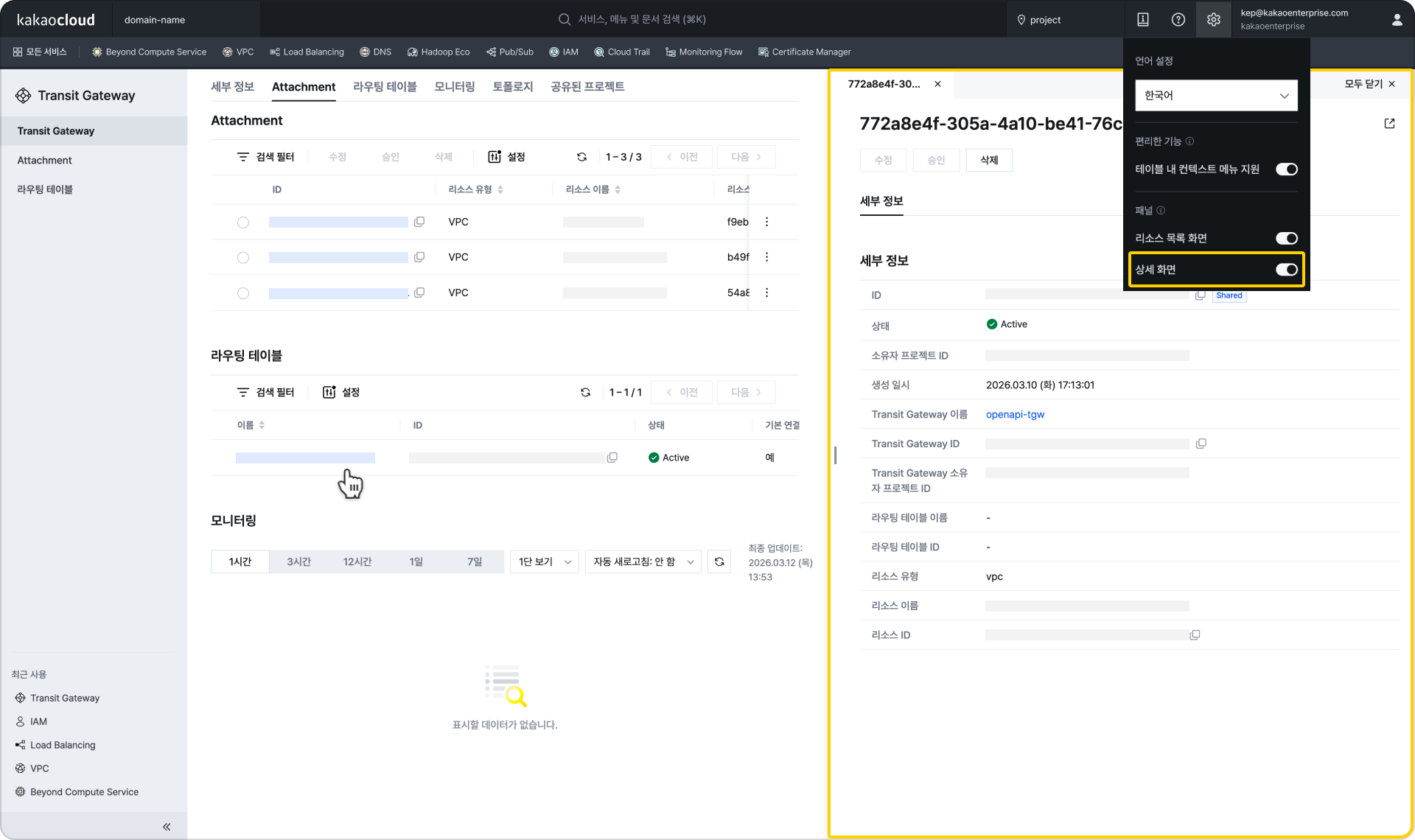
3 Right panel display (when detail screen option is enabled in Settings at the top right)
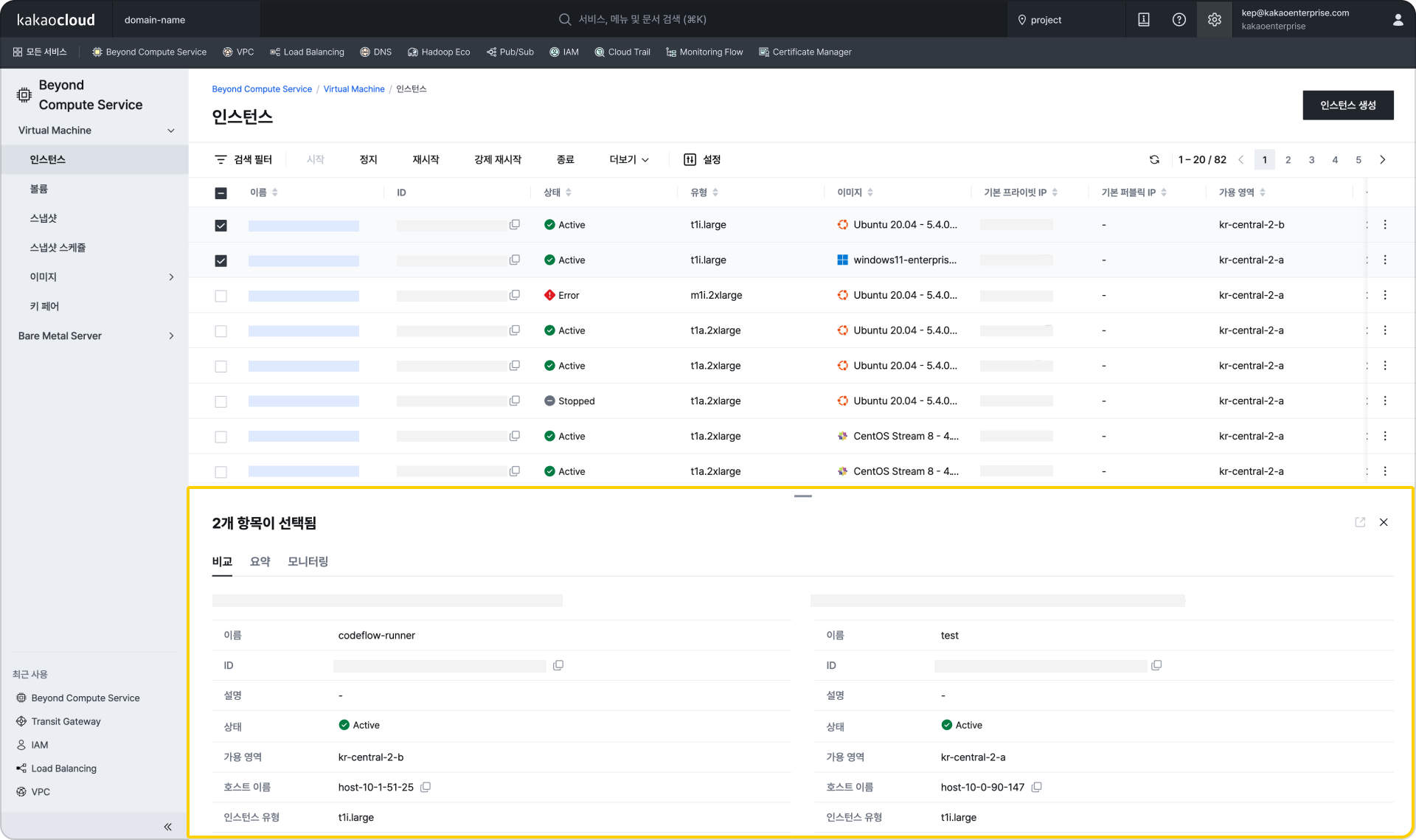
In addition, when you need to quickly compare multiple resources, you can compare and understand resource status information in the bottom panel. 3 View details in the bottom panel when two resources are selected
The resource details page viewing method has also been improved. Previously it used a tab structure with screen transitions, but the new console has changed to a full-scroll format so all information can be checked on one page. Anchor tabs are provided at the top so users can quickly move to the desired information area.

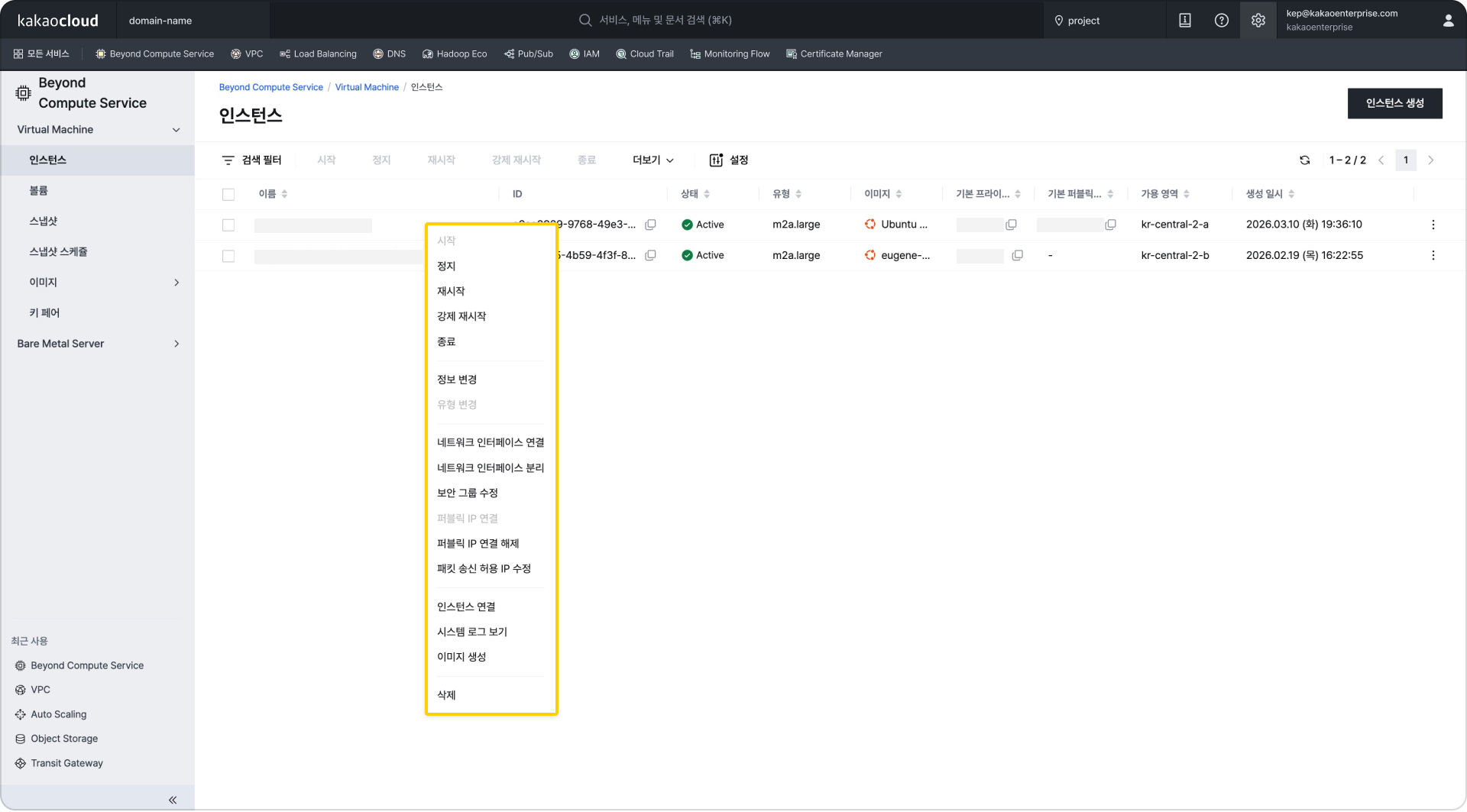
The resource task method has also become more intuitive. Previously, users had to click the More button at the far right of the table to see task menus. In the new console, users can open the same context menu directly by right-clicking the desired resource row in the table.

Image Context menu support in tables (when context menu support in tables is enabled in Settings at the top right)
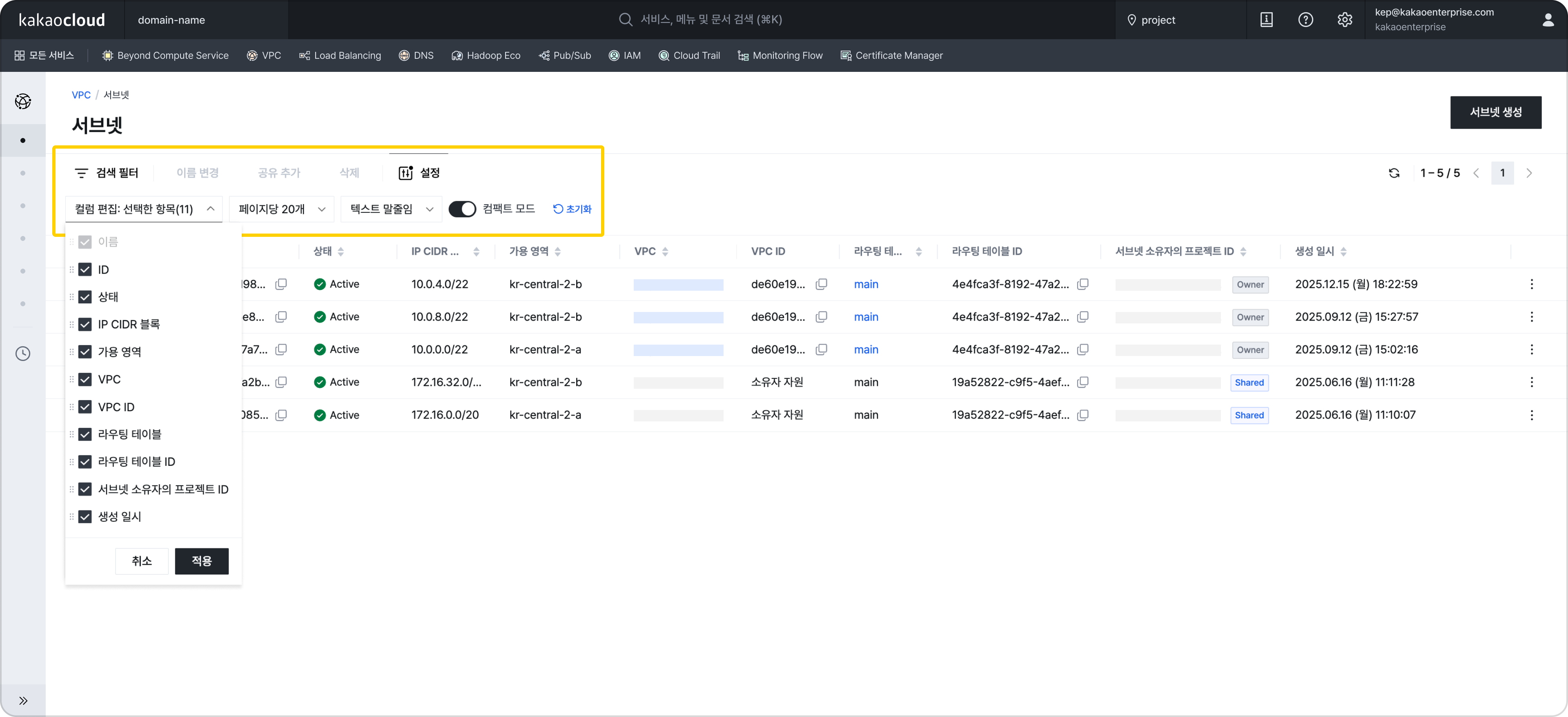
Table control features

Resource list screens support features for finely adjusting how tables are displayed. With text truncation and compact mode, more data can be displayed densely on one screen, and column configuration, header length, and width can also be adjusted.
By allowing users to directly control data density, the data-centric console philosophy has been implemented at the UI level. Beyond simple viewing, users can directly control how data is exposed, embedding the data-centric console philosophy into the UI layer.

1 Resource list screen

Intuitive topology

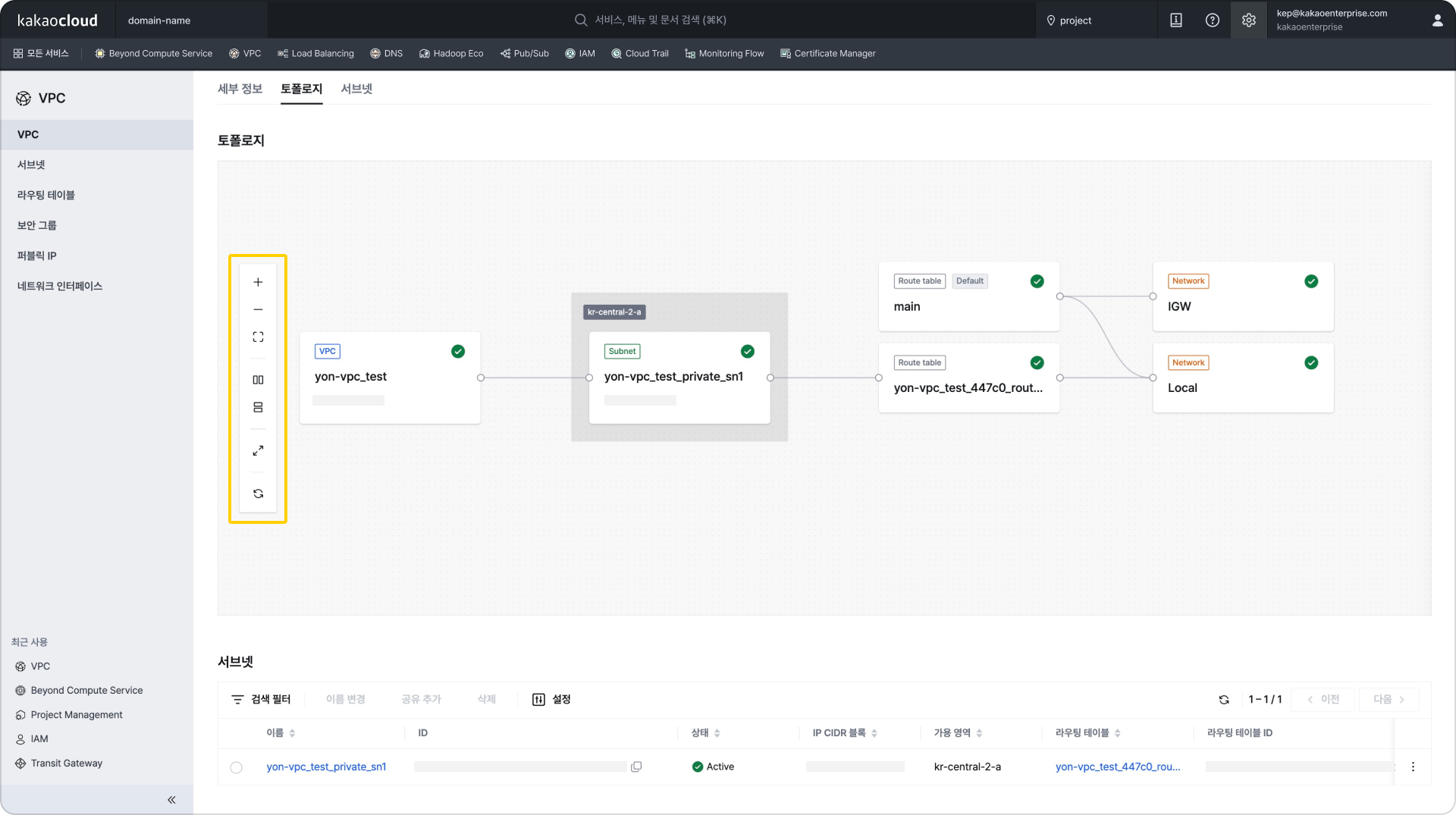
The existing topology feature has also been updated to improve the user exploration experience. When a resource card is selected in topology, details can be checked immediately in the panel without moving to another screen. Convenience features such as resource alignment and zoom in/out have also been added, and relationships between resources are expressed more intuitively so users can understand service components and resource structures at a glance.

3 Topology with zoom in/out, alignment, and other features added
Improved search and screen accessibility

Several convenience features have also been added by reflecting the actual usage patterns of users who use the console in operating environments.
For example, pressing Enter on each resource list screen now immediately opens the search filter, enabling faster search.
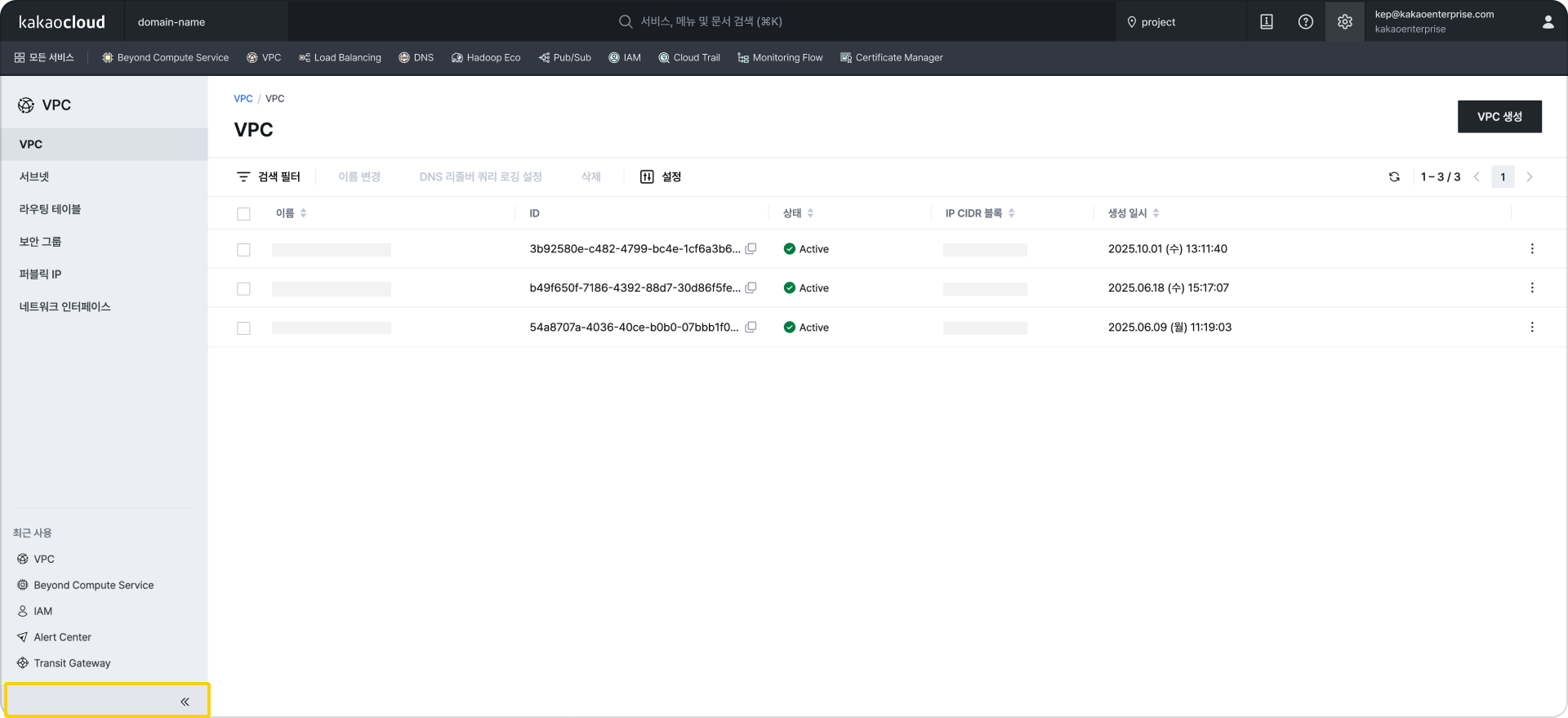
The left navigation bar (LNB) now supports collapse and expand, allowing screen space to be used more efficiently. Even on small screens or mobile environments, resource tables can be viewed more widely, improving usability in urgent response situations. Frequently used services can also be pinned to the top bar by adding them to favorites, and recently used services are displayed at the bottom left, making it easier to move between frequently used services.

3 Collapse and expand feature

Console-dedicated data architecture introduced

There were also major changes from an architecture perspective. The previous console was structured around service APIs. This was natural from a service development perspective, but in the console it created the burden of combining and processing multiple APIs to complete screens. As services and resources expanded, many API calls and real-time processing logic accumulated, and some logic became concentrated in the client or BFF (Backend for Frontend) layer. As a result, reflecting state changes also had to depend on periodic polling.

The new console improves these limitations by introducing a CDC, ETL, and SSE-based structure. Data changes are detected in real time and reflected in a console-dedicated data layer, then immediately delivered to the screen through SSE (Server-Sent Events). Read responses aim for less than one second, and resource creation and state changes are implemented to be reflected in the UI in real time.

Complex business logic is pre-transformed and stored at the ETL stage, minimizing the calculation burden during screen rendering. This lowers API dependency and provides a foundation for configuring the data needed from the console's perspective more flexibly.

Console as a platform

The new console is not simply a screen that shows multiple services in one place. It is defined as "one platform." It was designed as a platform structure so that services can continue to expand and still be accommodated stably.

A Module Federation-based structure has been introduced so that each service can participate independently, and controls have been prepared to minimize the impact of changes in one service on the entire console. This provides a foundation for adding new features faster than before. Areas shared by all services, such as common layout, authentication, navigation, and design system, are managed consistently from the center, while each service team can focus on developing business features.

This structure provides users with a consistent experience everywhere, and from an operations perspective, enables minimized change impact and gradual expansion. Update units have also become more flexible, making it easier to deploy improvements for each service independently.

The initial entry experience was also improved. SSR (Server-Side Rendering), a method where the server prepares and delivers the screen first, has been applied to reduce the loading burden users feel on first landing and let them start work faster.

Closing

The new KakaoCloud console is not simply a screen renewal. It was a change and a new challenge that redefined the role of the console through real-time data reflection, a console-dedicated data layer, data-centric UI, and modular platform architecture. Now, users can configure a console experience suited to their operating environment depending on which widgets they place on the dashboard and whether they choose compact mode or normal mode for tables. We are curious what data and what UI will be contained in your KakaoCloud console.

The March 13 release was first applied to Beyond Compute Service (Virtual Machine, Bare Metal Server), Networking (VPC, Load Balancing, DNS, Transit Gateway), and Management (IAM), and the remaining services will be converted sequentially.

KakaoCloud console will continue evolving as an operations platform designed around user experience.
Thank you.

👉 Start the new KakaoCloud console

Troubleshooting instances that cannot be accessed by SSH using OpenAPI

· 5 min read
Erin (오예진)
Cloud Engineer
update

An SSH port configuration becoming tangled while changing the port on an operating server, a forgotten password after a long period without access, or a sudden file system error that prevents booting... These are alarming situations that any cloud operator may have experienced at least once.

When the newly configured port does not work and even the existing port 22 is closed, leaving only repeated Connection refused or Connection timeout messages, the instance becomes isolated: alive, but uncontrollable.

In such a frustrating situation where the instance is in the Active state but there is no way to enter it internally, this post introduces two methods for recovery using OpenAPI while minimizing the risk of data loss, based on the troubleshooting guides in KakaoCloud technical documentation.

💡 Method 1. Automatic recovery with a user script (user_data)

This method is especially useful when "software configuration" issues occur, such as an SSH port configuration error, an unregistered SELinux policy, or a forgotten SSH password. Instead of an in-place method that attempts to fix the problem inside the affected instance, it aims for an immutable-infrastructure-based replacement method that recreates resources with a script containing normal configuration.

📍 Recovery flow
Create an image of the existing instance → Write a recovery user script → Provision a new instance with the script injected

🩺 Detailed checks and recovery procedure

Step 1. Create a snapshot: Check the existing specifications with Get instance, then create an image of the current root volume state with Create image.
- Tip: We recommend stopping the instance before proceeding so that residual data in memory can be recorded safely.

Step 2. Write a recovery script: Write a user script (user_data) that restores the port to 22 or configures a new password/key pair. This script runs when the instance first boots, and must be Base64 encoded for the API request.

Step 3. Provision the instance: Call Create instance with the recovery script attached to the image created earlier. As soon as the instance is created, the injected script runs, correcting the blocked port configuration or immediately restoring account access.

The biggest advantage of this method is that even in an "isolated situation" where an operator cannot enter the instance, settings can be automatically corrected remotely from outside. By quickly replacing the failed instance with a verified environment instead of repairing it directly, recovery time objective (RTO) can be significantly shortened.

▶︎ Troubleshooting guide for restoring access after changing the SSH port

💡 Method 2. Directly inspect the root volume

File system corruption or network configuration file errors that cannot be resolved with a user script require a more direct approach. This is a kind of rescue mode strategy in which the affected volume is temporarily treated as a "sub disk" so an engineer can directly modify its contents.

📍 Recovery flow
Create a root volume snapshot → Attach to an inspection instance → Repair data and detach → Recover with a new instance

🩺 Detailed checks and recovery procedure

Step 1. Snapshot and restore the volume: To prevent damage to the original data, create a snapshot of the affected root volume and restore a new volume based on it. This secures a safe working environment.

Step 2. Attach the inspection volume: Designate another normally operating instance as the "rescue" instance, and attach the restored volume to that instance.

Step 3. Mount and repair data: Mount the volume on the inspection instance and directly fix the problem area. Key checks and actions include the following.

  • Network: Immediately fix typos or configuration errors in files under /etc/netplan or /etc/sysconfig/network-scripts.
  • File system: After unmounting, check and repair disk errors with commands such as xfs_repair or fsck. There may be various other causes depending on system logs and configuration environments, so detailed diagnosis is required.

Step 4. Create an image and provision: After solving the problem, detach the volume, then create a new image based on that volume. Finally, deploy a normalized new instance using this image to complete recovery.

The core of this method is to use the environment of a normal instance to directly fix the problematic parts, such as the file system and network settings, instead of forcibly recovering the failed instance. After all fixes are complete, the volume is converted back into an image and redeployed as a new instance with the defects resolved.

▶︎ Troubleshooting guide for instance recovery through root volume inspection

📝 Recovery golden rules operators should remember

The core of recovery that operators should learn in practice goes beyond simply using individual features. It is about structurally preparing a system-level recovery framework. Above all, by using a cloud-based flow that connects image creation, configuration correction, and redeployment, you can secure a recovery path even when access is blocked.

In this process, data protection is the basic premise. Making it a habit to stop the instance and create a snapshot before recovery work can minimize the risk of data loss. After recovery is complete, it is also advisable to clean up temporary snapshots, restored volumes, and existing instances to avoid unnecessary costs.

Failures occur without warning, but recovery procedures can be prepared in advance. By using KakaoCloud troubleshooting guides together with OpenAPI, you can secure reproducible recovery paths for most access failure situations. Refer to the technical documentation now and review automated recovery scenarios suitable for your infrastructure environment.

👉 Start KakaoCloud now

Hadoop Eco adds features for operational efficiency in data lake architecture

· 5 min read
Evan (진은용)
Service Manager
HDE update

When enterprises design cloud-based large-scale data lake architectures, we have reached a point where we must go beyond simply accumulating data and maximize operational efficiency. To secure efficiency, it is necessary to build a balanced set of core elements such as high-performance processing, flexible separation of compute resources, and robust data governance.

If this balance breaks down, complex problems can occur, such as real-time analytics queries being delayed by batch jobs or difficulty understanding the location and reliability of the data needed.

KakaoCloud Hadoop Eco (HDE) recently carried out a large-scale update to solve these problems and improve the processing power and operational management capabilities of analytics environments. Based on the release of the new HDE-2.3.0 version, this update includes major changes such as improved integration with Iceberg catalogs, a next-generation metastore, and the introduction of task nodes optimized for workloads.

In this post, we briefly introduce how these improvements can be used within HDE to improve analytics workflows.

🚀 New HDE-2.3.0 version and powerful components added

With this update, HDE-2.3.0 is newly provided, and JupyterLab, Impala, and Kudu components have been added to effectively support data analytics and processing workflows.

Create HDE cluster Create HDE cluster

  • JupyterLab: Provides a web-based programming and shell environment, offering a development environment where data exploration and analysis code can be executed immediately within cluster nodes.
  • Impala: A powerful query engine that supports fast interactive queries against data stores such as Kudu based on Hive Metastore.
  • Kudu: Serves as a columnar data store that supports low-latency reads and writes.

In addition, Druid, a core component of Dataflow-type clusters, has been upgraded to v33.0.0, and Superset has been upgraded to v5.0.0, further improving performance and stability.

💡 View the Hadoop Eco component list

⚙️ Securing cluster structure flexibility: introducing task nodes

One of the tricky parts of cluster operations is separating batch processing and interactive processing resources to minimize mutual interference. In this update, the newly introduced task node effectively reduces operational burden.

Task node settings Task node settings

  • Role separation: Task nodes are mainly used as dedicated compute resources for executing large-scale batch computation jobs (YARN Jobs). By separating their role from worker nodes, they ensure the stability of core data processing resources and effectively prevent performance degradation caused by resource contention.
  • More accurate capacity planning: With the introduction of task nodes, the method for calculating YARN available resources has been changed to include the number and flavor of task nodes. This makes cluster capacity planning more accurate and predictable.

⚠️ Note when using task nodes: Task nodes can only be added when creating a cluster. Please carefully decide whether to add task nodes during the initial design stage, because they cannot be added after creation. However, reducing the number of nodes to 0 and increasing it again is possible.

🧊 Iceberg catalog integration, now with one click

As KakaoCloud Data Catalog officially supports the Apache Iceberg format, Iceberg catalog integration when creating a Hadoop Eco cluster has been dramatically simplified.

Iceberg catalog integration Iceberg catalog integration

In the Hadoop Eco service with this improvement, the console now lets you directly select and connect a Data Catalog Iceberg catalog in the external metastore integration setting during cluster creation. This minimizes human error, shortens integration time, and lets you start analytics work immediately.

In addition, an option has been added so that users can choose whether to automatically retain data during the data retention period (90 days) after cluster deletion. This feature can be used to prevent unnecessary metadata retention costs and clarify governance.

This Hadoop Eco update is not just a feature expansion. It further strengthens the operational efficiency of data lake architecture around three axes: stable metadata governance, high-performance interactive analytics environments, and flexible compute resource management.

Operate analytics workflows more efficiently and systematically with KakaoCloud's new Hadoop Eco.

Thank you.

👉 Start KakaoCloud now

Latest service updates for stronger operational reliability - Iceberg, PITR, SMS

· 4 min read
Mia (정혜원)
Technical Contents Manager
update

One of the most important values in cloud operations is stability. System stability is not only about preventing problems. Its reliability is determined by how quickly and flexibly problems can be recovered and resolved when they occur, and how well they can be prevented and prepared for in advance.

Through recent updates across several services, KakaoCloud has further strengthened this important value of Operational Reliability. We focused on improving users' operating experience around safe data recovery, efficient system maintenance, and fast failure notification systems.

In this post, we take a closer look at three notable improvements that can substantially improve operational reliability.


🧊 1. Iceberg format support for data integrity

One notable change in the recent update is that Data Catalog has officially started supporting the Apache Iceberg format. Apache Iceberg, developed by Netflix, is a powerful open-source table format designed for tracking change history in large-scale data (Time Travel) and restoring to specific points in time.

You can now select the Iceberg catalog type in KakaoCloud Data Catalog. With Iceberg added alongside the existing Hive Metastore-based Standard type, version management and point-in-time recovery have become much simpler even in large-scale data environments. Even if data loss or errors occur, you can easily restore to a previous state, and integration with major analytics engines such as Spark and Trino can be used immediately.

Through this update, KakaoCloud Data Catalog fully supports the integrity and resilience of large-scale data at a practical operational level, and is expected to further improve data reliability across analytics environments.

📝 Learn more about Apache Iceberg catalogs

⏪ 2. Stronger recovery reliability with point-in-time recovery (PITR)

Databases are one of the most important elements of cloud operational stability. Improving the reliability of recovery features in these database systems is truly important. In this MySQL update, the long-awaited Point-in-Time Recovery (PITR) feature has been added.

Based on automatic backups and Binary Logs, you can specify a desired point in time and restore a new instance group to the state at that time. Because you can now specify the recovery point down to the second, you can respond very flexibly to data loss caused by mistakes or errors.

💡 Please note! For service stability, point-in-time recovery currently supports a single availability configuration. If high availability (HA) configuration is required, we recommend adding instances after recovery is complete.

In addition, security groups can now be modified while instances are running, improving flexibility in network control. Account management procedures have also been improved so that password policies are applied in the same way when procedures are used. These detailed improvements to security and recovery features are important changes that substantially increase stability in real operating environments.

📝 Learn more about MySQL point-in-time recovery

📩 3. Notification speed is response speed

The outcome of responding to issues depends on how quickly operators recognize the system status. In this update, Maintenance introduced a new SMS notification feature in addition to existing email. When a maintenance task fails or an important event occurs, a notification is immediately sent to the registered mobile phone number. Now, even if you do not check email, you can recognize and respond to problem situations in real time.

💡 Please note! SMS notifications are sent only for events that require quick action, and project administrators must register valid contact information in advance.

📝 Learn more about Maintenance


These three updates were made in different services, but they all point in the same direction. Data can be restored safely without loss, security settings have become more flexible, and failures can be detected faster. This is the operational resilience KakaoCloud aims for. Stability improvements covering the entire operational process, from data to notifications, will continue.

KakaoCloud will continue improving technical completeness so that customers' operating environments become more stable and predictable. We appreciate your continued interest and support.

👉 Start KakaoCloud now

Building a Kafka-based real-time data pipeline

· 3 min read
Erin (오예진)
Cloud Engineer
Tutorial new release

Logs, user events, and transaction information generated by services. Storing this data is important, but it becomes a truly "meaningful flow" only when it can be analyzed quickly.

The Kafka-based real-time data pipeline tutorial series introduced here is a hands-on tutorial that lets you directly follow how to implement this "flow of data" on KakaoCloud.

This series consists of three parts and guides you step by step through the entire process, from receiving real-time messages to storage and analysis. It is designed so that you can connect Kafka, Object Storage, Data Catalog, and Data Query, understand the overall structure through which data flows, and implement it directly.

architect Architecture for building a real-time data pipeline

Part 1: Build a structure for receiving Kafka messages

In the first tutorial, you create a Kafka cluster and configure an environment for sending and receiving messages through topics. You create Kafka topics, configure producers and consumers, and send and receive messages to establish the foundation for real-time data collection. This process focuses on understanding the basic structure of an event-driven system and creating the starting point of message flow.

👉 View the message processing through Kafka tutorial

Part 2: Store received messages in Object Storage

The second tutorial covers the flow of periodically collecting messages received through Kafka and storing them in Object Storage. Messages are collected at regular intervals and stored as a single file, and the stored files are used later as data sources for analysis. In this process, you can also consider the boundary between streaming and batch and how file formats and structures should be designed.

👉 View the tutorial for loading Kafka data into Object Storage

Part 3: Real-time analysis with Data Catalog and Data Query

The final tutorial configures an environment where data stored in Object Storage is registered in Data Catalog and SQL-based analysis can be performed through Data Query. Tables registered in the catalog are managed by partition, and new data can be automatically reflected through periodic synchronization settings. The most important part of this stage is converting real-time data collected through Kafka into a structure that can be analyzed immediately without a separate complex pipeline.

👉 View the tutorial for analyzing Kafka messages using Data Catalog and Data Query


This real-time data pipeline tutorial series is not a simple code example. It is written based on architecture and settings that can be used as-is in operating environments. By directly following the entire process of receiving Kafka messages, storing them in Object Storage, and connecting them to analysis with Data Catalog and Data Query, you can quickly build practical intuition for designing real-time services, monitoring systems, and event-based statistics pipelines.

If you are designing a Kafka-based real-time data pipeline for the first time or want to expand an existing pipeline on KakaoCloud, this tutorial will be a good reference.

🖥️ Try it now!
View the Kafka-based real-time data pipeline tutorial series at a glance

Secrets Manager and KMS services released

· 5 min read
Miguel (김현덕)
Service Manager
security-release

As cloud-based services expand, operational efficiency and scalability have improved significantly, but security requirements have also become more sophisticated. In particular, sensitive information such as authentication information or credentials, which is essential inside systems but can directly lead to security incidents if exposed externally, can no longer be considered safe simply by hiding it. It must be managed systematically, including how it is stored, who accesses it, and how it is renewed and destroyed.

Encryption keys that protect encrypted data must also be managed separately and securely. If even one key is leaked, the meaning of all security can disappear.

To respond to these security needs, KakaoCloud has released two new security services: Secrets Manager and KMS (Key Management Service). In this post, we introduce how these two services can securely separate and manage secrets and keys while improving both security and operational efficiency.

🔐 How to manage secrets securely: Secrets Manager

When operating a service, there is information that must be protected. Examples include database usernames and passwords, authentication keys for external APIs, and tokens used for communication between services. This information is generally called a secret, and it is a security credential required for applications to communicate safely with external or internal systems. If these secrets are exposed, they can lead to serious security incidents such as unauthorized access or data theft.

KakaoCloud Secrets Manager is a service that securely stores secrets in encrypted form and helps users retrieve them safely only when needed. Traditional methods such as hardcoding secrets in code or setting them as environment variables on operating servers are vulnerable in terms of security and make it difficult to track change history.

With Secrets Manager, however, secrets can be managed centrally in an integrated repository, and a version is automatically created every time a change is made, allowing change history to be tracked systematically. For example, even if an incorrect value is saved by mistake, it can be rolled back easily to a previous version. If needed, only a specific version can be deactivated or destroyed. Currently active secrets remain in the Active state, and availability is clearly distinguished by status.

In addition, integration with IAM allows secret access permissions to be controlled granularly by user or service account. For example,

  • Secrets Manager Project Manager can perform all management tasks such as creating, modifying, and deleting secrets.
  • Secrets Manager Project Viewer can be configured to only view secret lists, versions, and status.

In this way, permission separation enables safer and more flexible secret operations.

🔑 How to encrypt data and handle keys securely: KMS

As important as data encryption is how securely the "keys" that decrypt that data are managed. Databases containing customer information, sensitive logs, and files in cloud storage must all be protected through encryption, and the creation and operation of encryption keys for this purpose must be carried out systematically.

KakaoCloud KMS (Key Management Service) is a service that helps users create, securely store, rotate, and destroy encryption keys used to encrypt data or create digital signatures.

Keys created in KMS can be configured to undergo periodic automatic rotation, and can be immediately deactivated or destroyed when a security event occurs. One key is managed in multiple versions, and even when a new version is created, previous versions are retained so that past data can still be decrypted without issue.

KMS supports industry-standard algorithms such as AES and RSA, and keys can be clearly distinguished as available or unavailable based on their Active, Deactivated, or Destroyed status. It also integrates with KakaoCloud IAM so that access to keys can be controlled granularly by user or service account. Depending on the assigned role,

  • KMS Project Manager has full management permissions, including key creation, status changes, and policy configuration.
  • KMS Project Viewer has permission to view key metadata and status information.

Because permissions can be separated and configured based on roles, operational stability and security control can both be secured. In addition, key creation, usage, and destruction history are automatically recorded through Cloud Trail, making them useful for security audits and compliance response.

✅ Raise your security level

Secrets Manager and KMS are newly added services in the existing Security category. They provide a security system that centrally manages secrets and encryption keys and implements more precise permission control through integration with IAM.

Protect sensitive information and build a key management system with just a few clicks in the KakaoCloud console. KakaoCloud will continue strengthening features in line with customer security requirements and providing an integrated security operations environment through integration with various services.

For detailed descriptions and API guides for Secrets Manager and KMS, see the technical documentation below. Thank you.

👉 View Secrets Manager documentation 👉 View KMS documentation

Pub/Sub, the start of more precise role management

· 3 min read
Chloe (이다예슬)
Service Manager
pub-sub

As services grow and users increase, clearly distinguishing who can perform which tasks becomes increasingly important. Beyond simple permission assignment, it is time for a more precise permission management system that considers both operational efficiency and security.

Through the IAM update last July, KakaoCloud expanded service-specific dedicated permissions and enabled more granular role control at the organization and project levels.

Now, Pub/Sub continues this direction.

Core of this update: separating permissions by role

Since its initial release, Pub/Sub has stably supported event delivery between applications and real-time data streaming as a serverless message queue. In particular, after the GA release, continuous improvements were made, including Object Storage integration, more granular subscription statuses, and SLA application.

In this update, a role-based access control (RBAC) system has been newly introduced to Pub/Sub to improve operational efficiency and security. Previously, permissions were granted collectively according to organization- or project-level role types. Now, detailed permissions such as message publishing, receiving, and resource viewing can be clearly separated based on the following four Pub/Sub-specific roles.

Role nameDescription
Pub/Sub ManagerHas full management permissions, including creating, modifying, and deleting topics and subscriptions, and publishing and receiving messages
Pub/Sub PublisherCan publish messages to topics
Pub/Sub SubscriberCan receive and process messages through subscriptions
Pub/Sub ViewerCan only view topics and subscriptions

Among these, the Pub/Sub Manager role is the highest-level permission that includes Publisher, Subscriber, and Viewer permissions, and it also includes advanced features such as Object Storage export channel settings and subscription seek.

Changes to the Project Reader role

With the introduction of this role system, starting on September 19, 2025, Pub/Sub message receiving and processing permissions will be excluded from the Project Reader role. In other words, users who need to process messages must be granted the Pub/Sub Subscriber role separately. This change is intended to reduce unnecessary permission grants and make service operations safer according to the Principle of Least Privilege.

KakaoCloud will continue improving each service's roles and permission systems to be more precise and more practical. We will help ensure that only the permissions necessary for service operations are granted safely and that both administrators and users clearly understand their roles and responsibilities.

Thank you.

Want to learn more about Pub/Sub?
👉 View Pub/Sub documentation

KakaoCloud Data Query officially released as GA

· 4 min read
Chloe (이다예슬)
Service Manager
data-query

KakaoCloud's serverless interactive query service, Data Query, has finally been officially released as GA (General Availability). This GA version can be seen as a release in which features, performance, and the pricing system have been refined overall through numerous customer cases during internal beta testing and preview stages, so it can be used reliably in real customer environments.

Data Query is a serverless query engine that lets users query data stored in Object Storage directly using SQL without managing separate infrastructure. Users can explore large-scale data with a single query without building a data warehouse themselves or worrying about complex cluster operations.

Simpler and more transparent pricing

In the GA version, a data-scan-based pay-as-you-go pricing model is applied. Fees are charged at KRW 5,850 per TiB based on the amount of data scanned when a query is executed, and no cost is incurred for metadata queries or DDL statements (CREATE, DROP, SHOW TABLE).

A particularly notable change in this version is that the billing policy for failed and canceled queries has been clarified. If a user cancels a query directly, only the data scanned up to the cancellation point is charged. If a system timeout occurs, fees are charged based on the scanned amount immediately before the timeout. This pricing policy helps ensure that unnecessary charges do not occur from an actual operator's perspective, and allows users to safely try experimental queries or large-scale exploration tasks.

Data Query is also most efficient when used together with Object Storage. Because data can be queried as-is without separate replication or movement, no additional overhead occurs beyond standard Object Storage pricing. As a result, operators can secure flexibility in data analytics while reducing unnecessary costs.

Real example: log analysis based on a data lake

Data Query works closely with Object Storage and enables analysis in the same way even as data scale grows. One of the most frequently mentioned cases during the beta service stage was service log analysis. One customer stored tens of TB of service logs in Object Storage and used Data Query to explore abnormal traffic patterns in near real time. With the existing approach, logs had to be collected, loaded, and then ingested into a separate analysis system. With the GA version of Data Query, however, results can be checked directly with SQL queries without separate ETL.

For example, users can quickly check the distribution of error codes concentrated during a specific time period or instantly analyze API response times by user segment. This usage clearly shows the value of a serverless query service in a data lake architecture.

Data analysis closer to real operations

The GA release of Data Query is an important starting point for KakaoCloud's expansion into the data platform area. You can now explore data stored in Object Storage directly without separately building or managing a query-only cluster. In particular, by providing a predictable cost model rather than a complex billing structure, it can improve stability and efficiency in actual service operations. After this GA release, support for various additional data sources will continue to expand, and additional features such as IAM Role integration and more sophisticated query optimization will be provided sequentially.

Data analysis is no longer the role of only dedicated teams. An environment has been prepared where various users, including operators, developers, and planners, can immediately explore the data they need through Data Query and make decisions quickly.
Try the GA version of Data Query now and experience the changed data analytics experience directly.

Want to learn more about Data Query?
👉 View Data Query documentation