26 posts tagged with "kakaocloud"

View All Tags

IAM update: Check my roles and use dedicated permission systems

· 4 min read
Martin (왕현수)
Service Manager
Management Update

When collaborating in a cloud environment, questions like these often come up.

"What permissions do I have in this project?"
"Why can't I access this setting?"
"What role did we assign to this user?"

In this update, a feature has been added so that each user can directly check their own role information to answer these questions. In addition, a new dedicated role system for managing IAM and projects, excluding cloud resources, has been introduced, allowing permissions to be configured and operated more precisely.

🖥️ Easily check your role information

One of the biggest changes in this update is that users can now directly check their own role information in the console.

Previously, users had to ask an administrator separately to confirm "what role I have" or "what settings I can access." This was especially difficult when participating in multiple projects at the same time, because it was hard to clearly understand the permission scope.

Now, however, the console provides a feature that clearly distinguishes and displays organization roles and project roles.

org role

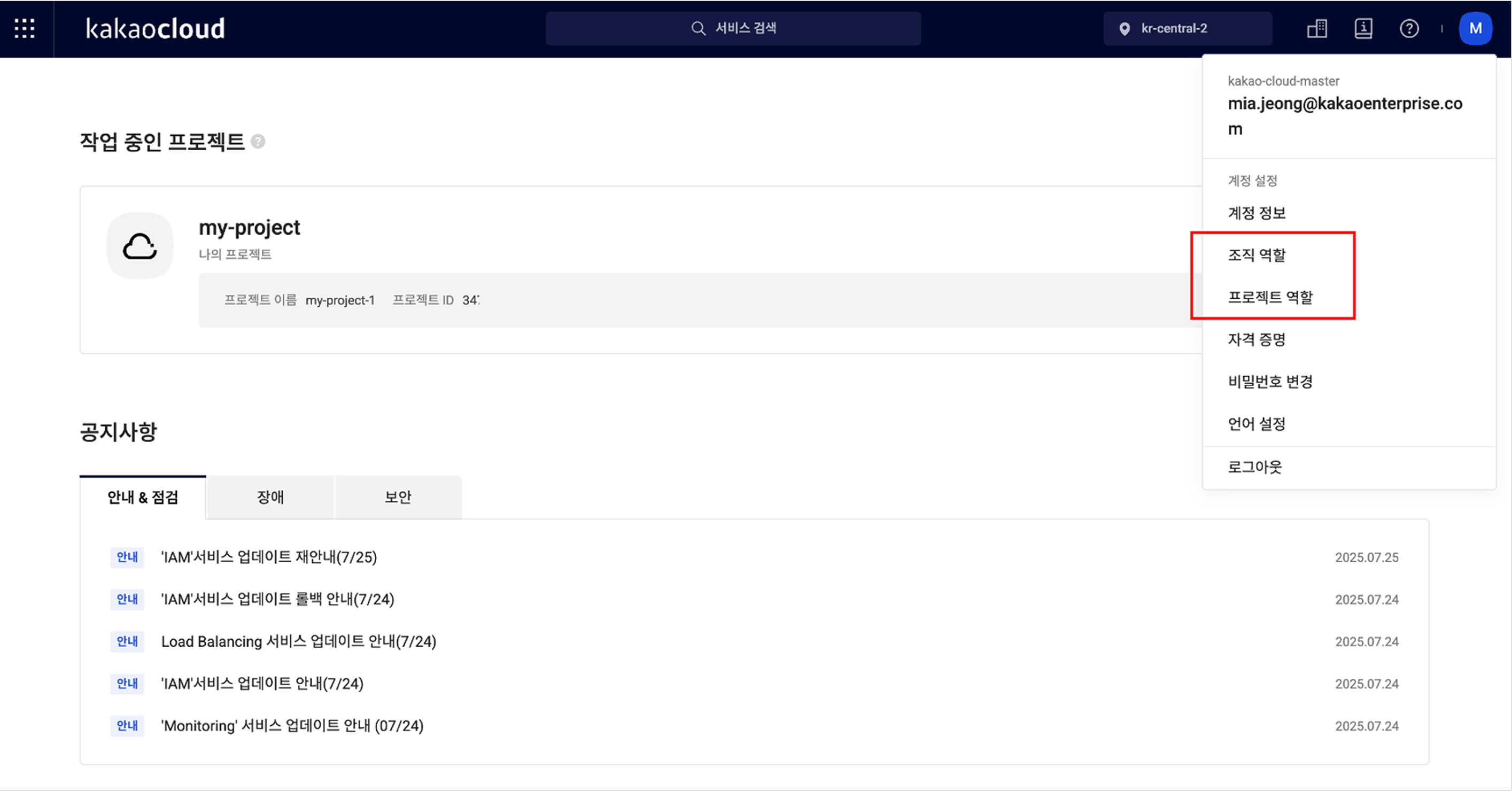
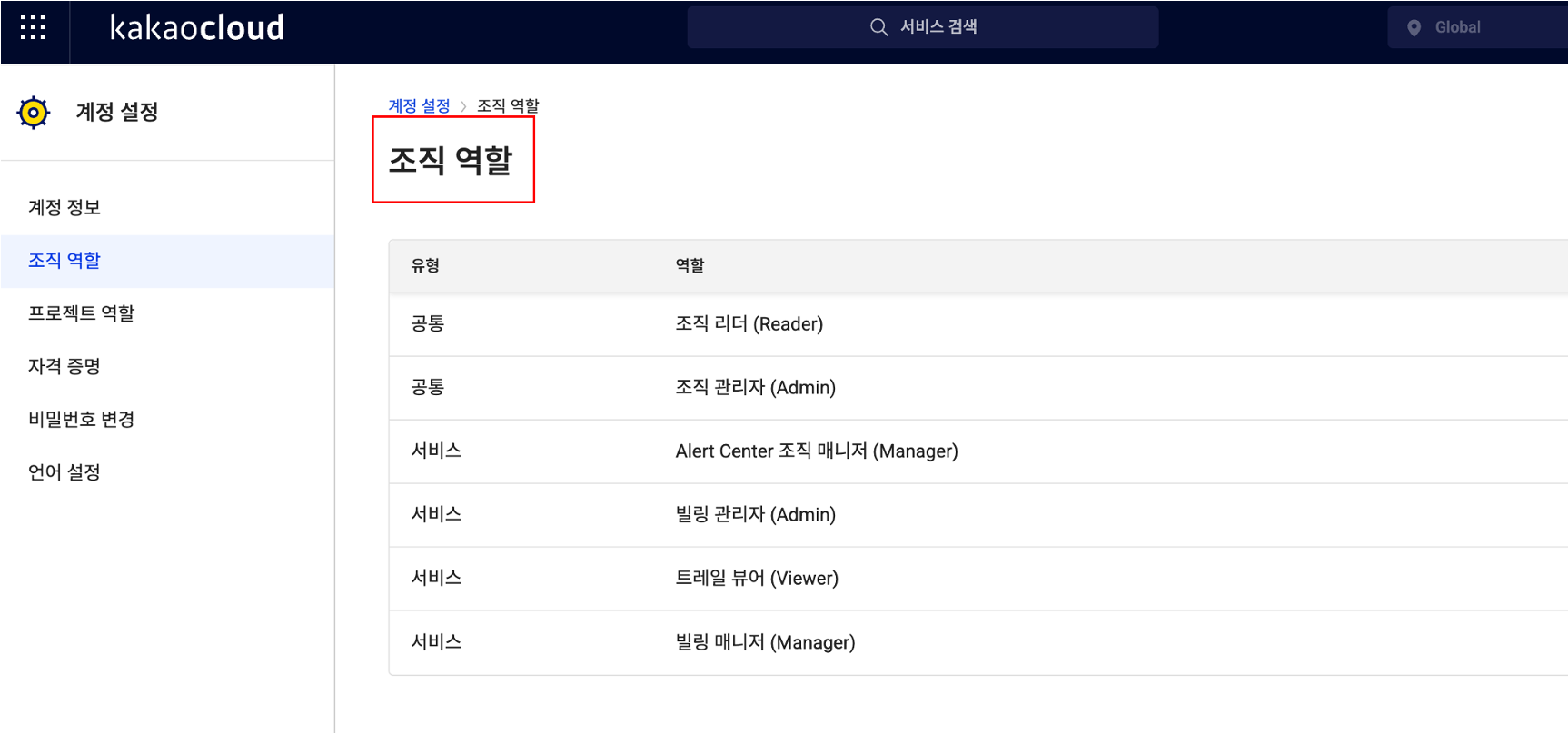
First, organization-level roles can be checked by selecting Organization roles from the profile menu at the top right of the console. In addition to the role names assigned to you, it also shows whether they are common roles or service roles limited to a specific service, allowing you to understand your current permissions at a glance.

org role

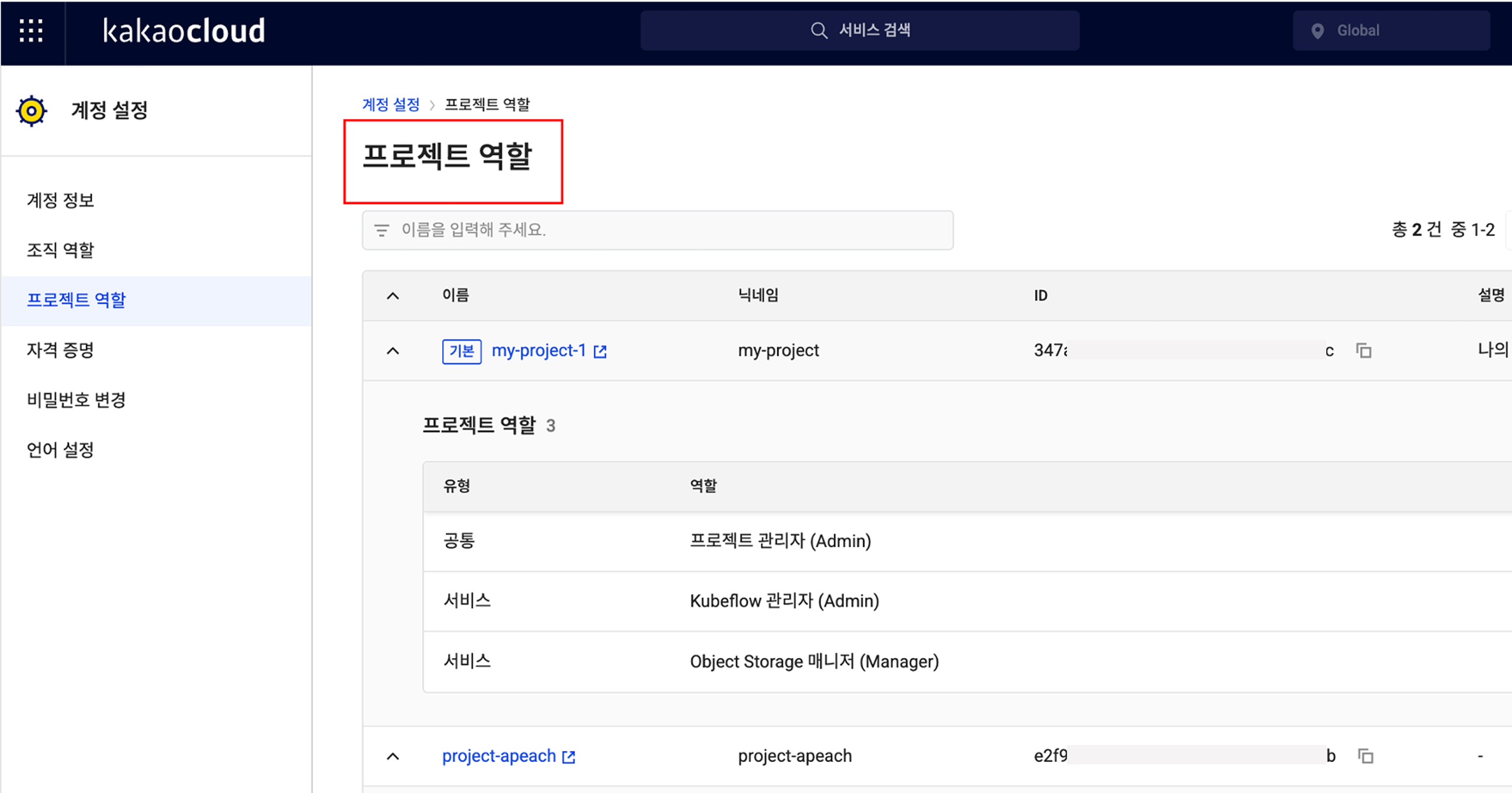
The same applies to project-level roles. In the Project roles menu at the same location, you can check the list of projects you belong to and see which roles are assigned within each project. The project name, nickname, ID, description, role type, and role name are provided together, so even if you participate in multiple projects, you can clearly understand the scope of your permissions.

project role

🎉 New roles added for IAM and project management features

This update also includes important changes to the role system.

Previously, the system consisted only of default roles such as Organization Admin, Project Admin, Member, and Reader, making it difficult to subdivide roles and responsibilities in real operating environments. For example, even if you wanted to grant a specific user permission to manage only IAM settings, Organization Admin or Project Admin roles also included resource management permissions, creating concerns.

To reflect these practical needs, dedicated roles specialized for IAM services and project management features have been newly introduced.

  • IAM Organization Admin has permission to assign or remove roles for users in the IAM service.
  • IAM Organization Viewer can view role information but cannot modify it directly.
  • IAM Project Admin can assign or modify user permissions for a specific project.
  • IAM Project Viewer has read-only permission to view role information for the project.

These dedicated roles can be assigned independently from existing organization/project administrators, allowing management responsibility for users to be subdivided more precisely.
👉 Learn more about IAM and project management roles

💡 Improving usability and clarifying responsibility

This IAM update is meaningful not simply because a feature was added, but because it provides a system that clarifies roles and responsibilities within an organization and distributes permissions efficiently.

Administrators no longer need to say, "I assigned the role, so please check whether you can access it." Instead, they can say: "Check and use the permissions you need directly in the console." In other words, the flow changes from a verification request to guidance for autonomous verification.

In addition, by using the new roles specialized for IAM and project management, you can assign service-specific owners while granting only the permissions they truly need. This strengthens security policies and makes permission operations more efficient.

Going forward, KakaoCloud plans to further subdivide service-specific role systems, including IAM. Through this, organizations can better follow the Principle of Least Privilege, administrators can reduce operational burden by granting customized permissions by task, and users can more clearly understand their own roles and responsibilities.

Want to check more details in the IAM documentation?
👉 View IAM role management documentation

Maintenance released for predictable cloud operations

· 3 min read
Irene (윤영지)
Service Manager
Monitoring Flow

If you have operated a cloud environment, you may have experienced this at least once: a missed update being pointed out in a security vulnerability report, or anxiously watching the monitor when a server restarts at an unwanted time while users are flooding in.

In fact, this is a reality many operators face. As cloud environments become increasingly complex and security threats more sophisticated, the burden that update and patch management places on operators is growing noticeably.

AWS, Azure, and Google Cloud also provide maintenance services to address missed security patches, operational time constraints, and insufficient stability in large-scale environments, helping operators focus on their essential work.

KakaoCloud also understands the anxiety and burden operators experience. In July 2025, we introduced the Maintenance service, tailored to the environment of domestic customers.🎉 🎉 🎉

Changes operators can experience directly

Maintenance goes beyond simply automating updates. It provides stability and efficiency that operators can experience directly. Let's look at a few representative situations.

First is the case of security patches. Previously, operators always had to worry about when to apply patches and how they would affect services. Now, those concerns can be reduced.
Maintenance automatically detects when new security updates are needed and lets operators schedule them for a selected time window. When an update is complete, operators can immediately check success or failure through email notifications, and if a failure occurs, they can quickly reschedule. This helps reduce the risk of service interruption.

The effect is also clear in database operations. For example, when a MySQL instance needs to be upgraded to the latest version, operators previously had to manage downtime directly and watch the process with concern. With Maintenance, however, operators only need to specify the scheduled time and task details. Maintenance automatically performs the upgrade at the specified time and provides results and status in real time, enabling stable upgrades without separate manual intervention.

In this way, Maintenance helps systematically and predictably manage tasks that directly affect service stability, such as security, database, and system updates.

How to use Maintenance

The usage flow of Maintenance is simple.

  1. Check update targets Review automatically detected upgrade targets or user-registered maintenance task lists, and check recommended schedules and expected impact in advance.
  2. Schedule tasks Set the execution date and time for each task, and schedule it during periods of low service usage to secure operational stability.
  3. Monitor progress When the scheduled time arrives, the task runs automatically, and you can check progress in real time.
  4. Check results and follow up Check the success status and detailed results of completed tasks, and retry or change the schedule if needed.

All of these processes can be performed in an intuitive console UI, allowing operators to continue maintenance conveniently without complex procedures.

Predictable maintenance that reduces uncertainty

The key to cloud operations is always stability and predictability. Maintenance improves operational efficiency by automating repetitive tasks, reduces uncertainty by notifying users in advance of interruption risks that may occur during updates, and further strengthens stability through staged updates.

Currently, maintenance is supported for MySQL instances and will be expanded to more managed services, including PostgreSQL, in the future.

Reduce unnecessary operational risk and raise service stability to the next level with KakaoCloud Maintenance.

You can find more information about Maintenance in the technical documentation.
👉 Understand key concepts of Maintenance

KakaoCloud IAM onboarding video guide

· 4 min read
Martin (왕현수)
Service Manager
Kali (명시온)
Service Manager
new iam onboarding video

Using the cloud is like operating a virtual building with dozens of keys. 🔐
If it is not clear who can enter which room and which doors they can open, confusion quickly follows.
Deciding who receives these keys and under what conditions is exactly what IAM (Identity and Access Management) does. In other words, IAM is a service that grants only the permissions needed according to each user's role, helping manage resources efficiently and reduce unnecessary access.

However, for those encountering IAM for the first time, the concept may feel somewhat complex and burdensome.
To help users understand and use KakaoCloud IAM more accurately, the content planning team created a four-part onboarding video series.
In this post, we briefly summarize the key content of each video.

🎬 Part 1. Getting started with IAM - Concepts and basic structure

The first video in the IAM onboarding series introduces the basic concepts of IAM and the structure of projects and organizations.
Even users new to IAM can easily understand the overall IAM structure through this video. Like looking at a city map, view the big picture of what permissions should be assigned to each area.

🎬 Part 2. IAM groups and service accounts - Improving user management efficiency

Part 2 introduces two features you must know to operate IAM more conveniently and systematically: IAM groups and service accounts.

  • IAM groups are a useful feature that groups users who need the same permissions into one user group and configures the required permissions all at once. For example, if you group users by teams such as development, operations, or marketing and configure the required permissions for each team at the group level, when a new team member joins, permissions are automatically granted simply by adding the member to the group. This enables much more efficient user management.
  • Service accounts are non-user accounts used by applications or automation scripts to access or control resources within a project, rather than actual IAM user accounts. They can issue API tokens and call KakaoCloud APIs instead of using IAM user accounts.

By using these two features appropriately, user management and system permission settings can be operated more systematically and securely. See the video for details.

🎬 Part 3. Tracking IAM change history with Cloud Trail

Initial IAM setup is important, but continuously checking and managing change history is also important. In Part 3, we introduce how to use KakaoCloud Cloud Trail to track who changed which IAM settings and when, at the event level.

🎬 Part 4. Reviewing IAM operational best practices

The final video introduces five best practices for operating IAM stably. Check whether all five operational tips below are applied in your organization.

  • Grant only the minimum permissions needed, without unnecessary permissions.
  • Use Cloud Trail to regularly check change history.
  • Regularly review and clean up departed-user and dormant accounts.
  • Clearly separate user accounts and service accounts for operations.
  • Integrate with Alert Center to quickly detect and respond to anomalies.

How was it?
IAM is more than a simple permission management tool. It is an important standard for securely protecting resources in an organization and clearly separating roles and responsibilities.
If you understand IAM's basic structure and operating methods well, you can continue providing stable and reliable services even in complex cloud environments.

If you want to learn more about KakaoCloud IAM, see the links below. Thank you :)

Resource Explorer released: distributed resources in one place

· 4 min read
Kali (명시온)
Service Manager
Resource Explorer

As cloud environments grow, one question naturally follows: "How many resources are we actually using right now?"
Where are the servers, how many volumes are connected, how many public IPs are in use... Checking each service one by one and organizing everything in a spreadsheet takes time and is prone to mistakes.

To resolve this inconvenience, KakaoCloud has officially released Resource Explorer, a service that makes it easier to view and manage cloud resources.
Resource Explorer is a service that lets you view various resources such as instances, Block Storage, public IPs, and load balancers in one integrated screen by KakaoCloud project. You can search resources by various criteria such as name, ID, status, and tags, and move to the details page of the corresponding resource with one click to continue the tasks you need.

In this post, we announce the release of Resource Explorer and briefly introduce its key features and use cases.

🏷️ How to distinguish resources by "context" - tags!

The ability to classify and filter resources based on tags is especially useful for users.

"Who created this instance?" "Were there this many volumes running?" "Was this for testing or production?"

The simplest and most effective way to answer these questions is tags. Resource Explorer helps you systematically organize and explore cloud resources around this tag feature.

You can assign desired metadata to each resource as key:value tags and give them clear meaning and purpose, as shown below.

  • Project:Alpha – Belongs to a specific project
  • Environment:Production – Production environment
  • Owner:ML Team – Responsible organization
  • Billing:2505 – Cost management

Previously, resources were distinguished only by name or resource ID. Now you can understand why a resource exists and what intent it was created with through tags. This meaning-based organization enables much faster and more accurate exploration than a simple list.

For example,

✅ Want to quickly view only AI infrastructure in production? → Filter by Environment:Production, Owner:AI Team!

✅ Want to view only test servers created last month? → Check immediately with the Environment:Dev, CreateDate:2025-04 tags!

Users can freely create custom tags by combining the keys and values they want, and can easily add tags to selected resources or edit existing tags. System tags automatically attached when resources are created, such as kc:platform, can also be used together.

Check the types of tags here!


In addition, Resource Explorer provides several features that help cloud operators resolve frequently encountered situations faster and more efficiently.

📂 Understand many resources at a glance - Integrated view

Previously, to check resources scattered across services, you had to move between consoles and view them one by one. Now, in Resource Explorer, you can check instances, Block Storage, public IPs, load balancers, and backups all at once. Because you can view the entire resource structure within a project, it can be used as a starting point for asset identification.

"I need to extract a list of all running VMs and public IPs." → Just select the project and the list is generated automatically!

Finding one or two resources among many can take more time than expected. Resource Explorer provides an exploration feature that lets you combine various conditions such as name, ID, tag, region, and creation date, save search conditions, and quickly reuse them.

"I want to see only Block Storage created last month with 'db' in the name." → Combine conditions to filter and get results in seconds!


🚀 Cloud resource management is now lighter and smarter

Resource Explorer is like the "eyes" of cloud operators.👀 It finds resources that were not visible, visualizes structures that were difficult to understand, and makes reporting and response flows much faster.

Resource Explorer can be used immediately in the KakaoCloud console without separate configuration.
Start KakaoCloud now and experience various services directly.

Practical machine learning workflows starting with Kubeflow

· 5 min read
Update Kubeflow

Using machine learning and AI in the cloud is no longer an area limited to specific developers or researchers. It is becoming a technology that is closer to practitioners who plan or operate services, and even to beginners encountering AI technology for the first time.

In line with this trend, KakaoCloud provides the latest version of Kubeflow. This time, we are newly providing two hands-on tutorial series that let anyone build machine learning pipelines directly based on Kubeflow.

The newly released tutorials are series on LLM (large language model) practice and web service traffic prediction. Beyond simple code examples, they let you easily experience the full practical process, from model training to serving, optimization, and automation.


📘 Build generative AI yourself - LLM workflow tutorial series

The first series is the LLM workflow tutorial. This series is structured so that you can practice the entire process of serving a large language model directly in a Kubeflow environment, fine-tuning it for your intended purpose, and finally building a document-based question answering system (RAG).

In particular, this series uses Meta Llama 3.2 from Hugging Face Hub together with Kanana, a model developed by Kakao. You can directly experience various LLM usage scenarios, from real-time inference to domain-specific training.

The LLM series consists of three parts.

  • Part 1: Create an LLM model serving endpoint Deploy a pretrained LLM to a cloud environment using KServe and create an endpoint that supports real-time inference.

  • Part 2: Fine-tune an LLM model Guides you through efficiently retraining a selected model on domain-specific data based on PEFT (LoRA, and more). It also includes how to save and reuse the model after training.

  • Part 3: Implement document-based RAG Complete an LLM use case by embedding user text documents into vectors, storing them in FAISS, and configuring a question answering API using LangChain.

Because this series lets you directly configure an LLM using CPU/GPU in a cloud environment, we believe it will be a very useful starting point for developers and AI planners who want to review actual productization possibilities.

📌 Go to the Kubeflow-based LLM workflow series


📈 From logs to insights - Traffic prediction model tutorial series

The second series is a hands-on tutorial for building a traffic prediction model. This series walks through the process of collecting access log data from a web service and creating a time-series machine learning model that predicts future traffic based on that data.

In particular, this tutorial does not stop at analysis. It also covers serving the trained model as an API and automating the entire process with Kubeflow Pipelines. In other words, you can experience an end-to-end pipeline that covers data preprocessing, model development, hyperparameter optimization, deployment, and operations all at once.

The traffic prediction series consists of four parts.

  • Part 1: Collect and preprocess traffic data Collect web server log data and refine it into a form suitable for time-series analysis. Create features that reflect periodic patterns such as day of week and time of day, and build a dataset that can be used as input for machine learning models.

  • Part 2: Tune model hyperparameters Based on the results of baseline model training, use Kubeflow Katib to perform hyperparameter optimization and improve performance.

  • Part 3: Create a model serving API Deploy the trained model as a KServe-based InferenceService and perform predictions through API requests.

  • Part 4: Configure a model pipeline Automate the entire process, from data preprocessing and model training to performance validation and serving deployment, with Kubeflow Pipelines.

This series is highly recommended for MLOps beginners and data engineers because it lets you practice the complete flow of an operational machine learning service directly in a cloud environment.

📌 Go to the Kubeflow-based traffic prediction model series


🚀 Practical machine learning workflows starting with Kubeflow

Both series released this time are built on KakaoCloud Kubeflow. Kubeflow is a tool that simplifies complex MLOps processes and helps manage reproducible machine learning experiments easily. You can intuitively configure machine learning infrastructure such as GPU, storage, and network settings in the KakaoCloud console, and it provides features for deploying and operating various machine learning workloads in a consistent way.

These tutorials are designed as practical learning paths where you can acquire technology flows applicable to real work, going beyond simply following steps. From the latest generative AI technologies such as LLMs to predictive models and pipeline configuration, you do not merely copy and run complex code. Instead, you configure the meaning of each step yourself, understand the technical context, and build practical intuition.

You can directly practice and experience two machine learning fields currently receiving attention, generative AI and time-series prediction, in the KakaoCloud environment. Start building practical machine learning pipelines with Kubeflow-based hands-on tutorials.

📝 View all Machine Learning & AI tutorials
👉 Start KakaoCloud now

Manage SSL certificates more securely with Certificate Manager

· 3 min read
Certificate Manager

In April 2025, Certificate Manager, KakaoCloud's integrated SSL certificate management service, was officially released. Now you can register and connect certificates from one integrated console, without having to configure certificates separately in each service such as Load Balancer or Kubernetes Engine.

🔐 What is Certificate Manager?

Certificate Manager is a service in the Management group that supports registering SSL certificates and connecting them to various KakaoCloud services. Previously, certificates had to be configured separately for each service. Now certificates can be registered in one place and selected for connection when needed, improving management efficiency and security consistency.

Key features

KakaoCloud Certificate Manager provides features for integrated certificate lifecycle management.

  • 🔐 Register and delete certificates You can register SSL certificates directly in the console. By entering the PEM-format certificate body, private key, and chain information including root and intermediate certificates, you can easily add certificates, and register or delete them through an intuitive UI.

  • 🧩 Connect to various services A certificate registered once can be applied to various services. Currently, when configuring an HTTPS listener for Load Balancing ALB or a TLS listener for NLB, certificates can be selected from a dropdown. In Kubernetes Engine, registered certificates can also be connected as-is when configuring ALB-based HTTPS ingress. Because the same certificate does not need to be registered repeatedly, configuration is simplified and security consistency and operational efficiency are improved.

  • Lifecycle and expiration management You can check certificate expiration dates in the console, allowing you to identify and respond to renewal or replacement timing in advance. Certificates can be managed periodically without service interruption, enabling stable operations.

✔️ The improvements from the Certificate Manager release can be summarized as follows.

ItemBeforeAfter Certificate Manager release
Certificate registration locationRegistered separately by serviceRegistered centrally in the console and selectable from various services
Listener configuration methodEntered directly by serviceSelect registered certificates from a dropdown
Expiration date managementSeparate tracking requiredMetadata such as expiration date can be checked in the console

Certificate Manager is provided as a default management service. For detailed usage instructions, see the Certificate Manager user guide.

KakaoCloud will continue improving features that enhance user operational convenience and security, as with the release of Certificate Manager. We hope you experience a safer and more reliable KakaoCloud.

Thank you.

Introducing IAM roles dedicated to Alert Center

· 4 min read
Kali (명시온)
Service Manager
Management Update

📢 Alert Center permissions have been subdivided!

KakaoCloud Alert Center permission management has been improved so that more precise roles can be configured at the organization and project levels. This makes it possible to grant appropriate permissions to each user and operate notification policies more safely and efficiently.

In this post, we introduce what IAM roles dedicated to Alert Center are and how to use them effectively.

🔐 IAM and Alert Center permission structure

KakaoCloud IAM (Identity and Access Management) is a service that controls access permissions for cloud resources. IAM uses RBAC (Role-Based Access Control) so that only users granted specific roles can access the resources they need.

Previously, permissions for Alert Center resources could not be subdivided by organization or project, making it difficult to grant appropriate permissions to users who needed to manage only notifications for a specific organization or project. With this improvement, manager and viewer roles can now be assigned separately at the organization and project levels, enabling more flexible permission management.

In other words, if a user is responsible for managing Alert Center for the entire organization, an organization-level role can be granted; if a user needs to manage only notifications for a specific project, a project-level role can be granted.

🏢 Introducing roles dedicated to Alert Center

🏛️ Role management at the organization level

Organization-level Alert Center roles have permission to manage notifications generated by IAM and Billing services. To manage Alert Center resources within an organization, you must grant the Alert Center Organization Manager or Alert Center Organization Viewer role.

Organization Managers can view all Alert Center resources and directly manage notification policies and receiving channels. Organization Viewers can view all resources but cannot change settings. If Alert Center notification settings need to be changed, grant the Manager role; if only monitoring is needed, grant the Viewer role.

📌 Role management at the project level

Alert Center is used not only at the organization level but also at the project level. Project-level Alert Center roles have permission to manage notifications such as metrics, logs, and events generated in individual projects. If you need to manage notifications generated in a specific project, grant the Alert Center Project Manager or Alert Center Project Viewer role.

Project Managers can view all Alert Center resources in the project and manage notification policies and receiving channels. Project Viewers can view all resources but cannot change settings.

🚨 Changes starting March 18

With the introduction of the new permission system, appropriate roles must be assigned to use Alert Center features starting March 18.

✔️ Only organization or project administrators, or users with Alert Center roles, can manage resources.
✔️ Users without permissions can only view Alert Center resources and cannot view the recipient list of the default receiving channel.
✔️ Until March 18, resources in Alert Center can be created and deleted without roles, the same as before. In other words, to configure notification policies in Alert Center after March 18, appropriate roles must be assigned in advance at the organization or project level.

🔎 Use Alert Center more safely and flexibly

Although new roles dedicated to Alert Center have been added, users with existing IAM project roles can still use some features.

For example, users with the Project Member or Project Reader role can still view notification policies, receiving channels, and sending history in Alert Center. However, they cannot view the recipient list within receiving channels. In other words, basic monitoring is possible, but the new Alert Center roles are required for detailed notification management.

Alert Center is a service that detects various events and logs generated by cloud services and provides notifications. Through this subdivision of IAM roles, safer and more efficient permission management is possible at the organization and project levels. Please configure the required roles properly for stable system operations.

For more details, see Alert Center > Key concepts.

Thank you!

Latest tutorials - Guides for Rancher, Tableau, and Splunk

· 4 min read
Mia (정혜원)
Technical Contents Manager
Tutorial new release

When operating a cloud environment, integration with third-party solutions is no longer optional; it has become essential. Because it is difficult to meet every requirement with a single cloud service alone, companies are shifting toward building more flexible and scalable infrastructure by combining various open-source and commercial solutions.

In line with this trend, KakaoCloud technical documentation has prepared three new tutorials that cover how to integrate with proven solutions such as Rancher, Tableau, and Splunk in key operational areas such as Kubernetes cluster management, data analytics, and log monitoring.

In this post, we introduce tutorials on Kubernetes cluster management with Rancher, MySQL data analysis with Tableau, and real-time Cloud Trail log monitoring with Splunk.

🚀 Integrating Kubernetes Engine with Rancher - Optimizing multi-cluster management

As Kubernetes environments expand, effectively managing clusters becomes more important. This tutorial introduces how to efficiently operate KakaoCloud Kubernetes Engine using Rancher. Rancher is an open-source platform that helps manage multi-cluster environments in an integrated way, and is widely used because it lets users centrally and easily control clusters across various environments, including on-premises and cloud environments.

In this tutorial, you will learn how to integrate Rancher with Kubernetes Engine and get practical tips for managing clusters more intuitively through the Rancher web console. If you want to optimize multi-clusters and operate deployment and monitoring more easily, this is a tutorial worth reviewing.

📌 Go to the tutorial for integrating a Kubernetes Engine cluster with Rancher

📊 Integrating MySQL with Tableau - Implementing cloud data visualization

Simply accumulating data is not enough. The key is how to analyze and use it. With Tableau, you can visualize data intuitively and effectively understand rapidly changing business environments in real time. This tutorial introduces how to integrate KakaoCloud MySQL with Tableau.

This scenario explains the process step by step, from securely accessing MySQL through security group and bastion host settings on KakaoCloud to loading and analyzing data in Tableau. If you want to reduce database costs in a cloud environment while effectively visualizing large-scale data, use this tutorial to build a more efficient data analytics environment.

📌 Go to the tutorial for integrating KakaoCloud MySQL with Tableau

🔍 Analyzing Cloud Trail logs with Splunk - Real-time security and operations monitoring

Detecting and analyzing various events that occur in cloud infrastructure in real time is essential for securing stability. Splunk is a solution that effectively analyzes large volumes of log data, detects anomalies, and enables rapid response.

This tutorial introduces how to store Cloud Trail logs in KakaoCloud Object Storage and send them to Splunk Enterprise using Splunk Universal Forwarder. Through this process, you can reduce operational risk with real-time log analysis and understand events occurring in a cloud environment at a glance. This tutorial is a practical guide designed to help security teams and cloud operations teams use log data more effectively.

📌 Go to the tutorial for loading Cloud Trail logs into Splunk Enterprise

🛠 Efficient use of KakaoCloud and various solutions

The three tutorials introduced above cover how to support more efficient cloud operations by integrating KakaoCloud with third-party solutions.

If you want to easily manage a multi-cluster environment, see Integrating Kubernetes Engine with Rancher. If you are interested in data analysis using a cost-efficient database, see Integrating MySQL with Tableau. If you need practical examples of real-time log analysis and security monitoring, see Loading Cloud Trail logs into Splunk.

In cloud-native environments, a single service has limitations. We believe smooth integration with various open-source and commercial solutions is a key factor in maximizing the efficiency and scalability of cloud operations. We hope KakaoCloud's latest tutorials serve as useful references for configuring your cloud environment.

Thank you!

Building a CDC Pipeline with Kafka

· 4 min read
Analytics Use Cases

Hello. In this post, we introduce how to build a CDC (Change Data Capture) pipeline for real-time data synchronization using KakaoCloud services.

CDC (Change Data Capture) is a technology that detects changes in a database in real time and delivers them to other systems. By capturing changes such as INSERT, UPDATE, and DELETE that occur in a database and delivering them to other systems, real-time data synchronization and processing become possible. This technology is widely used for various purposes, including real-time data sharing between microservices, providing up-to-date data for real-time analytics, and improving the reliability and speed of data backups.

Importance of CDC for real-time synchronization

Let's use the order system of a large online shopping mall as an example. During a special sale for a popular product, Customer A completes the purchase of the last item in stock. In a system without CDC, there may be a delay before changes in the inventory database are reflected in other systems. Therefore, if another customer, Customer B, orders and completes payment for the same product during this delay, the order must later be canceled due to insufficient inventory. If this situation continues to occur in the system, it will negatively affect business reliability as well as customer satisfaction.

If CDC technology had been applied in advance, the database change would have been detected immediately after Customer A's purchase was completed and reflected in real time across all related systems, including inventory management, product display, and payment systems. In this process, the product could immediately be displayed as "sold out," preventing unnecessary additional orders from Customer B.

In this way, CDC contributes to improving both business operational efficiency and customer satisfaction by immediately reflecting database changes. For this reason, many companies are adopting CDC solutions to improve data management and system integration.

KakaoCloud provides various managed services for building CDC pipelines. By using these services, you can easily build a stable and cost-effective CDC pipeline. The following are the core services required to build a CDC pipeline.

  • MySQL: KakaoCloud provides an enterprise-grade managed MySQL service. Automatic backup, real-time monitoring, and security patches are performed automatically, and stable database operations are possible through high availability and automatic failure handling.

  • Advanced Managed Kafka: Advanced Managed Kafka is KakaoCloud's fully managed Apache Kafka service. It automatically configures and manages high-performance infrastructure for large-scale real-time data streaming, and cluster operation and monitoring are automated, enabling a stable message brokering service.

  • Hadoop Eco: Hadoop Eco is a data analytics ecosystem that makes it easy and fast to perform various tasks using large-scale data. It provides various open-source components in the Hadoop ecosystem as fully managed services, reducing the burden of building and operating complex big data environments.

Building a CDC Pipeline with Kafka

You can check the CDC pipeline configuration example described above in detail in a tutorial in KakaoCloud technical documentation.

The Building a CDC Pipeline with Kafka tutorial explains how to set up a CDC pipeline using MySQL, a managed database service, Advanced Managed Kafka for real-time data streaming, and Hadoop Eco for data analytics.

The following architecture shows the overall flow of the tutorial: Debezium detects data changes in MySQL, delivers them in real time through Kafka, and finally analyzes them in Druid and visualizes them with Superset.

Image KakaoCloud CDC pipeline architecture

KakaoCloud CDC pipelines can be used effectively in various business environments, such as real-time inventory management, user behavior analytics, and event-driven systems. The Building a CDC Pipeline with Kafka tutorial provides a useful guide for implementing these cases and applying them to real business environments.

Closing

In recent business environments, CDC pipelines have become an essential element for supporting real-time data synchronization and analytics. Please also remember that by using KakaoCloud managed services, you can easily and efficiently build stable and scalable CDC pipelines.

For more details and usage methods, see Building a CDC Pipeline with Kafka.

Thank you!

Advanced Managed Prometheus released for high-performance managed monitoring

· 4 min read
Evan (진은용)
Service Manager
Advanced Managed Prometheus

Hello.
On December 26, 2024, KakaoCloud's new service, Advanced Managed Prometheus, was released. 🎉

If you have experienced difficulties with complex monitoring setup or unexpected failure handling in cloud environments, Advanced Managed Prometheus is a service worth watching.

Advanced Managed Prometheus is a high-performance managed monitoring service that can efficiently collect, store, and analyze metric data in cloud-native environments. It is designed to reliably process large-scale data generated from Kubernetes, Virtual Machine, applications, and more, and provides scalability and stability optimized for cloud environments based on Prometheus's core features.

What is Prometheus?
Prometheus Logo

Prometheus is a project that began at SoundCloud in 2012 and is now an official project of the Cloud Native Computing Foundation (CNCF). It provides metric-based monitoring and collects, stores, and analyzes system and application performance data. In particular, it efficiently stores and queries data based on a time-series database. With scalability, reliability, and flexibility, Prometheus is an essential monitoring tool in cloud-native environments.

What is Advanced Managed Prometheus?

Now let's take a closer look at the key features and characteristics of KakaoCloud Advanced Managed Prometheus.
Advanced Managed Prometheus is a service that optimizes the powerful features of Prometheus for cloud-native environments and provides real-time metric collection and monitoring without complex configuration.

In large-scale environments, users may face limitations in data storage capacity and processing speed, difficulties in cluster configuration and maintenance, and problems where failures are not detected in advance. Advanced Managed Prometheus was designed to solve these operational difficulties. The service collects metric data in real time without the risk of data delay or loss. It also automates Prometheus installation, configuration, and backup, reducing operational burden and helping users focus on business logic and performance optimization instead of infrastructure management.

In Kubernetes environments in particular, it effectively manages large-scale container-based workloads and greatly improves visibility into cloud-native applications.

Key features of Advanced Managed Prometheus

1. Automated operations management

  • Automates Prometheus installation, upgrades, and backups to minimize operational burden.
  • Users can build a stable monitoring environment without complex configuration.

2. Scalable data storage

  • Large-scale metric data can be retained and processed reliably.
  • It responds flexibly to growing data volumes while maintaining performance.

3. Real-time alerts and Alert Center integration

  • By integrating with KakaoCloud Alert Center, you can configure threshold alerts for key metrics and logs.
  • When an issue occurs, immediate notification messages help you respond quickly.

4. Integrated monitoring

  • You can monitor and manage various resources such as Kubernetes, VMs, and applications in an integrated way.
  • Operational efficiency improves because all resources can be viewed at a glance.

5. Real-time dashboard and visualization

  • By integrating with Grafana, it provides real-time dashboard and visualization features.
  • Complex metric data can be analyzed and understood intuitively.

Usage purposes and examples

Advanced Managed Prometheus is especially useful in the following situations.

  • Monitoring large-scale workloads in Kubernetes clusters
  • Analyzing resource usage for VMs and applications
  • Collecting real-time metric data and managing alerts
  • Building a stable monitoring environment while minimizing operational burden

Closing

KakaoCloud Advanced Managed Prometheus is designed to make monitoring and alerts easier and more stable to operate in cloud-native environments. In fact, Advanced Managed Prometheus was created based on requests and feedback from many customers. We thought deeply about how to reduce complex monitoring setup and maintenance burden and help users manage infrastructure more effectively.

Select Advanced Managed Prometheus in the KakaoCloud console and easily build a monitoring environment. For more details, see the How-to Guides documentation.

Thank you.