34 posts tagged with "kakaocloud"

View All Tags

Monitoring Flow service released for workflow monitoring automation


· 5 min read
Irene (윤영지)
Service Manager
Monitoring Flow

KakaoCloud's new service, Monitoring Flow, has been released.

As the name suggests, Monitoring Flow is a service focused on monitoring application status in real time and automating complex business flows to resolve inefficient issues in systems.

If you have experience with monitoring in an existing cloud environment, you may agree that building a monitoring system, automating processes, and integrating systems require considerable time and resources. Although many companies are working to solve these problems, the reality is that they still struggle with manual work and inefficient management. KakaoCloud developed Monitoring Flow as a solution that presents a new monitoring standard for system management and makes it easy to solve complex problems in cloud environments.

Now let's take a closer look at how Monitoring Flow works and what features it provides.

What is Monitoring Flow?​

Monitoring Flow is a service that helps monitor application status in real time through APIs and automate user-defined workflows. Users can create monitoring scenarios directly and schedule them to run automatically at desired times. Monitoring Flow is especially strong in that workflows can be intuitively designed and managed easily in the KakaoCloud console without writing code. This enables not only IT experts but also non-experts to easily build monitoring processes.

] In addition, through integration with Alert Center, you can set thresholds for key metrics and receive notifications that match the conditions. For example, if the response time of a specific server exceeds the configured threshold, a notification is automatically sent so that the person in charge can resolve the issue immediately. By using these features, you can greatly improve the stability and efficiency of system operations.

How Monitoring Flow works​

The basic concepts of Monitoring Flow are Step, Scenario, and Flow Connection.

A step is the smallest unit that composes a workflow in Monitoring Flow and represents a single task. A scenario means a workflow, and it automatically executes a defined work flow composed of various steps according to a schedule. A flow connection is a channel that connects subnets in a VPC, enabling monitoring of KakaoCloud internal resources. Because resources can be accessed for the subnets of the VPC registered in the flow connection during monitoring, flow connection registration is required.
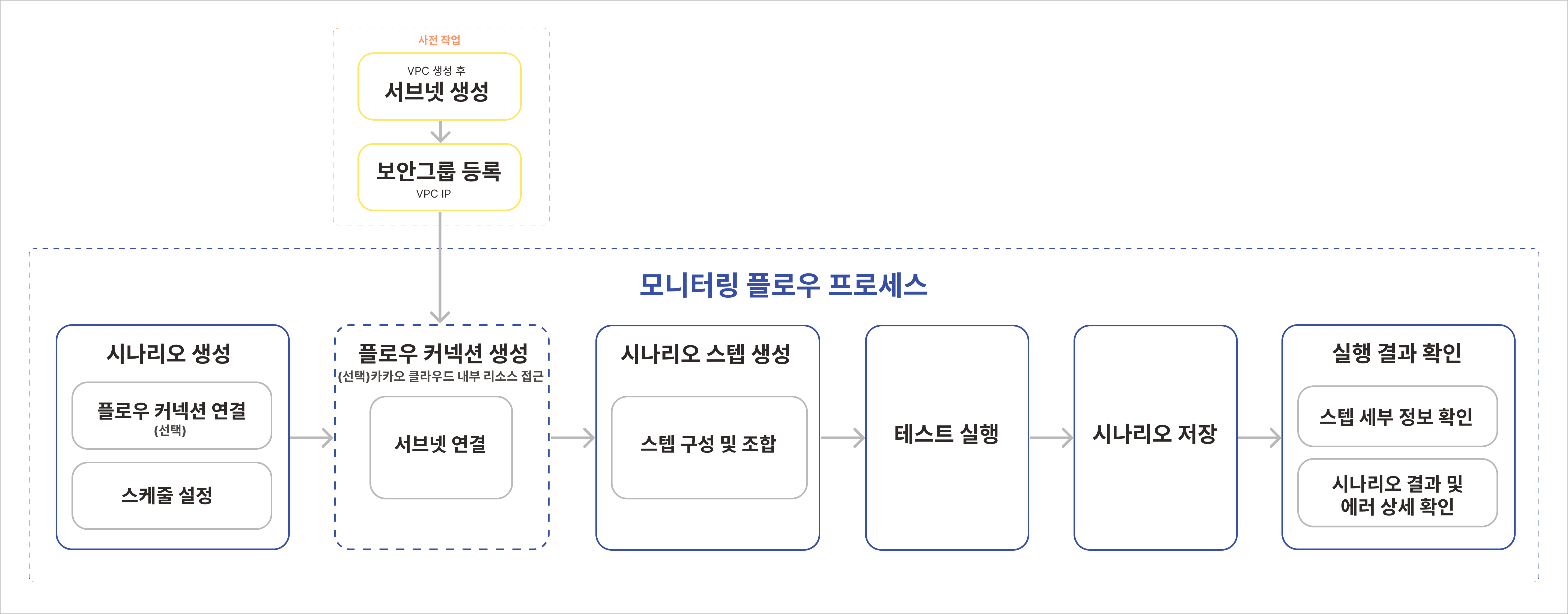
Monitoring Flow process Monitoring Flow process

Monitoring Flow constructs a workflow based on steps configured by the user and executes the tasks defined in each step sequentially. Because the process proceeds through various paths depending on conditions, you can easily identify workflow progress and points where errors occur. In addition, you can monitor system status in real time and respond quickly through preconfigured notification policies.

Monitoring Flow features​

Monitoring Flow provides users with various features such as intuitive workflow design, real-time monitoring, and serverless architecture, helping them efficiently manage complex cloud environments. Detailed features of Monitoring Flow are as follows.

1. Intuitive workflow visualization

Monitoring Flow visually represents user-defined scenarios with an intuitive UI and drag-and-drop method, and supports easy configuration of complex workflows. This lets users understand the status and progress of each step at a glance, quickly identify and resolve issues, and makes workflows accessible even to users without development experience, lowering the barrier to workflow management and enabling fast prototyping and operation.
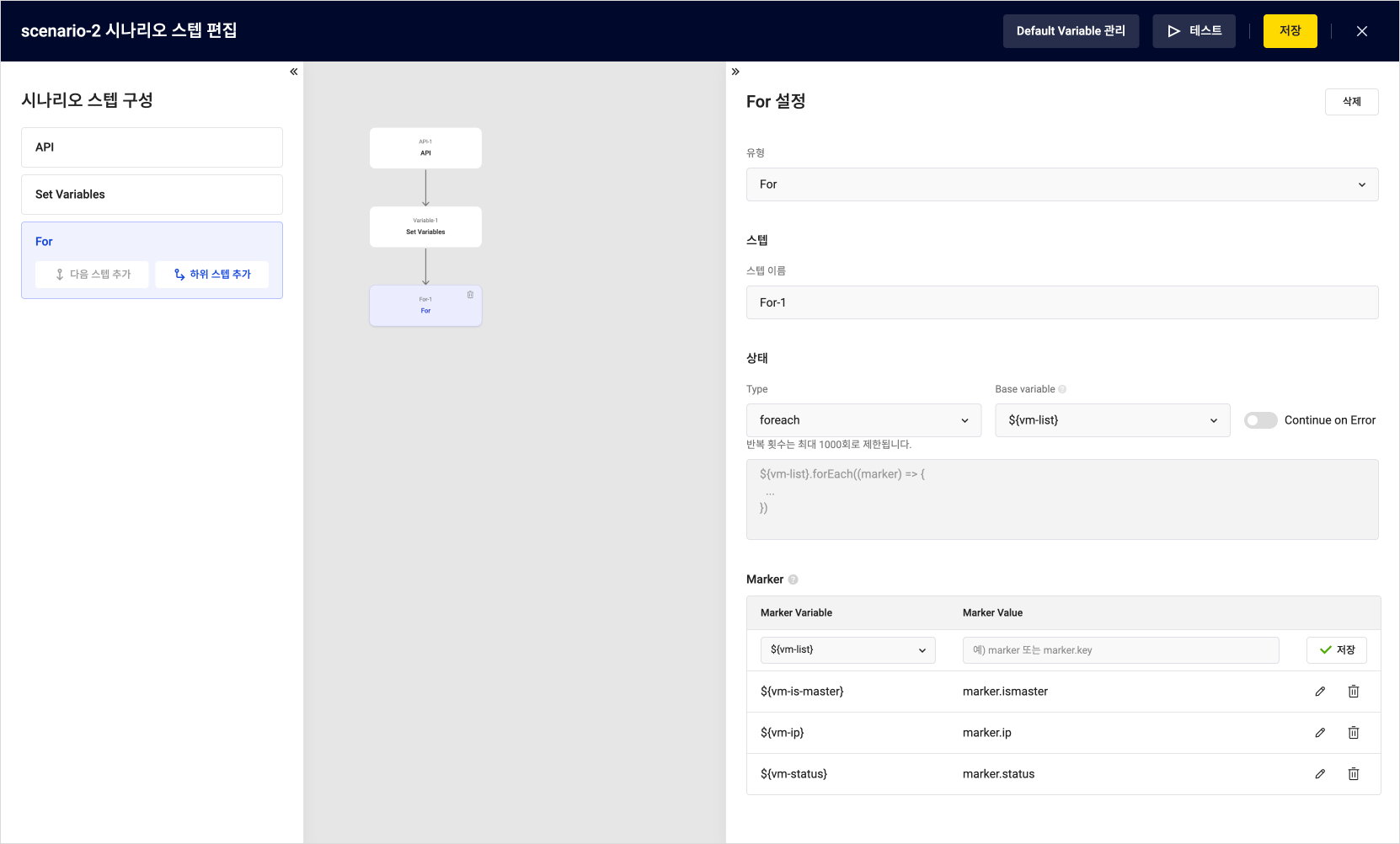
Monitoring Flow's intuitive UI in the web console Configuration in the Monitoring Flow web console

2. Process structuring and automation

Monitoring Flow lets you design complex workflows by dividing them into multiple steps and setting conditions for each step so that processes can proceed through various paths. This allows users to manage workflows flexibly according to conditions and automate repetitive tasks to improve operational efficiency.

3. Serverless architecture

Monitoring Flow runs in a serverless environment that does not require server management, so users can build and run workflows without worrying about infrastructure management. Because costs are charged only for usage, it is cost-efficient and suitable for small and medium-sized businesses with limited resources.

4. Integration with various services

Monitoring Flow integrates with various KakaoCloud services, allowing workflow execution results to be integrated with other systems or important notifications to be managed automatically. These integration features enable efficient resource management and fast issue response in complex work environments.

5. Real-time monitoring and fast response

Monitoring Flow provides a feature for monitoring workflow execution status in real time. Users can check errors that occur at each step in real time and respond quickly when an issue occurs. This improves operational stability and minimizes downtime.

Closing​

KakaoCloud Monitoring Flow is a powerful tool that lets you conveniently manage system monitoring and process automation in one platform. The intuitive UI and various features introduced in this post can greatly improve the stability and efficiency of system operations.

Select Monitoring Flow in the KakaoCloud console and easily design the workflow you want. You can find more detailed instructions in KakaoCloud's How-to Guides documentation.

Thank you.

MemStore, KakaoCloud's new in-memory data storage service

· 3 min read
Kate (김소희)
Service Manager
Memstore

Starting in August, KakaoCloud will release MemStore, a new in-memory data storage service, replacing the existing Redis® service. This service name change was decided to respond quickly to the recent Redis® license change and provide users with improved features and stability.

Why MemStore?​

In March this year, Redis Labs announced that it would change the existing BSD 3-Clause license to a dual license model called Redis Source Available License v2 (RSALv2) and Server Side Public License v1 (SSPLv1). As a result, a separate license is required to use Redis® commercially, affecting multiple cloud service providers including KakaoCloud.
In response to this change and to provide sustainable service, KakaoCloud is introducing MemStore, a managed cache database service.

Key features and benefits of MemStore​

KakaoCloud MemStore preserves the performance and features of the existing Redis® service while including cache database features that will be further expanded in the future.

  • High performance and stability: MemStore stores all data in memory, providing high-speed data access and processing.
  • Automatic backup and restore: Data is periodically backed up to separate storage so it can be easily restored in case of data loss. Snapshot and backup features are provided to protect user data from unexpected situations.
  • Enhanced security: Security features are strengthened in line with the new license model, placing customer data safety first. In addition, virtual private cloud (VPC) network and security group connection features provide a secure database operating environment by controlling access from outside specific IP ranges.
  • Redundant configuration and high availability: High availability is ensured through an Active-Standby redundant configuration. If a failure occurs on the Active server, the Standby server immediately takes over operations to minimize service interruption.

Support for existing users​

Redis® service resources of existing KakaoCloud users are automatically converted to MemStore without service impact. In addition, all services that can be used together with Redis® (Cloud Trail, Alert Center, Monitoring, and others) can be used without impact from the MemStore service name change.

Through MemStore, KakaoCloud will work to provide customers with a better service experience and build a sustainable service environment that keeps pace with the latest technology trends.

For more information, see the KakaoCloud website and technical documentation.
Thank you.

Redis® is a trademark of Redis Ltd. MemStore is based on open-source Redis® version 7.2 or earlier.

Maximizing DevOps efficiency with GitOps on KakaoCloud

· 6 min read
GitOps

Hello! In this post, we introduce how to improve development and operations environments through GitOps on KakaoCloud.

GitOps, based on DevOps principles, refers to the process of using a Git repository as a single source of truth to track all changes and declaratively manage infrastructure, thereby maintaining consistency between infrastructure and applications. As a way to automate deployment and management of infrastructure and applications and maximize efficiency, GitOps has become one of the key methods for responding to rapidly changing market requirements as cloud-native environments spread.

In actual development environments, GitOps means managing infrastructure and application deployment using a Git repository as a single source of truth. Infrastructure is defined declaratively, all changes are tracked through Git, and deployments are automated. This series of tasks ensures that code stored in Git stays synchronized with the actual state of infrastructure and applications.

Why implement GitOps?​

In practice, GitOps provides a wide range of benefits in modern software development and operations. First, declarative infrastructure lets you define the desired state of infrastructure as code. For example, if the configuration of a specific server is written as code, that configuration can be applied consistently at any time, maintaining consistency in infrastructure management. Through the version control principle of storing all configuration files in Git to track changes and manage versions, you can easily understand change history and roll back to a previous state when an issue occurs. Automated deployment applies changes to infrastructure automatically after code changes are approved, and because changes are tested and deployed through CI/CD pipelines, infrastructure management becomes more efficient.

Through these processes, GitOps greatly improves stability and reliability because infrastructure and applications defined as code can be deployed predictably and consistently. It can minimize human error, and changes are quickly tested and deployed through CI/CD pipelines, providing a fast feedback loop that enables issues to be resolved quickly. In terms of reducing operational costs, automated deployment and management reduce manual work and allow developers to focus on writing actual code, maximizing efficiency.

Resources required to implement GitOps​

Several important resources are needed to implement GitOps.

  1. Git repository: A Git repository is needed to store all infrastructure code and manage versions. Common examples include the widely used GitHub, GitLab, and AWS CodeCommit.
  2. GitOps deployment tool: A deployment tool is needed to automatically deploy changes and continuously synchronize infrastructure and application states. Examples include ArgoCD, Flux, Jenkins X, and GitHub Actions.
  3. Kubernetes: GitOps is mainly used with container orchestration platforms such as Kubernetes. Therefore, a Kubernetes environment must be prepared in advance.
  4. Container Registry: A secure registry is needed to store and deploy container images.

Implementing GitOps on KakaoCloud​

KakaoCloud provides cost-effective cloud infrastructure so customers can use cloud resources in an economically efficient way. KakaoCloud managed services reduce operational costs through automated features and help minimize unnecessary costs through flexible pay-as-you-go pricing.

You can use the following resources to implement a GitOps environment on KakaoCloud.

  • Kubernetes Engine: KakaoCloud provides Kubernetes Engine, a managed Kubernetes service, to make it easy to deploy and manage Kubernetes clusters. It ensures high availability and scalability, reducing the burden of infrastructure operations and letting you focus on development. Based on the benefits provided by Kubernetes Engine, you can build a GitOps environment and declaratively manage Kubernetes resources, maintaining change consistency and maximizing operational efficiency through automated deployment.

  • Container Registry: KakaoCloud provides a secure and reliable Container Registry service that lets you store, manage, and deploy container images. Container Registry integrates smoothly with CI/CD pipelines, enabling automated build, test, and deployment.

Usage example for implementing a GitOps environment​

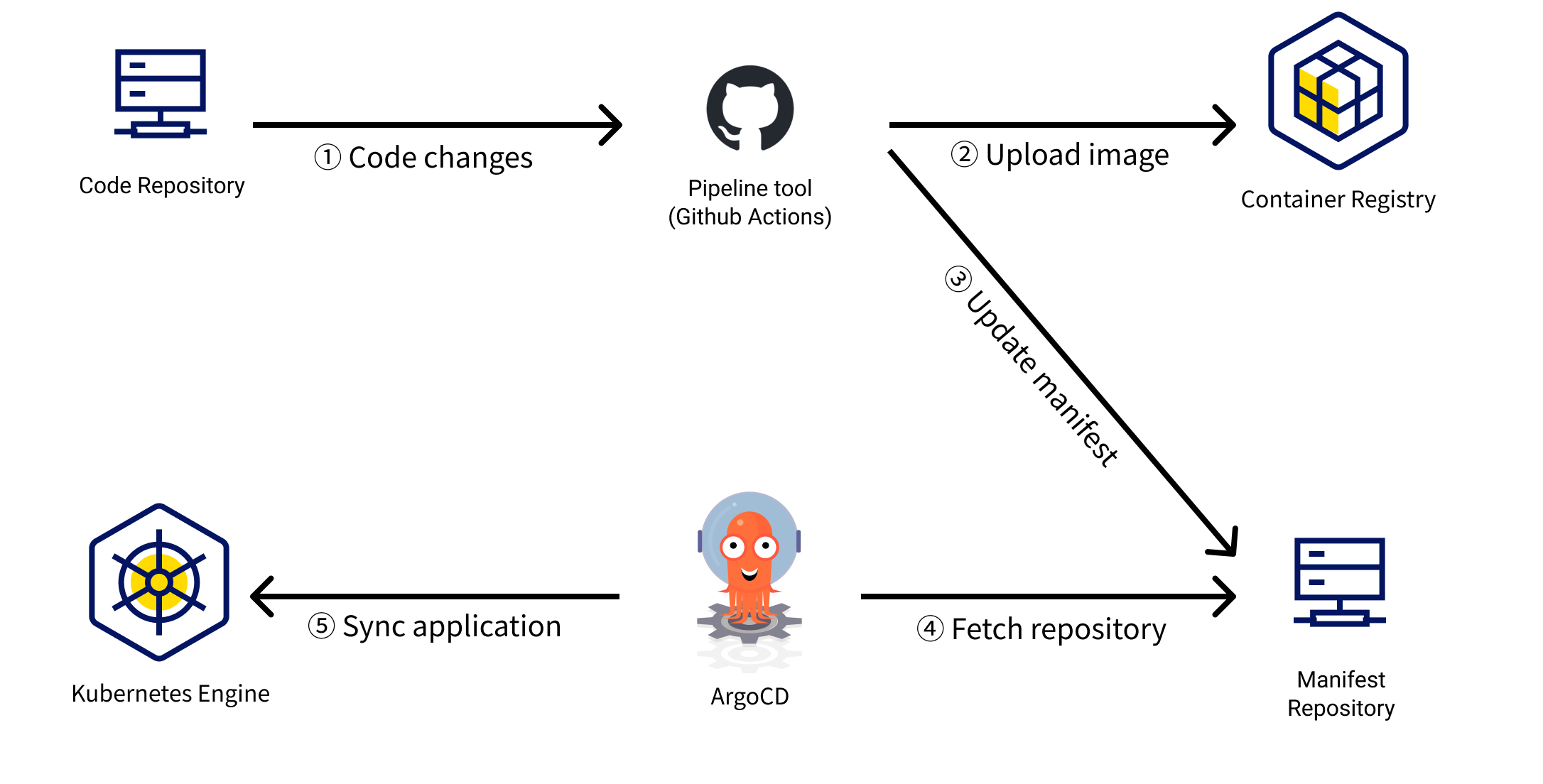
As a simple example, let's describe how a fictional Company A can build GitOps on KakaoCloud. Company A uses GitHub to version-control all infrastructure configuration and application code, and has built a CI/CD pipeline with GitHub Actions.

Company A's GitOps implementation process​

Step 1. Code commit and automatic build

  • Company A's development team commits code to GitHub whenever adding a new feature or fixing a bug.
  • GitHub Actions is triggered to automatically build and test the code.
  • When the build succeeds, a container image is created and pushed to KakaoCloud Container Registry.

Step 2. Automatic deployment and infrastructure specification update

  • The infrastructure specification repository is updated by using a pipeline tool or directly.
  • When the infrastructure specification repository is updated, ArgoCD, the GitOps tool, detects it.
  • ArgoCD checks the updated specifications and automatically deploys changes to the Kubernetes cluster.

Step 3. Environment reflection

  • When the specifications for the development environment are updated, deployment proceeds to the development environment.
  • When the specifications for the production environment are updated, deployment proceeds to the production environment.

Through this series of processes, Company A was able to manage development and operations processes efficiently, significantly shorten deployment time, and reduce operational costs. You can check the detailed method for implementing this example on KakaoCloud.

Tutorial for configuring a GitOps environment​

You can find the example GitOps environment configuration described above in detail in a tutorial in KakaoCloud technical documentation. The Build GitOps in a KakaoCloud Kubernetes environment tutorial explains how to set up a GitOps pipeline using the managed Kubernetes service Kubernetes Engine and Container Registry.

gitops-overview Tutorial architecture

Closing​

As described above, GitOps is a powerful approach that can significantly improve development and operations processes by automating infrastructure and application deployment and management. Of course, introducing GitOps can involve initial setup and a learning curve. Sufficient planning and preparation are required, and it can take time until all team members become familiar with the new workflow. Therefore, it is recommended to introduce GitOps according to your situation and optimize the necessary tools and processes.

Please remember that, as shown in the GitOps pipeline tutorial, you can build a better development and operations environment with automated processes and consistent deployment management by using KakaoCloud services. We hope you experience improved productivity and cost savings directly.

KakaoCloud English console support is now available

· 2 min read
Mia (정혜원)
Technical Contents Manager
KakaoCloud Releases English Console

Hello, KakaoCloud users!

Today, a language setting feature has been added to the KakaoCloud console, and English console service has begun. Accordingly, English guides are also provided in the technical documentation.

Users can choose Korean, English, or the browser default option through the newly added language setting tab in the console. For details on how to select a language in the console, see the Console language setting guide. For the technical documentation, you can set your preferred language, Korean or English, through the language setting tab in the top menu.

This improvement has been applied to the main screens and services of the console. It has first been applied to Dashboard, Settings, BCS (Virtual Machine, Bare Metal Server, GPU) services, VPC, Transit Gateway, and IAM. We plan to provide multilingual support across all areas in the future with user convenience in mind.

The KakaoCloud team is pleased to be able to provide services to a broader user base through this English service. We will continue doing our best to meet the diverse needs of our users. If you need more detailed help, please contact the Helpdesk.

Thank you!