Monitoring Flow service released for workflow monitoring automation

KakaoCloud's new service, Monitoring Flow, has been released.
As the name suggests, Monitoring Flow is a service focused on monitoring application status in real time and automating complex business flows to resolve inefficient issues in systems.
If you have experience with monitoring in an existing cloud environment, you may agree that building a monitoring system, automating processes, and integrating systems require considerable time and resources. Although many companies are working to solve these problems, the reality is that they still struggle with manual work and inefficient management. KakaoCloud developed Monitoring Flow as a solution that presents a new monitoring standard for system management and makes it easy to solve complex problems in cloud environments.
Now let's take a closer look at how Monitoring Flow works and what features it provides.
What is Monitoring Flow?
Monitoring Flow is a service that helps monitor application status in real time through APIs and automate user-defined workflows. Users can create monitoring scenarios directly and schedule them to run automatically at desired times. Monitoring Flow is especially strong in that workflows can be intuitively designed and managed easily in the KakaoCloud console without writing code. This enables not only IT experts but also non-experts to easily build monitoring processes.
] In addition, through integration with Alert Center, you can set thresholds for key metrics and receive notifications that match the conditions. For example, if the response time of a specific server exceeds the configured threshold, a notification is automatically sent so that the person in charge can resolve the issue immediately. By using these features, you can greatly improve the stability and efficiency of system operations.
How Monitoring Flow works
The basic concepts of Monitoring Flow are Step, Scenario, and Flow Connection.
A step is the smallest unit that composes a workflow in Monitoring Flow and represents a single task. A scenario means a workflow, and it automatically executes a defined work flow composed of various steps according to a schedule. A flow connection is a channel that connects subnets in a VPC, enabling monitoring of KakaoCloud internal resources. Because resources can be accessed for the subnets of the VPC registered in the flow connection during monitoring, flow connection registration is required.
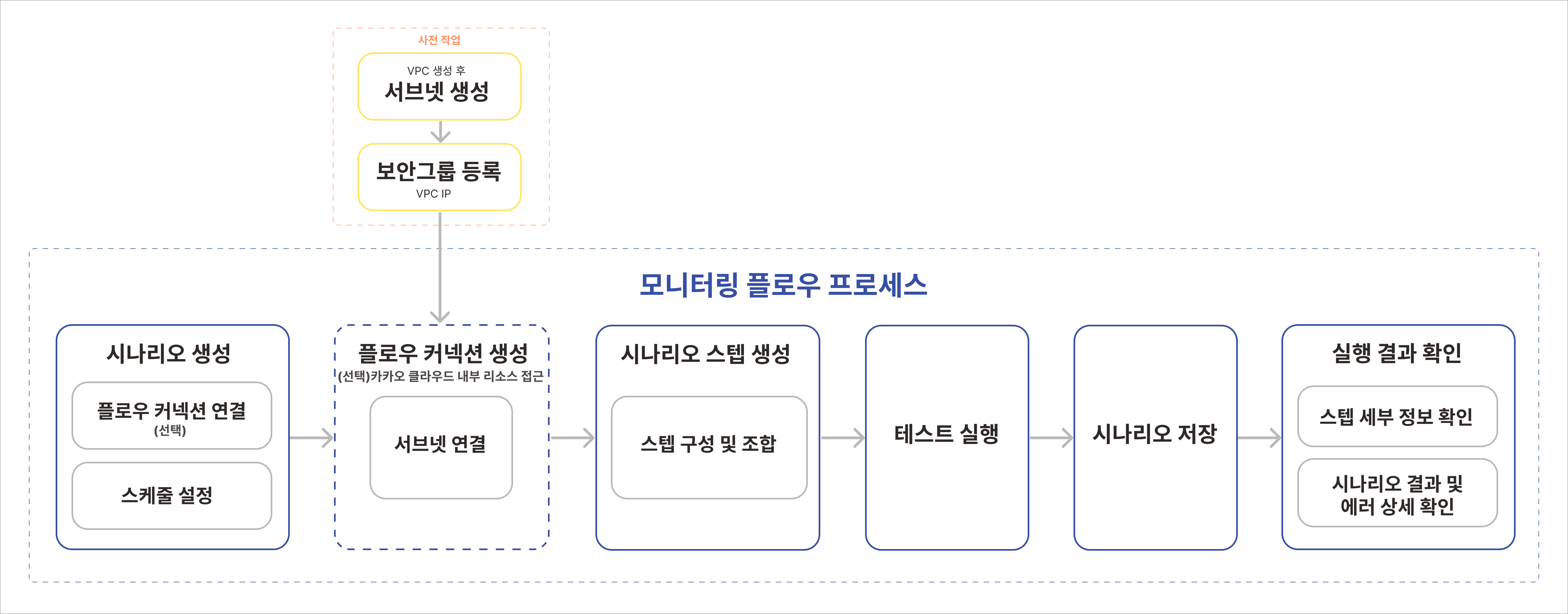 Monitoring Flow process
Monitoring Flow constructs a workflow based on steps configured by the user and executes the tasks defined in each step sequentially. Because the process proceeds through various paths depending on conditions, you can easily identify workflow progress and points where errors occur. In addition, you can monitor system status in real time and respond quickly through preconfigured notification policies.
Monitoring Flow features
Monitoring Flow provides users with various features such as intuitive workflow design, real-time monitoring, and serverless architecture, helping them efficiently manage complex cloud environments. Detailed features of Monitoring Flow are as follows.
1. Intuitive workflow visualization
Monitoring Flow visually represents user-defined scenarios with an intuitive UI and drag-and-drop method, and supports easy configuration of complex workflows. This lets users understand the status and progress of each step at a glance, quickly identify and resolve issues, and makes workflows accessible even to users without development experience, lowering the barrier to workflow management and enabling fast prototyping and operation.
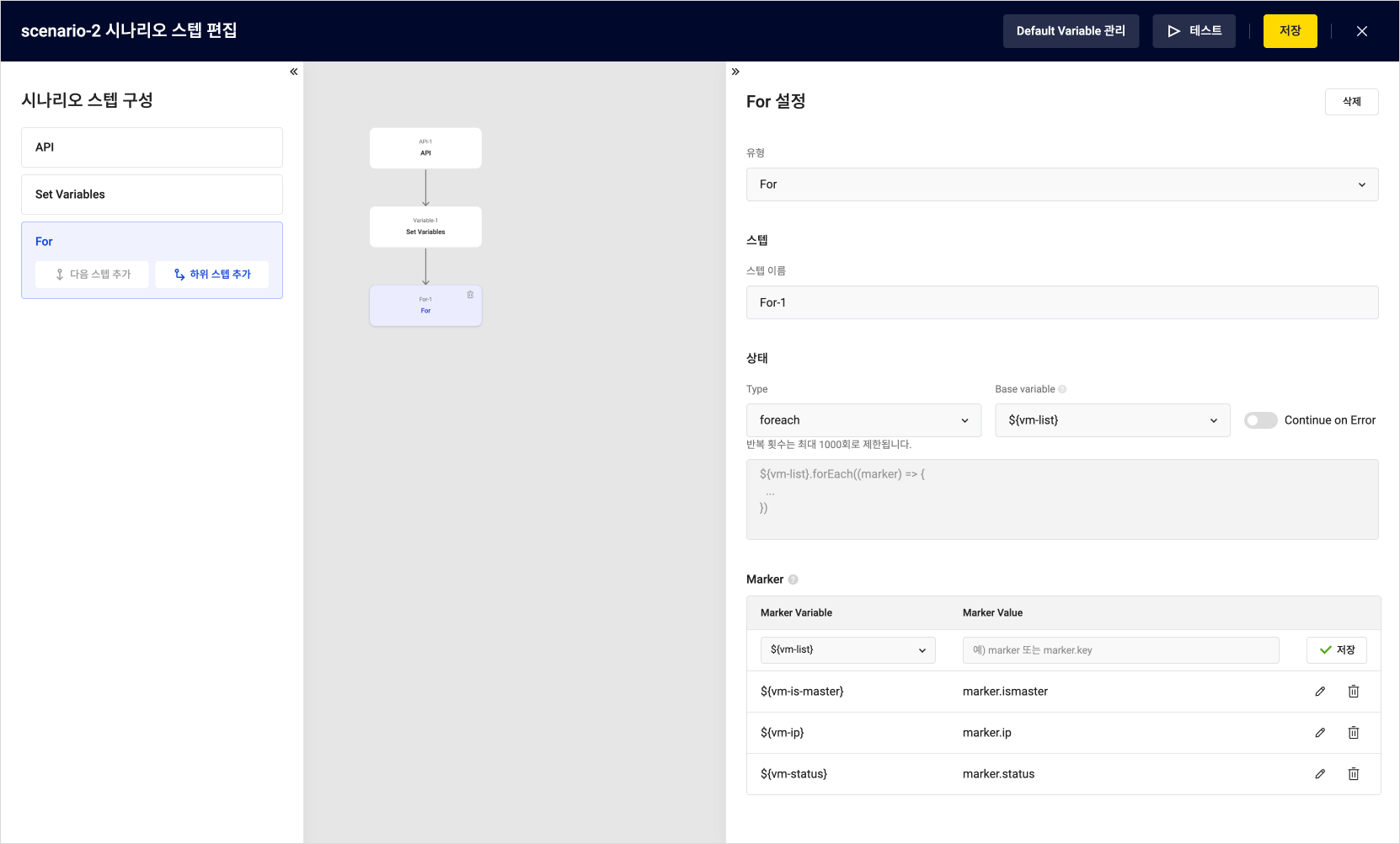 Configuration in the Monitoring Flow web console
2. Process structuring and automation
Monitoring Flow lets you design complex workflows by dividing them into multiple steps and setting conditions for each step so that processes can proceed through various paths. This allows users to manage workflows flexibly according to conditions and automate repetitive tasks to improve operational efficiency.
3. Serverless architecture
Monitoring Flow runs in a serverless environment that does not require server management, so users can build and run workflows without worrying about infrastructure management. Because costs are charged only for usage, it is cost-efficient and suitable for small and medium-sized businesses with limited resources.
4. Integration with various services
Monitoring Flow integrates with various KakaoCloud services, allowing workflow execution results to be integrated with other systems or important notifications to be managed automatically. These integration features enable efficient resource management and fast issue response in complex work environments.
5. Real-time monitoring and fast response
Monitoring Flow provides a feature for monitoring workflow execution status in real time. Users can check errors that occur at each step in real time and respond quickly when an issue occurs. This improves operational stability and minimizes downtime.
Closing
KakaoCloud Monitoring Flow is a powerful tool that lets you conveniently manage system monitoring and process automation in one platform. The intuitive UI and various features introduced in this post can greatly improve the stability and efficiency of system operations.
Select Monitoring Flow in the KakaoCloud console and easily design the workflow you want. You can find more detailed instructions in KakaoCloud's How-to Guides documentation.
Thank you.