Use Kubeflow Trainer
Run a single-node and multi-node distributed training tutorial with Kubeflow Trainer.
Support tools
| Tool | Version | Description |
|---|---|---|
| Kubeflow Trainer | v2 | - A distributed AI platform that supports large-scale LLM fine-tuning and model training - Efficiently orchestrates multi-node, multi-GPU distributed training in HPC environments to process large-scale training workloads - Supports various ML frameworks and provides a flexible training execution environment - Integrates with the cloud native AI ecosystem to provide scheduling, workload management, and scalability |
Introduce scenario
In this tutorial, you will use Kubeflow Trainer v2 to run the following two training scenarios on the Kanana model.
- Tuning with multiple GPUs in a single-node environment
- Large-scale distributed model tuning in a multi-node environment
Through this, you can see the differences in how single-machine multi-GPU training and multi-node distributed training are executed.
Outline used resources
Kubeflow Trainer v2 uses the following two core resources to run distributed training.
- TrainingRuntime
- A training runtime template defined by the platform administrator
- Includes container images, job structure, and default policies
- Namespace-scoped resource
- TrainJob
- A resource that defines actual training execution by the user
- Specifies the number of nodes, the number of processes, commands, environment variables, and resources (such as GPUs)
- Runs the workload by referencing TrainingRuntime via runtimeRef
In other words, TrainingRuntime serves as the “training execution environment template,” and TrainJob serves as the “actual execution request object.”
Follow tutorial flow
This tutorial runs distributed training in the following order.
-
Create TrainingRuntime: Define the base runtime to use for training
-
Create TrainJob: Run single-node / multi-node distributed training
-
Check training status: Check pod status and logs
Explain terms
- MPI (OpenMPI): A standard/implementation that runs multiple processes across multiple nodes and enables them to communicate. In this tutorial, it acts as a launcher that starts distributed processes with
mpirun. (MPI Forum) - DeepSpeed: A training framework that provides distributed training features and optimizations such as ZeRO to train large models with less GPU memory. (Hugging Face)
- ZeRO (Zero Redundancy Optimizer): A technique that reduces GPU memory usage by partitioning optimizer states, gradients, and parameters across processes that were previously duplicated on each GPU in data-parallel training. (DeepSpeed)
- NCCL: An NVIDIA communication library that performs high-speed collective communication such as all-reduce across GPUs (single-node/multi-node). (NVIDIA Docs)
- Rank / World size: In distributed training, rank is the unique number of each process, and world size is the total number of processes (for example, number of nodes × number of GPUs).
- InfiniBand (IB)*: A network used for node-to-node communication in multi-node training. IB generally has lower latency and higher bandwidth than Ethernet, which helps reduce communication bottlenecks. (NVIDIA Developer)
*Even for single-node training, if InfiniBand/RDMA is configured, you can optimize storage I/O using GPUDirect Storage (GDS).
Step 1. Prepare
Create notebook
- Access the Kubeflow dashboard, click the Notebooks tab, and then click the [New Notebook] button.
- On the New Notebook screen, enter the required information as in the table below and click the [LAUNCH] button to create a notebook instance.
| Item | Category | Value | Description |
|---|---|---|---|
| Name | Name | trainer-tutorial | Used to identify the notebook instance in the Kubeflow dashboard |
| Type | JupyterLab / VSCode / Rstudio | VSCode | Select VSCode |
| Custom Notebook | Image | kc-kubeflow-registry/kc-jupyter-pytorch-full:natl.py311.cu130.1b | Select image |
| CPU / RAM | Minimum CPU | 32 | Number of CPU cores, and the amount of CPU resources the notebook instance will use |
| Minimum Memory Gi | 180 | Unit of memory resources (GiB), and the amount of memory resources the notebook instance will use | |
| GPUs | Number of GPUs | 1 | Amount of GPU resources |
| Workspace Volume | Name | workspace-pvc | Specify the volume name |
| Size in Gi | 1000 | Specify the volume size | |
| Access Mode | ReadWriteMany | Set access mode to ReadWriteMany |
Since tokenizer tasks are performed in the notebook environment, allocating sufficient resources is recommended.
Configure notebook
- Check the Volume name created when the notebook is created.
- After accessing the created VSCode, create directories under
/home/jovyanaccording to the path below, and upload the attached files.
/home/jovyan/ : Parent folder
├── kanana-8b/ : Kanana 8b model folder
├── kanana-30b/ : Kanana 30b model folder
├── dataset/ : Tokenized dataset folder required for training
├── reports/ : Folder to store metrics generated during training
├── preprocessing.py : Preprocessing code for dataset processing and model saving
├── train.py : Code for model training
├── ds_config.json : Distributed training configuration file
└── cmd/ : Folder to build images for training
	├── requirements.txt
	├── Dockerfile.deepspeed
	└── Dockerfile.torch
Attached files
(Optional) Build an image
- If additional packages are required, build the image needed for distributed training in the notebook environment.
- You can also proceed using the default images provided by the cluster.
- mlops.kr-central-2.kcr.dev/kc-kubeflow-registry/pytorch:2.9.1-cuda13.0-cudnn9-runtime.kbm.1a
- mlops.kr-central-2.kcr.dev/kc-kubeflow-registry/deepspeed-runtime:v2.1.0.kbm.1d
Package information for the default images
| Package | Version |
|---|---|
| datasets | 4.4.2 |
| transformers | 4.57.3 |
| peft | 0.18.1 |
| tensorboard | 2.20.0 |
cd /home/jovyan/cmd
docker build -t {IMAGE_NAME} -f Dockerfile.torch .
docker push {IMAGE_NAME}

docker build -t {IMAGE_NAME} -f Dockerfile.deepspeed .
docker push {IMAGE_NAME}
Preprocess model and dataset
- To load the model and dataset quickly during training, store the model and the preprocessed dataset on the volume.
- If the package versions used in the image differ from those used for preprocessing, errors may occur.
cd /home/jovyan/
pip install transformers==4.57.3 datasets==4.4.2
python preprocessing.py
Create Tensorboard
- Create Tensorboard to monitor the training process.
- In TrainJob, you must specify the log path according to this path.
| Item | Category | Value | Description |
|---|---|---|---|
| Name | Name | kanana-tuning | Used to identify the Tensorboard instance in the Tensorboard dashboard |
| Storage Type | Object Storage / PVC | PVC | Select PVC |
| PVC Name | PVC Name | workspace-pvc | The PVC name created when creating the notebook |
| Mount Path | reports/ | Path to store training reports |
Step 2. Tune the model using multiple GPUs on a single node
Create Training Runtime
Below is an example TrainingRuntime.
Be sure to replace namespace with your actual namespace before applying it.
Important
- TrainingRuntime name:
torch-distributed- The TrainJob
runtimeRef.namemust match this name.- If required libraries are needed for training, build and use an image with the libraries installed.
apiVersion: trainer.kubeflow.org/v1alpha1
kind: TrainingRuntime
metadata:
  # The TrainingRuntime name must match TrainJob spec.runtimeRef.name.
  name: torch-distributed

  # This Runtime is a namespace-scoped resource.
  # It must be created in the same namespace as the TrainJob to be referenced.
  namespace: {USER_NAMESPACE}
spec:
  # MLPolicy: Defines a torch.distributed-based launch policy for distributed execution.
  mlPolicy:
    # (Runtime default) Number of nodes. Actual execution is determined by TrainJob numNodes.
    numNodes: 1

    # PyTorch distributed settings
    torch:
      # (Runtime default) Number of processes per node.
      # When set to auto, it is automatically determined based on the number of GPUs or the environment.
      # In actual execution, it is common to override this with TrainJob numProcPerNode.
      numProcPerNode: auto

  # template: The node workload template that Trainer v2 will actually create.
  template:
    spec:
      replicatedJobs:
        # ----------------------
        # node workload template
        # ----------------------
        - groupName: default
          name: node

          # Number of node Pod replicas.
          # In distributed training, this is overridden by TrainJob numNodes.
          replicas: 1

          template:
            metadata:
              labels:
                # Ancestor step label used internally by Trainer v2
                trainer.kubeflow.org/trainjob-ancestor-step: trainer

            spec:
              template:
                metadata:
                  annotations:
                    # Disable to prevent torch.distributed communication issues in environments with automatic Istio sidecar injection.
                    sidecar.istio.io/inject: 'false'

                spec:
                  containers:
                    - image: >-
                        # Runtime image for PyTorch distributed execution
                        # Must include CUDA, cuDNN, PyTorch, etc.
                        mlops.kr-central-2.kcr.dev/kc-kubeflow-registry/pytorch:2.9.1-cuda13.0-cudnn9-runtime.kbm.1a
                      name: node
In the notebook terminal, save the file above as trainruntime-torch.yaml and run the following commands.
kubectl apply -f trainruntime-torch.yaml
kubectl get trainingruntime
kubectl describe trainingruntime torch-distributed
Create TrainJob
Key values in the TrainJob example are as follows.
spec.runtimeRef.name: torch-distributed- spec.trainer.resourcesPerNodes.requests.nvidia.com/mlnxnics: Request VF resources for InfiniBand
- spec.podTemplateOverrides.metadata.annotation: k8s.v1.cni.cncf.io/networks → Configure a secondary network for InfiniBand (required for GPUDirect Storage)
- Execution file
python3 /workspace/train.py
The YAML below is an example that reflects the changes above.
apiVersion: trainer.kubeflow.org/v1alpha1
kind: TrainJob
metadata:
  name: kanana-8b-tuning
  namespace: {USER_NAMESPACE}
spec:
  # TrainJob references TrainingRuntime via runtimeRef.
  runtimeRef:
    apiGroup: trainer.kubeflow.org
    kind: TrainingRuntime
    name: torch-distributed  # Must match TrainingRuntime.metadata.name
  trainer:
    # Number of nodes / processes per node for distributed training
    numNodes: 1
    numProcPerNode: 4

    # Resource requests/limits per node
    resourcesPerNode:
      limits:
        cpu: '40'
        memory: 400Gi
        nvidia.com/gpu: '4'
        nvidia.com/mlnxnics: "1"  # Setting to use SR-IOV/IB
    env:
      - name: MODEL_PATH
        value: "/workspace/kanana-8b"
      - name: DATASET_PATH
        value: "/workspace/dataset/ultrachat_tokenized"
      - name: BF16
        value: "true"
      - name: TENSORBOARD_LOGDIR
        value: "/workspace/reports/kanana-8b"
      - name: OUTPUT_DIR
        value: "/workspace/kanana-8b/out"
    args:
      - /bin/bash
      - '-lc'
      - |-
        set -euo pipefail
        torchrun \
        --nnodes=${PET_NNODES} \
        --nproc_per_node=${PET_NPROC_PER_NODE} \
        --node_rank=${PET_NODE_RANK} \
        --master_addr=${PET_MASTER_ADDR} \
        --master_port=${PET_MASTER_PORT} \
        /workspace/train.py
  podTemplateOverrides:
    - targetJobs:
        - name: node
      metadata:
        annotations:
          # Disable to avoid communication issues in environments with automatic Istio sidecar injection
          sidecar.istio.io/inject: "false"
          # Specify the network attachment for InfiniBand
          k8s.v1.cni.cncf.io/networks: |-
            kbm-g-operation
      spec:
        containers:
          - name: node
            volumeMounts:
              - mountPath: /workspace
                name: workspace
        volumes:
          # PVC to mount training code/config/logs. Use the volume name created earlier.
          - name: workspace
            persistentVolumeClaim:
              claimName: workspace-pvc
In the dashboard, click TrainJobs > + New TrainJob, paste the YAML above, and create it.
Alternatively, you can create it from the notebook terminal as follows.
kubectl apply -f kanana-8b-tuning.yaml
kubectl get trainjob
kubectl describe trainjob kanana-8b-tuning
Step 3. Large-scale model tuning on multiple nodes
Create Training Runtime
Below is an example TrainingRuntime.
Be sure to replace namespace with your actual namespace before applying it.
Important
- TrainingRuntime name:
deepspeed-llm- The TrainJob
runtimeRef.namemust match this name.- If required libraries are needed for training, build and use an image with the libraries installed.
apiVersion: trainer.kubeflow.org/v1alpha1
kind: TrainingRuntime
metadata:
  # The TrainingRuntime name must match TrainJob spec.runtimeRef.name.
  name: deepspeed-llm

  # This Runtime is a namespace-scoped resource.
  # It must be created in the same namespace as the TrainJob to be referenced.
  namespace: {USER_NAMESPACE}  # Example: kbm-g-company
spec:
  # MLPolicy: Defines policies such as the distributed launcher and communication method.
  mlPolicy:
    mpi:
      # Launch based on OpenMPI.
      mpiImplementation: OpenMPI

      # (Runtime default) Processes per node. In practice, it is commonly overridden by TrainJob numProcPerNode.
      numProcPerNode: 1

      # Run the launcher as a node as well (may be required depending on configuration)
      runLauncherAsNode: true

      # MPI/SSH auth key mount path (depending on the runtime image/configuration)
      sshAuthMountPath: /home/mpiuser/.ssh

    # (Runtime default) Number of nodes. Actual execution is determined by TrainJob numNodes.
    numNodes: 1

  # template: The launcher/node workload template that Trainer v2 will actually create.
  template:
    metadata: {}
    spec:
      network:
        # Include NotReady Pods as addresses in headless service/endpoint configurations
        publishNotReadyAddresses: true

      replicatedJobs:
        # -------------------------
        # launcher workload template
        # -------------------------
        - groupName: default
          name: launcher
          replicas: 1
          template:
            metadata:
              labels:
                trainer.kubeflow.org/trainjob-ancestor-step: trainer
            spec:
              template:
                metadata:
                  annotations:
                    # Disable to avoid MPI/SSH communication issues in environments with automatic Istio sidecar injection.
                    sidecar.istio.io/inject: "false"
                spec:
                  containers:
                    - name: node
                      # Training runtime image (must include DeepSpeed/MPI/SSH, etc.)
                      image: mlops.kr-central-2.kcr.dev/kc-kubeflow-registry/deepspeed-runtime:v2.1.0.kbm.1d
                      resources: {}
                      securityContext:
                        runAsUser: 1000

        # ----------------------
        # node workload template
        # ----------------------
        - groupName: default
          name: node
          replicas: 1
          template:
            metadata: {}
            spec:
              template:
                metadata:
                  annotations:
                    sidecar.istio.io/inject: "false"
                spec:
                  containers:
                    - name: node
                      image: mlops.kr-central-2.kcr.dev/kc-kubeflow-registry/deepspeed-runtime:v2.1.0.kbm.1d

                      # The node Pod runs an SSH daemon so that MPI can start remote processes.
                      command: ["/usr/sbin/sshd"]
                      args: ["-De", "-f", "/home/mpiuser/.sshd_config"]

                      readinessProbe:
                        # Check SSH port open (adjust to image/sshd config)
                        initialDelaySeconds: 5
                        tcpSocket:
                          port: 2222

                      resources: {}
                      securityContext:
                        runAsUser: 1000

      # Policy that treats the whole job as successful when the launcher succeeds (adjust as needed)
      successPolicy:
        operator: All
        targetReplicatedJobs:
          - launcher
In the notebook terminal, save the file above as trainruntime-deepspeed.yaml and run the following commands.
kubectl apply -f trainruntime-deepspeed.yaml
kubectl get trainingruntime
kubectl describe trainingruntime deepspeed-llm
Create TrainJob
Key values in the TrainJob example are as follows.
spec.runtimeRef.name: deepspeed-llm- spec.trainer.resourcesPerNodes.requests.nvidia.com/mlnxnics: Request VF resources for InfiniBand
- spec.podTemplateOverrides.metadata.annotation: k8s.v1.cni.cncf.io/networks → Configure a secondary network for InfiniBand (used for high-bandwidth node-to-node communication)
- Execution file
python3 /workspace/train.py
The YAML below is an example that reflects the changes above.
apiVersion: trainer.kubeflow.org/v1alpha1
kind: TrainJob
metadata:
  name: kanana-30b-tuning
  namespace: {USER_NAMESPACE} # Example: kbm-g-company

spec:
  # TrainJob references TrainingRuntime via runtimeRef.
  runtimeRef:
    apiGroup: trainer.kubeflow.org
    kind: TrainingRuntime
    name: deepspeed-llm  # Must match TrainingRuntime.metadata.name

  trainer:
    # Number of nodes / processes per node for distributed training
    numNodes: 4
    numProcPerNode: 8

    # MPI-based launch: mpirun runs a bash -lc script on each node,
    # and the script configures RANK/WORLD_SIZE/MASTER_ADDR and then runs python training.
    command:
      - mpirun
      - "--hostfile"
      - /etc/mpi/hostfile
      - "-np"
      - "32" # Total processes = numNodes * numProcPerNode
      - "-x"
      - NCCL_IB_DISABLE
      - "-x"
      - JOBSET_NAME
      - "-x"
      - MODEL_PATH
      - "-x"
      - DATASET_PATH
      - "-x"
      - DEEPSPEED_CONFIG
      - "-x"
      - TENSORBOARD_LOGDIR
      - "-x"
      - OUTPUT_DIR

      # Actual command to run by mpirun
      - bash
      - "-lc"
      - |
        set -euo pipefail

        # Map environment variables injected by OpenMPI to standard variables used by PyTorch/HF
        export RANK=${OMPI_COMM_WORLD_RANK}
        export WORLD_SIZE=${OMPI_COMM_WORLD_SIZE}
        export LOCAL_RANK=${OMPI_COMM_WORLD_LOCAL_RANK}

        # Build a headless DNS for the launcher Pod based on the JobSet name
        export MASTER_ADDR=${JOBSET_NAME}-launcher-0-0.${JOBSET_NAME}
        export MASTER_PORT=29500

        echo "RANK=${RANK} LOCAL_RANK=${LOCAL_RANK} WORLD_SIZE=${WORLD_SIZE}"

        python3 /workspace/train.py

    # Environment variables required for training
    env:
      # NCCL settings
      - name: NCCL_IB_DISABLE
        value: "0"     # Use IB in multi-node training (0: enable, 1: disable)

      # Get jobset-name from the label injected by the JobSet controller to build the launcher DNS name
      - name: JOBSET_NAME
        valueFrom:
          fieldRef:
            fieldPath: metadata.labels['jobset.sigs.k8s.io/jobset-name']

      # Training parameters
      - name: MODEL_PATH
        value: "/workspace/kanana-30b"
      - name: DATASET_PATH
        value: "/workspace/dataset/ultrachat_tokenized"
      - name: DEEPSPEED_CONFIG
        value: "/workspace/ds_config.json"
      - name: BF16
        value: "true"
      - name: TENSORBOARD_LOGDIR
        value: "/workspace/reports/kanana-30b"
      - name: OUTPUT_DIR
        value: "/workspace/kanana-30b/out"

    # Resource requests/limits per node
    # (Example) 8xGPU node. Adjust CPU/memory based on your environment.
    resourcesPerNode:
      requests:
        cpu: "64"
        memory: "256Gi"
        nvidia.com/gpu: "8"
        nvidia.com/mlnxnics: "1"  # Setting to use SR-IOV/IB
      limits:
        cpu: "64"
        memory: "256Gi"
        nvidia.com/gpu: "8"
        nvidia.com/mlnxnics: "1"

  # podTemplateOverrides: Pod spec overrides for launcher/node
  podTemplateOverrides:
    # launcher Pod override
    - targetJobs:
        - name: launcher
      metadata:
        annotations:
          # Disable to avoid MPI/SSH communication issues in environments with automatic Istio sidecar injection
          sidecar.istio.io/inject: "false"

          # Specify the network attachment for InfiniBand
          k8s.v1.cni.cncf.io/networks: |-
            kbm-g-operation
      spec:
        volumes:
          # PVC to mount training code/config/logs. Use the volume name created earlier.
          - name: workspace
            persistentVolumeClaim:
              claimName: workspace-pvc
        containers:
          - name: node
            volumeMounts:
              - name: workspace
                mountPath: /workspace
    # node Pod override
    - targetJobs:
        - name: node
      metadata:
        annotations:
          sidecar.istio.io/inject: "false"
          k8s.v1.cni.cncf.io/networks: |-
            kbm-g-operation
      spec:
        volumes:
          - name: workspace
            persistentVolumeClaim:
              claimName: workspace-pvc
        containers:
          - name: node
            volumeMounts:
              - name: workspace
                mountPath: /workspace
In the dashboard, click TrainJobs > + New TrainJob, paste the YAML above, and create it.
Alternatively, you can create it from the notebook terminal as follows.
kubectl apply -f kanana-30b-tuning.yaml
kubectl get trainjob
kubectl describe trainjob kanana-30b-tuning
Step 4. Check training status
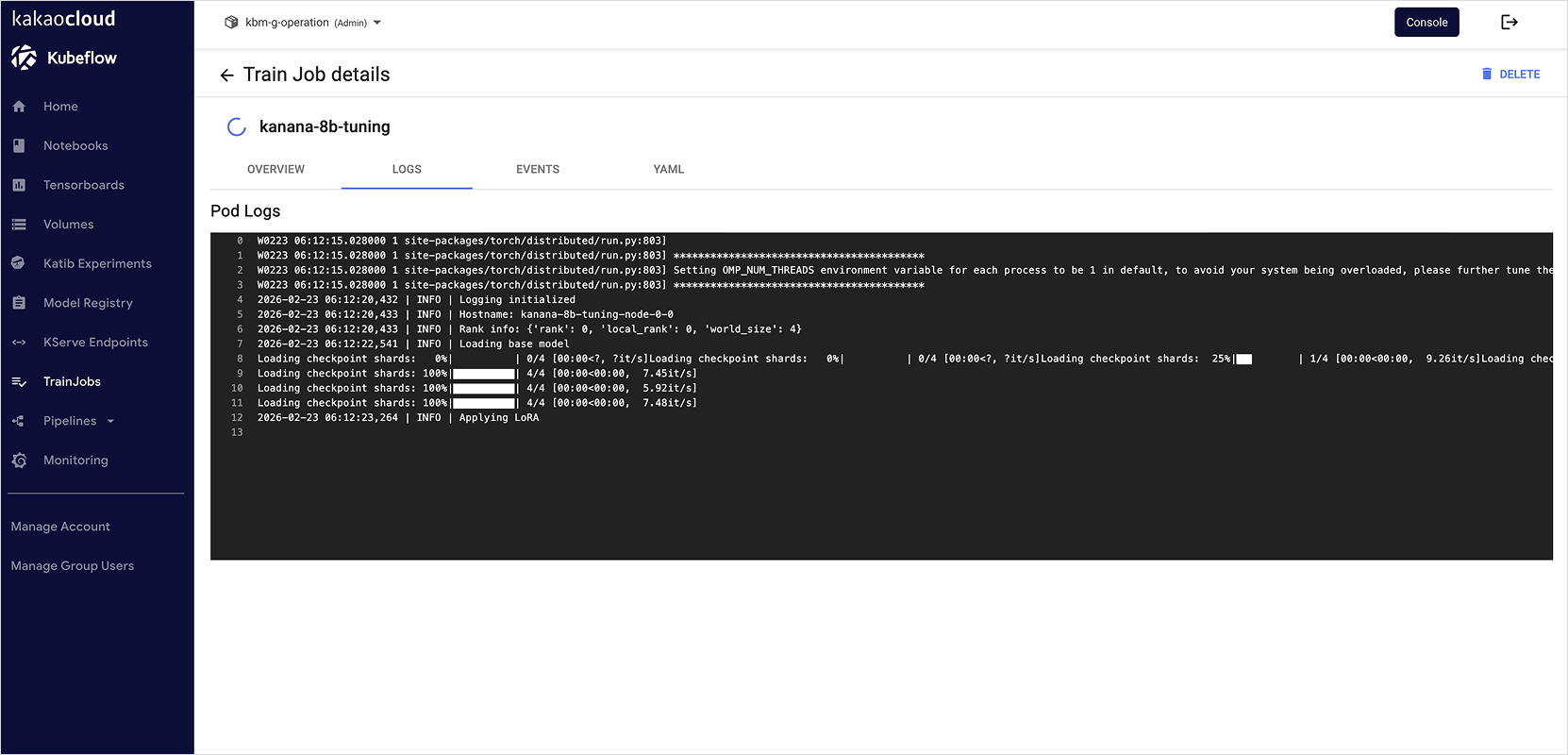
You can check training logs in the TrainJobs tab.
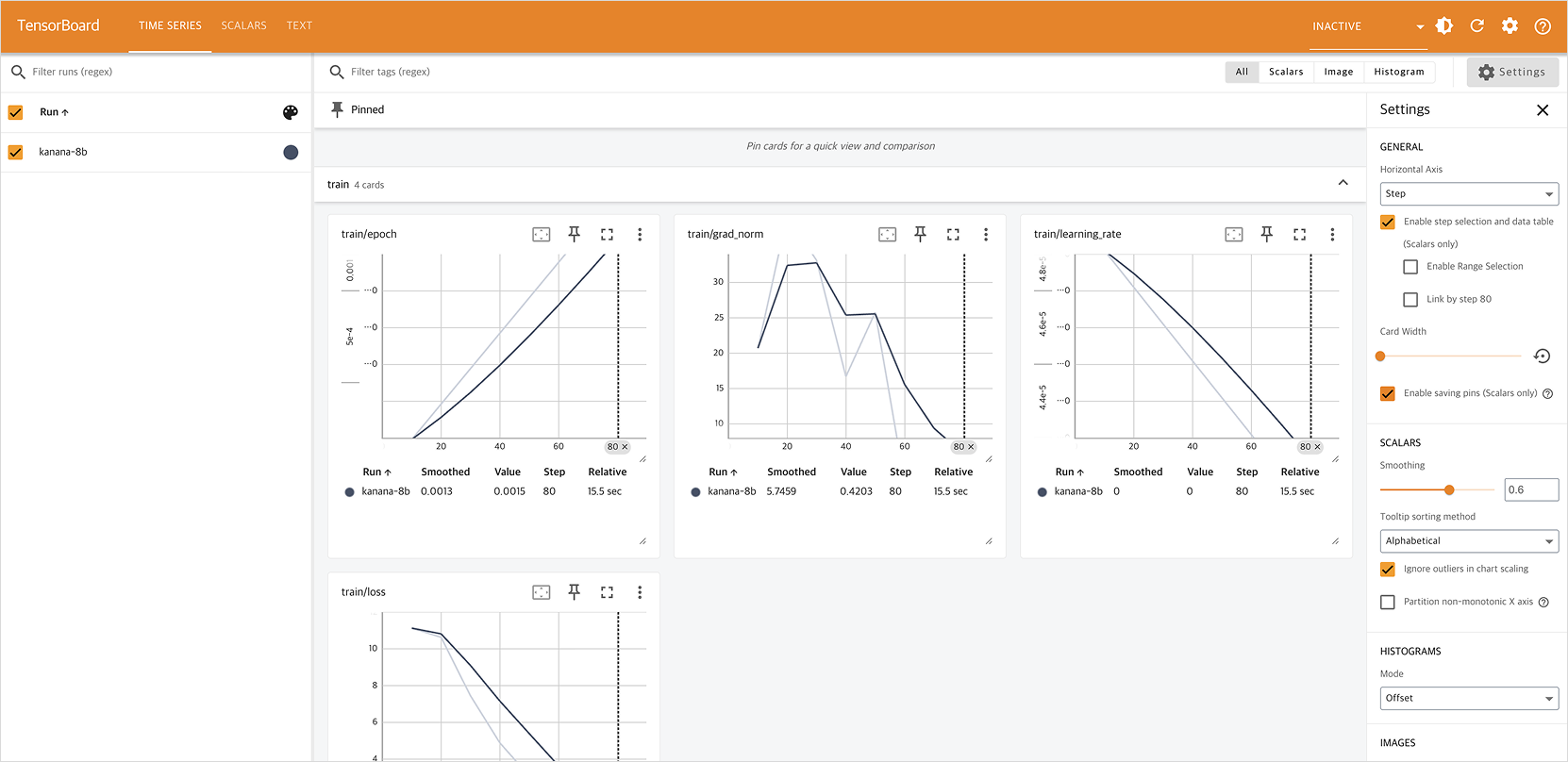
You can view training reports in the Tensorboard tab.
References
- Kubeflow Trainer official documentation
- Runtime Guide (TrainingRuntime/ClusterTrainingRuntime)
- Migrating to Kubeflow Trainer v2 (TrainJob/TrainingRuntime introduction)