Use Kubeflow pipeline
Create experiments and runs through the pipeline hands-on example, and train a prediction model.
Supported tools
| Tool | Version | Description |
|---|---|---|
| KF Pipelines | 2.4.1 | - Provides a simplified interface and a tool for fast experimentation and repeatable machine learning workflows - Supports tasks such as parameter tuning, experiment management, and model version management |
Step 1. Before you begin
Key concepts
Kubeflow Pipeline (KFP) is a framework for defining and automating Docker container-based machine learning workflows. You can define pipelines using the Python SDK and run them through the KFP backend.
| Key term | Description |
|---|---|
| Pipeline | A unit that defines the entire machine learning workflow and consists of multiple components |
| Component | An execution unit that performs one step of the workflow, such as data preprocessing or model training |
| Experiment | A logical workspace for repeatedly running a pipeline with various settings |
| Run | A single pipeline execution instance performed within an Experiment |
| Artifact | Output generated after each component runs (for example, model files, evaluation scores, logs, and so on) |
| TrainJob | A distributed training job created through Kubeflow Trainer |
| InferenceService | A model serving service created through KServe |
Pipeline configuration
Use the Python SDK for Kubeflow Pipeline (KFP) to configure and run a pipeline in the JupyterLab environment.
First, download the example script below and run it in the notebook environment.
(To set up the notebook environment, refer to Set up Jupyter Notebook environment using Kubeflow.)
- Download hands-on example script: build_pipeline_for_deploy_kanana_natl_gpu
After running the example script, perform the steps below in order.
Step 2. Configure environment
1. Basic configuration
After running the script in the notebook, refer to the content below to import the required modules and perform the basic configuration.
import os
import uuid
from kakaocloud_kbm import KbmPipelineClient
from kfp import kubernetes
import kfp.dsl as dsl

# Initialize KBM Kubeflow Pipeline client
os.environ["KUBEFLOW_HOST"] = "https://nipagpu.kakaocloud.com"
os.environ["KUBEFLOW_USERNAME"] = "your-username@kakaoenterprise.com"
os.environ["KUBEFLOW_PASSWORD"] = "your-password"

client = KbmPipelineClient()

# Set pipeline variables
# Extract the Kubernetes namespace where the current notebook is running
KBM_NAMESPACE = os.environ['NB_PREFIX'].split('/')[2]

# Set component file save path
COMPONENT_PATH = 'components'
SERVE_ENPOINT_PATH = os.path.join(COMPONENT_PATH, 'kanana_finetune')

# Generate a unique task ID (to distinguish each pipeline run)
TASK_UUID = uuid.uuid1().hex[:8]

# Create resource names
PVC_NAME = f"kanana-ft-pvc-{TASK_UUID}"  # PersistentVolumeClaim name
MODEL_NAME = f"kanana-model-{TASK_UUID}"  # Model name
KSERVE_ISVC_NAME = f"kanana-isvc-{TASK_UUID}"  # Model serving API name
EPOCH_NUM = 10  # Number of training epochs

print(f"Model Name: {MODEL_NAME}")
print(f"KServe InferenceService Name: {KSERVE_ISVC_NAME}")
print(f"Model PVC Name: {PVC_NAME}")
2. Write components
KFP components can be written using decorators from the dsl package. Each component consists of a single function, and any required libraries must be imported inside the function.
2.1. Dataset download component
A component that downloads training data from Object Storage.
@dsl.component(
    packages_to_install=['requests'],
    base_image='python:3.11'
)
def download_dataset(kc_kbm_os_train_url: str):
    """
    Component to download training data from Object Storage

    Args:
        kc_kbm_os_train_url: Object Storage URL of the training data CSV file
    """
    import os
    from requests import get

    def download(url, dist_dir, file_name=None):
        """Download a file from a URL and save it to the specified directory"""
        if not file_name:
            file_name = url.split('/')[-1]

        file_path = os.path.join(dist_dir, file_name)
        with open(file_path, "wb") as file:
            response = get(url)
            response.raise_for_status()
            file.write(response.content)
        print(f"Downloaded: {file_name} to {dist_dir}")

    # PVC mount path
    pvc_data_path = "/data"

    # Use sample data URL if base URL is not provided
    if not kc_kbm_os_train_url:
        kc_kbm_os_train_url = 'https://objectstorage.kr-central-2.kakaocloud.com/v1/c11fcba415bd4314b595db954e4d4422/public/tutorial/kubeflow/kubeflow-tensorboard/data/sample_train_data.csv'

    # Download training data
    download(kc_kbm_os_train_url, pvc_data_path, "sample_train_data.csv")

    # Check downloaded file list
    print(f"Downloaded files in {pvc_data_path}:")
    print(os.listdir(pvc_data_path))
2-2. Model fine-tuning component
This component fine-tunes the Kanana model using Kubeflow Trainer with a LoRA-based approach.
- Uses the LoRA technique from the PEFT (Parameter-Efficient Fine-Tuning) library
- Applies an Alpaca-style prompt template
- Performs GPU memory-efficient training
@dsl.component(
    packages_to_install=['kubeflow'],
    install_kfp_package=True,
    base_image='python:3.11',
    output_component_file=f'{SERVE_ENPOINT_PATH}/train_component.yaml'
)
def finetune_kanana_model(
    train_job_id: dsl.Output[dsl.Artifact],
    epoch_num: str,
    namespace: str,
    pvc_name: str,
    job_name: str,
):
    """
    Component for fine-tuning the Kanana model using a LoRA-based approach

    Args:
        train_job_id: Artifact to store the TrainJob ID (output)
        epoch_num: Number of training epochs
        namespace: Kubernetes namespace
        pvc_name: PVC name for data storage
        job_name: TrainJob name
    """
    from kubeflow.trainer import TrainerClient, CustomTrainer
    import os
    import time

    def finetune_kanana(model_name: str, epoch_num: str, pvc_data_path: str):
        """
        Training function executed inside the TrainJob Pod
        Performs LoRA-based fine-tuning.
        """
        from transformers import (
            AutoModelForCausalLM,
            AutoTokenizer,
            TrainingArguments,
            Trainer,
            TrainerCallback,
        )
        from peft import LoraConfig, get_peft_model
        from datasets import Dataset
        import torch
        import os

        # Set working directory
        os.chdir("/")

        # Configure GPU environment
        os.environ["NVIDIA_VISIBLE_DEVICES"] = "0"
        os.environ["CUDA_VISIBLE_DEVICES"] = "0"

        print(f"PyTorch version: {torch.__version__}")
        print(f"CUDA available: {torch.cuda.is_available()}")

        # 1. Load model and tokenizer
        print("=" * 80)
        print("Step 1: Loading LLM model and tokenizer")
        print("=" * 80)

        tokenizer = AutoTokenizer.from_pretrained(model_name, padding_side="left")
        # For LLaMA-type models, pad_token must be set to eos_token
        tokenizer.pad_token = tokenizer.eos_token

        # Load base model (use bfloat16 for memory efficiency)
        base_model = AutoModelForCausalLM.from_pretrained(
            model_name,
            torch_dtype=torch.bfloat16,
            trust_remote_code=True,
            device_map="auto"
        )

        # 2. Configure and apply LoRA
        print("=" * 80)
        print("Step 2: Setting up LoRA configuration")
        print("=" * 80)

        lora_config = LoraConfig(
            r=8,  # LoRA rank (lower reduces parameter count)
            lora_alpha=32,  # LoRA alpha (scaling factor)
            lora_dropout=0.1,  # Dropout ratio
            target_modules=["q_proj", "k_proj", "v_proj"],  # Target modules
            task_type="CAUSAL_LM",
        )

        model = get_peft_model(base_model, lora_config)
        model.print_trainable_parameters()  # Print number of trainable parameters

        # 3. Load and preprocess dataset
        print("=" * 80)
        print("Step 3: Loading and processing dataset")
        print("=" * 80)

        train_data_path = f"{pvc_data_path}/sample_train_data.csv"
        dataset = Dataset.from_csv(train_data_path)

        # Apply Alpaca-style prompt template
        def formatting_prompts_func(examples):
            """Format prompts in Alpaca style"""
            alpaca_prompt = """Below is an instruction that describes a task, paired with an input that provides further context. Write a response that appropriately completes the request.

### Instruction:
{}

### Input:
{}

### Response:
{}"""

            instructions = examples["instruction"]
            inputs = examples["input"]
            outputs = examples["output"]
            eos_token = tokenizer.eos_token

            texts = []
            for instruction, input_text, output in zip(instructions, inputs, outputs):
                # EOS token is required (without it, generation may loop indefinitely)
                text = alpaca_prompt.format(instruction, input_text, output) + eos_token
                texts.append(text)

            return {"text": texts}

        # Apply prompt formatting
        dataset = dataset.map(formatting_prompts_func, batched=True)
        # Remove unnecessary columns (for example, CSV index columns)
        if 'Unnamed: 0' in dataset.column_names:
            dataset = dataset.remove_columns(['Unnamed: 0'])

        # Tokenization
        def tokenize_function(examples):
            """Convert text to tokens"""
            tokens = tokenizer(examples["text"], padding=True, return_tensors="pt")
            tokens["labels"] = tokens["input_ids"]  # Labels for language modeling
            return tokens

        dataset = dataset.map(tokenize_function, batched=True, remove_columns=["text"])
        print("Dataset processing complete")

        # 4. Configure training and initialize Trainer
        print("=" * 80)
        print("Step 4: Setting up Trainer")
        print("=" * 80)

        class TrainingCallback(TrainerCallback):
            """Callback for logging training progress"""
            def on_log(self, args, state, control, logs=None, **kwargs):
                if logs:
                    print(f"Step {state.global_step}: {logs}")

        trainer = Trainer(
            model=model,
            train_dataset=dataset,
            args=TrainingArguments(
                per_device_train_batch_size=2,
                gradient_accumulation_steps=4,  # Effective batch size = 2 * 4 = 8
                warmup_steps=5,
                max_steps=60,  # Reduced steps for quick testing
                learning_rate=2e-4,
                bf16=True,  # Use bfloat16 to reduce memory usage
                logging_steps=1,
                weight_decay=0.01,
                lr_scheduler_type="linear",
                seed=1234,
                output_dir="outputs",
                report_to="none"  # Do not use external logging services
            ),
            callbacks=[TrainingCallback()],
        )

        # Check GPU memory status
        gpu_stats = torch.cuda.get_device_properties(0)
        start_gpu_memory = round(torch.cuda.max_memory_reserved() / 1024**3, 3)
        max_memory = round(gpu_stats.total_memory / 1024**3, 3)
        print(f"GPU: {gpu_stats.name}, Max memory: {max_memory} GB")
        print(f"Initial reserved memory: {start_gpu_memory} GB")

        # 5. Run training
        print("=" * 80)
        print("Step 5: Starting training")
        print("=" * 80)

        trainer_stats = trainer.train()

        # Print memory and time statistics after training
        used_memory = round(torch.cuda.max_memory_reserved() / 1024**3, 3)
        used_memory_for_lora = round(used_memory - start_gpu_memory, 3)
        used_percentage = round(used_memory / max_memory * 100, 3)
        lora_percentage = round(used_memory_for_lora / max_memory * 100, 3)

        print("=" * 80)
        print("Training statistics")
        print("=" * 80)
        print(f"Training time: {trainer_stats.metrics['train_runtime']:.2f} seconds ({trainer_stats.metrics['train_runtime']/60:.2f} minutes)")
        print(f"Peak reserved memory: {used_memory} GB ({used_percentage}% of max)")
        print(f"Memory for training: {used_memory_for_lora} GB ({lora_percentage}% of max)")

        # 6. Save model
        print("=" * 80)
        print("Step 6: Saving model and tokenizer")
        print("=" * 80)

        model_dir = f"{pvc_data_path}/kanana-2-1b-kcdocs"

        # Merge LoRA weights with base model and save
        model = model.merge_and_unload()
        model.save_pretrained(model_dir)
        tokenizer.save_pretrained(model_dir)

        print(f"Model and tokenizer saved to: {model_dir}")

        # 7. Clean up distributed training process group (to avoid warnings)
        print("=" * 80)
        print("Step 7: Cleaning up distributed process group")
        print("=" * 80)

        if torch.distributed.is_initialized():
            torch.distributed.destroy_process_group()
            print("Distributed process group destroyed successfully")
        else:
            print("No distributed process group to clean up")

        # 8. Clean up CUDA context and resources
        print("=" * 80)
        print("Step 8: Cleaning up CUDA resources")
        print("=" * 80)

        # Clear CUDA cache
        if torch.cuda.is_available():
            torch.cuda.empty_cache()
            torch.cuda.synchronize()
            print("CUDA cache cleared and synchronized")

        # Release model and tokenizer from memory
        del model
        del tokenizer
        del base_model
        import gc
        gc.collect()
        if torch.cuda.is_available():
            torch.cuda.empty_cache()
        print("Model and tokenizer released from memory")

        # 9. Explicitly exit the process (to terminate the container)
        print("=" * 80)
        print("Step 9: Training completed successfully, exiting...")
        print("=" * 80)

    # Configure CustomTrainer
    pvc_data_path = "/data"
    llm_model_name = "kakaocorp/kanana-nano-2.1b-base"

    trainer = CustomTrainer(
        func=finetune_kanana,
        func_args={
            "model_name": llm_model_name,
            "epoch_num": epoch_num,
            "pvc_data_path": pvc_data_path
        },
        num_nodes=1,
        resources_per_node={
            "nvidia.com/gpu": "1",
            "cpu": "8",
            "memory": "16Gi"
        },
        packages_to_install=[
            "transformers",
            "peft",
            "datasets",
            "torch",
            "pandas",
            "accelerate>=0.26.0",
        ],
    )

    trainer_client = TrainerClient()
    train_kwargs = {"trainer": trainer}

    # Configure PodTemplateOverrides for PVC mounting
    if pvc_name:
        from kubeflow.trainer.options.kubernetes import (
            PodTemplateOverrides,
            PodTemplateOverride,
            PodSpecOverride,
            ContainerOverride,
        )

        options_list = [
            PodTemplateOverrides(
                PodTemplateOverride(
                    target_jobs=["node"],
                    metadata={
                        "annotations": {
                            "sidecar.istio.io/inject": "false"
                        }
                    },
                    spec=PodSpecOverride(
                        volumes=[
                            {
                                "name": "data",
                                "persistentVolumeClaim": {"claimName": pvc_name}
                            }
                        ],
                        containers=[
                            ContainerOverride(
                                name="node",
                                volume_mounts=[
                                    {
                                        "name": "data",
                                        "mountPath": pvc_data_path
                                    }
                                ]
                            )
                        ]
                    )
                )
            )
        ]
        train_kwargs["options"] = options_list
    except ImportError:
        print("Warning: Could not import PodTemplateOverrides. PVC mounting may not work.")

    # Create TrainJob
    print("Creating TrainJob...")
    import inspect
    sig = inspect.signature(trainer_client.train)

    if 'runtime' in sig.parameters and sig.parameters['runtime'].default != inspect.Parameter.empty:
        job_id = trainer_client.train(**train_kwargs)
    else:
        try:
            job_id = trainer_client.create_trainjob(trainer)
        except AttributeError:
            raise RuntimeError(
                "TrainJob creation requires runtime configuration. "
                "Please ensure ClusterTrainingRuntime is properly configured."
            )

    print(f"TrainJob created with job_id: {job_id}")

    # Wait for TrainJob to start
    print("Waiting for TrainJob to start...")
    time.sleep(10)

    # Retrieve TrainJob logs
    print("\n=== TrainJob logs ===")
    try:
        logs = list(trainer_client.get_job_logs(job_id, follow=False))
        if logs:
            for logline in logs:
                print(logline)
        else:
            print("No logs available yet")
    except Exception as log_error:
        print(f"Warning: Could not retrieve logs: {log_error}")

    print("\nTraining job submitted successfully!")

    # Write job_id to component output
    with open(train_job_id.path, 'w') as f:
        f.write(job_id)
2-3. Model serving component
This component creates a KServe InferenceService and serves the fine-tuned model with vLLM.
- High-performance inference using the vLLM backend
- Load the model from a PVC
- Automatic GPU resource allocation
@dsl.component(
    packages_to_install=['kubeflow', 'kubernetes', 'pyyaml'],
    install_kfp_package=True,
    base_image='python:3.11',
    output_component_file=f'{SERVE_ENPOINT_PATH}/deploy_component.yaml'
)
def deploy_kanana_op_func(
    namespace: str,
    pvc_name: str,
    kserve_name: str,
    train_job_id: dsl.Input[dsl.Artifact],
    model_path_in_pvc: str = "kanana-2-1b-kcdocs",
    served_model_name: str = "kanana-nano-2.1b-base",
    max_model_len: str = "32768",
    gpu_memory_utilization: str = "0.8",
):
    """
    Deploy a fine-tuned model with vLLM by creating a KServe InferenceService

    Args:
        namespace: Kubernetes namespace
        pvc_name: PVC name where the model is stored
        kserve_name: InferenceService name
        train_job_id: TrainJob ID artifact (passed from the previous component)
        model_path_in_pvc: Model path inside the PVC
        served_model_name: Name of the served model
        max_model_len: Maximum sequence length
        gpu_memory_utilization: GPU memory utilization (0.0-1.0)
    """
    from kubernetes import client, config
    from kubernetes.config import ConfigException
    from kubeflow.trainer import TrainerClient
    import time
    import sys

    # Initialize Kubernetes client
    try:
        config.load_incluster_config()
    except ConfigException:
        config.load_kube_config()  # When running locally

    custom_api = client.CustomObjectsApi()
    group = "serving.kserve.io"
    version = "v1beta1"
    plural = "inferenceservices"

    # In KFP v2, artifacts are accessed through a file path
    # Read the actual job_id string from the artifact file
    with open(train_job_id.path, 'r') as f:
        trainjob_id_str = f.read().strip()

    # Initialize TrainerClient
    trainer_client = TrainerClient()

    # Poll until TrainJob is done
    max_wait = 60 * 60  # 1 hour at most
    interval = 15       # seconds
    waited = 0

    print(f"Waiting for TrainJob '{trainjob_id_str}' to complete...")

    while waited < max_wait:
        try:
            trainjob = trainer_client.get_job(trainjob_id_str)
            job_status = trainjob.status if hasattr(trainjob, 'status') else None

            if job_status == 'Complete':
                print(f"TrainJob '{trainjob_id_str}' completed successfully.")
                break

            if job_status == 'Failed':
                raise RuntimeError(f"TrainJob '{trainjob_id_str}' failed!")

        except RuntimeError:
            raise
        except Exception as e:
            # Keep waiting if TrainJob is not created yet or another error occurs
            pass

        time.sleep(interval)
        waited += interval
    else:
        raise TimeoutError(f"Timed out waiting for TrainJob '{trainjob_id_str}' to complete.")

    # Define InferenceService manifest
    inferenceservice_manifest = {
        "apiVersion": f"{group}/{version}",
        "kind": "InferenceService",
        "metadata": {
            "name": kserve_name,
            "namespace": namespace,
        },
        "spec": {
            "predictor": {
                "annotations": {
                    "serving.knative.dev/progress-deadline": "1h"
                },
                "automountServiceAccountToken": False,
                "maxReplicas": 1,
                "minReplicas": 1,
                "model": {
                    "args": [
                        f"--model_name={served_model_name}",
                        "--model_id=/mnt/models",
                        "--dtype=bfloat16",
                        "--backend=vllm"
                    ],
                    "env": [
                        {
                            "name": "VLLM_LOGGING_LEVEL",
                            "value": "DEBUG"
                        },
                        {
                            "name": "MAX_MODEL_LEN",
                            "value": max_model_len
                        },
                        {
                            "name": "GPU_MEMORY_UTILIZATION",
                            "value": gpu_memory_utilization
                        },
                        {
                            "name": "PYTORCH_CUDA_ALLOC_CONF",
                            "value": "expandable_segments:True,max_split_size_mb:128"
                        }
                    ],
                    "lifecycle": {
                        "preStop": {
                            "exec": {
                                "command": [""]
                            }
                        }
                    },
                    "modelFormat": {
                        "name": "huggingface"
                    },
                    "name": "",
                    "resources": {
                        "limits": {
                            "cpu": "23",
                            "memory": "180Gi",
                            "nvidia.com/gpu": "1"
                        },
                        "requests": {
                            "cpu": "1",
                            "memory": "2Gi",
                            "nvidia.com/gpu": "1"
                        }
                    },
                    "storageUri": f"pvc://{pvc_name}/{model_path_in_pvc}"
                },
                "timeout": 600
            }
        }
    }

    # Create or update InferenceService
    try:
        try:
            existing_isvc = custom_api.get_namespaced_custom_object(
                group=group,
                version=version,
                namespace=namespace,
                plural=plural,
                name=kserve_name
            )
            print(f"InferenceService '{kserve_name}' already exists. Updating...")
            inferenceservice_manifest["metadata"]["resourceVersion"] = existing_isvc["metadata"].get("resourceVersion")
            updated_isvc = custom_api.patch_namespaced_custom_object(
                group=group,
                version=version,
                namespace=namespace,
                plural=plural,
                name=kserve_name,
                body=inferenceservice_manifest
            )
            print(f"InferenceService '{kserve_name}' updated successfully")
        except client.rest.ApiException as e:
            if e.status == 404:
                print(f"Creating InferenceService '{kserve_name}'...")
                created_isvc = custom_api.create_namespaced_custom_object(
                    group=group,
                    version=version,
                    namespace=namespace,
                    plural=plural,
                    body=inferenceservice_manifest
                )
                print(f"InferenceService '{kserve_name}' created successfully")
            else:
                raise

        # Wait until InferenceService becomes Ready
        print(f"Waiting for InferenceService '{kserve_name}' to be ready...")
        max_wait_time = 1800
        wait_interval = 10
        elapsed_time = 0

        while elapsed_time < max_wait_time:
            try:
                isvc_status = custom_api.get_namespaced_custom_object_status(
                    group=group,
                    version=version,
                    namespace=namespace,
                    plural=plural,
                    name=kserve_name
                )

                conditions = isvc_status.get("status", {}).get("conditions", [])
                ready = False

                for condition in conditions:
                    if condition.get("type") == "Ready":
                        if condition.get("status") == "True":
                            ready = True
                            break

                if ready:
                    print(f"InferenceService '{kserve_name}' is ready!")
                    break

                time.sleep(wait_interval)
                elapsed_time += wait_interval
                print(f"Still waiting... ({elapsed_time}/{max_wait_time} seconds)")

            except Exception as status_error:
                print(f"Error checking status: {status_error}")
                time.sleep(wait_interval)
                elapsed_time += wait_interval

        if elapsed_time >= max_wait_time:
            print(f"Warning: InferenceService '{kserve_name}' did not become ready within {max_wait_time} seconds")

        print(f"KServe InferenceService '{kserve_name}' deployment completed successfully")
        return

    except Exception as e:
        print(f"Error deploying InferenceService: {e}")
        import traceback
        print(f"Traceback: {traceback.format_exc()}")
        raise
3. Define pipeline
Define the entire pipeline by connecting each component.
@dsl.pipeline(name="Kanana Model Finetuning Pipeline")
def kanana_model_finetuning_Pipeline(
    kc_kbm_os_train_url: str = 'https://objectstorage.kr-central-2.kakaocloud.com/v1/c11fcba415bd4314b595db954e4d4422/public/tutorial/kubeflow/kubeflow-tensorboard/data/sample_train_data.csv',
    epoch_num: str = "10",
    job_name: str = None,
    endpoint_name: str = None,
):
    """
    Kanana model fine-tuning and serving pipeline

    Args:
        kc_kbm_os_train_url: Object Storage URL of the training data CSV file
        epoch_num: Number of training epochs
        job_name: TrainJob name (optional)
    """
    # 1. Create PVC (for data and model storage)
    pvc1 = kubernetes.CreatePVC(
        pvc_name=PVC_NAME,
        access_modes=['ReadWriteMany'],
        size='10Gi',
        storage_class_name='',
    )

    # 2. Dataset download component
    download_data = download_dataset(kc_kbm_os_train_url=kc_kbm_os_train_url)
    download_data.set_cpu_request(cpu="1").set_memory_request(memory="2G")
    download_data.set_caching_options(enable_caching=False)

    # Mount PVC
    kubernetes.mount_pvc(
        download_data,
        pvc_name=pvc1.outputs['name'],
        mount_path='/data',
    )

    # 3. Model fine-tuning component
    model_train = finetune_kanana_model(
        epoch_num=epoch_num,
        namespace=KBM_NAMESPACE,
        pvc_name=pvc1.outputs['name'],
        job_name=job_name,
    )
    model_train.set_cpu_request(cpu="1").set_memory_request(memory="2G")
    # .set_cpu_limit(cpu="1").set_memory_limit(memory="2G")
    model_train.set_caching_options(enable_caching=False)
    model_train.after(download_data)  # Run after dataset download

    # 4. Model serving component
    inference_model = deploy_kanana_op_func(
        namespace=KBM_NAMESPACE,
        kserve_name=endpoint_name,
        pvc_name=pvc1.outputs['name'],
        train_job_id=model_train.output,
        served_model_name="kanana-nano-2.1b-base",
        max_model_len="8192",
        gpu_memory_utilization="0.8",
    )
    inference_model.set_cpu_request(cpu="1").set_memory_request(memory="2G")
    # .set_cpu_limit(cpu="1").set_memory_limit(memory="2G")
    inference_model.set_display_name("Serving Finetuned Kanana Model")
    inference_model.after(model_train)  # Run after fine-tuning
4. Compile and run pipeline
experiment_name = kanana_model_finetuning_Pipeline.name + ' experiment'
run_name = kanana_model_finetuning_Pipeline.name + ' run'

arguments = {
    "epoch_num": str(EPOCH_NUM),
    "job_name": MODEL_NAME,
    "endpoint_name": KSERVE_ISVC_NAME,
}

# Run pipeline
run_result = client.create_run_from_pipeline_func(
    kanana_model_finetuning_Pipeline,
    experiment_name=experiment_name,
    run_name=run_name,
    arguments=arguments
)

print(f"Pipeline run created: {run_result.run_id}")
Step 3. Check run
-
In the Kubeflow dashboard, select the Pipelines → Runs tab.
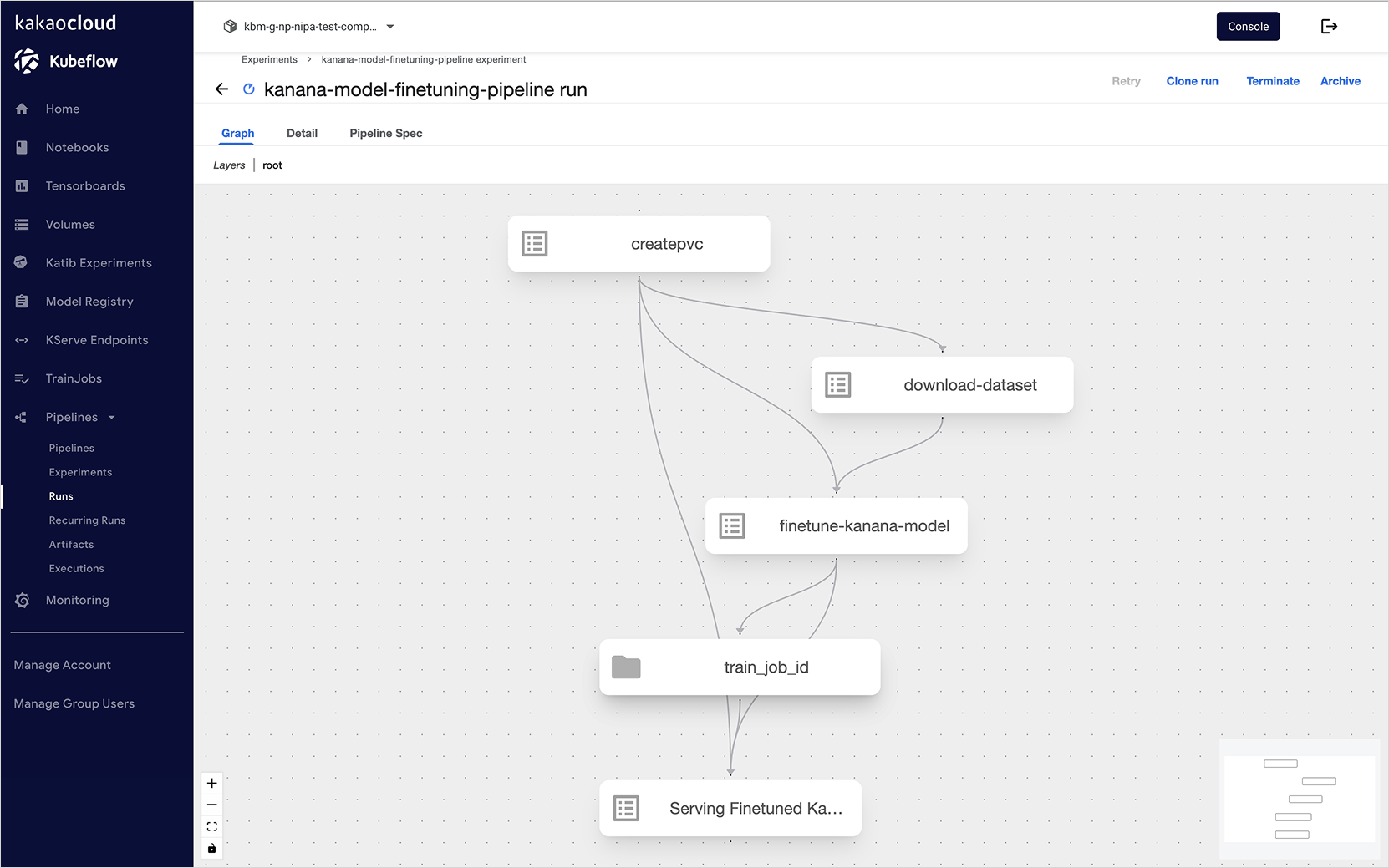
-
Select the created run and move to the detail page to review detailed run information. Note that it may take several minutes for the run to complete.
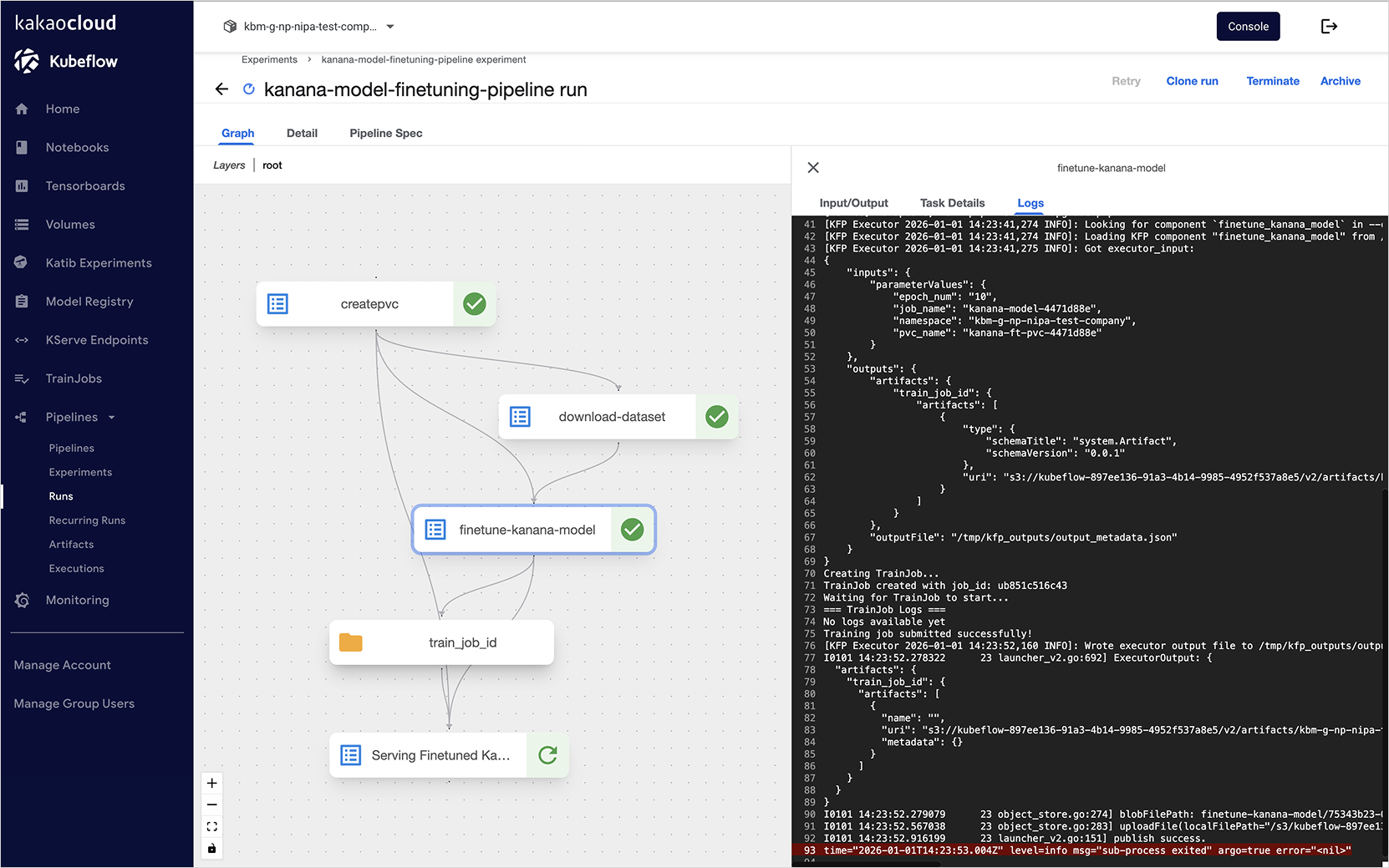
-
On the Run detail page, you can check the execution status, logs, inputs, and outputs of each component.
-
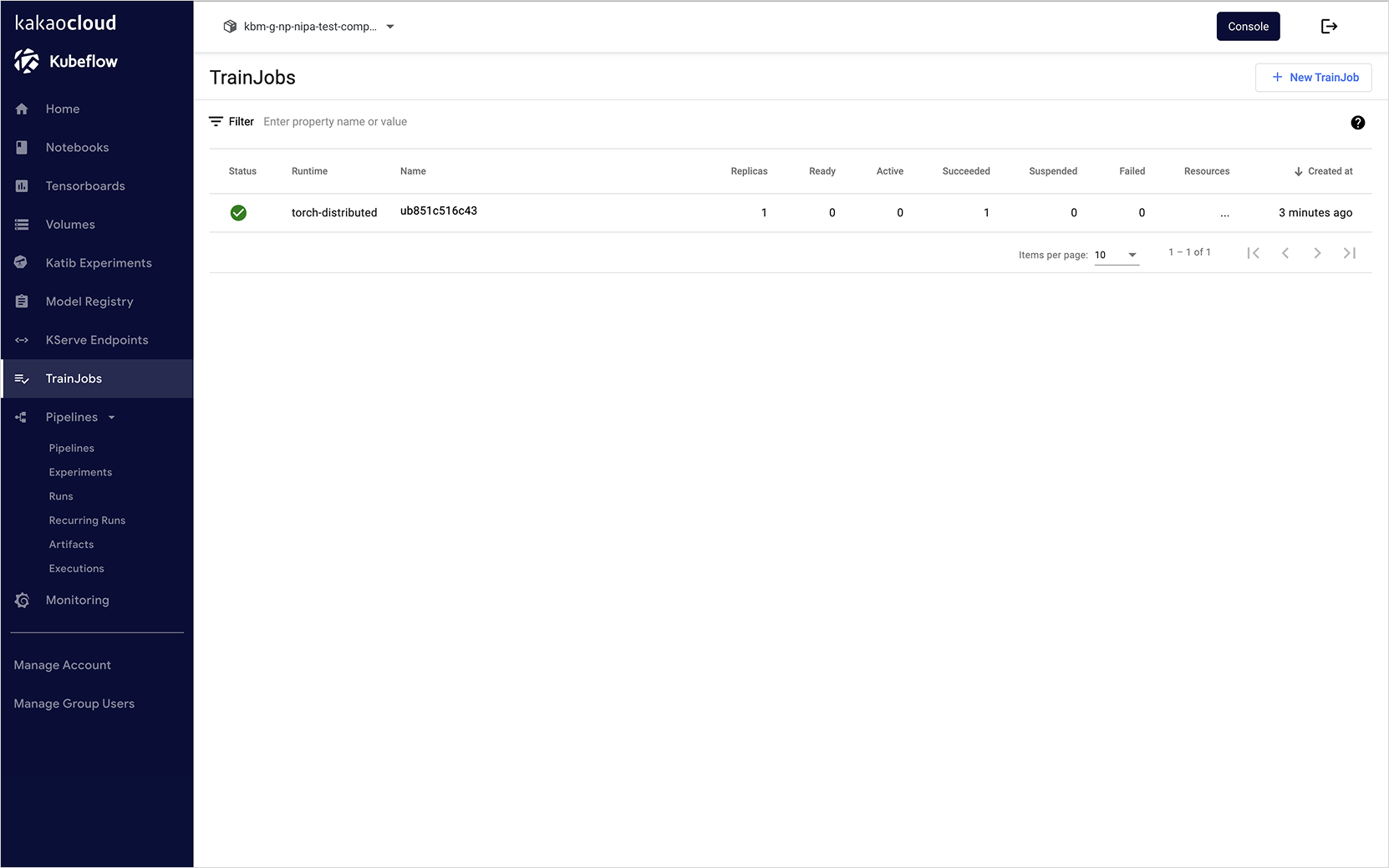
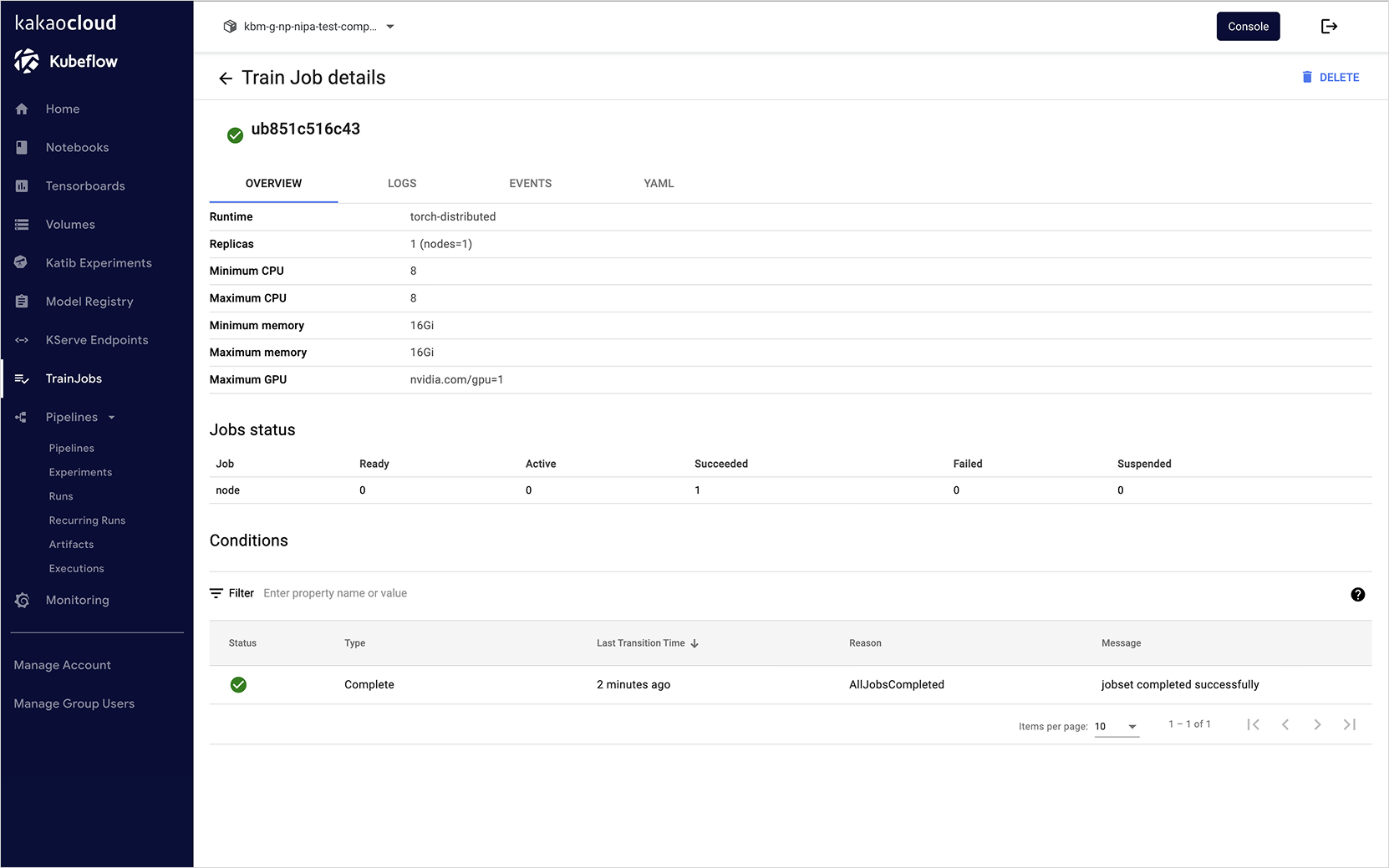
In the Kubeflow dashboard, select the TrainJob tab.
-
Check the status of the TrainJob created by the model fine-tuning component during pipeline execution.
-
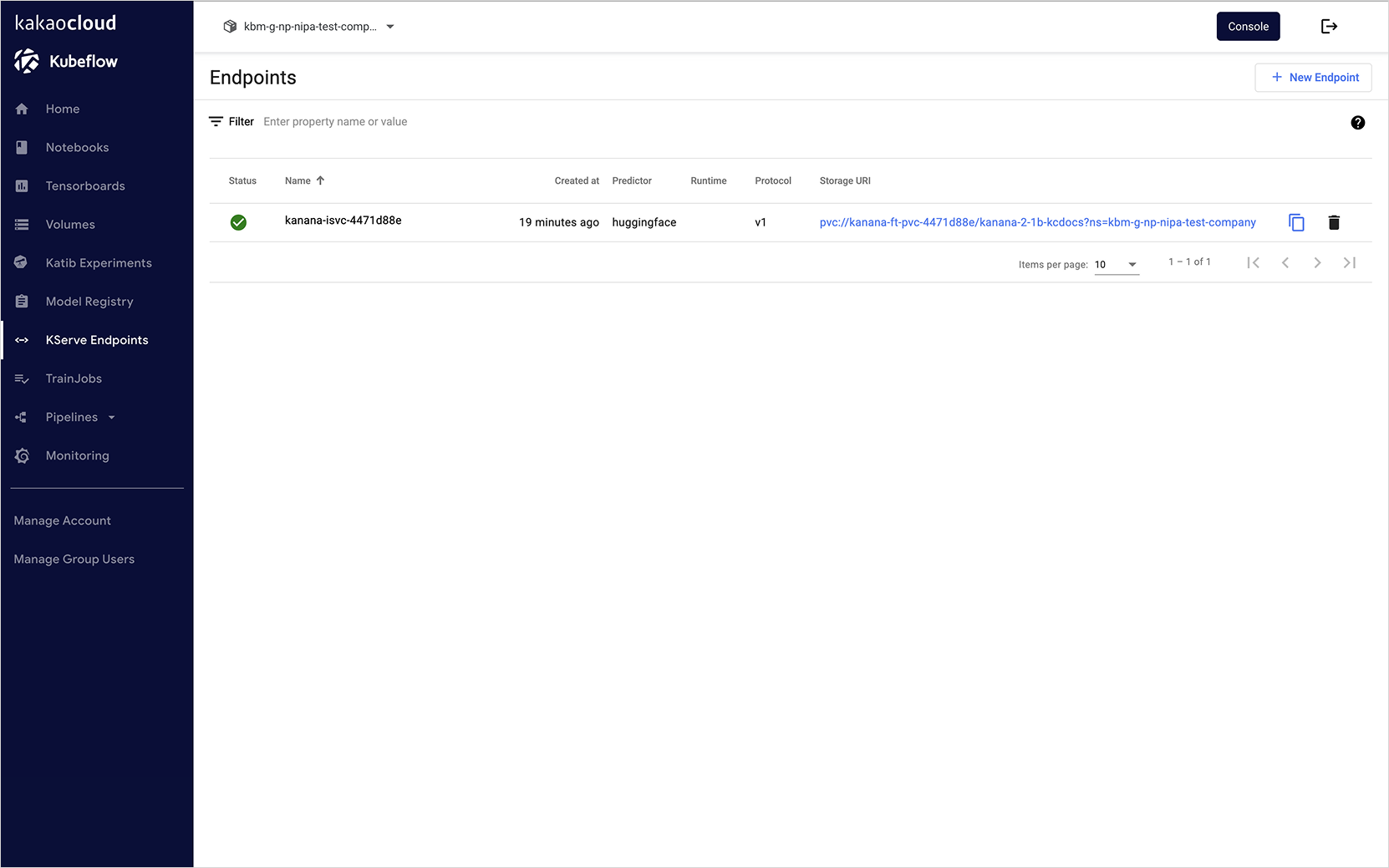
In the Kubeflow dashboard, select the KServe Endpoints tab.
-
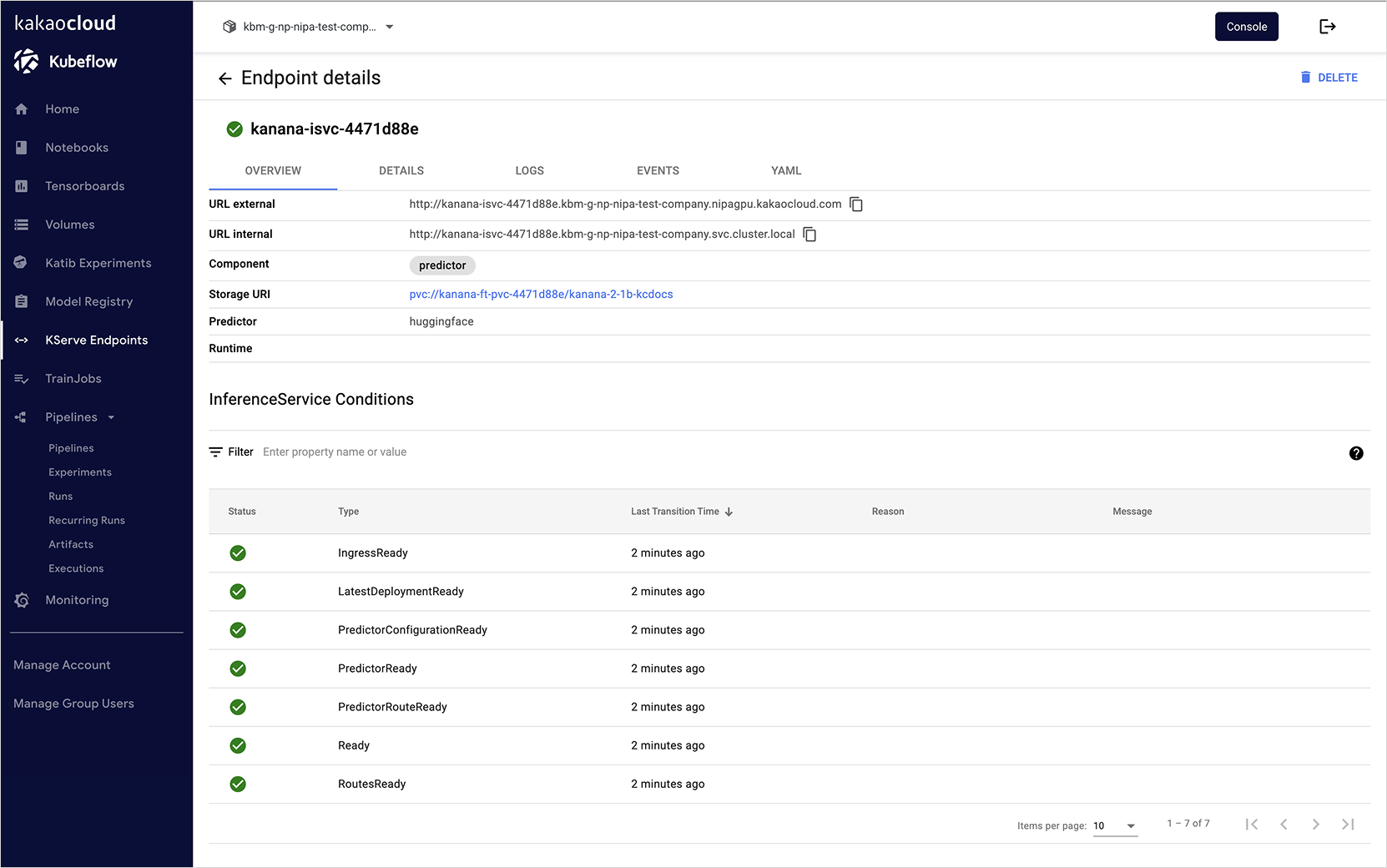
After the pipeline run is completed, check the status and endpoint of the created KServe InferenceService.
- Status: Ready, Pending, Failed, and so on
- Endpoint URL: URL available for model serving
- Resource usage: CPU, memory, GPU usage
- Logs: InferenceService execution logs
Step 4. Test model serving API
After the pipeline execution and when the KServe InferenceService becomes Ready, you can test the deployed model.
Method 1. API test using requests library
import requests

# Obtain session cookie for Kubeflow authentication
host = os.environ.get("KUBEFLOW_HOST", "https://nipagpu.kakaocloud.com")
username = os.environ.get("KUBEFLOW_USERNAME", "")
password = os.environ.get("KUBEFLOW_PASSWORD", "")

session = requests.Session()
_kargs = {"verify": False} if host.startswith("https") else {}

response = session.get(host, **_kargs)
session.post(
    response.url,
    headers={"Content-Type": "application/x-www-form-urlencoded"},
    data={"login": username, "password": password}
)
session_cookie = session.cookies.get_dict().get("authservice_session", "")

# Test InferenceService using OpenAI API format
NAMESPACE = KBM_NAMESPACE
KUBEFLOW_PUBLIC_DOMAIN = host.split("//")[1]
SERVED_MODEL_NAME = "kanana-nano-2.1b-base"

# Test prompt
prompt_text = "카카오엔터프라이즈에 대해서 설명해줘"

# OpenAI completions API-style request
data = {
    "model": SERVED_MODEL_NAME,
    "prompt": prompt_text,
    "stream": False,
    "max_tokens": 1000
}

# API request
response = requests.post(
    url=f"{host}/openai/v1/completions",
    cookies={'authservice_session': session_cookie},
    headers={
        "Host": f"{KSERVE_ISVC_NAME}-{NAMESPACE}.{KUBEFLOW_PUBLIC_DOMAIN}",
        "Content-Type": "application/json",
    },
    json=data,
    **_kargs
)

response_json = response.json()
print(f"Input prompt: {prompt_text}")
print(f"Status code: {response.status_code}")
print(f"Response: {response_json['choices'][0]['text']}")
Method 2. API test using LangChain
You can communicate with the InferenceService using LangChain’s ChatOpenAI.
from langchain_openai import ChatOpenAI

# Internal InferenceService URL (accessible inside the cluster)
llm_svc_url = f"http://{KSERVE_ISVC_NAME}.{NAMESPACE}.svc.cluster.local/"

llm = ChatOpenAI(
    model_name=SERVED_MODEL_NAME,
    base_url=f"{llm_svc_url}openai/v1",
    openai_api_key="empty"  # KServe does not require an API key
)

input_text = "카카오엔터프라이즈에 대해서 설명해줘"
result = llm.invoke(input_text)
print(result.content)
Step 5. Archive run
-
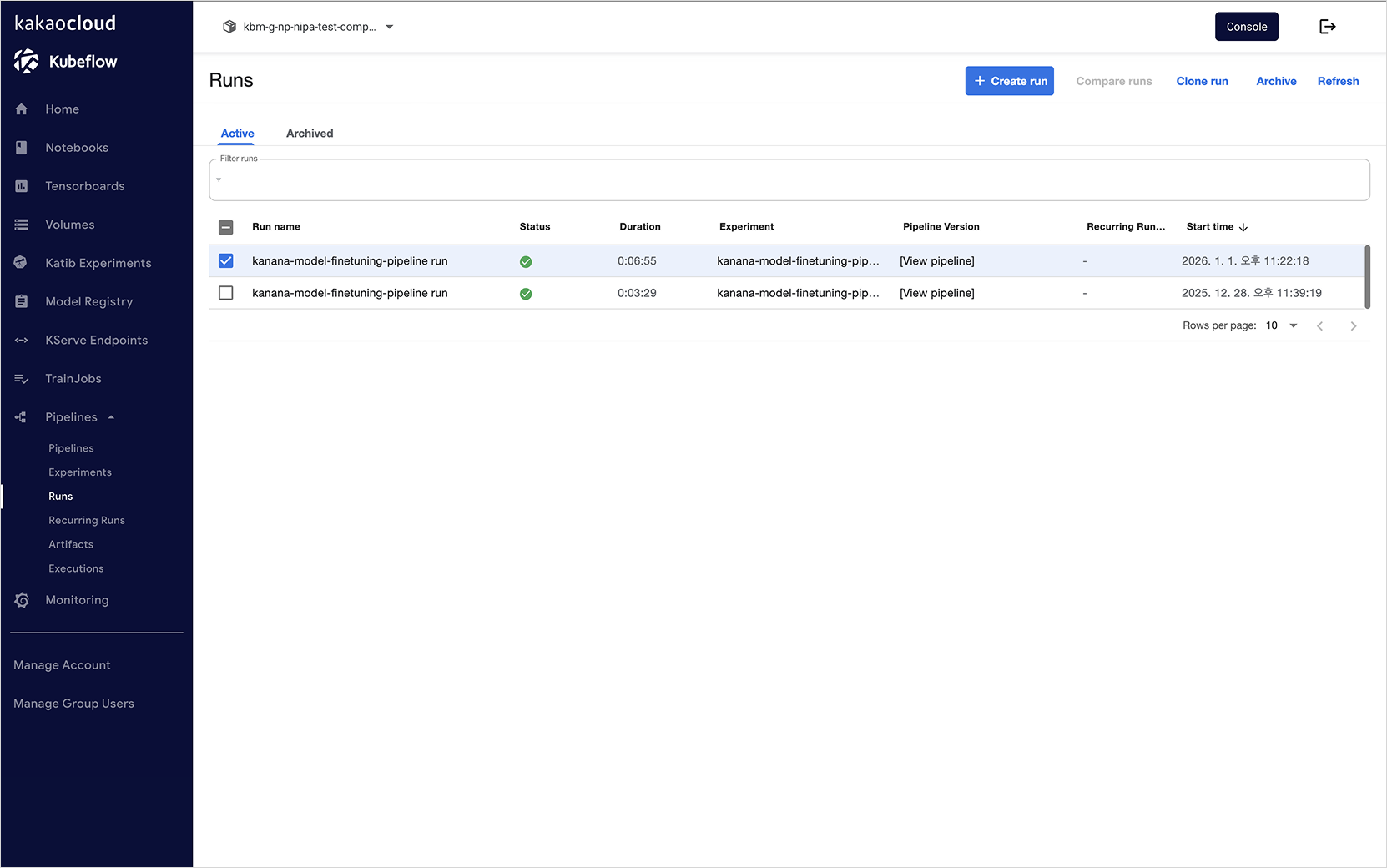
Access the dashboard, click the Runs tab, select the run to archive from the list, and click the [Archive] button.
-
Archived runs can be found under the Archived section of the Runs tab. You can restore a run by selecting it and clicking the [Restore] button.
Step 6. Delete run
For resource management, it is recommended to delete completed or unused runs.
-
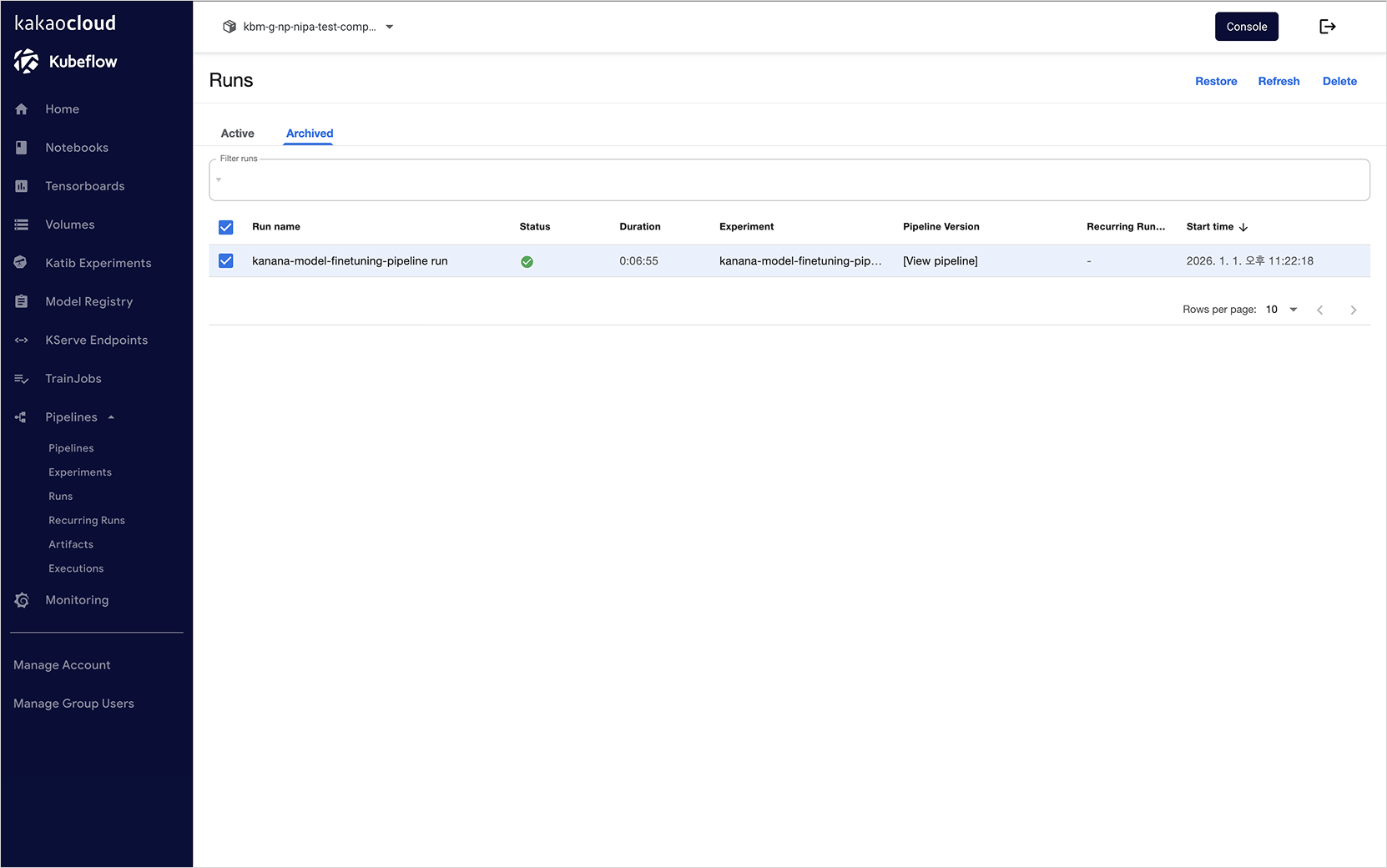
Access the dashboard, click the Runs tab, select the run to delete from the list, and click the [Archive] button.
-
Archived runs can be found under the Archived section of the Runs tab. Select a run and click the [Delete] button to delete it.
-
When a run is deleted, you can confirm that the associated pods are also deleted.
For more details on pipeline creation, refer to the Kubeflow > Kubeflow Pipeline > Quick Start documentation.