Key concepts
Advanced Managed Search from KakaoCloud is a managed search service that provides OpenSearch-based indexes and data as a fully managed platform. It allows users to integrate, search, and analyze large-scale data without managing complex cluster infrastructure.
Cluster
A cluster is an OpenSearch execution unit composed of multiple nodes (Data Node and Cluster Manager Node) and OpenSearch Dashboards that perform indexing and analysis tasks. A cluster provides an integrated search and analytics environment including high-performance search processing, data durability, scalability, and security configuration. It enables reliable exploration of data generated from various applications and systems.
The following describes the lifecycle and status of an OpenSearch cluster in the Advanced Managed Search service.
Cluster lifecycle and status
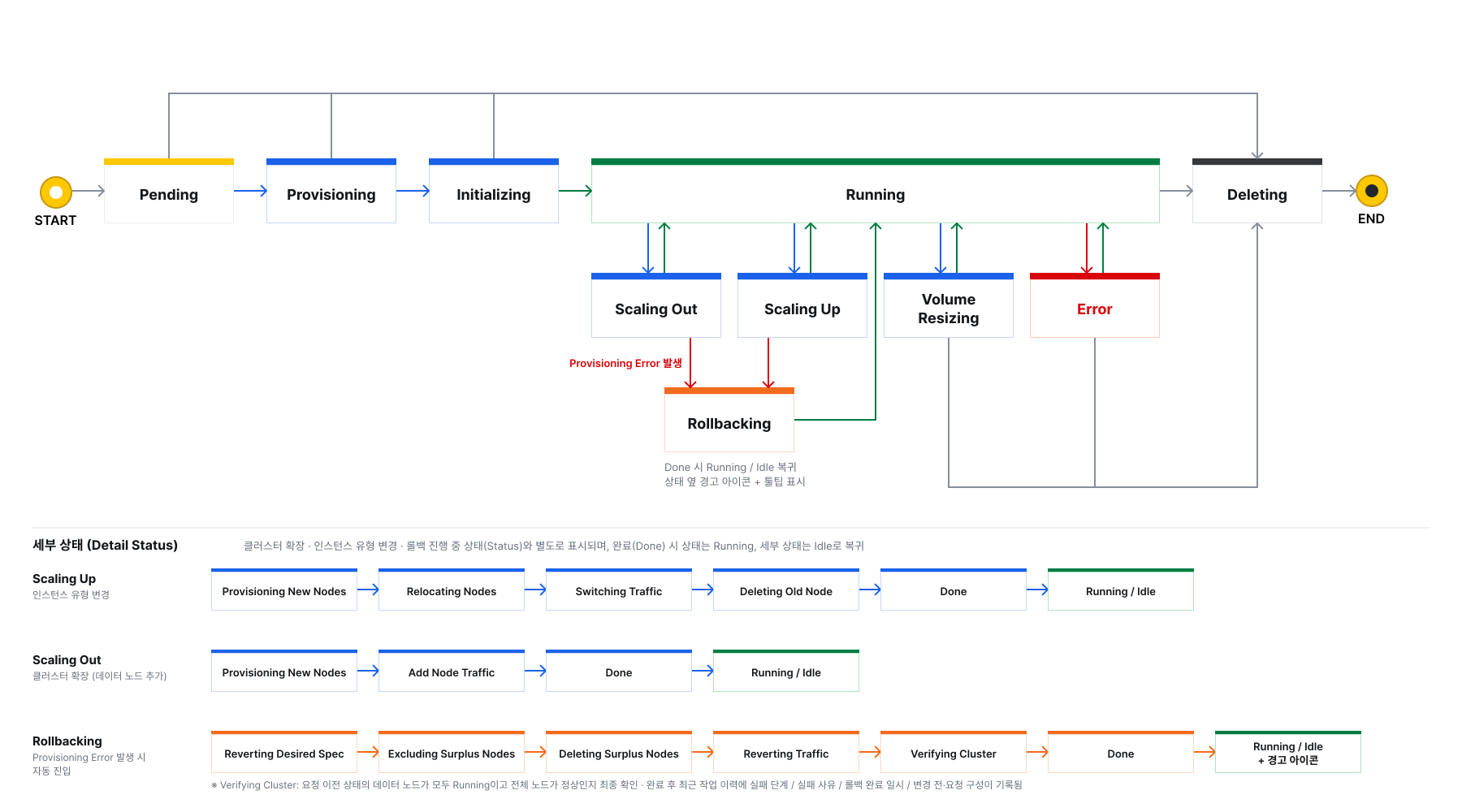 Cluster lifecycle and status
| Status | Description |
|---|---|
Pending | Waiting state for resource allocation and initialization required to create the cluster |
Provisioning | Deploying infrastructure resources for cluster configuration, including OpenSearch nodes and OpenSearch Dashboards |
Initializing | Configuring the OpenSearch engine, plugins, and runtime environment on the deployed infrastructure and establishing communication between data nodes - See the supported plugins list |
Running | All nodes in the cluster are operating normally and search engine services and dashboard access are available |
Scaling Out | Increasing the number of data nodes through cluster expansion - Existing data nodes remain operational while only the newly added nodes go through the creation process - If provisioning a new node fails, the cluster transitions to Rollbacking |
Scaling Up | Replacing data nodes with higher-specification nodes through an instance type change - If provisioning a new node fails, the cluster transitions to Rollbacking |
Volume Resizing | Expanding the volume size of each data node to secure additional storage capacity |
Rollbacking | Automatically restoring the configuration that was in place before the request after an error occurs during cluster expansion or an instance type change - When recovery is complete, the cluster returns to Running and a warning icon appears next to the status - Volume expansion, cluster expansion, instance type changes, and cluster deletion cannot be requested in this state |
Error | Search service is unavailable due to system failure or health check failure - Only cluster deletion is available in this state - Immediately after an instance type change, this status might appear temporarily while nodes are being replaced. In this case, the cluster returns to Running without additional action. For more information, see Change instance type |
Deleting | Deleting the cluster and all associated infrastructure resources |
Supported plugins
analysis-icu
analysis-kuromoji
analysis-nori
analysis-phonetic
analysis-smartcn
analysis-stempel
analysis-ukrainian
opensearch-alerting
opensearch-anomaly-detection
opensearch-asynchronous-search
opensearch-cross-cluster-replication
opensearch-custom-codecs
opensearch-flow-framework
opensearch-geospatial
opensearch-index-management
opensearch-job-scheduler
opensearch-knn
opensearch-ltr
opensearch-ml
opensearch-neural-search
opensearch-notifications
opensearch-notifications-core
opensearch-observability
opensearch-performance-analyzer
opensearch-reports-scheduler
opensearch-security
opensearch-security-analytics
opensearch-skills
opensearch-sql
opensearch-system-templates
prometheus-exporter
query-insights
repository-s3
workload-management
Cluster detailed status
Detailed status is displayed separately from the cluster status. It shows the current processing stage during cluster expansion, an instance type change, or rollback.
During normal operation, the detailed status is Idle. When an operation is complete, the cluster status returns to Running and the detailed status returns to Idle.
| Operation | Status | Detailed status sequence |
|---|---|---|
| Normal operation | Running | Idle |
| Cluster expansion | Scaling Out | Provisioning New Nodes → Add Node Traffic → Done |
| Instance type change | Scaling Up | Provisioning New Nodes → Relocating Nodes → Switching Traffic → Deleting Old Node → Done |
| Rollback | Rollbacking | Reverting Desired Spec → Excluding Surplus Nodes → Deleting Surplus Nodes → Reverting Traffic → Verifying Cluster → Done |
For descriptions of each detailed status and how to view them in the console, see Cluster status and detailed status.
Network configuration
All nodes of Advanced Managed Search are created inside the user-specified VPC.
For the cluster to operate correctly, a security group must be configured, and the necessary inbound rules must allow node-to-node communication and management traffic.
Through network design, you can block external access or control cluster access paths using specific subnets and security policies.
For more information about network and security settings, refer to Security groups.
Data node
Data nodes are core components in OpenSearch that store and index actual data.
When creating a cluster, the same number of data nodes are automatically distributed across availability zones. Balanced distribution between nodes contributes to stable search performance and improved fault recovery capability. The instance type and volume size specified by the user are applied equally to each data node.
Data nodes perform the following tasks.
- Index and store documents
- Manage shard allocation and maintain replicas
- Process search queries and return results
- Distribute cluster load and support scaling
When workload increases, cluster performance can be improved easily by adding data nodes or expanding volumes.
Data node lifecycle and status
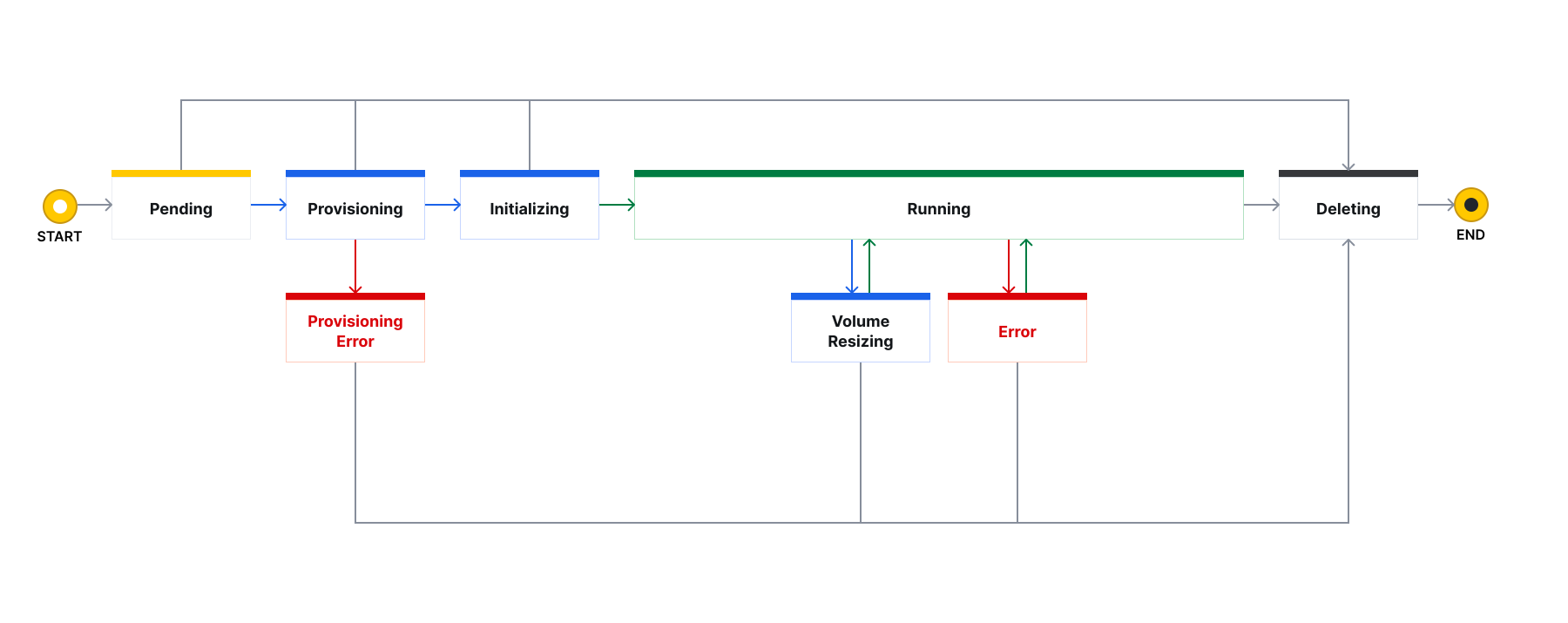 Data node lifecycle and status
| Status | Description |
|---|---|
Pending | Initial state waiting for resource allocation for data node creation |
Provisioning | Deploying resources for the data node (VM, network, port, volume, etc.) |
Provisioning Error | Infrastructure provisioning failed due to insufficient resources or storage allocation errors - If a new node enters this state during cluster expansion or an instance type change, the cluster transitions to Rollbacking |
Initializing | Installing and running files required for data processing, such as the OpenSearch engine and monitoring agents |
Running | Data node operating normally and capable of handling indexing and search requests |
Volume Resizing | Expanding the allocated volume size to resolve storage shortages or improve performance |
Error | Data input/output unavailable due to health check failure or hardware failure - Only cluster deletion is available in this state |
Deleting | Deleting the data node and stored data |
Data node status transitions during cluster operations
The list of data node statuses remains the same regardless of the cluster operation. Statuses transition as follows for each node group, depending on the operation.
| Cluster operation | Node group | Status transition |
|---|---|---|
Cluster expansion (Scaling Out) | Existing nodes | Remain Running |
Cluster expansion (Scaling Out) | New nodes | Pending → Provisioning → Initializing → Running |
Instance type change (Scaling Up) | Existing nodes | Remain Running → excluded from allocation and shards relocated → Deleting after traffic switches |
Instance type change (Scaling Up) | New nodes | Pending → Provisioning → Initializing → Running |
Rollback (Rollbacking) | New nodes | Provisioning Error or Running → excluded from allocation → Deleting |
Rollback (Rollbacking) | Existing nodes | Remain Running |
Volume
The volume size specified when creating the cluster is applied equally to all data nodes, and each node stores data using the assigned volume. OpenSearch distributes and replicates data by shard, so node volume size directly affects the cluster’s total storage capacity and performance. Volume size can be expanded during cluster operation without service interruption, providing flexible scalability for workloads that store large volumes of logs or analytics data.
For more information about volumes, refer to Create and manage volumes.
Cluster manager node
Cluster manager nodes maintain cluster state and manage metadata. In Advanced Managed Search, three cluster manager nodes are always automatically created and distributed across availability zones to ensure stable operation even during failures.
Cluster manager nodes perform the following functions.
- Manage cluster metadata
- Determine shard allocation and movement
- Monitor node status and detect failures
- Manage the master election process
Users do not need to manage or modify manager nodes directly. KakaoCloud maintains three nodes at all times to ensure stable operation.
| Status | Description |
|---|---|
Pending | Initial state waiting for resource allocation for cluster manager node creation |
Provisioning | Deploying resources for the cluster manager node (VM, network, port, volume, etc.) |
Provisioning Error | Infrastructure provisioning failed due to insufficient resources or network configuration errors |
Initializing | Installing and running essential software such as OpenSearch processes and cluster management agents |
Running | Cluster manager node operating normally and capable of managing cluster metadata and monitoring |
Error | Node control functions unavailable due to health check failure or master election process errors - Only cluster deletion is available in this state |
Deleting | Deleting the cluster manager node and related resources |
Cluster manager node lifecycle and status
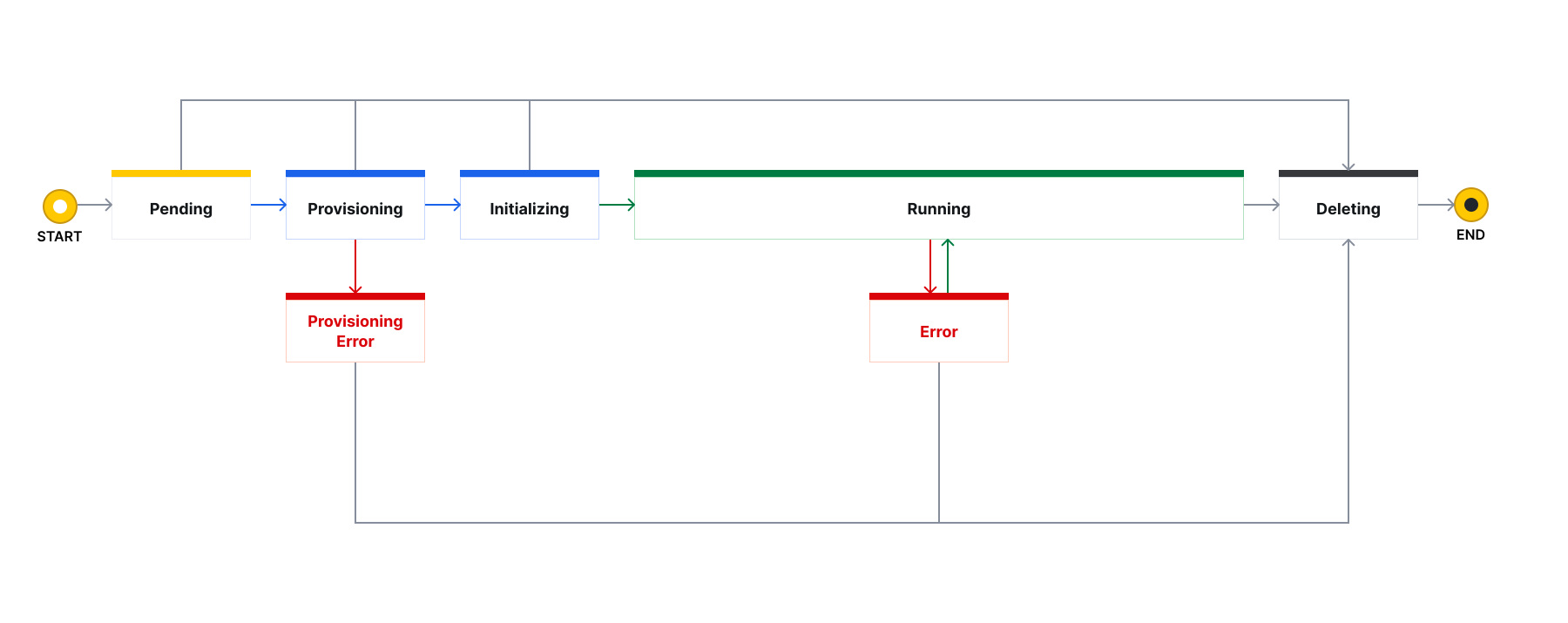 Cluster manager node lifecycle and status
Cluster manager nodes remain Running during cluster expansion, instance type changes, and rollback. Cluster manager nodes are not subject to instance type changes or cluster expansion.
Master user
The master user is a privileged account used to perform administrative operations on the OpenSearch cluster.
When creating the cluster, the username and password are configured. After creation, the account can perform the following operations through OpenSearch Dashboards or APIs.
- Create and delete indexes
- Manage user and role-based access control
- Configure templates and ISM (Index State Management) policies
- Grant permissions for search and analytics tasks
- Check cluster status and modify configurations
Because the master user account has critical permissions for cluster operations, secure password configuration and access management are important.
OpenSearch version
- Supported versions
- Unsupported APIs
Advanced Managed Search currently provides the following version.
| OpenSearch version | Support start date | Support end date |
|---|---|---|
| 2.19.2 | 2026-02-26 | - |
For OpenSearch 2.19, Advanced Managed Search does not support the following APIs. For detailed API information, refer to the OpenSearch API reference.
- If a deprecated API is called, a 410 response is returned.
- To use
PUT /_snapshot/{repository}among the supported APIs, IAM access credentials are required. Refer to Create IAM access key to prepare the access key.
POST /_cluster/voting_config_exclusions/{node_name}
DELETE /_cluster/voting_config_exclusions
POST /_cluster/voting_config_exclusions
DELETE /_cluster/routing/awareness/weights
DELETE /_cluster/routing/awareness/{attribute}/weights
GET /_cluster/routing/awareness/{attribute}/weights
PUT /_cluster/routing/awareness/{attribute}/weights
POST /_cluster/reroute
PUT /_cluster/decommission/awareness/{awareness_attribute_name}/{awareness_attribute_value}
DELETE /_cluster/decommission/awareness
GET /_cluster/decommission/awareness/{awareness_attribute_name}/_status
GET /_script_context
GET /_script_language
GET /_nodes/hot_threads
GET /_nodes/{nodeId}/hot_threads
GET /_remotestore/stats/{index}
GET /_remotestore/stats/{index}/{shard_id}
POST /_remotestore/_restore
POST /_cache/clear
POST /_close
POST /_forcemerge
GET /_settings
GET /_settings/{name}
GET /_segments
POST /_open
PUT /_settings
POST /_upgrade
GET /_upgrade
GET /_cat/nodeattrs
GET /_plugins/_replication/autofollow_stats
GET /_plugins/_replication/follower_stats
GET /_plugins/_replication/leader_stats
GET /_plugins/_replication/{index}/_pause
GET /_plugins/_replication/{index}/_start
GET /_plugins/_replication/{index}/_status
POST /_plugins/_replication/{index}/_resume
POST /_plugins/_replication/{index}/_stop
POST /_plugins/_replication/_autofollow
DELETE /_plugins/_replication/_autofollow
PUT /_plugins/_replication/{index}/_update
Custom API
S3 snapshot
This custom API allows KakaoCloud Object Storage to be used as long-term storage for OpenSearch. You can create snapshots of indexes to store data safely and restore them to a specific point in time when needed.
1. Register snapshot repository
Before creating a snapshot, you must configure a repository where snapshots will be stored. Register the repository using KakaoCloud Object Storage information.
PUT _snapshot/my_s3_repository
{
  "type": "s3",
  "settings": {
    "endpoint": "https://objectstorage.kr-central-2.kakaocloud.com",
    "path_style_access": true,
    "bucket": "test-s3",
    "region": "kr-central-2",
    "access_key": "YOUR_ACCESS_KEY",
    "secret_key": "YOUR_SECRET_KEY",
    "base_path": "snapshots"
  }
}
- endpoint: Object Storage connection address
- base_path: Directory path within the bucket where snapshots will be stored
To obtain the IAM access key ID and secret access key required for API calls, refer to Prepare for API usage.
2. Create snapshot (backup)
Create a snapshot for a specific index or the entire dataset.
POST _snapshot/my_s3_repository/my-first-snapshot
{
  "indices": "test-index*",
  "ignore_unavailable": true,
  "include_global_state": false,
  "partial": false
}
- indices: Index pattern to back up (for example,
test-index*) - partial: When set to
false, snapshot creation stops if any shard fails, ensuring data integrity
3. Check snapshot status
Check the information and status (SUCCESS, IN_PROGRESS, etc.) of the created snapshot.
GET /_snapshot/my_s3_repository/my-first-snapshot
Key response fields
| Field | Description |
|---|---|
| state | Snapshot result (completed when SUCCESS) |
| indices | List of indexes included in the snapshot |
| duration_in_millis | Time required to create the snapshot |
4. Restore snapshot
Restore data using a stored snapshot. It is recommended to rename the restored index to avoid conflicts with existing indexes.
POST /_snapshot/my_s3_repository/my-first-snapshot/_restore
{
  "indices": "test-index*",
  "ignore_unavailable": true,
  "include_global_state": false,
  "rename_pattern": "(.+)",
  "rename_replacement": "$1_restored",
  "include_aliases": false
}
- rename_pattern / replacement: Adds
_restoredto the restored index name to distinguish it from existing data
5. Verify restore result
Confirm that the restored index was created successfully and that its status is open.
GET /_cat/indices/test-index2_restored
- Response example:
yellow open test-index2_restored KlLBNIBcReazgKnutWZbXw 1 1 0 0 208b 208b