Create account and manage permissions
You can manage accounts and permissions in KakaoCloud MySQL using the default stored procedures provided.
Create account
This procedure is used to create additional user accounts other than those created through the console.
Procedure name
mnms_create_user
Procedure parameters
| Name | Data type | Description |
|---|---|---|
| p_user | VARCHAR(250) | - The name of the account to be created. - Only lowercase English letters and underscores (_) are allowed; length can be 1 to 32 characters. (Same as the console) |
| p_host | VARCHAR(20) | The host range allowed for access. |
| p_pwd | VARCHAR(250) | - The password to be used for the account to be created. - Can be used except for Korean characters, spaces, and certain special characters (/ ' " @); length can be 8 to 16 characters. (Same as the console) |
| p_plugin | VARCHAR(50) | - The name of the plugin to be used for the account password. - Provided range: mysql_native_password, caching_sha2_password, sha256_password |
How to use
call mysql.mnms_create_user('UserName', '%', 'password', plugin);
Example
Create account
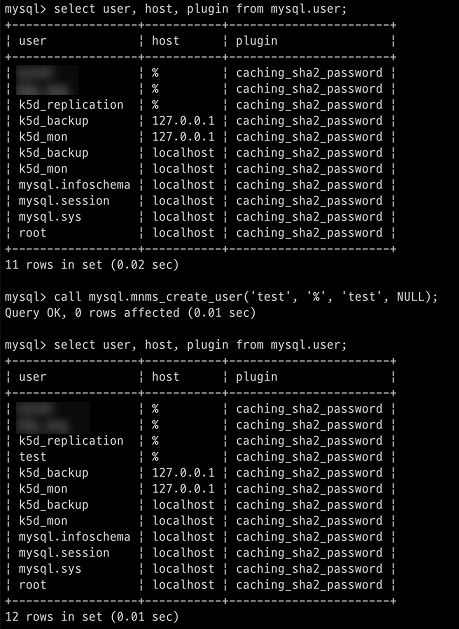
Cannot create account with name identical to system account.
Change account password
This procedure is used to change the password or password plugin for a specified account.
Procedure name
mnms_alter_user
Procedure parameters
| Name | Data type | Description |
|---|---|---|
| p_user | VARCHAR(250) | - The name of the account to be modified. - Only lowercase English letters and underscores (_) are allowed; length can be 1 to 32 characters. (Same as the console) |
| p_host | VARCHAR(20) | The host range allowed for access. |
| p_pwd | VARCHAR(250) | - The password to be used for the account to be modified. - Can be used except for Korean characters, spaces, and certain special characters (/ ' " @); length can be 8 to 16 characters. (Same as the console) |
| p_plugin | VARCHAR(50) | - The name of the plugin to be used for the account password. - Provided range: mysql_native_password, caching_sha2_password, sha256_password |
How to use
# Enter the new plugin or password
call mysql.mnms_alter_user('Username', '%', 'password', plugin);
Example
-
Change password plugin
Change plugin from NULL (caching_sha2_password) to mysql_native_password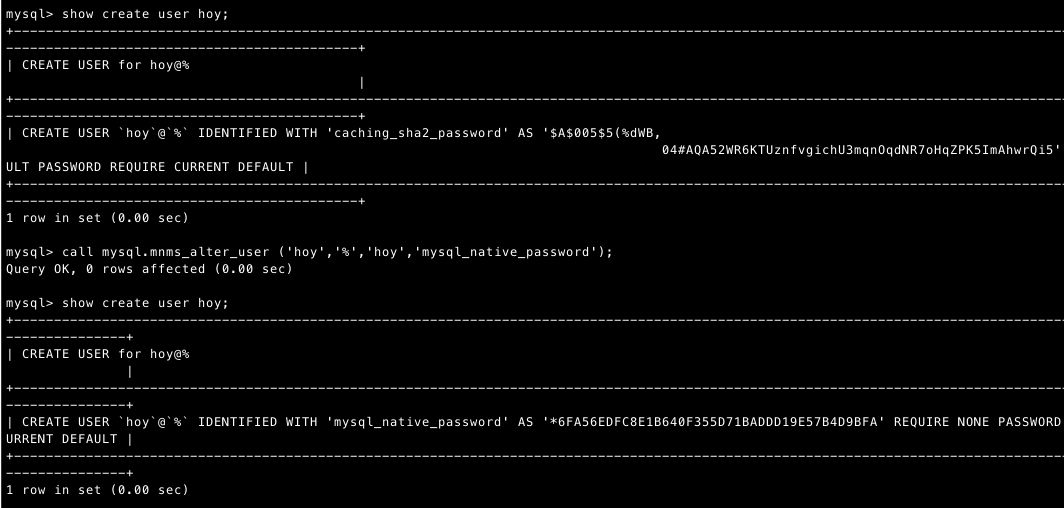
-
Change password
Change password from hoy to hoyhoy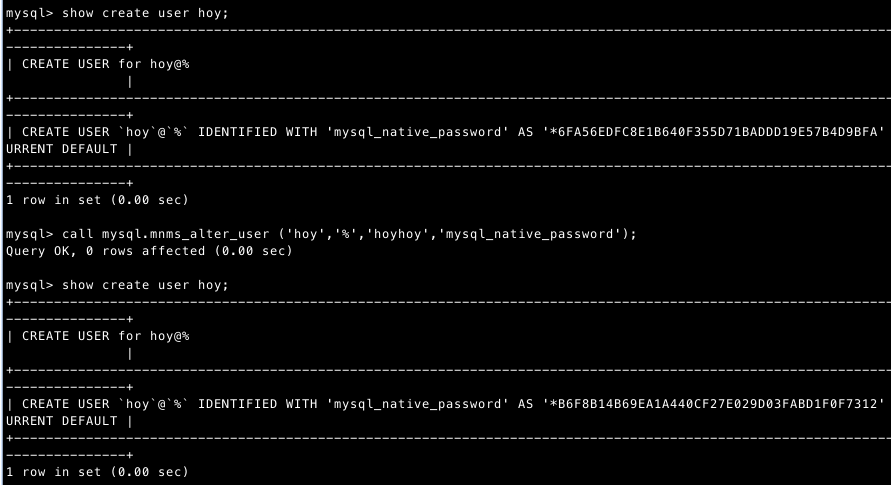
Cannot modify account with name identical to system account.
Delete account
This procedure is used to delete user-created accounts, excluding those created through the console.
Procedure name
mnms_drop_user
Procedure parameters
| Name | Data type | Description |
|---|---|---|
| p_user | VARCHAR(32) | Name of the account to be deleted. |
| p_host | VARCHAR(20) | Host range of the account to be deleted. |
How to use
call mysql.mnms_drop_user('UserName', '%');
Example
Delete account
Cannot delete system accounts.
Grant permissions
This procedure is used to grant necessary permissions to user-created accounts.
Procedure name
mnms_grant_right_user
Procedure parameters
| Name | Data type | Description |
|---|---|---|
| p_value | VARCHAR(20) | The name of the user account to be granted permissions. |
| p_host | VARCHAR(20) | The host range of the user account to be granted permissions. |
| p_right | VARCHAR(8000) | The permissions to be granted to the account. |
| p_target_db | VARCHAR(250) | The target database to which permissions will be granted. |
| p_target_schema | VARCHAR(250) | The objects within the target database to which permissions will be granted. |
How to use
call mysql.mnms_grant_right_user('UserName', '%', 'ALTER, CREATE, DELETE, DROP, EXECUTE, INSERT, SELECT, UPDATE', '*', '*');
Example
Grant permissions
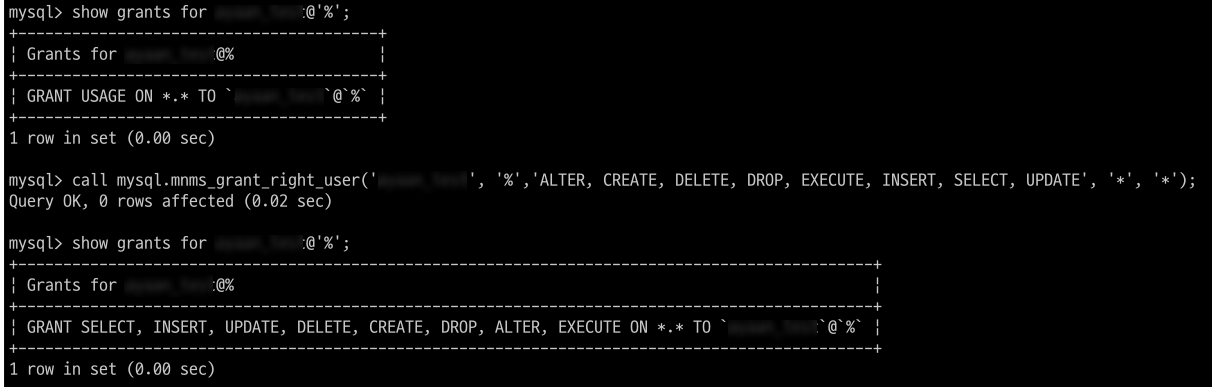
Cannot grant permissions to system accounts.
Revoke permissions
This procedure is used to revoke permissions granted to user-created accounts.
Procedure name
mnms_revoke_right_user
Procedure parameters
| Name | Data type | Description |
|---|---|---|
| p_user | VARCHAR(32) | Name of the user account to revoke permissions from. |
| p_host | VARCHAR(20) | Host range of the user account to revoke permissions from. |
| p_right | VARCHAR(8000) | Permissions to revoke. |
| p_target_db | VARCHAR(250) | Target database to revoke permissions from. |
| p_target_schema | VARCHAR(250) | Target object in the database to revoke permissions from. |
How to use
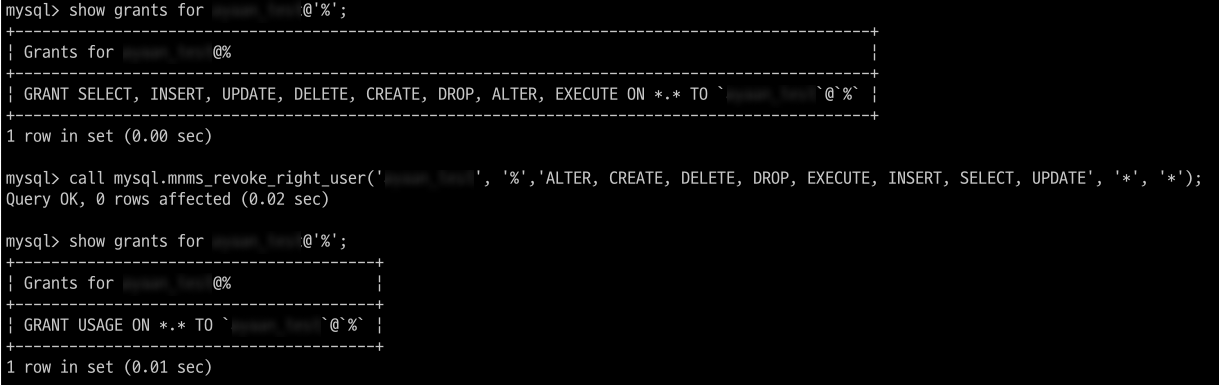
call mysql.mnms_revoke_right_user('UserName', '%', 'ALTER, CREATE, DELETE, DROP, EXECUTE, INSERT, SELECT, UPDATE', '*', '*');
Example
Revoke permissions
Cannot revoke permissions from system accounts.